


-
Posts
766 -
Joined
-
Last visited
-
Days Won
1
Content Type
Profiles
Warranty Claims
Downloads
Forums
Store
Services
Downloads Plus Support
DOWNLOADS EXTRA
Reels
Everything posted by 0g.Ghost.7373
-
 Barrels explode in the sky and sometimes the loot makes it to the ground, sometimes it doest. Even tried a default config.
 -
Anyone still not getting anything for shooting the big ones with rockets?
-
Weird, post that comment and there they are. Sorry.
-
Since the explosion fix, the meteors no longer show on map. I used to open the map and see Markers, nothing since the update. I can still manually send them and buy them, just no random one son the map or if they are, they are not marked.
-
 Does this still not play well with SkillTree if you use the collectables and gathering part?
 -

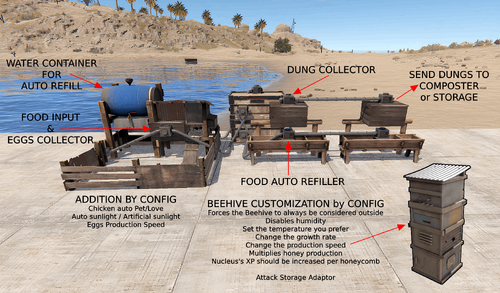 I stand corrected. I could have sworn that it turned on when I added stuff. But you are correct.
 -
Just saying what I was told. The "oldID" field has to be unique now.
-
 We know they, they don't know that.. But it's all working since I removed them. I am on.a Mac so no notepad++ last time I looked to see if it had a Mac version.
 -
I told the guy that made the fullwipedeasy* bases that over 120 of his bases in his 210 pack are bad. He called me a liar and said to use his configs and they will work.
-
 I looked up that Transports can carry 6. players so I did 5 companions. Unless they all have to be different, it doesn't work. I turned off all but that one. And each one still only has a driver and 1 companion. I may have to Wipe. Started getting this when a scrap one is destroyed. CollisionMeshData couldn't be created because the mesh has been marked as non-accessible. Mesh asset path "" Mesh name "ScrapHeliGibs_Part001" CollisionMeshData couldn't be created because the mesh has been marked as non-accessible. Mesh asset path "" Mesh name "UCX_ScrapHeliGibs_Part002" CollisionMeshData couldn't be created because the mesh has been marked as non-accessible. Mesh asset path "" Mesh name "UCX_ScrapHeliGibs_Part003" CollisionMeshData couldn't be created because the mesh has been marked as non-accessible. Mesh asset path "" Mesh name "UCX_ScrapHeliGibs_Part003" CollisionMeshData couldn't be created because the mesh has been marked as non-accessible. Mesh asset path "" Mesh name "UCX_ScrapHeliGibs_Part011" CollisionMeshData couldn't be created because the mesh has been marked as non-accessible. Mesh asset path "" Mesh name "UCX_ScrapHeliGibs_Part011" CollisionMeshData couldn't be created because the mesh has been marked as non-accessible. Mesh asset path "" Mesh name "UCX_ScrapHeliGibs_Part046"
 -
All of these make Raidablebases error. The guy that made that plug says all the "oldID": 1, in the files needs changed to something unique. fullwipedeasy2 fullwipedeasy6 fullwipedeasy8 fullwipedeasy10 fullwipedeasy11 fullwipedeasy15 fullwipedeasy16 fullwipedeasy17 fullwipedeasy20 fullwipedeasy23 fullwipedeasy24 fullwipedeasy29 fullwipedeasy34 fullwipedeasy35 fullwipedeasy36 fullwipedeasy37 fullwipedeasy40 fullwipedeasy41 fullwipedeasy42 fullwipedeasy43 fullwipedeasy45 fullwipedeasy48 fullwipedeasy49 fullwipedeasy50 fullwipedeasy51 fullwipedeasy52 fullwipedeasy54 fullwipedeasy58 fullwipedeasy63 fullwipednight1 fullwipednight2 fullwipednight3 fullwipednight4 fullwipednight5 fullwipednight6 fullwipednight7 fullwipednight8 fullwipednight10 fullwipedmed1 fullwipedmed2 fullwipedmed6 fullwipedmed7 fullwipedmed8 fullwipedmed9 fullwipedmed10 fullwipedmed12 fullwipedmed15 fullwipedmed19 fullwipedmed23 fullwipedmed24 fullwipedmed25 fullwipedmed26 fullwipedmed27 fullwipedmed28 fullwipedmed31 fullwipedmed32 fullwipedmed33 fullwipedmed34 fullwipedmed35 fullwipedmed36 fullwipedmed37 fullwipedmed38 fullwipedmed39 fullwipedmed40 fullwipedmed41 fullwipedmed42 fullwipedmed43 fullwipedmed44 fullwipedmed45 fullwipedmed46 fullwipedmed49 fullwipedmed51 fullwipedmed52 fullwipedmed53 fullwipedmed54 fullwipedmed56 fullwipedmed57 fullwipedmed59 fullwipedmed60 fullwipedexp1 fullwipedexp2 fullwipedexp3 fullwipedexp4 fullwipedexp5 fullwipedexp6 fullwipedexp7 fullwipedexp8 fullwipedexp9 fullwipedexp10 fullwipedhard1 fullwipedhard2 fullwipedhard3 fullwipedhard4 fullwipedhard5 fullwipedhard6 fullwipedhard8 fullwipedhard9 fullwipedhard10 fullwipedhard11 fullwipedhard12 fullwipedhard13 fullwipedhard15 fullwipedhard16 fullwipedhard17 fullwipedhard19 fullwipedhard20 fullwipedhard21 fullwipedhard24 fullwipedhard25 fullwipedhard26 fullwipedhard27 fullwipedhard28 fullwipedhard29 fullwipedhard32 fullwipedhard33 fullwipedhard34 fullwipedhard35 fullwipedhard36 fullwipedhard37 fullwipedhard38 fullwipedhard39 fullwipedhard40 fullwipedhard41 fullwipedhard42 fullwipedhard44 fullwipedhard45 fullwipedhard46 fullwipedhard48 fullwipedhard49 fullwipedhard50 fullwipedhard55 fullwipedhard54 fullwipedhard53 fullwipedhard57 fullwipedhard56
-
I have noticed the auto recycler doesnt always work.
-
I did a "rb.config remove" on each one I found with the old ID 1 stuff. Then I deleted the files off the server. I still get the error. The only things I changed before this started was buying the bases pack and I raised the amount of bases spawning for each level. Would lowering the spawn amount down stop the error? Like is it showing that error because its wanting to spawn 5 bases of that level instead of 1 I had before?
-
I think I figured it out. I think one of these plugins is the cause. Ultimate Industrial Farm - Expand Storage Adapters, Farm automation, Industrial customization or Item Perks The Ultimate one auto plants and harvests and Perks randomly gives an item on various things...
-
I started getting that error this Wipe. I just searched all the copy/paste files and have like 20 with "oldID": 1, One was bought in a pack the day before Wipe, the rest have been used for a while. Only thing I changed was adding more bases and increasing the base spawn count. If I need to change these.... I see they are in order like there's a "oldID": 0, "oldID": 1, "oldID": 2, and so on, do I need to keep them in order?
-
 I seen the update. Thanks!
 -
Did you just buy the packs from fullwiped? I started getting this error right after I bought the Raidable Bases Mega Pack (210 Bases) the other days.
-
Any way to get this to work with this? Every harvest is cloth with the one seed skin.
-
 Is there a way to get this to work with this? It farms every thing as cloth wit the weed seeds skin.
 -
Just did that. The one error in the last few hours was for someone that last played right after yesterday's wipe. I will keep my eyes on my console and see if a reload fixed it again.
-
Just realized you made both of them... so wrong support but right person.
-
Well, spoke too soon. I just looked and yep, the errors back.
-
I deleted the ActivityRewards files and reinstalled. All seems to work fine, Now. And sorry, I meant to post this on the ActivityRewards support, not yours,
-
 [Random NPC Names] NPC Renamed:scientistnpc_roamtethered[2178904] -> [Scientist] Mildred B. [Random NPC Names] NPC Renamed:scientistnpc_oilrig[2148077] -> [Scientist] Alfred C. [Random NPC Names] NPC Renamed:npc_tunneldweller[2175502] -> [Dweller] Ivette B. [Random NPC Names] NPC Renamed:scientistnpc_oilrig[2147870] -> [Scientist] Shirley D. [Random NPC Names] NPC Renamed:scientistnpc_excavator[2172326] -> [Scientist] Dagmar D. [Random NPC Names] NPC Renamed:scientistnpc_oilrig[2163666] -> [Scientist] Jerome K. [Random NPC Names] NPC Renamed:scientistnpc_roam_nvg_variant[2171828] -> [Scientist] Randee B. [Random NPC Names] NPC Renamed:npc_tunneldweller[2175220] -> [Dweller] Queen D. [Random NPC Names] NPC Renamed:npc_tunneldweller[2175536] -> [Dweller] Daniela M. [Random NPC Names] NPC Renamed:npc_tunneldweller[2173715] -> [Dweller] Harold K. [Random NPC Names] NPC Renamed:npc_tunneldweller[2171201] -> [Dweller] Arden M. [Random NPC Names] NPC Renamed:scientistnpc_excavator[2172286] -> [Scientist] Dimple D. [Random NPC Names] NPC Renamed:scientistnpc_oilrig[2147947] -> [Scientist] Denise P. [Random NPC Names] NPC Renamed:scientistnpc_full_lr300[2191515] -> [Scientist] Xiomara I. [Random NPC Names] NPC Renamed:npc_tunneldweller[2174987] -> [Dweller] Darius J. [Random NPC Names] NPC Renamed:npc_tunneldweller[2173423] -> [Dweller] Collene G. Turning on debug shows a lot of that in the console. Flying around with radar on, none of the scientists are renamed, same with at the tunnels and underwater labs. Going to guess another plugin is blocking it or something.
 -
Anyone know how many Companions the Transports can have?