A highly customizable Shop that you configure in game. Use NPCs as shopkeepers and add, edit, or remove items right from the game interface.
⭐ Features of Shop
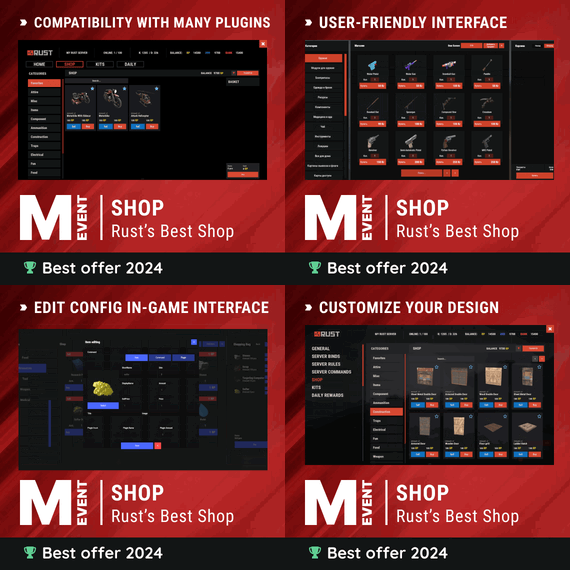
Beautiful user interface with multiple templates (Fullscreen, In-Menu V1/V2/V4)
Shopping Basket: add multiple items to cart and purchase them all at once
Search functionality: search for items by name across all categories
Pagination: browse items page by page
Discount system (by permissions) with per-item custom discounts
Automatic shop filling (+ the plugin has support for the ItemCostCalculator plugin)
Selling items (players can sell items to the store and receive money for it)
Sell containers configuration: choose which containers (main, belt) players can sell from
Blocked skins: prevent selling of specific item skins
High performance with optimized item loading
Adding/editing/removing items IN GAME with visual editor
Supports NPC shops (HumanNPC integration)
Supports Custom Vending Machines
Supports NoEscape plugin integration
Supports Duel/Duelist: blocks shop access during duels
Convert from ServerRewards
Favorite items system: players can mark items as favorites
Buy Again feature: quick repurchase of previously bought items
By default, the plugin has English, Russian and Chinese translations
LangAPI integration for custom translations
Transfer money between players directly in the plugin (including offline players option)
Shop allows you to use multiple economy plugins at once (players can choose what they want to pay with)
For each item, you can choose which payment methods are available and how much they will cost, based on the selected method
Cooldown system: per-item buy/sell cooldowns with per-permission overrides
Wipe cooldown: block items for purchase/sale after server wipe
Respawn cooldown: block purchase/sale for a set time after respawn
Buy/Sell limits: lifetime and daily limits per permission
Max buy/sell amount: limit items per transaction
Force buy: fast purchase without confirmation dialogs
Plant genes configuration for plant items
Weapon configuration: spawn weapons with ammo and attachments
Content system: configure container contents (liquid, weapon mods, etc.)
Customizable UI: full color customization and formatting options
Offline Image Mode: use local images instead of downloading from internet
Image loading on login: preload images when players connect
Console and file logging of shop activity
ServerPanel integration: add Shop to the ServerPanel menu
Notify/UINotify integration for notifications
Auto-wipe settings: automatically reset cooldowns, limits, and player data on wipe
Discord Logging: track all purchases, sales, and transfers in your Discord server through webhooks with customizable embeds
API methods for other plugins to interact with Shop
🎮 Commands
shop: open the shop interface
shop.install: starts the shop installation
shop.refill <recovery_rate>: refill the shop
recoveryRate: A value between 0 and 1 that determines the multiplier for the cost of selling items. For example, shop.refill 0.5 means that items will have a sale cost of 50% of their purchase cost.
shop.convert.sr [clear]: convert items from ServerRewards to Shop. The clear option clears Shop items before converting
shop.setvm [categories: cat1 cat2 ...]: add a custom VM to the config
shop.setnpc [categories: cat1 cat2 ...]: add an NPC to the config
shop.remove all: console command that removes all items and categories from the plugin
shop.remove item [category name/all]: console command that removes an item (or all items)
shop.remove category [category name/all]: console command that removes a category (or all categories)
shop.fill.icc [all/buy/sell]: console command that updates item prices in the store using ItemCostCalculator. all updates both Price and SellPrice, buy updates Price, sell updates SellPrice
shop.convert.from.1.2.26: converts Shop plugin version 1.2.26 to version 1.3.0+
shop.reset: resets store data, including templates, configurations, and items.
shop.reset template: resets the store interface template data.
shop.reset config: resets store configuration data.
shop.reset items: resets store items data.
shop.reset full: completely resets all store data (templates, configurations and items).
shop.manage: manages the Shop plugin.
shop.manage economy list: displays a list of all available economic systems in the plugin.
shop.manage economy set <economy_ID> <name>: sets the economic system by plugin ID and name. The command updates that economic system on the server and saves the change to the configuration.
FOR EXAMPLE:
shop.manage economy set 0 Economics: sets the main economy plugin to "Economics".
shop.manage economy set 1 ServerRewards: sets the additional economy system with ID 1 to "ServerRewards".
shop.wipe: manually trigger wipe (resets cooldowns, limits, and player data)
shop.change: change item category (used in editor)
shop.item: console command for item actions
🛡️ Permissions
shop.setvm: for the "shop.setvm" command
shop.setnpc: for the "shop.setnpc" command
shop.free: for free item purchases
shop.admin: admin permission
shop.bypass.dlc: allows bypassing Facepunch ToS item restrictions (WARNING: your server may be banned for this)
📈 API Methods
The Shop plugin provides API methods for other plugins to interact with it:
API_OpenPlugin(BasePlayer player): opens the shop UI for a player. Returns empty string if failed, or UI data if successful.
API_GetShopPlayerSelectedEconomy(ulong playerID): returns the economy ID (0 = main, 1+ = additional) that the player has selected for shopping.
Note: Other plugins can call these methods using Shop.Call("API_MethodName", ...) syntax.
⚖️ Sort Types
None
Name
Amount
PriceDecrease
PriceIncrease
🧬 Category Types
None: normal category for items
Favorite: category for favorite items
Hidden: hidden category, available only in NPC stores or Vending Machines
🎥 Video
P.S. Video of the old version, video for the V2+ version is now in development
🖼️ Showcase
Full screen Templates
Template OLD STYLE
Template NEW RUST
In-Menu Templates
Template V1 (V1.1)
Template V1 (V1.1) with BASKET
Template V2
Template V2 with BASKET
Template V4
Template V4 with BASKET
Installer
Editor
⚙️ Web Config Editor
Manage the Shop settings in our web config editor. You change the config in a browser form instead of editing files on the server by hand.
P.S. The web config editor is open to members of the "Shop" group in our Discord server. Join at https://discord.gg/mevent and ask for the group.
📢 Discord Logging
Track all shop activity via Discord webhooks: purchases, sales, and money transfers.
🧪 TEST SERVER
Join our test server and try all the features yourself!
Copy the IP address below to start playing.
connect 155.103.86.38:28015
📚 FAQ
Q: I get the message "The plugin does not work correctly, contact the administrator!". What should I do?
A: It means the plugin is not installed. To install it, use the "/shop.install" command. You need the "shop.admin" permission for this command.
Q: Where can I see an example of a config?
A: Config
Q: How to use BankSystem to store the economy
A:
"Economy": {
"Type (Plugin/Item)": "Plugin",
"Plugin name": "BankSystem",
"Balance add hook": "Deposit",
"Balance remove hook": "Withdraw",
"Balance show hook": "Balance",
"ShortName": "",
"Display Name (empty - default)": "",
"Skin": 0,
"Lang Key (for Title)": "LangTitle",
"Lang Key (for Balance)": "BalanceTitle"
},
Q: How to use ServerRewards to store the economy
A:
"Economy": {
"Type (Plugin/Item)": "Plugin",
"Plugin name": "ServerRewards",
"Balance add hook": "AddPoints",
"Balance remove hook": "TakePoints",
"Balance show hook": "CheckPoints",
"ShortName": "",
"Display Name (empty - default)": "",
"Skin": 0,
"Lang Key (for Title)": "LangTitle",
"Lang Key (for Balance)": "BalanceTitle"
},
Q: How to use Economics to store the economy
A:
"Economy": {
"Type (Plugin/Item)": "Plugin",
"Plugin name": "Economics",
"Balance add hook": "Deposit",
"Balance remove hook": "Withdraw",
"Balance show hook": "Balance",
"ShortName": "",
"Display Name (empty - default)": "",
"Skin": 0,
"Lang Key (for Title)": "LangTitle",
"Lang Key (for Balance)": "BalanceTitle"
},
Q: How to use IQEconomic to store the economy
A:
"Economy": {
"Type (Plugin/Item)": "Plugin",
"Plugin name": "IQEconomic",
"Balance add hook": "API_SET_BALANCE",
"Balance remove hook": "API_GET_BALANCE",
"Balance show hook": "API_REMOVE_BALANCE",
"ShortName": "",
"Display Name (empty - default)": "",
"Skin": 0,
"Lang Key (for Title)": "LangTitle",
"Lang Key (for Balance)": "BalanceTitle"
},
Q: How to use scrap to pay for items
A:
"Economy": {
"Type (Plugin/Item)": "Item",
"Plugin name": "",
"Balance add hook": "",
"Balance remove hook": "",
"Balance show hook": "",
"ShortName": "scrap",
"Display Name (empty - default)": "",
"Skin": 0,
"Lang Key (for Title)": "LangTitle",
"Lang Key (for Balance)": "BalanceTitle"
},
Q: How to add KIT as shop item
A: https://pastebin.com/4szBQCgz
Q: How to add Command as shop item
A: https://pastebin.com/bcCkzBEL
Q: How do I make a weapon spawn with ammo in it?
A: Configure the "Weapon" section in the item config:
"Weapon": {
"Enabled": true,
"Ammo Type": "ammo.rifle.explosive",
"Ammo Amount": 128
}
Q: How do I make items spawn some content (liquid, weapon modifications)?
A: Configure the "Content" section in the item config:
"Content": {
"Enabled": true,
"Contents": [
{
"ShortName": "weapon.mod.lasersight",
"Condition": 100.0,
"Amount": 1,
"Position": -1
}
]
},
Q: How to turn off the sell feature?
A: Turn off "Enable item selling?" in the config, or in the item settings in game.
"Enable item selling?": false,
Q: How to use the ItemCostCalculator with Shop?
A: Use the "shop.refill" command (it refills the Shop).
Q: What should be the size of images for item icons?
A: Item icons are usually 512x512 pixels, but any square image works.
Q: I get the error "UI is unavailable for player. Reason: Menu UI is not initialized". How to fix it?
A: This error occurs when the interface template is not installed or configured. Follow these steps:
1. Reset the template using the command: shop.reset template (use only template to avoid data loss).
2. Install the interface via shop.install in the game (to visually select a template) or through the console.
Note: You need the shop.admin permission to execute these commands.
Q: How do I add Shop to the ServerPanel menu?
A: Follow these steps:
1. Open ServerPanel menu in-game and click "+ADD CATEGORY" button
2. Set these exact parameters:
Type: Plugin
Plugin Name: Shop
Plugin Hook: API_OpenPlugin
3. Click "SAVE" button to create the category
4. Reset Shop template and install it:
Type in console: shop.reset template (IMPORTANT: use only "template"!)
Then type: shop.install
Note: If Shop doesn't appear in ServerPanel menu, make sure both plugins are loaded and you typed the parameters exactly as shown above.
Q: I see black images with Rust logo or get error 429 when loading images. What should I do?
A: This happens when images fail to download from the internet. The Shop plugin passes images to ImageLibrary but does not download them itself. Error 429 usually comes from rate limits on image hosting services like Imgur (see HTTP 429 documentation for more details). To fix it, enable Offline Image Mode so the plugin uses local images:
Enable the mode in config:
Open "oxide/config/Shop.json" (or "carbon/config/Shop.json" for Carbon)
Set "Enable Offline Image Mode": true
Set up the images:
Create folder "TheMevent" in "oxide/data" (or "carbon/data" for Carbon)
Download PluginsStorage (click "CODE" → "Download ZIP")
Extract the ZIP and copy all contents to the "TheMevent" folder
Reload the plugin:
Type o.reload Shop (Oxide) or c.reload Shop (Carbon)
Note: If you want to add your own custom images, place them in the "TheMevent" folder and reference them with the "TheMevent/" prefix. For example: "TheMevent/Icon1.png", "TheMevent/MyCustomIcon.jpg", etc.
Q: What placeholders are available for commands and what do they do?
A: Shop commands support these placeholders. They are replaced when a player buys a command item:
%steamid%: replaced with the player's Steam ID (e.g., "76561198000000000")
%username%: replaced with the player's display name (e.g., "PlayerName")
%player.x%: replaced with the player's X coordinate position
%player.y%: replaced with the player's Y coordinate position
%player.z%: replaced with the player's Z coordinate position
Example usage in shop commands:
"Command (%steamid%)": "say Welcome %username%!|teleport %steamid% %player.x% %player.y% %player.z%"
Note: Separate multiple commands with the "|" character. They run in order when the item is purchased.
Q: How to set different prices for different currencies (RP and balance)?
A: Each item can have its own price for each currency. Edit the file oxide/data/Shop/Shops/Default.json and find the item you want to modify. In the "Currencies" section, set different prices for each economy:
"Currencies": {
"Enabled": true,
"Currencies": {
"0": {"Price": 1000},
"1": {"Price": 500}
}
}
This means players pay 1000 from their main balance (Economics) or 500 RP from their ServerRewards balance. Economy ID 0 = main economy, ID 1 = ServerRewards.
Q: How to create a shop using HumanNPC plugin and set specific categories?
A: To create a shop with HumanNPC, follow these steps:
Create an NPC using HumanNPC plugin
Get the NPC ID (you can find it in the HumanNPC config or use the command humannpc.list)
Use the Shop command to add the NPC: shop.setnpc [categories: cat1 cat2 ...]
Example:
shop.setnpc categories: Weapon Ammunition Tools: adds the NPC with Weapon, Ammunition, and Tools categories
shop.setnpc categories: *: adds the NPC with all available categories
Note: You need the shop.setnpc permission to use this command. Make sure both HumanNPC and Shop plugins are loaded on your server.
Q: How to add Custom Vending Machines to Shop plugin?
A: To add Custom Vending Machines to Shop, follow these steps:
Place a Custom Vending Machine in your world
Look at the vending machine and use the command: shop.setvm [categories: cat1 cat2 ...]
Example:
shop.setvm categories: Weapon Ammunition: adds the vending machine with Weapon and Ammunition categories
shop.setvm categories: *: adds the vending machine with all available categories
Note: You need the shop.setvm permission to use this command. The vending machine will be automatically added to the Shop configuration.
Q: How does the Shopping Basket feature work?
A: Players put several items into the basket, check what they picked, and buy everything at once. The basket shows the total cost, and players can remove items before checkout. The basket has to be enabled in the template settings.
Q: How does the Search functionality work?
A: Players search for items by name across all enabled categories. Type in the search box and the shop shows the matching items. Search respects permission settings and can be enabled/disabled in the template configuration.
Q: What are the wipe and respawn blocks?
A: These are time-based restrictions:
Wipe block: Blocks items from being bought/sold for a specified time after a server wipe. Use it to stop players from buying powerful items right after a wipe. Configure in config: "Wipe Block": true and "Wipe Cooldown": 3600 (seconds).
Respawn block: Blocks buying and selling for a specified time after the player respawns. Helps prevent abuse. Configure in config: "Respawn Block": true and "Respawn Cooldown": 60 (seconds).
Q: How do Daily and Lifetime Limits work?
A: Limits control how many times players can buy/sell items:
Lifetime Limits: Total number of times a player can buy/sell an item across their entire account. Set to 0 for unlimited.
Daily Limits: Maximum number of times per day a player can buy/sell an item. Resets daily. Set to 0 for unlimited.
Limits are per-permission, so you can set different limits for VIP players, regular players, etc.
The plugin uses the highest limit among all permissions the player has.
Q: What is the "Buy Again" feature?
A: Buy Again lets players quickly rebuy items they bought before. It shows a history button in the shop UI (if enabled) and requires a permission. To enable, set "Buy Again Settings": {"Enabled": true, "Permission": "shop.buyagain"} in the config.
Q: How do I configure blocked skins for selling?
A: You can prevent players from selling specific item skins. In the config, add entries to "Blocked skins for sell":
"Blocked skins for sell": {
"rifle.ak": [52, 25],
"pistol.m92": [100, 200]
}
Q: How do I configure which containers players can sell from?
A: In the config, set "Settings available containers for selling item":
"Settings available containers for selling item": {
"Enabled": true,
"Available Containers (main, belt, wear)": ["main", "belt"]
}
Available container names: "main" (inventory), "belt" (hotbar), "wear" (clothing), etc.
Q: What are Auto-Wipe Settings?
A: Auto-Wipe Settings automatically reset certain data when you run the shop.wipe command. Configure in config:
"Auto-Wipe Settings": {
"Cooldown": true,
"Players": true,
"Limits": true
}
Cooldown: Resets all item cooldowns
Players: Resets all player data (favorites, economy selection, etc.)
Limits: Resets all buy/sell limits
Q: How do I customize price formatting?
A: In the config, set "Formatting Settings" to control how prices are displayed:
"Formatting Settings": {
"Buy Price Format": "G",
"Sell Price Format": "G",
"Shopping Bag Cost Format": "G",
"Balance Format": "G"
}
Format options: "G" (general), "N" (number with separators), "C" (currency), "F" (fixed-point), etc. See .NET number formatting for all options.
Q: How do I enable transfers to offline players?
A: In the config, set "Allow money transfers to offline players?": true. By default, this is disabled for security reasons.
Q: How do I configure Duel/Duelist integration?
A: To block shop access during duels, set "Blocking the opening in duels?": true in the config. Make sure you have the Duel or Duelist plugin loaded.
Q: What do all shop item settings mean and how should I configure them?
A: Here are the most important item fields and what they do.
Type: what this entry does: Item (gives an in-game item), Command (runs server commands), Plugin (calls another plugin hook), Kit (gives a kit).
ID: unique numeric ID of the item inside Shop. Used internally (for logs, favorites, editor); normally you don’t change it manually.
Image: custom UI icon key. If empty, Shop will try to use the item icon found by ShortName.
Permission: Oxide/Carbon permission required to see and use this item. Leave empty to make the item available to everyone, or set e.g. shop.vip for VIP‑only items.
Title: custom title shown in the UI. If empty, the plugin will try to use DisplayName, then the in‑game display name of the item, or fall back to an empty string.
Description: additional text shown in the item window. Optional, purely visual.
Command (%steamid%): used when Type = Command. The plugin will execute this command on the server. You can use placeholders like %steamid%, %username%, %player.x%, %player.y%, %player.z%. Each purchase can run multiple commands (split internally by |).
Kit: kit name for Type = Kit. The plugin will give a kit with this name when the player buys the item.
Plugin: used for Type = Plugin. Contains plugin name, hook name and amount. When the item is purchased, the specified hook will be called in the target plugin.
DisplayName (empty - default): overrides the in‑game item name shown to the player (for Type = Item). If empty, the plugin uses the original item display name (optionally via Lang API).
ShortName: shortname of the item (e.g. rifle.ak). This is required for Type = Item; it is used to find ItemDefinition, icon, stack size, etc.
Skin: workshop skin ID for the item. Only used when Type = Item.
Is Blueprint: if enabled, Shop will give the item as a blueprint instead of the regular item.
Amount: how many items are given/sold per one purchase. For blueprints this is how many separate blueprint items are created.
Enable item buying? (CanBuy😞 if disabled, the item cannot be bought (only sold, if selling is enabled).
Price: default purchase price. Can be overridden per‑economy in Currencies. If a currency is configured for buying, its price will be used instead of this value.
Enable item selling? (CanSell😞 if disabled, players cannot sell this item back to the shop.
Sell Price: default sell price. Can also be overridden in Currencies for selling.
Buy Cooldown / Sell Cooldown: base cooldown in seconds between purchases/sales of this item. Can be overridden by per‑permission cooldowns below.
Buy Cooldowns / Sell Cooldowns: per‑permission cooldowns. Keys are permission names (e.g. shop.vip), values are cooldown seconds. The plugin uses the lowest cooldown among permissions that the player has.
Use custom discount?: if enabled, the item will use its own Discount map instead of the global discount configuration.
Discount (%): per‑permission discount percentages for this item (only if custom discount is enabled). The highest discount from permissions that the player has will be applied.
Sell Limits / Buy Limits: global lifetime limits per permission. A value of 0 means "no limit". The plugin selects the highest limit among permissions the player has.
Daily Buy Limits / Daily Sell Limits: per‑day limits (reset by the plugin’s daily logic). 0 means "no daily limit".
Max Buy Amount / Max Sell Amount: maximum number of items that can be bought/sold in a single transaction (0 disables this limit).
Force Buy: if enabled, the item will use fast purchase flow (without extra confirmation windows, depending on UI settings).
Prohibit splitting item into stacks?: if enabled, the plugin will try to give the item in a single stack instead of splitting it into multiple stacks, when possible.
Purchase/Sale block duration after wipe: time (in seconds) after a wipe during which this item cannot be bought/sold. Useful for limiting powerful items early in the wipe.
Localization: per‑language messages for the item title. If enabled and a translation exists for the player’s language, it will override the normal title.
Content: configuration of contents for containers (e.g. boxes, weapons with attachments, etc.). You can add inner items (shortname, amount, condition, position).
Weapon: additional settings for weapons (ammo type, ammo amount, etc.). Applied when the item is created.
Genes: plant gene configuration. If enabled, the plugin will set specified genes on the created item.
Currencies: per‑economy price configuration. You can set different prices for each enabled economy plugin (by economy ID) for both buying and selling. If a currency is configured and enabled for the player’s selected economy, its price takes priority over the default Price/Sell Price.
Q: What do shop category settings mean and how should I configure them?
A: Categories group your shop items and control how they are shown, sorted and filtered for players.
Enabled: turns this category on or off. If disabled, the category and all its items will not appear in the shop UI at all.
Category Type: controls special behavior of the category:
None: a normal category that shows the items you added to Items.
Favorite: a virtual category that shows each player’s favorite items (based on their own favorites list). Items here are taken from other categories the player marked as favorite.
Hidden: a hidden category. It is stored in data and can be used for management, but is not shown in the normal category list in UI.
Title: the name of the category displayed in the UI. If Localization is enabled and contains a translation for the player’s language, that localized text will be shown instead of this value.
Permission: permission required to see and use this category. If you leave it empty, all players can see the category (subject to item‑level rules). If you set e.g. shop.category.vip, only players with that permission will see this category in the shop.
Sort Type: how items inside the category are sorted:
None: items are shown in the order they are stored/edited.
Name: items are sorted alphabetically by their PublicTitle (what the player sees).
Amount: items are sorted by Amount (stack size) in ascending order.
PriceIncrease: items are sorted by price from cheaper to more expensive.
PriceDecrease: items are sorted by price from more expensive to cheaper.
Sorting is applied every time the category items are requested.
Items: the list of ShopItem entries that belong to this category. For normal categories (Type = None/Hidden) this is what will be displayed in the item grid. For Favorite categories this list is not used for display. The plugin uses the player’s favorites instead.
Localization: optional localized title for the category. When enabled, the plugin will try to show a translated title based on the player’s language. If no translation is found, it falls back to the Title field.
How visibility and filtering work: when the shop builds a category:
For normal categories, only items that are available for the player (permission, currencies, buy/sell rules, etc.) are included.
Skip/take pagination is applied on top of that filtered list to show items page by page.
For favorite categories, the plugin takes the player’s favorite items, applies sorting, and displays them in this special category.
Reordering categories and items: categories and items can be moved up/down (or left/right) in the in‑game editor. This changes the order in which categories are shown in the UI and the default order of items when Sort Type = None.
Q: How do I enable and use ADMIN MODE?
A: ADMIN MODE is a visual in-game editor that lets you manage your shop without editing files by hand.
Step 1: Enable ADMIN MODE
Ensure you have the shop.admin permission
Open shop with /shop command
Click the "ADMIN MODE" button in the header (shows "■" when active)
Step 2: Create/Edit Categories
To create a new category:
With ADMIN MODE enabled, click the "+" button in categories list
Fill in category details (Title, Enabled, Type, Permission, Sort Type)
Click "SAVE"
To edit an existing category:
Click the "Edit" button (pencil icon) next to the category
Modify settings
Click "SAVE" or "CANCEL"
Step 3: Create/Edit Items
To create a new item:
Open the target category
Click "+ADD ITEM" button
Select item from the selection panel
Configure all item properties (price, amount, permissions, etc.)
Click "SAVE"
To edit an existing item:
Click the "Edit" button on the item
Modify properties
Click "SAVE" or "CANCEL"
Additional ADMIN MODE Features:
Use ↑↓ arrows to reorder categories
Use ←→ arrows to reorder items within categories
Use "DELETE" button in editor to remove categories/items
All changes save automatically, so you don't need to edit files by hand
Q: Where are shop files stored and what do they contain?
A: Shop plugin data is organized in the following structure:
📁 Configuration (oxide/config/Shop.json or carbon/config/Shop.json)
Plugin settings (permissions, commands, economy configuration)
Notification settings
Discord logging configuration
Global plugin options
📁 Shop Data (oxide/data/Shop/Shops/Default.json or carbon/data/Shop/Shops/Default.json)
This is the main shop inventory file
All categories and their settings
All items with prices, permissions, cooldowns, limits
Item configurations (weapons, content, currencies, etc.)
Edited through ADMIN MODE or manually
📁 UI Template (oxide/data/Shop/UI.json or carbon/data/Shop/UI.json)
Interface template configuration
Colors, sizes, positions
Display settings
Reset with: shop.reset template then shop.install
📁 Player Data (oxide/data/Shop/Players/ or carbon/data/Shop/Players/)
Individual player files (one per player)

![[UI] Custom Items Creator](https://codefling.com/uploads/monthly_2026_10/ogra(3).thumb.gif.5e4623ffacf80eb59ec1a595297e1956.gif)
![Nightmare In Rust 3K [Halloween Custom Map]](https://codefling.com/uploads/monthly_2026_09/reel_20.jpg)


![More information about "The Legend Of Morningstar [ Halloween Themed Map ]"](https://codefling.com/cdn-cgi/image/width=285,height=285,quality=80,fit=cover,format=webp/https://codefling.com/uploads/monthly_2026_10/b46nfn.thumb.gif.ccfb1aa983849e70515244846359364b.gif)
![More information about "Forgotten Island [ Fantasy Medieval Themed Map ]"](https://codefling.com/cdn-cgi/image/width=285,height=285,quality=80,fit=cover,format=webp/https://codefling.com/uploads/monthly_2026_10/b40034.thumb.gif.4b3dd9a417e89c0f2a65a21c6f56c71f.gif)




.thumb.gif.30bb4fb1ad6b9cbba98fad72b9533086.gif)

.thumb.png.ac72dca13c4e30a2d2181ddd2b0fdc0a.png)

.thumb.png.bcb832e22f0a48b6833fee517e444bff.png)
.thumb.png.a7c2fd7605e0c7715440826ab59f53db.png)

.thumb.png.c0db57b36e2837e9cc8785f6236a82ed.png)

.thumb.png.51d5a4f2fea1966184b3a801f24ed76a.png)








.thumb.png.c7790b6c782f69b9138ef5896e26d274.png)