BenDer
-
Posts
396 -
Joined
-
Last visited
Content Type
Profiles
Warranty Claims
Downloads
Forums
Store
Services
Downloads Plus Support
DOWNLOADS EXTRA
Reels
Everything posted by BenDer
-
Changed Status from Pending to Fixed Changed Fixed In to 1.2.1
-
Changed Status from Pending to Not a Bug Changed Fixed In to 1.2.0
-
Changed Status from Pending to Not a Bug Changed Fixed In to 1.2.0
-
Hello, since there are a lot of skins and they are loaded every game session, it takes time for it to load (for this we can only thank the developers since they banned skins that are accepted by the game ((
-
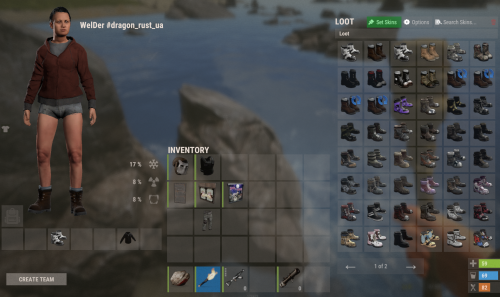
Hi! If you see transparent skins inside the skinner itself, it doesn't mean they are broken. They aren't visible in any skinbox because the author used invisible layers, shadows, or textures. If you repaint an item with this "invisible" skin and place it (like a door or a box), the skin will appear on the object even though it's not visible in your inventory. As for skins not loading—that’s due to your internet connection and game mechanics. The developers have restricted the use of official store skins, allowing only custom ones. These custom skins must be downloaded to your client during every game session (as mentioned in the description).
-

Workshop Custom Skins Pack for Skinner | 10000+ Skins Ready!
BenDer commented on BenDer's file in Customizations
 It’s your money, and you have every right to a refund—that’s perfectly fine. Just to be clear, I’m not advertising one plugin over the other; both are great. The reason I mentioned Skinbox is that an identical set with these exact skins exists for it and works perfectly. The difference is technical: Skinbox simply skips broken IDs and keeps running, while Skinner stops working if even a single ID is incorrect. This makes it look like a file error, when it’s actually a plugin issue that the developer should fix by allowing it to skip errors instead of crashing.
- 37 comments
-
- 1
-

-
- #skins2024
- #skinworkshop
- (and 10 more)
-
Workshop Custom Skins Pack for Skinner | 10000+ Skins Ready!
BenDer commented on BenDer's file in Customizations
Send a request for a refund, there is no problem with this, I understand you, but I cannot repair the plugin itself because I am not its author ((and the fact that it only works with working skins does not depend on me, for example, on my server the skinbox does not crash from 1 broken skin) -
Workshop Custom Skins Pack for Skinner | 10000+ Skins Ready!
BenDer commented on BenDer's file in Customizations
I will update the file as much as possible. But before, the skinner did not have such a problem. Skinbox, for example, easily eats broken skins and this does not cause an error. This problem is only with the skinner. -
Workshop Custom Skins Pack for Skinner | 10000+ Skins Ready!
BenDer commented on BenDer's file in Customizations
you can check for yourself using the program that is written in the description for editing skins, there are buttons to delete skins that are in the store and are broken- 37 comments
-
- 1
-

-
- #skins2024
- #skinworkshop
- (and 10 more)
-
Workshop Custom Skins Pack for Skinner | 10000+ Skins Ready!
BenDer commented on BenDer's file in Customizations
From what I see, only the skinner has such problems, he can't cope with a broken skin( The fact that the skins are invisible is the same everywhere in all skin boxes, it's the author's fault because he used some layers that are displayed in the preview.- 37 comments
-
- 1
-

-
- #skins2024
- #skinworkshop
- (and 10 more)
-
Changed Status from Pending to Fixed Changed Fixed In to 1.1.2
-
Yes, I'll do it today, I'm just really busy right now, a lot of things to do, a lot of skins are just transparent and I can't fix it.
-
Workshop Custom Skins Pack for Skinner | 10000+ Skins Ready!
BenDer commented on BenDer's file in Customizations
I'll try to make a 5000 version this weekend, I just won't include very old skins, and there will be two files available in the package, you can choose how many skins you want. Maybe I'll make another 3000. -
Workshop Custom Skins Pack for Skinner | 10000+ Skins Ready!
BenDer commented on BenDer's file in Customizations
also every time I update I check what skins have been added to the store and delete them -
Workshop Custom Skins Pack for Skinner | 10000+ Skins Ready!
BenDer commented on BenDer's file in Customizations
I think the built-in skinner filter will be enough if it checks for DLC, that's enough. -
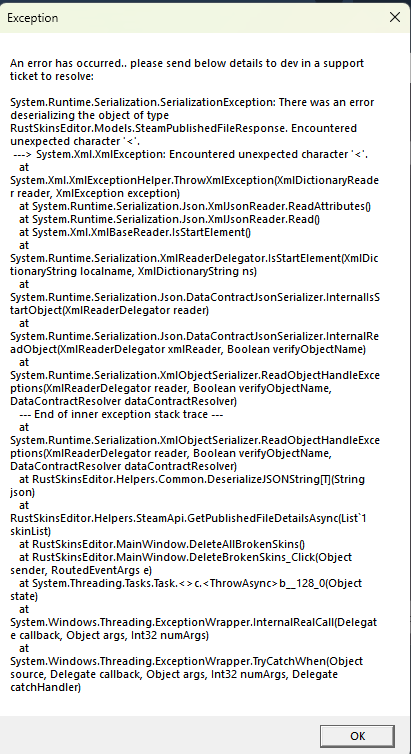
well, the error indicates that the problem is in the plugin, it doesn't want to read a small image, it wants a large one, some of the skins have a small preview and that's why such a conflict occurs, it's better to ask the plugin author and show him this error, because the data file just contains a list of different skins from the workshop
-
What version of skinner do you have?
-
Correct Installation Sequence: 1. In the console, stop the plugin: oxide.unload Skinner 2. Open the oxide/data/Skinner folder, delete the old file and upload the new file named ImportedSkins.json 3. In the console, start the plugin again: oxide.load Skiinner
-
Please tell me how you installed this file and whether you read the instructions about the correct installation sequence.?