
BenDer
-
Posts
396 -
Joined
-
Last visited
Content Type
Profiles
Warranty Claims
Downloads
Forums
Store
Services
Downloads Plus Support
DOWNLOADS EXTRA
Reels
Everything posted by BenDer
-
I would like a refund for this plugin because it doesn't suit my needs; the players didn't like how it works—very often, all the stones disappear completely
-
Hi, I’m writing to request a refund for a recent purchase and to let you know about a server glitch on codefling.com. I had your plugin saved in my collection from a while ago. Recently, I noticed that while the plugin is currently unavailable for purchase on its main product page, it was still allowing purchases directly from my collection list. Curious to see if this was a bug, I tested it—and the purchase actually went through, and I was able to download the file. I don’t actually need or use this plugin; I only bought it to verify the bug. Could you please process a refund for this transaction? Also, please report this server/platform glitch to Envato support, as it seems there is a loophole allowing purchases of unlisted or unavailable items through user collections.
-
 Yeah, it’s really strange—when they’re closed, it looks like they’re bent toward the front, but when they’re open, it looks like the curve is toward the back.
 -
And his wings are turned the right way around?
-
Everyone’s already loving it—they say it’s absolutely the bomb!
-
Huge thanks to the developer for the Dragon plugin! I couldn't even dream that I would ever have something like this on my own server, and now my dream has finally come true. I am fantastically satisfied, I'm just vibing and enjoying every second of it. Absolute masterpiece—now DRAGONRUST-UA feels complete, unique, and on a whole new level. My deepest respect and appreciation to you! P.S. If anyone wants to see how epic this dragon looks in action, you are more than welcome to drop by and check it out firsthand: connect 168.119.9.232:28020
-
Now my DRAGON RUST-UA server is complete. Thanks for the great addition! If anyone wants to see what it’s like in person, you’re welcome to come.! connect 168.119.9.232:28020
-
Changed Status from Pending to Not a Bug
-
im use SkinBox

-
 @The_Kiiiing When the speed setting is activated on the recycler, they start running regardless of whether the power station is on or off. Can this be fixed? I also have a question: is there a way to apply multipliers globally to all boxes? For example, setting a 2x multiplier for scrap across the board, so I don't have to enter "2x" for each individual box—the same applying to other items. Thank you, have a nice day)
 -
Changed Status from Pending to Not a Bug Changed Fixed In to 1.3.6
-
Hi! As mentioned in the description page, this is expected behavior. The issue is that the pack contains a lot of skins that aren't built into the client, so they have to download directly from the server when deployed. Because of how the developers designed this system, loading takes time and depends heavily on your internet speed and the server's download queue. Just give it a moment to finish downloading and it will show up properly.
-
 Hello, I don't know, yesterday I got some error, today everything is fine, maybe an update once changed it
 -
RNPCAddonPopulation Update please)
-
 Dude plugin is genuinely top-tier I've got almost all the software from this author running on my server, and it has never let me down once—the guy clearly knows his stuff. Ultimate Quests is not just some boring "gather 50 wood" or run-around-marking-stuff . These are actual proper events: instanced zones for each player, sharks circling loot crates, patrol helis, and waves of bots spawning in. Players loved it right away, and it makes the gameplay feel so much more alive. Having 45 ready-made quests right out of the box is a huge! lifesaver—you just install it and don't have to stress about content. Huge respect for the web editor and in-game commands too, because messing around with those damn JSON files was driving me nuts. Author @Mevent is an absolute legend, keeps delivering great stuff.
 -

Version 1.0.0
4 downloads
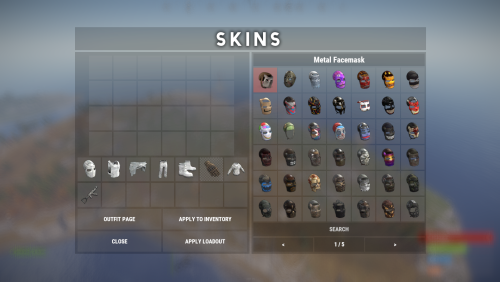
This file is a ready-to-use list of skin data for Skin Controller(2023–2025), containing the most popular and requested skins for Rust servers. It is very easy to install, unload the plugin, replace the Data file and load the plugin! Important: This is NOT a plugin! This is only a data file for the Skin Controller plugin! You need to have the SkinController plugin installed and properly set up for this data file to work! Facepunch have changed their TOS regarding DLC/paid content As of August 7th 2025, it is not allowed to grant users access to paid DLC that they do not own. That includes all Rust DLC and any paid skins. If you continue to grant users access after that date it can result in your server being delisted or worse. You can still use Skin Controller using the Player DLC API plugin, which filters skins based on what the player is allowed to use. Correct Installation Sequence: 1. In the console, stop the plugin: oxide.unload SkinController 2. Open the /oxide/data/SkinController/ folder, delete the old file and upload the new file named workshopskins.json 3. In the console, start the plugin again: oxide.load SkinController Inside this file you will get approximately ~10411 Rust skins, already organized and optimized for SkinController, saving you countless hours of manual browsing and collection. The first time you load custom skins, the plugin may take a while to open the SkinBox. This is normal as the plugin needs to retrieve and cache workshop data. Once loaded, the plugin will start working. Please note: Unfortunately, unlike official skins, which are already built into the Rust client and load instantly, custom skins from the workshop are downloaded separately by the client to your PC when you log in to the server and open the SkinController.. Of course it takes some time** before they become visible, and this process is repeated every time you log out of the server, restart the game or reboot your computer.... **The download speed depends on your internet connection and the number of skins in the SkinController. If you have a very slow loading, we recommend reducing the number of skins for comfortable use. You can use a free tool called Editor for Skins Plugins, available on CodefLink, and remove unnecessary skins. Please note: That after conversion you will still need to manually add skins to your plugin according to its documentation and usage instructions because the tool only gives a list of skins for some plugins and not the entire configuration file!$7.50 -
Changed Status from Pending to Not a Bug
-
Hi! Just to clarify: Skinner and Skin Controller are two completely different plugins, so it's completely normal that they don't work together out of the box. As for the refund, you can request it directly from your purchases list. However, if you want, you can send me your /oxide/data/SkinController/workshopskins.json file in a private message, and I will gladly convert/rework it for you so it works properly.
-
 Hello, is it possible to support the server panel template 5?
 -
.thumb.gif.4707aef13cba7c3b9ad410f5f982b71c.gif) Hello, is it possible to support the server panel template 5?
Hello, is it possible to support the server panel template 5?



.thumb.gif.30bb4fb1ad6b9cbba98fad72b9533086.gif)