Seven tools, one belt slot
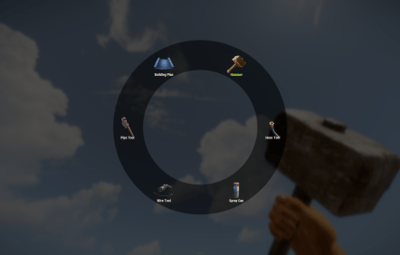
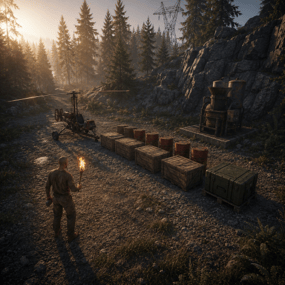
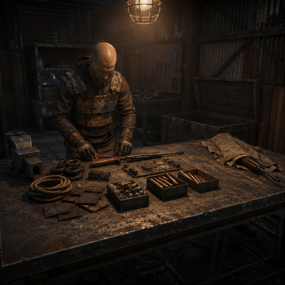
Building a base means a hammer, a plan, wire, pipes, a hose, a spray can and a wallpaper tool — and a belt with nothing left in it. This is one item that becomes any of them. Hold it, hit a shortcut, a radial menu opens around your crosshair, click a tool and it's already in your hand, in the same slot. Nothing wears out, nothing takes up space, and each tool can be locked behind its own permission.
|
7
Tools in the wheel by default
|
7
Shortcuts to pick from
|
|
1
Belt slot for all of them
|
0
Durability ever lost
|
|
✓
|
Radial menu at the crosshair — one shortcut, one click, tool swapped
|
|
✓
|
A permission per tool — the wallpaper tool for VIP, the hammer for everyone
|
|
✓
|
Any item can go in the wheel — it isn't limited to building tools
|
|
✓
|
Closes itself when you're hit — a menu never gets you killed
|
|
✓
|
English and Russian included — and every label in the wheel is your own text
|
See it in action
Open, click, build — without leaving the wall you're on
The whole interaction is one shortcut and one click. No inventory, no dragging, no hunting for the right slot while your teammate holds the wall up.
Seven shortcuts, pick the one that fits your hand
Shift + E, Shift + left or right click, Ctrl + E, Ctrl + left or right click, or the middle mouse button. Or skip shortcuts entirely and have the wheel open the moment the tool comes into your hands.
Laid out by itself
Icons are spaced evenly around the circle from however many tools that player can actually see — three tools or twelve, the ring stays balanced. The tool currently in your hands is highlighted in green.
The slot doesn't move
Picking a tool replaces the item in the same belt position and puts it straight back in your hands. Your belt layout survives a hundred swaps unchanged.
Gets out of the way on its own
Take a single point of damage and the menu closes instantly. Switch to another item and it closes too. Nobody dies staring at a UI because a raider walked in.
Sized to the screen
One scale value shrinks or grows the whole wheel, and it can be drawn on the unscaled overlay layer so it looks the same regardless of a player's UI scale setting.
Your list, not a fixed one
Seven building tools come set up and ready. The list itself is just items, so it holds anything you want it to.
Preloaded with the full building set
Hammer, building plan, wire tool, pipe tool, hose tool, spray can and wallpaper tool — the seven items that otherwise eat most of a belt.
A permission on any of them
Leave a tool's permission empty and everyone sees it; fill it in and only that group does. The wheel is built per player, so a default player and a VIP holding the same item get different menus. Permissions are registered for you on load.
Any item ID, any skin, your own label
A tool entry is an item id, an optional skin, a name shown under the icon and a permission. Add a torch, a codelock, a custom skinned hammer — anything you can name by id belongs in the wheel, under whatever text you like.
Nothing in the wheel ever wears out
Tools carried as part of the multi-tool lose no durability at all, so a player never loses their hammer mid-raid-repair and never has to craft a replacement.
A skinned item you can sell, gift or script
The multi-tool is an ordinary building plan wearing a specific skin. That makes it trivial to distribute however your server already distributes things.
Give it from chat, console or any other plugin
A chat command for admins and holders of the give permission, a server console command that names a player, and — because it's just an item with a skin — a shop lot, a kit or an event reward with no integration work at all.
Optional free building
One switch lets anyone holding the multi-tool place structures without paying resources — built for creative and event servers. Left off by default, and it applies to every holder, so hand the tool out accordingly.
Your own skin, if you have one
The skin id is a config value. Swap in a workshop skin of your own and the plugin recognises it as the multi-tool from then on.
Built to be left alone
|
✓
|
Oxide and Carbon — on Carbon the built-in image database is used and nothing else is needed
|
|
✓
|
Nothing is stored — the tool is a normal item, so there is no data file to corrupt and nothing to lose on a wipe
|
|
✓
|
Clean unload — open menus are closed for every player; items already in belts keep working as ordinary items
|
|
✓
|
Idle cost is nothing — unused hooks are unsubscribed on boot, so features you turned off don't run at all
|
|
✓
|
Misconfiguration is called out — enable two shortcuts and the console tells you which one it used instead of failing quietly
|
Two commands, and the tool permissions you invent
|
/give_mt
|
Give yourself a multi-tool. Admins, or anyone with the give permission
|
|
give_mt <player>
|
Server console and RCON — give one to a named player, online or sleeping
|
|
multitool.give
|
Use the chat command
|
|
multitool.hosetool
|
The one gated tool in the default config — an example you can copy onto any other tool, or delete
|
Before you buy
What do I need installed?
On Oxide, ImageLibrary — it's free, and the plugin says so in console if it's missing. On Carbon, nothing at all.
How do players get one?
However you hand out items. It's a building plan with a set skin, so a shop lot, a kit, a rank reward or the console command all work — no integration needed.
Can I put non-building items in the wheel?
Yes. Any item id works, with any skin and any label. The default seven are building tools because that's the pain everyone has, not because it's a limit.
Can VIPs get more tools than everyone else?
Yes — give those entries a permission. The wheel is assembled per player from what they're allowed to see, and the layout adjusts to however many that is.
Does the menu get me killed?
It closes the instant you take damage, and again if you switch off the tool. There's also a close button in the middle of the ring.
Can I use a different shortcut, or none?
Seven combinations are available and exactly one is active. Alternatively, switch on "open when the tool is equipped" and the wheel appears as soon as the item reaches the player's hands.
Does free building apply to everyone?
To everyone holding a multi-tool, yes — it's a server-wide switch, off by default, meant for creative and event servers. If you only want some players building for free, control it by who has the tool.