Every craftable item, on your terms
One crafting speed for everyone, a workbench ladder you can't touch, and a tech tree that hands out everything eventually. Servers that want tiered craft speed, a banned weapon, or an item nobody is allowed to research end up stacking three plugins to get there. This is one file that owns crafting from end to end — speed by permission group, and seven switches on every item in the game.
|
7
Switches on every craftable item
|
3
Routes to a blueprint, each closable
|
|
|
2
Speed tiers shipped, add as many as you like
|
0
Dependencies
|
|
| ✓ |
Craft speed per permission group — name the permission, name the multiplier, it is registered for you |
| ✓ |
Workbench tier per item — raise it, lower it, or take the bench requirement off entirely |
| ✓ |
Research table, blueprint paper and tech tree — three separate switches, because players will try all three |
| ✓ |
A blocked tech tree node doesn't have to wall off the branch — the plugin unlocks around it and charges the right scrap |
| ✓ |
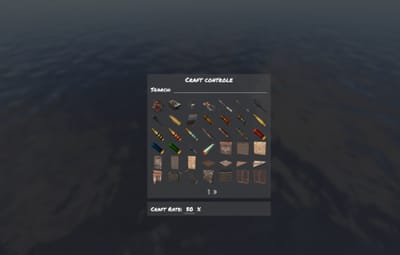
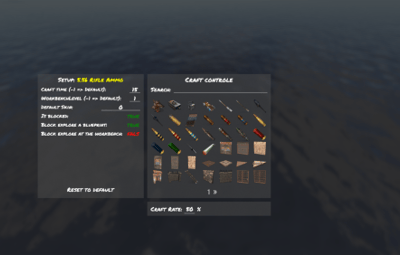
Every craftable item is listed for you — an icon grid with search, no shortname hunting |
Faster crafting as something you sell
Craft speed is one of the few perks players will actually pay for, and the only one that costs a server nothing to give. Here it is a two-column list: permission on the left, multiplier on the right.
As many tiers as your shop has
Two come configured — 1.5× for everyone and 3× for VIP — but the list is yours. Write craftcontroller.bronze, .silver, .gold with the numbers you want and the plugin registers every one of them on load. Nothing to declare anywhere else.
Worked out per craft, not per session
The multiplier is resolved the moment a craft starts, from the item's own base time. Grant a permission mid-wipe and the next thing that player queues is already faster — no relog, no reload.
Seven switches on anything with a recipe
On first load every craftable item in the game is written into the config with its vanilla values, so there is no list to build and no shortname to look up. Open the menu, click the icon, change what you need.
Move an item up or down the bench ladder
The plugin takes the workbench requirement off the engine and enforces its own, which is what lets you go both ways: put an AK behind tier 3, or let players craft a tier-2 item with no bench at all by setting it to zero. A player who tries too early gets a game tip naming the tier they need.
Block an item outright
One toggle and the recipe is closed — caught on both the inventory craft and the crafter itself, so there is no second path in. The player gets a message instead of a silent failure, and it is in the language file like everything else.
A default skin, applied on the way out
Give an item a skin ID and everything crafted comes out wearing it, held entity included, so it looks right in hand and not just in the inventory. A player who deliberately picked a skin keeps theirs — the default only fills the gap.
Closing a door means closing all three
There are three ways to learn something in Rust, and blocking one is worth nothing on its own. Each gets its own switch, so you can leave a route open on purpose — researchable from a found blueprint, but never from the tech tree.
The table and the paper
One switch covers both the research table and studying a blueprint that dropped in loot — the two routes players reach for first, and the pair that plugins usually forget to close together.
The tech tree, node by node
Mark a node blocked and it cannot be unlocked at the workbench, with a notice on screen and in chat rather than a dead button.
And what happens to everything behind it
This is the part most plugins get wrong. Block a node in the middle of a branch and you have accidentally banned the whole branch. A second switch decides which you meant: seal the path, or let players through it. Let them through and the plugin rebuilds the unlock itself — it works out which nodes are still needed, prices them in scrap at the correct tier including tax, takes the payment, unlocks them, and tells other plugins it happened through the standard hook so your logging and reward plugins still see it.
Puts the game back
| ✓ |
Vanilla values are saved before anything is touched — every recipe's original time and bench level go into a data file on first load, and that file is the reference point from then on |
| ✓ |
Unload restores every recipe — times and bench levels are written back from that file and the client is told to go back to normal crafting, so removing the plugin is not a wipe-day job |
| ✓ |
Joining players are handled properly — if someone is still loading their snapshot the plugin waits and retries instead of firing into the void and leaving them with the wrong crafting rules |
| ✓ |
Edits apply live — change a bench level or a block in the menu and it is in force before you close it, on a server full of people |
| ✓ |
Four messages, all translatable — and no dependencies to install alongside it |
One command, and the tiers you invent
Players never type anything — the rules apply to them through the vanilla crafting menu.
| /craftcontrole |
Open the item grid — search, pick an icon, edit its seven settings |
| craftcontroller.use |
Open the editor. Server admins have it without being granted anything |
| craftcontroller.default |
1.5× craft speed as shipped — rename it or change the number |
| craftcontroller.vip |
3× as shipped, and the template for every extra tier you add |
Before you buy
The workbench labels disappear from the crafting menu. Is that expected?
Yes, and it is the trade for being able to move items between tiers at all. Those coloured “requires workbench X” lines are drawn by the client straight from the recipe, so the requirement has to come off the recipe before the plugin can enforce a different one. The rule itself still holds — a player crafting too early is stopped and told which tier they need — but the label is gone until they try. If untouched tier labels matter more to you than per-item tiers, this plugin is the wrong trade.
A player is in two speed groups. Which multiplier applies?
The last one they match in the config file, not the largest. Write the list slowest first and fastest last and the answer is always the one you want.
Do I have to know item shortnames?
No. Every craftable item writes itself into the config on the first load with its vanilla values, and the in-game grid shows real item icons with a search box above them. Shortnames are there if you prefer editing the file, but nothing requires it.
Can players still find a banned item as a blueprint in loot?
The blueprint can still drop, but studying it is refused if you closed that route, and blocking the craft closes it even for a player who learned the item before you installed the plugin.
If I block one tech tree node, do I lose everything past it?
Only if you want to. That is a separate switch on the same item — leave it off and players unlock straight through the blocked node to what is behind it, paying the correct scrap for the nodes they actually get.
Can I let players craft without standing at a workbench?
Set an item's bench level to 0 and it crafts anywhere. Do it for everything and you have a no-workbench server without a second plugin.
What happens if I remove the plugin later?
Every recipe is written back to the values captured before it ever changed anything, and connected players are switched back to normal crafting on the spot. Blueprints players unlocked while it was running stay unlocked — those live in the game's own save, not in the plugin.