Jump to content

2 Screenshots

  • 22.2k
  • 553
  • 78.39 kB
  • Update details
    v2.0.0
    Released
    Download size 78.39 kB
    Total versions 26
    Typical update pace About every 5 days
    Freshness Updated 2 days ago

Works with

Compatible add-ons, packages, or tools that pair well with this resource.

About LuckyBlock

Random events with rarity
A crate that owes you nothing

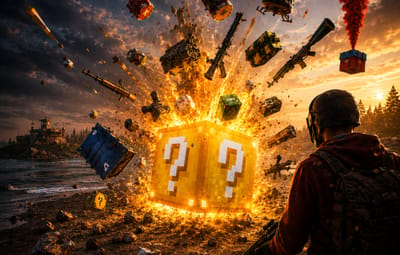
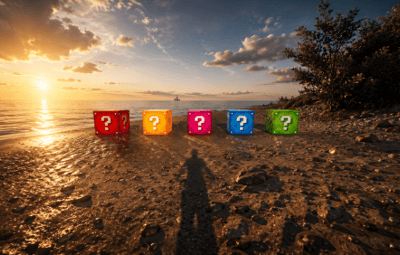
Looting is the most predictable part of a wipe: you know what a barrel holds before you break it. Lucky Blocks fix that. Any container on the map can quietly turn into one, wrapped on all six faces in the texture of its rarity, and opening it doesn't give loot — it rolls. A Common block pays a few scrap; a Legendary one drops an airdrop on your head. A Cursed one has nothing good inside it at all, and the player can see that before deciding to touch it.

31
Event types built in
5
Tiers, Common to Cursed
35
Events preconfigured
0
Dependencies
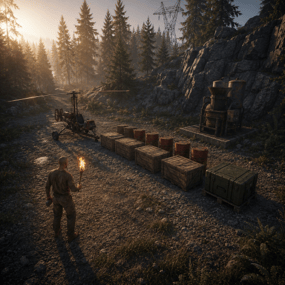
Rarity you can read across the field — every tier carries its own workshop decal, colour and name
The Cursed tier only hurts — a visible risk your players choose to take, and no competitor has one
Hand blocks out as an item — a shop reward the player places where they want and opens when they want
Any event is a list of server commands — whatever your other plugins can do belongs on the wheel too
Rare blocks announce themselves — chat with a grid reference, a marker on the map, an embed in Discord
01 — Tiers
Five rarities, five different wheels

A block belongs to a tier from the moment it spawns until somebody opens it. The tier decides how the block looks, how often it appears, who is allowed to open it and which events can come out of it. Common, Rare, Epic, Legendary and Cursed ship configured, with the events already spread across them by weight.

The block tells you what it is
Each tier has its own Steam Workshop decal, published with the plugin and set in the config, plus a name in its own colour. A player crossing a field sees a gold block and a black one and knows the difference without opening either.
Cursed: the whole point of looking first
Ten events, all of them bad: the concrete box with C4 counting down, a patrol helicopter aimed at the opener, meteors, bears, radiation, a wound, an inventory dropped on the ground. Walk past it or gamble that the roll lands on the least painful one.
Weights, not percentages
Spawn weight per tier, event weight inside a tier. Raise one number and everything else rebalances itself; set it to zero and that tier or event stops appearing. Adding a sixth tier is a copy of a block in the config.
A tier can belong to a group
Give a tier a permission and only that group can open its blocks. Legendary for VIPs, Cursed for everyone, the rest open to the server — blocks still spawn for all players, they just don't open for the wrong hands.
02 — Events
Thirty-one ways it can end

An event is a list of server commands with a weight and a description, so the built-in ones and yours sit in the same table and roll against each other. %steamid% in a command is replaced with the player who opened the block.

Reward
Money through Economics, ServerRewards, BankSystem or IQEconomic. A kit by name. An item with a skin, a rain of items landing around the player, an airdrop, a blueprint unlocked, every piece of gear repaired, full health with the boosters running, or any vehicle and entity spawned by its prefab name.
Chaos
A patrol helicopter sent straight at the opener. Meteors falling over the area. Lightning. Bears or scientists in a ring around the player, a wall of fireballs, radiation, a teleport to a random point or to a monument, a swap of positions with the closest player, everything stripped off, or the sealed concrete cube with nine C4 counting down inside it.
Trolling
The camera spinning for half a minute. An explosion with no damage behind it. Heavy armour that cannot be taken off. Night vision goggles for a while, an inventory dropped at the player's feet.
Server wide
An airdrop called in for every player online, and Lucky Rain: a ring of fresh blocks around the one just opened, which turns a single find into a crowd within a minute.
03 — Blocks as an item
Sell one, let the player open it where they like

Fill the item skin id on a tier and that tier becomes a box in the inventory. One console command hands it out, so your shop, your cases and your event plugin can all give lucky blocks as a reward without knowing anything about this plugin.

Placed like any deployable
The player deploys the box the usual way, so the game itself checks building privilege, the surface and the slope. The plugin only replaces what was placed with a block of that tier.
It waits as long as it has to
A block a player placed ignores the despawn timer and comes back after a restart, in the same spot. It is never announced and never appears on the map either, so buying one doesn't paint a target on the buyer's base.
One way in
A placed block cannot be picked back up. Once it is on the ground the only thing left to do with it is open it.
04 — What the server sees
A rare block is an event, not a private find

Announcements are set per tier, so Common blocks stay quiet and a Legendary one starts a race. Spawn and opening are separate switches — announce the find without telling everyone what came out of it, or the other way round.

Chat with a grid reference
The message names the tier in its own colour and the grid square it landed in, which is enough to send half the server running and not enough to lead them to the exact rock.
A marker for as long as it lives
A circle in the colour of the tier sits on the map while the block is there and disappears with it, whether it was opened or despawned.
The same news in Discord
One webhook url in the config and every announcement is mirrored as an embed coloured like the tier, so the players who are not online still see the server is alive.
Who opens the most
The plugin counts openings per player and per tier and shows the top ten in chat. Statistics reset themselves on a wipe.
Reliability
Nothing left in the map save
Blocks are never written into the save, so a restart leaves no leftovers — only blocks placed by players come back, from the plugin's own data file
A block costs seven network entities, and a limit in the config keeps that budget where you put it
Configs from 1.x upgrade themselves: the old event list becomes the Common tier and keeps its skin
Hooks the setup does not need stay unsubscribed, so a server that gives out no blocks as items never listens for deployables
Spawns can be blocked underwater, above the ocean and inside any monument — the monument list fills itself from your map
Runs on Oxide and Carbon, needs no other plugin, and every message lives in the language files, English and Russian included
Commands and permissions
Three commands, and one of them is for players
/lbtop Top ten openers on the server. Open to everyone.
/lbtest [tier] Puts a block of that tier where you are looking, or a random one. Needs luckyblock.admin.
luckyblock.give Console or RCON: luckyblock.give <steamID|name> <tier> [amount], the line your shop calls.
luckyblock.admin Spawning blocks and handing them out.
luckyblock.<tier> Whatever you write in a tier's permission field, registered on load. Leave it empty and the tier is open to everyone.
For developers
Four methods, three hooks

A tier is always named by its key in the config, Common, Rare, Legendary and so on: that is what the hooks hand you and what every method takes. Everything goes through a plain plugin reference, LuckyBlock?.Call<bool>("GiveLuckyBlock", player, "Legendary", 1), nothing to add as a dependency.

Methods
IsLuckyBlock (BaseEntity entity) → bool
True for a live lucky block of this plugin, so your loot or damage rules can step around it.
GetLuckyBlockTier (BaseEntity entity) → string
Tier name of that block, null when the entity is not one.
SpawnLuckyBlock (Vector3 position, string tier) → bool
Puts a block of that tier at the position, an empty tier rolls a random one by weight. It behaves like a natural spawn: despawns by the timer, gets announced and marked on the map when the tier says so. False when the tier is not in the config, or nothing can roll because every weight is zero.
GiveLuckyBlock (BasePlayer player, string tier, int amount) → bool
Hands the block over as an item, amount clamped to 1..100. False when the tier does not exist or has no item skin id, such a tier can only spawn on the map.
Hooks
OnLuckyBlockSpawned (LootContainer block, string tier)
A block appeared: spawned on the map, placed by a player, or restored after a restart.
CanOpenLuckyBlock (BasePlayer player, LootContainer block, string tier) → object
A player is trying to open one. Return anything but null to veto. It runs after the tier permission and before the cooldown and the daily limit, so your refusal shows before the built-in ones.
OnLuckyBlockOpened (BasePlayer player, LootContainer block, string tier)
The tier event has already fired, the block is about to vanish.
Questions
Before you buy
I am on 1.x. What happens to my config?
It migrates on the first load. Your event list becomes the Common tier with the skin you were using, and the other four tiers arrive next to it, ready to be tuned or deleted.
Can I add my own events?
That is the main way to use it. An event is a list of server commands with a weight, and %steamid% stands for the player who opened the block. Anything with a console command belongs on the wheel.
Can I use my own artwork?
Yes. Five decals come with the plugin and are set in the config out of the box; a skin id is just a config value, so your own decal from the Spray Decal Creator takes its place in one line.
What does it cost the server?
Seven network entities per block, and the block limit in the config caps the total. Blocks replace loot containers that already exist, so nothing is added to the map that wasn't going to be there.
Will the deadly events wreck bases?
No. The C4 in the concrete cube is a visual: it kills the player who opened the block and leaves the neighbourhood standing.
What happens on a restart or a wipe?
Spawned blocks are gone and new ones appear as loot respawns. Blocks players placed themselves come back where they were. Statistics start over on a new save.
  • Like 2
  • Love 1

User Feedback

About Us

Codefling is the largest marketplace for plugins, maps, tools, and more, making it easy for customers to discover new content and for creators to monetize their work.

Downloads
2.9m
Total downloads
Customers
12k
Customers served
Files Sold
169.8k
Total sales
Payments
3.7m
Processed total
×
×
  • Create New...

Important Information

We have placed cookies on your device to help make this website better. You can adjust your cookie settings, otherwise we'll assume you're okay to continue.