
Monster
-
Posts
1,202 -
Joined
-
Last visited
-
Days Won
10
Content Type
Profiles
Warranty Claims
Downloads
Forums
Store
Services
Downloads Plus Support
DOWNLOADS EXTRA
Reels
Everything posted by Monster
-
["gates.external.high.stone"] = 0, ["wall.external.high.stone"] = 0 It's for stone ( Adobe ). ["gates.external.high.wood"] = 0, ["wall.external.high"] = 0 It's for the wood ( Legacy ). But the skins are not officially released yet.
-
Wait for a new case (which I don't believe). This message-log appears in the server console when the restart is skipped.
-
Do a search in the server logs - ( RESTART CANCELED! ONLINE PLAYERS MORE THAN )
-
Maybe the restart was missed due to players online more than 14?
-
Replace 'testridablehorse' with 'ridablehorse2' in the code and configuration. And test the horses again. It is also likely that 'ridablehorse2' is missing from the player data. I will try to update the plugin within a few days.
-
Send your configuration.
-
Yes, I'll add.
-
Version 1.0.3
34 downloads
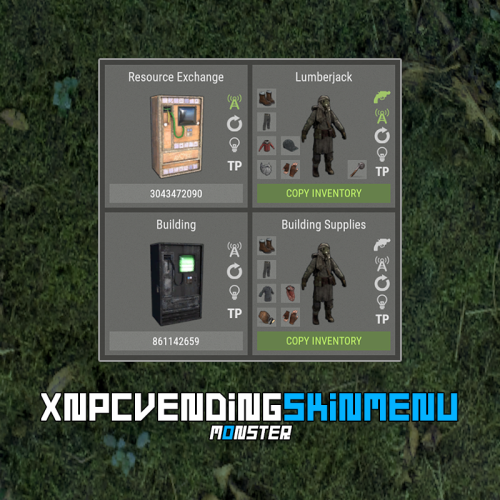
XNPCVendingSkinMenu - NPC Vendings/Shopkeepers skin menu for your server. -> In the code you can switch the plugin language - LanguageEnglish = true <- Key Features Optimization of the interface for different monitor resolutions. Storing NPC data in - oxide/data/XDataSystem/XNPCVendingSkinMenu There is a lang ru/en/uk/es. Sound effects when interacting with the menu. Vending settings: skin and automatic application. Shopkeeper settings: clothing, weapon(belt), skins, item in hand and automatic application. Easily copy your inventory with one click of a button. [ Clothing and belt with skins and modules are copied. ] Ability to change the skin of an item. Just click on it. Ability to display NPCs on the map - all of them or individually. Ability to teleport to NPCs. [ Select an NPC from the list if there are 2 or more NPCs. ] If there is no NPC on the map, it will be displayed in transparent color in the menu. NPCs that are not in the plugin data will be automatically copied and added as soon as they are spawned. The plugin only copies and modifies default NPCs. This allows you to use custom NPCs from other plugins without problems. [ OwnerID(vendings and shopkeepers) and SkinID(shopkeepers only) == 0 ] The NPC is automatically changed after loading the plugin. For an NPC to be changed, its settings must be activated. Brief description of the buttons: Permissions xnpcvendingskinmenu.admin - access to menu and settings. Commands [ChatCommand] /npcvendingskin - open menu. [ConsoleCommand] npcvendingskin.savedata - command for additional saving of changes. [ Optional. The plugin will automatically save the information when you unload it. ] Config { "General settings": { "SteamID profile for custom avatar": 0, "Chat prefix": "<size=12><color=#FFFFFF50>[</color> <color=#00FF0050>XNPCVendingSkinMenu</color> <color=#FFFFFF50>]</color></size>\n" }, "GUI settings": { "Color_background_1": "0.517 0.521 0.509 0.95", "Color_background_2": "0.217 0.221 0.209 0.95", "Color_background_3": "0 0 0. 0.9", "Button color (icons)": "1 1 1 0.75", "Block color": "0.517 0.521 0.509 0.5", "Color of the active button next": "0.35 0.45 0.25 1", "Color of the inactive button next": "0.35 0.45 0.25 0.4", "Text color of the active button next": "0.75 0.95 0.41 1", "Text color of the inactive button next": "0.75 0.95 0.41 0.4", "Color of the active button back": "0.65 0.29 0.24 1", "Color of the inactive button back": "0.65 0.29 0.24 0.4", "Text color of the active button back": "0.92 0.79 0.76 1", "Text color of the inactive button back": "0.92 0.79 0.76 0.4" } }$18.99 -
 ImageLibrary is installed correctly?
 -

Configure default new player settings
Monster replied to Castiel the Shield's Support Report in Support
Changed Status from Pending to Closed -
Changed Status from Pending to Closed
-
Changed Status from Pending to Closed
-
Changed Status from Pending to Closed
-
Changed Status from Pending to Closed
-
Changed Status from Pending to Closed
-
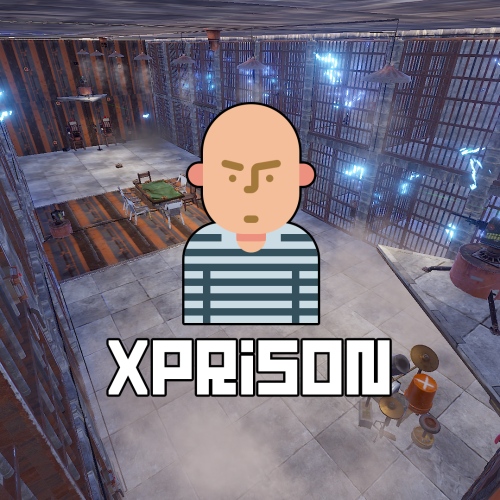 @hid333 Quite a few different settings are in the configuration. "Do not kill the prisoner when he enters the prison, but simply teleporting": false, /entspawn stone-ore 300 - It's necessary to be in prison. A stone will be placed on your current position, which will appear every 300 seconds after it is mined.
 -
Config --> "Allow regular players to visit the prison": false, 6 - is the maximum number of buttons for time. I'm checking clothes later.
-
Write me in PM.
-
I can give you that file, no problem. But I don't recommend using skins from the workshop. They're nothing but trouble. At the moment there are 5000 accepted skins that are cached by you client and they don't need to be individually downloaded. The plugin automatically generates and replenishes this list.
-
Hi. Are you expecting the plugin to download skins from Steam workshop by itself? Or did you use some commands and didn't get any result?
-
Hi. They are not in the configuration yet, I will add these settings to the configuration in the next plugin update. Right now it can be found and changed in the code: - "0.968 0.917 0.878 0.329" - in one place in the code. - "0.968 0.917 0.878 0.129" - in two places in the code. You can simply change the alpha value. 0.329 --> 1.0 0.129 --> 0.5