
-
Posts
947 -
Joined
-
Days Won
4
Content Type
Profiles
Warranty Claims
Downloads
Forums
Store
Services
Downloads Plus Support
DOWNLOADS EXTRA
Everything posted by Mabel
-
Version 2.0.1
2 downloads
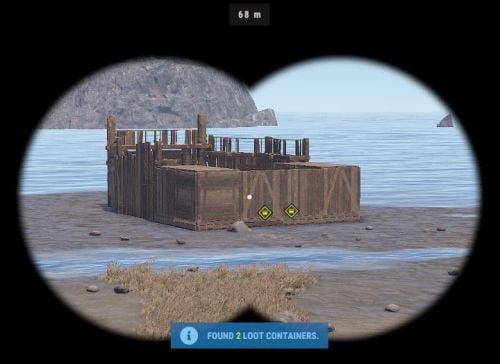
Base Insight provides players with the ability to ping loot containers and tool cupboards inside buildings. This allows players to quickly identify valuable loot containers and strategic tool cupboards within a specified radius. Features • Loot Container Pinging – Ping supported storage containers inside a base including large wooden boxes, coffins, barrels, fridges, lockers, vending machines, wall cabinets, drop boxes, and weapon racks. • Tool Cupboard Pinging – Locate Tool Cupboards inside a scanned base. • Allowed Container List – Choose exactly which storage containers can be pinged using the allowed container list in the config. • Loot-Only Pinging – Optionally only ping supported containers that currently contain loot. • Raidable Bases Only Option – Optionally restrict the scanner so it can only be used on **Raidable Bases**. • Customizable Scanner Settings – Adjust scan radius, max distance, ping delay, ping duration, scanner skin, scanner display name, ping types, and more. • Permission-Based Cooldowns – Set a default scan cooldown and override it with permission-based cooldowns. • Chat and Console Distribution – Give the scanner to players through chat command aliases or via console command. • Loot Support – Optionally add the scanner item into supported loot containers with configurable chances and min/max amounts. Permissions • baseinsight.use – Required to use the Base Insight scanner. • baseinsight.give – Required to use the chat command to receive a scanner. Commands Chat Commands • /bis – Gives the Base Insight scanner item to the player. Console Commands • bis [SteamID] – Gives the Base Insight scanner item to the target player. • bi_wipe – Manually wipe the cooldown data file *(automatically wipes on new wipes)*. Configuration Options Scanner Settings • Scanner Display Name – Display name of the Base Insight scanner item. • Scanner Skin ID – Skin ID used for the scanner item. • Enable Storage Containers – Enable or disable storage container pinging. • Enable Tool Cupboard – Enable or disable tool cupboard pinging. • Only Use On RaidableBases – Restrict scanner use to Raidable Bases only. • Only Ping Containers with Loot – Only ping supported containers that currently contain loot. • Destroy Scanner After Use – Destroy the scanner item after one successful use. • Max Distance from Base – Maximum distance the player can be from the base they are scanning. • Scan Radius – Radius around the targeted base used for scanning. • Ping Delay – How long the player must hold before the scan completes. • Ping Duration – How long pings remain visible. • Ping Type – Loot Containers – Ping type used for storage containers. • Ping Type – Tool Cupboard – Ping type used for tool cupboards. • Ping Types – List of available ping types included in the config for reference. Allowed Storage Containers Settings • Allowed Storage Container List – List of storage container prefab names that the scanner is allowed to ping. Permissions & Cooldown Settings • Chat Command Cooldown – Cooldown for receiving a scanner via chat command. • Default Scan Cooldown – Default cooldown between scans. • Scan Cooldowns By Permission – Permission-based scan cooldown overrides. Chat Command Settings • Chat Command Aliases – List of chat commands that give the scanner item. Loot Settings • Add Scanner To Loot Containers – Enable or disable adding the scanner item into loot containers. • Min Scanners Per Container – Minimum number of scanners that can be added. • Max Scanners Per Container – Maximum number of scanners that can be added. • Loot Containers List – Loot container prefab names and the chance for the scanner to be added. Default Configuration { "Scanner Settings": { "Scanner Display Name": "Base Insight Scanner", "Scanner Skin ID": 3242988854, "Enable Storage Containers": true, "Enable Tool Cupboard": true, "Only Use On RaidableBases": false, "Only Ping Containers with Loot": true, "Destroy Scanner After Use": false, "Max Distance from Base": 100, "Scan Radius": 50, "Ping Delay": 5, "Ping Duration": 20, "Ping Type - Loot Containers": 3, "Ping Type - Tool Cupboard": 2, "Ping Types": { "Hostile": 0, "GoTo": 1, "Dollar": 2, "Loot": 3, "Node": 4, "Gun": 5, "Build": 6 } }, "Allowed Storage Containers Settings": { "Allowed Storage Container List": [ "abyss_barrel_horizontal", "abyss_barrel_vertical", "bamboo_barrel", "box.wooden.large", "coffinstorage", "component.box.ammo.large", "component.box.armor.large", "component.box.charcoal.large", "component.box.clothing.large", "component.box.comps.large", "component.box.explosives.large", "component.box.food.large", "component.box.guns.large", "component.box.meds.large", "component.box.metal.large", "component.box.ore.large", "component.box.scrap.large", "component.box.stone.large", "component.box.sulfur.large", "component.box.tools.large", "component.box.wood.large", "dropbox.deployed", "electric.wallcabinet.deployed", "fridge.deployed", "krieg_storage_horizontal", "krieg_storage_vertical", "locker.deployed", "medieval.box.wooden.large", "minifridge.deployed", "pilot_hazmat_woodbox_deployed", "storage_barrel_b", "storage_barrel_c", "twitch_dropbox.deployed", "vendingmachine.deployed", "weaponrack_horizontal.deployed", "weaponrack_single1.deployed", "weaponrack_single2.deployed", "weaponrack_single3.deployed", "weaponrack_stand.deployed", "weaponrack_tall.deployed", "weaponrack_wide.deployed", "wicker_barrel", "woodbox_deployed" ] }, "Permissions & Cooldown Settings": { "Chat Command Cooldown": 3600, "Default Scan Cooldown": 60, "Scan Cooldowns By Permission": { "baseinsight.vip": 30, "baseinsight.elite": 10 } }, "Chat Command Settings": { "Chat Command Aliases": [ "bis", "givebis" ] }, "Loot Settings": { "Add Scanner To Loot Containers": false, "Min Scanners Per Container": 1, "Max Scanners Per Container": 1, "Loot Containers List": { "crate_elite": 0.2, "heli_crate": 0.8, "bradley_crate": 0.8, "codelockedhackablecrate": 0.5, "codelockedhackablecrate_oilrig": 0.5 } }, "Version": { "Major": 2, "Minor": 0, "Patch": 1 } } Language { "Cooldown": "Scan cooldown. Please wait {0} seconds.", "ChatCooldown": "You need to wait {0} seconds to use this command!", "ScanResult": "Found {0} loot containers and {1} Tool Cupboards.", "ScanResultLootOnly": "Found {0} loot containers.", "ScanResultTCOnly": "Found {0} Tool Cupboards.", "NoPerm": "You do not have permission for this command!", "RaidableBasesOnly": "Only Usable On RaidableBases!", "ItemReceived": "You Received A {0}", "NoPermission": "You Don't Have Permission To Use {0}", "TooFar": "Too far away from base! Max distance is {0}m.", "Error": "ERROR: No scannable targets are enabled in the config." }$5.00 -
You need to own the product to submit a support request. In your screenshot it doesn't show the "download" button, so maybe your not logged in ?
-
Submit a support request to the author https://codefling.com/plugins/property-buying
-
 Can confirm you wont be disappointed in this purchase if you have been using the Unity editor .
- 11 comments
-
- 1
-

-
- #cui
- #cui editor
- (and 2 more)
-
Hands down the best tool for CUI creation. Whether you’re a novice or a seasoned developer, this tool will save you time and help you perfect your CUI development.
- 11 comments
-
- 2
-
-

-
- #cui
- #cui editor
- (and 2 more)
-
.thumb.jpg.e9d17b75aae5d2248cd203bab27522eb.jpg) 100% agree. This should be optional and shouldn't be a dependency. I hope the Mad Mappers team see that it wasn't a good change and revert back.
100% agree. This should be optional and shouldn't be a dependency. I hope the Mad Mappers team see that it wasn't a good change and revert back.- 78 comments
-
- 8
-
-
- #loot
- #lootmanager
- (and 2 more)
-
Currently a minimum of 14 day wait for new submissions.
-
 You need to add {0} to the end of the message. It was missing in a previous update, so you’ll need to manually add it or generate a new language file. EX: "CoordinateMessage": "The crash site is located at coordinates - {0}",
- 268 comments
-
- 1
-
-
- #event
- #cargoplane
- (and 18 more)
-
The plugin doesn't come with the other plugins it supports I.E Karuzas Vehicles.you purchase that separately if you want those.
-
.thumb.gif.639bad9e0c01fe84e49ee5afd0939b6f.gif) As a server owner, I can confidently say Beast Master is one of the most versatile and well-built plugins I’ve added to our setup. The new Animal Scale Update is a game-changer — it brings a level of control and customization to animal behaviour and rewards that I haven’t seen anywhere else. The configuration options are outstanding. You can fine-tune spawn areas, scale animal stats, adjust rewards for licensed vs. unlicensed players, and even limit spawns near monuments or buildings. It’s clear this plugin was designed with serious server management in mind. Integration with other popular plugins has been smooth, and performance remains solid even with extensive scaling and custom profiles. The documentation is clear, and support from the developer has been excellent — responsive, knowledgeable, and active with updates. If you’re looking to make the wildlife on your server more dynamic, balanced, and rewarding for your players, Beast Master is absolutely worth it. A must-have plugin for any PVE server.
As a server owner, I can confidently say Beast Master is one of the most versatile and well-built plugins I’ve added to our setup. The new Animal Scale Update is a game-changer — it brings a level of control and customization to animal behaviour and rewards that I haven’t seen anywhere else. The configuration options are outstanding. You can fine-tune spawn areas, scale animal stats, adjust rewards for licensed vs. unlicensed players, and even limit spawns near monuments or buildings. It’s clear this plugin was designed with serious server management in mind. Integration with other popular plugins has been smooth, and performance remains solid even with extensive scaling and custom profiles. The documentation is clear, and support from the developer has been excellent — responsive, knowledgeable, and active with updates. If you’re looking to make the wildlife on your server more dynamic, balanced, and rewarding for your players, Beast Master is absolutely worth it. A must-have plugin for any PVE server. -
 "Spawn graveyards during this time": { "start": 19, "end": 7 }, You can set the spawn times in the config
 -
We do have a clear refund policy on the site https://codefling.com/refunds/
-
That would be a disaster, people would be buying products, downloading them and then requesting a refund because they no longer use it.
-
 The tool i linked is using the api that nivex provided, it's just made it a more convenient way I guess. But I agree we need the full clarification from FP still
 -
This is a very useful tool for checking your configs & data files for now banned skins & items https://app.rustspain.com/facepunch/checkitems Link courtesy of @ninco90
-
What's the problem with it? Have you used the support tab on the plugin page to raise any concerns with the developer? https://codefling.com/plugins/skinner?tab=support
-
 ah sorry i see now, if you message me on discord i can help you do it (mabel8686)
 -
You can edit in the language file or create a new file for the language you prefer
-
This one offers alot of customisation and allows you too create new unique versions of weapons
-
in your `server.cfg` add `eventschedulewipeoffset.event_hours_before_wipe 0` to prevent the event from starting
-
https://codefling.com/plugins/raidable-bases?tab=support
-
That's the native clan system
-
It would be limitations of the game, you could only do it with a plugin if they are spawnable entities, but as yours are custom prefabs they will need to be added to your map using RustEdit
-
Install this on your server machine and restart the server, You can see the Thread regarding it HERE https://www.amazontrust.com/repository/SFSRootCAG2.cer