Cargonia
-
Posts
42 -
Joined
Content Type
Profiles
Warranty Claims
Downloads
Forums
Store
Services
Downloads Plus Support
DOWNLOADS EXTRA
Reels
Everything posted by Cargonia
-
 Same for me, no updates showing on my Discord Hook although quite a few Codefling plugins needed an update.
 -
 It's the CopyPaste Plugin that needs an update, not the Quests.
 -
 Enter the hazmatsuit in the setting "List of items that won't drop on death", in each bots profile: "List of items that won't drop on death": [ { "Item shortname or ID": "hazmatsuit", "Item name (leave empty for default)": "", "Item skin": 0, "Enable chance of drop on death?": false, "Chance of drop on death (0-100)": 100, "Attachments": [] } ],
 -
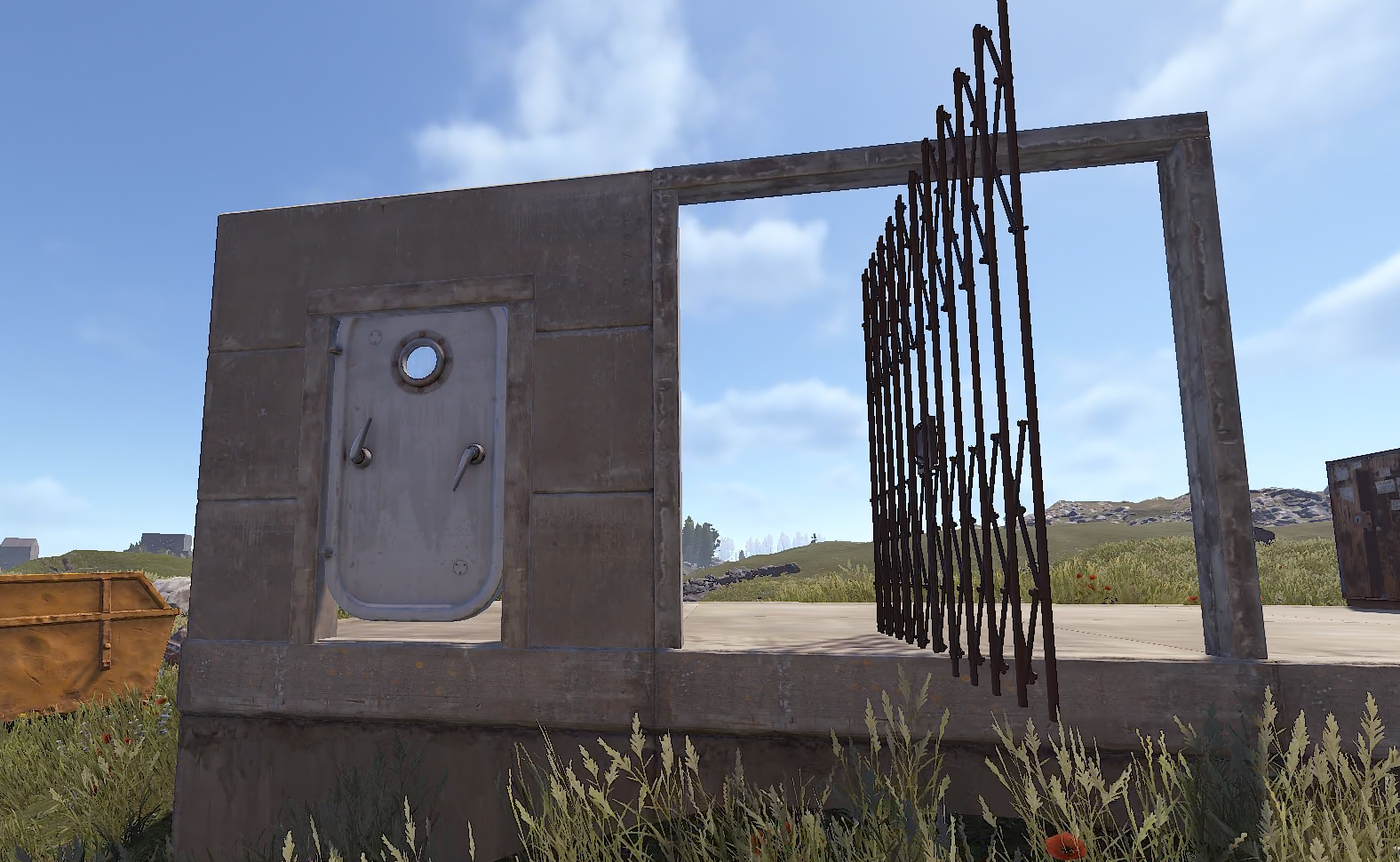
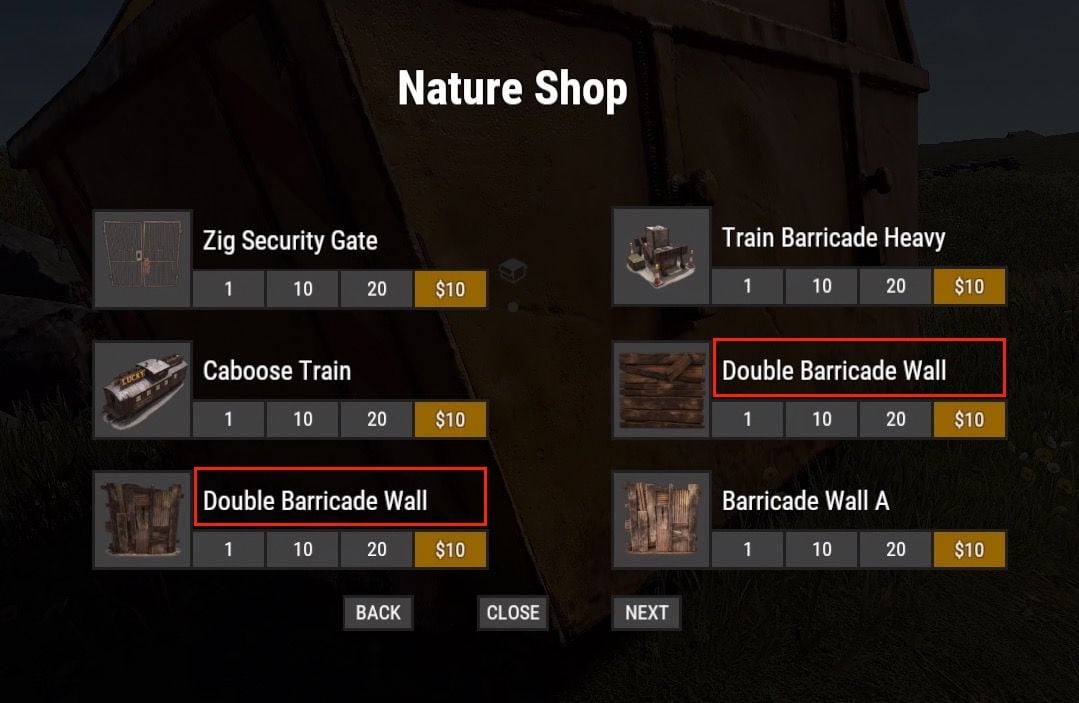
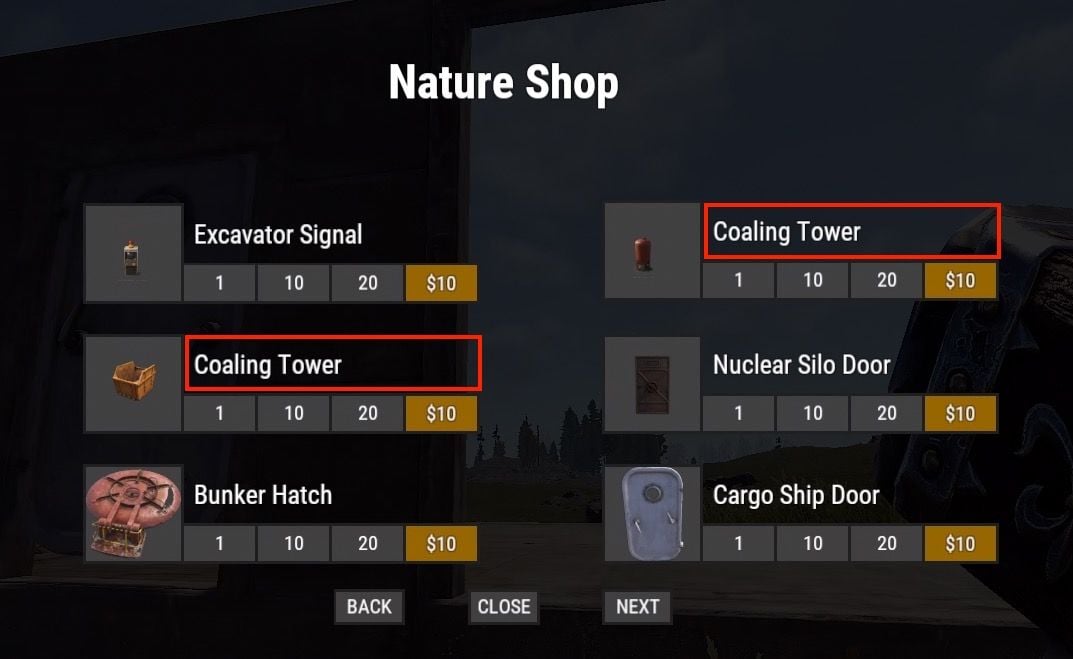
First of all thanks for the great plugin! Here is a list of a few bugs I've noticed and I hope that can be fixed: The Elevator Door always snaps 90° to the actual door frame. The Cargo Ship Door seems to snap too high in the door frame to properly fit. The items "display names" don't show in full length in the shop. I assume they get cut off from the UI (see Double Barricade Wall A and B show without the letters and Coaling Tower Storage misses the word Storage). The config setting "Display a chat message when a player pulls out a hammer for the first time, reminding them that they can remove deployables" set to "false", doesn't seem to prevent the message from appearing. Whenever I first pull out a hammer, I get the info message in the chat. Lastly more a suggestion: If the actual storage amount of the Coaling Tower Storage could be increased to hold atleast a large box that would be great. Ideally even more, because let's be honest that thing is huge and should fit a lot of items. A setting for the item slots in the config would be great! Also cherry on top would be an option for the Coaling Tower (the tank) to mimic the large water catcher UI so it can hold water.

-
 This happens on our server, too.
 -
I love the addition of the option to lock the deployed boxes. Unfortunately it seems the boxes are not breakable on PVE. This is caused by the TruePVE plugin and its "LockedBoxesImmortal" flag. There is a fix though, if you add this code in after line 3012: private void OnCollectiblePickedup(CollectibleEntity collectible, CustomPet customPet, Item item) { if (customPet) customPet.CustomBrain.OnCollectiblePickedup(item); } // start new code private object CanEntityTakeDamage(BaseEntity entity, HitInfo info) { if (entity is StorageContainer && info?.InitiatorPlayer != null && !(info.InitiatorPlayer is CustomPet) && PluginEntityComponent.TryGetComponent<DropContainer>(entity, out _)) return true; return null; } // end new code #endregion When any entity takes damage, this hook checks if: The target is a StorageContainer (cheap type check, skips 99%+ of calls early) The damage source is a real player (not decay, fire, animals, heli, etc.) The player is not a CustomPet bot (prevents bots destroying their own boxes) The entity has a DropContainer component (confirming it's an NPC-deployed container) If all conditions pass, it returns true, which tells TruePVE to allow the damage — bypassing the immortal flag. Player-owned locked boxes remain fully protected. I have tested this on my server and it seems to work. If you don't see any issues on the plugin's side with this, I would love if this could be added.
-
 Try this: { "Type": "Event", "Image URL": "https://i.ibb.co/vvvY97sG/Flying-Cargo-Event.png", "Title": "Flying Cargo", "Prefab": "FlyingCargoEvent", "Second Prefab": "" }
 -
I noticed that the bots will stash their ammo, too. I would like to have limited ammo for the bots but maybe it can be made so they won't stash their ammo or make them prioritze to stash resources before ammo and meds? Also it would be nice if the boxes could be locked with a keylock so you have to break them to get the items.
-
There's a separate Add-on that does this:
-
I have an additional question: Right now I give my bot a rock and torch as default loot. For gathering they have this setup: { "Allow to create item if it is not in inventory?": true, "Allow to give item when respawning?": false, "Item": { "Item shortname or ID": "stonehatchet", ... }, { "Allow to create item if it is not in inventory?": true, "Allow to give item when respawning?": false, "Item": { "Item shortname or ID": "rock", ... } } I would've expected the bot to create a stonehatchet now as it is higher in priority and not in inventory, but the bot is still farming with a rock. Did I set some wrong config here or did I misunderstand?
-
Thanks for the blazing fast reply and the explanations! For the "create item" section: What is the practical difference then between "Allow to create item if it is not in inventory?" and "Allow to give item when respawning?"? If I understand this right, the last one will create the item instantly when the bot spawns, while the other one will create it as soon as the bot "decides" to go farming for example? I don't know how difficult this would be to implement, but I think it would be amazing if there was a setting to allow the bots to "craft" items if they have the necessary resources to mimic player like progression. This way they can't simply create the highest priority item out of thin air, but will craft increasingly better tools and weapons if they have the resources. Additionally, did I understand the config correctly that in order to make a bot use a certain weapon in fights that he picked up somewhere, it needs to be listed in the "Items for fights" section, correct? So ideally I would list all weapons there so the bot can use them if he gets his hands on any of them? Last suggestion I have (which likely has already been mentioned), I would love a setting for each bot along the lines of "Spawn bot preset only after X seconds/minutes/hours after wipe" to enable the option to setup increasingly better geared bots but not have them roam with a full kit on the spawn beaches after wipe Edit: Just saw for my last suggestion, there's already an Add-on that does this.
-
Could you please add a more detailed description of what the different settings mean from the config? I would like to know what these settings actually do: "Specify the ID of the bot generator (8 - 15)": 9, "Bot appearance (used if bot's amount - 1, use the id in the range of the specified number of digits for the bot ID generator or leave 0 for random appearance)": 100000000, "Enable periodic bot reinitialization? (can improve performance)": false, "Enable random bot behaviour?": false, "Brain timer tick (0.01 - 1)": 0.1, (in Controller setup) "Controls timer tick (0.01 - 1)": 0.5, (in Controller setup) "Use only NavMesh navigation?": true, (in Controller setup) "Another container prefab (you can leave it empty)": "" (in Box setup) "Allow to create item if it is not in inventory?": false, (in "Items for ore mining", does this mean they will craft this item if they have the necessary resources? Also does the priority mean they will use/craft the items depending on the priority?) Sorry for the many questions, but I really would like to understand the config and the bots possibilities fully. Thanks in advance for the great plugin, it's amazing already!
-
Do I have to set ´Automatically give rewards after the wipe` to `false` if I want to use the new `Claim Reward Settings` ?
-
 Absolute legend! Thank you very much!
 -
Any plans to add this in the future?
-
I get that this is a free plugin, but it bothers me immensly that the background color of the icons doesn't match the default ones. Any way to get these adjusted or in case this is a theme issue - to get the icons on a transparent background so I can put them on the desired bg color myself? Really appreciate these already, so a big thank you for providing those for free!
-
Does this plugin support the API for Mevents Ultimate Leaderboard? I would love to track completed NPCRaids. They have a section all the way on the bottom "API for Developers" which shows what's needed to integrate I guess.
-
 I noticed that if a player starts a raid, other players (from diffferent teams) can come in and just loot as well. We run a PVE server, so loot should be only accessible by the team who started the raid. I also thought this line in the config was supposed to do that, but I guess I'm missing something? `"Lock Treasure To First Attacker": true,`
 -
 I also get this error while trying to load the plugin: DeployableNature.cs 2061:37 'BaseVehicle' does not contain a definition for 'IsAuthedForBuilding' and no accessible extension method 'IsAuthedForBuilding' accepting a first argum... ent of type 'BaseVehicle' could be found (are you missing a using directive or an assembly reference?)
 -
 Do the oven rates apply to any smelting container (campfire, furnace, electric furnace, large furnace, refinery, cooking bench)? Does this plugin support increased smelting speed without burning food items or is there any option to exclude food items to not get increased multipliers?
- 1 comment
-
- 1
-

-
- #gather rates
- #rates
- (and 1 more)
-
Yes.
-
.thumb.gif.2d1b41b0ae0c1d0a34f2f55dc65983b5.gif) Could you explain, why all of the bases now have to have turrets?
Could you explain, why all of the bases now have to have turrets? -
Okay, I see. Is it possible though, to make it so players can skin items with the skins they own? Otherwise this plugin might not be of much use anymore unfortunately.
-
Is this Plugin not supposed to enable only the skins that the player owns now, as sort of a portable Repair Bench?
-
 It would be awesome if you could add an option like "Minimum Time after Wipe before schedule start" to set a time after wipe, where the event shouldn't take place until this time has passed. This would give us the option to start the Flying Cargo Event only on day 3 after wipe for example.