.png.a9f77afb0653176492a7ec78168c7ae0.png)
-
Posts
716 -
Joined
-
Days Won
3
Content Type
Profiles
Warranty Claims
Downloads
Forums
Store
Services
Downloads Plus Support
DOWNLOADS EXTRA
Reels
Everything posted by fullwiped
-
I see the following repeated error in the Carbon logs. The server crashed a few times, and I came across this while checking the logs, is this a serious issue? [2025.10.26 12:57:02] [ERRO] Timer of 119s has failed in 'RaidProtection v3.4.16 by mr01sam' [callback] (The requested operation caused a stack overflow.) at Timer Oxide.Plugins.Timers.In(float time, Action action)+() => { } at Timer Oxide.Plugins.Timers.In(float time, Action action)+() => { } x 455 in /__w/Carbon/Carbon/Carbon.Core/Carbon.Components/Carbon.Common/src/Oxide/Libraries/Timer.cs:line 50 at Timer Oxide.Plugins.Timers.In(float time, Action action)+() => { }
-
Changed Status from Pending to Closed Changed Fixed In to 2.0.1
-
same
-
 I’ll reduce their spawn rate a bit in a future update. I’ve made a note of it, remind me if I forget.
 -
 @AhigaO Could I ask for your advice on something?
 -
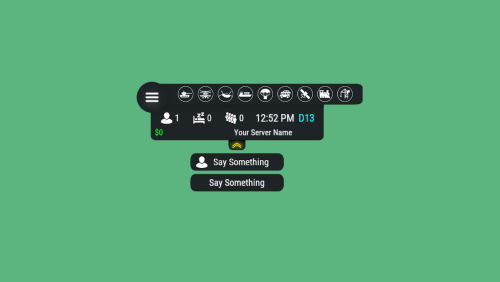
{ "Hook OnEventStart": [ "OnCaravanStart" ], "Hook OnEventStop": [ "OnCaravanStop" ], "Name": "Caravan", "Active color": "#10ff10", "Icon": "https://i.ibb.co/h1BMDdN1/caravann.png", "Color": "#fff", "Enable": true }, My settings for the Caravan event are as shown above, but the indicator on the HUD doesn’t turn green. Does anyone know why? All settings are enabled. For example, Convoy and ATrain display correctly.
-
.thumb.gif.3e14f6333e57dec79bba3889fa74084c.gif) Good job @fermens One of the rare plugins that truly deserves 5 stars. The Discord alert feature is especially impressive. However, I have a suggestion for the developer. In the alerts, only the raider’s Steam name is shown. It would be great if the raider’s Steam64ID could also be displayed in parentheses next to their name. Some malicious players might imitate admin Steam names, making it look like an admin raided someone, which could cause confusion. Adding the Steam64ID would help prevent such situations. In Rust+, the raider’s name is sometimes not fully visible, and there is no detailed info when you tap the notification, but that might be a limitation of the app itself. It also works great on Carbon servers. I tried configuring Telegram but couldn’t get it to work. If possible, WhatsApp notifications would be a great alternative, though I’m not sure if Meta’s system supports that. Still, thank you for this excellent plugin. I think it’s very well made.
Good job @fermens One of the rare plugins that truly deserves 5 stars. The Discord alert feature is especially impressive. However, I have a suggestion for the developer. In the alerts, only the raider’s Steam name is shown. It would be great if the raider’s Steam64ID could also be displayed in parentheses next to their name. Some malicious players might imitate admin Steam names, making it look like an admin raided someone, which could cause confusion. Adding the Steam64ID would help prevent such situations. In Rust+, the raider’s name is sometimes not fully visible, and there is no detailed info when you tap the notification, but that might be a limitation of the app itself. It also works great on Carbon servers. I tried configuring Telegram but couldn’t get it to work. If possible, WhatsApp notifications would be a great alternative, though I’m not sure if Meta’s system supports that. Still, thank you for this excellent plugin. I think it’s very well made. -
@tofurahie
-
Hello, there’s a critical issue in your latest 1.6.0 update that prevents Carbon servers from starting after a wipe. The servers failed to launch. When I reverted Gather Loot Multiplier to version 1.5.5, everything worked fine. I’d appreciate it if you could take a look at this. NullReferenceException: Object reference not set to an instance of an object at Oxide.Plugins.GatherLootMultiplier.ModifySpawnedEntity (BaseEntity entity) at (wrapper dynamic-method) MonoMod.Utils.DynamicMethodDefinition.SpawnGroup.Spawn_Patch0 (SpawnGroup,int) at SpawnGroup.Spawn () at SpawnGroup.SpawnInitial () at SpawnHandler.InitialSpawn () at ServerMgr.Initialize (System.Boolean loadSave, System.String saveFile, System.Boolean allowOutOfDateSaves, System.Boolean skipInitialSpawn) at Bootstrap+<StartServer>d__22.MoveNext () at UnityEngine.SetupCoroutine.InvokeMoveNext (System.Collections.IEnumerator enumerator, System.IntPtr returnValueAddress) (Filename: /home/.../carbon/plugins/GatherLootMultiplier.cs Line: 99)
-
Changed Status from Pending to Closed Changed Fixed In to 3.0.1
-
 Hi, Is this plugin still up to date and working? Last updated on July 16, 2023.
 -
I’m glad the issue was resolved! To help us serve great server owners like you even better, you can leave a short review using the link below if you’d like. https://codefling.com/bases/raidable-bases-pack-loot-tables-easy-to-nightmare-110-bases?tab=reviews Have a great day and good luck!
-
Hi, if you’re editing your configs using Notepad, it can be quite time-consuming. If that’s the case, the editor below will help you a lot: https://codefling.com/tools/raidable-bases-loot-table-editor You can load a default loot table there, check the stack values, and then compare them with the ones in our config to adjust them accordingly.
-
 Hi, @Adem I saw a crate spawning about 100–150 meters above the Stone Quarry. It looks like a very small bug, but it might be useful for you in future updates.
 -
.thumb.gif.473157f6844989d096c05bd9f3c4501b.gif) Hello is your map compatible with Dynamic Monuments, Caravan and Raidable Bases?
Hello is your map compatible with Dynamic Monuments, Caravan and Raidable Bases? -
Hello, I’ve been using the Solo Enforcement plugin for months, but players quickly learn how its detection system works and usually find ways to bypass it within a day or two. As a result, solo limit violations have increased, and we’ve received many complaints from players who are negatively affected by this. Even with the automatic ban feature enabled, I believe the current control mechanism is not always sufficient. Would you consider adding additional detectors such as shared vehicle usage, proximity checks, PvP interaction logs, or joint raid detection? I believe these improvements could make Solo Enforcement much more effective at identifying solo limit violations. Of course, it is completely up to you, this is just a suggestion. Thank you.
-
Changed Status from Pending to Not a Bug Changed Fixed In to 4.0.4
-
You can make edits here. https://editor.looty.cc/betterloot-v4
-
Changed Status from Work in Progress to Fixed
-
I’ve reviewed these BP fragments, and I’ll try to add them during the day.
-
Changed Status from Pending to Work in Progress Changed Fixed In to Next Version
-
I’ll take a look at this when I’m available.
-
 /home/rustserver/serverfiles/carbon/configs Open the RaidableBases.json file with Notepad. Press CTRL+F and search for "steam," then add your own steam64id as shown below. "Chat Steam64ID": 76561142564392767,
.thumb.png.fd415e6a279abcb86097c1d6ea9f77b2.png)