.png.a9f77afb0653176492a7ec78168c7ae0.png)
-
Posts
739 -
Joined
-
Days Won
3
Content Type
Profiles
Warranty Claims
Downloads
Forums
Store
Services
Downloads Plus Support
DOWNLOADS EXTRA
Reels
Everything posted by fullwiped
-
Changed Status from Pending to Closed
-
Changed Status from Pending to Closed
-
Changed Status from Fixed to Closed
-
Changed Status from Pending to Closed
-
Changed Status from Pending to Closed
-
Changed Status from Pending to Closed
-
I tested the new version in the same locations, and the Recycler spawned successfully. Thank you for the update!
-
Hi again, I tested a few more locations on the map. In addition to the small lake I tested earlier, the same issues also occur at the large lake, in the swamps, and at Abandoned Cabins. I've recorded videos of these locations as well. I hope they help you identify and resolve the issue. https://www.youtube.com/watch?v=oFwi8DppVhA https://www.youtube.com/watch?v=dft9vq-QheM https://www.youtube.com/watch?v=kRbtpdDKeQ8 Best regards.
-
Hello Mevent, the Recycler placement issue you fixed a few updates ago has returned. I'm sending you a video showing the issue around a lake. The recycler cannot be placed and is returned to the player's inventory. https://www.youtube.com/watch?v=b7gr7Pqz7Og Version: 2.3.4
-
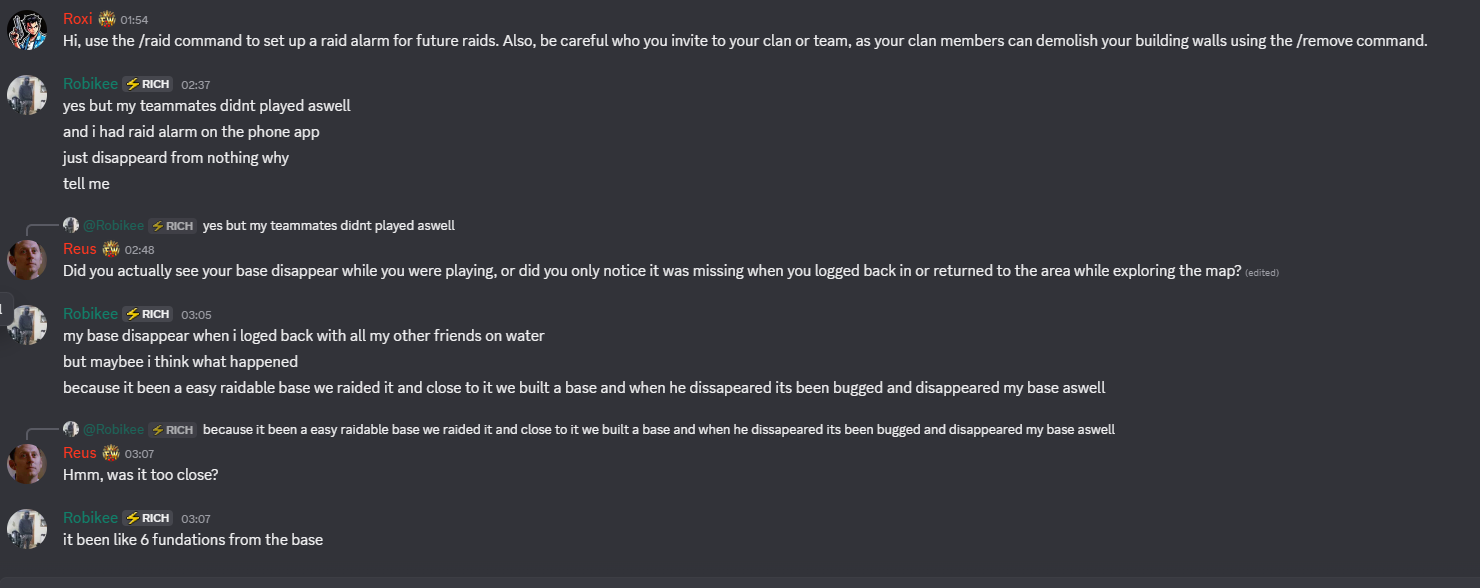
Hi Nivex, I hope you're doing well! I have a quick question about something one of my players reported, and I was hoping to get your thoughts on it. I've attached a screenshot showing the issue. The player claims that they built a base near a Raidable Base after raiding it, but later found that their base had disappeared. I was wondering if something like this could technically happen. About a year ago, I remember encountering a similar situation while using the remove + all command with the Remove plugin to remove a raid base. At the time, a nearby player base was also removed, although I'm not sure exactly what caused it. As far as I understand, the raided base should disappear after approximately one hour, based on my current configuration. Could this somehow cause a nearby player-built base to be removed as well, or is there a setting that could help prevent this? Thanks for your time, I really appreciate your help!

-
Changed Status from Pending to Fixed Changed Fixed In to 3.3.4
-
The new version includes 2 items with a 100% drop rate added to Supply. You can update and use it. Have a great day!
-
 Could you update it when you have a chance? Thank you. @Whispers88
 -
 A plugin we really enjoy using. Its developer is a talented guy who works incredibly hard, day and night. We really appreciate it. Thank you!
 -
I tested the new version, and it seems to be fixed now. Thank you for fixing this issue. Keep up the good work!
-
Hello, one of our players reported an issue where a Recycler is not spawning properly. This does not seem to be a common issue, as other Recyclers on the same server are spawning successfully at different locations. We have encountered a similar issue in previous months where a river near the base seemed to cause the problem. Perhaps this could be a similar situation here as well. When you have some time, we would appreciate it if you could take a look at this. My Movie(1).mp4
-
 Hello, yes. A few days ago, we added Heavy Fuses to the loot tables and made some improvements to their drop rates to make them a little easier to obtain. If you have significantly edited the config for your own setup, you may need to configure the Heavy Fuse drop settings yourself. If you use the latest update, your custom edits will be overwritten, so please make a backup of your current files first and test the update. If you don't want to replace your own Data file, set "Auto-update loot tables with new items": true in the config and restart the plugin so that Heavy Fuses can be added to the loot tables. After that, open your own loot table with the AlphaLoot Editor and adjust the Heavy Fuse drop rates according to your needs.
 -
Changed Status from Work in Progress to Fixed
-
Changed Status from Work in Progress to Fixed
-
We have added support for the Heavy Fuse item. You can download the latest update. Have a great day, and we wish you success with your project!
-
We have added support for the Heavy Fuse item. You can download the latest update. Have a great day, and we wish you success with your project!
.thumb.png.fd415e6a279abcb86097c1d6ea9f77b2.png)