Jump to content

fullwiped

Creator
  • Posts

    517
  • Joined

  • Days Won

    2

Everything posted by fullwiped

  1. fullwiped

    Admin Warn

    Version 1.0.3

    11 downloads

    Stop guessing whether your warning messages in chat were actually noticed. Tired of sending important warnings as an admin via RCON or global chat and never being sure who actually read them? AdminWarn is built to give admins certainty. AdminWarn is designed for manual warning delivery. This is not an automated warning system. Every warning is intentionally sent by an admin using commands. At the same time, AdminWarn handles warnings smartly and automatically in the background. Warnings sent to offline players are stored and shown automatically when the player next joins, even days later. For individual online players, warnings remain stored until acknowledged, then are automatically cleared. All data is wipe-aware and cleaned up automatically on server wipes. Instead of relying on admin-sent chat warnings that can get lost, ignored, or missed while players are AFK, AdminWarn delivers a mandatory, player-specific GUI warning directly on the player’s screen. Each warning includes a configurable sound effect, using only built-in, local in-game sounds. No external or custom audio files are used. This is not an auto chat message. It is a visual warning that requires player acknowledgment. Even if the player closes the game without confirming it, the warning will reappear on the next login until acknowledged. No hard movement lock is applied. Warnings can be sent via RCON, server console, or in-game admin console (F1). In-game commands /warn and /warnall are used to manually send warnings. /warn can target individual players whether they are online or offline, while /warnall applies only to online players. Discord webhook logs clearly confirm when warnings are acknowledged. Global warnings apply only to online players and do not generate Discord logs, preventing spam and rate-limit issues. How It Works 1) Admin sends warning (chat/RCON) → Message is delivered via GUI with sound 2) Player must acknowledge → Cannot play until clicking button (No movement lock, only a visual GUI barrier) 3) Offline player support → Warnings sent to offline players are saved and displayed via GUI when they join 4) Data management → Auto-clears on wipe Key Features - GUI warning that requires player confirmation - Works online/offline - Warnings save for offline players - Global warnings - Warn all online players at once - Discord logging - Track acknowledged warnings - Wipe detection - Auto-clear data on server wipe - Professional interface - Clean GUI with sound effects - UTC-based date display - All timestamps are shown in UTC (Coordinated Universal Time) Wipe Behavior - Restarts: Data preserved (approved warnings are auto-deleted for data optimization) - Server wipe: All warning data automatically cleared - No manual cleanup needed (Most of the time, it is not necessary) Commands ➤ Admin Chat Commands: /warn <player>|<steam64ID> <message> /warnall <message> ➤ Console/RCON Commands: warn <player>|<steam64ID> <message> warnall <message> Note: Player names are not unique and may include different alphabets or special characters. To avoid ambiguity, using Steam64ID is strongly recommended when sending warnings. Permissions Oxide/Carbon oxide.grant group admin adminwarn.admin c.grant group admin adminwarn.admin Discord Webhook Logging When enabled, sends acknowledgement logs to Discord: Player name Warning message Read status (online/after reconnect) Timestamp Does NOT log warning sending (only acknowledgements) Does NOT log global warning acknowledgements (due to DC rate limits) Configuration { "Clear data on wipe": true, "Discord Log Enabled": false, "Discord Webhook URL": "", "Show Date in GUI": true, "Warning sound": "assets/prefabs/building/wall.frame.shopfront/effects/metal_transaction_complete.prefab" } Lang/en { "NoPermission": "You don't have permission to use this command.", "WarnUsage": "Usage: /warn <player name or steamid> <message>", "PlayerNotFound": "Player not found. Use SteamID for offline players.", "DuplicateWarning": "Duplicate warning prevented for player {0}", "WarningSent": "Warning sent to {0}: {1}", "WarningSaved": "Warning saved for offline player {0}.", "WarnAllUsage": "Usage: /warnall <message>", "WarnAllSent": "Global warning sent to {0} online players: {1}", "ConsoleWarnUsage": "Usage: warn <player name or steamid> <message>", "ConsoleWarnAllUsage": "Usage: warnall <message>", "AcknowledgeThanks": "Thank you for acknowledging the warning.", "GuiTitle": "SERVER WARNING", "GuiButtonText": "✔ I ACKNOWLEDGE", "GuiDatePrefix": "Date", "GuiWarningFormat": "Hello {0}, you have received a warning." }
    $18.99
  2. I will try this, thank you!
  3. Hello @Mr01sam I’d like to share a constructive suggestion regarding the raid protection system. In practice, this system is frequently abused for griefing. We have observed players deliberately placing structures and turrets directly in front of other players’ bases to block or harass them under protection. To mitigate this, we have already disabled traps in the configuration. However, this alone has not fully resolved player dissatisfaction. From our experience, the plugin would greatly benefit from a limitation mechanism. Specifically, introducing a configurable TC limit per player or clan would significantly reduce abuse while still preserving the core purpose of offline protection. For example: "Max protected cupboards per player/clan": "1", "Max protected Tugboats per player/clan": "2" This feature would encourage players to prioritize protecting their main base while preventing them from placing protected cupboards in front of other players’ bases to block or disrupt gameplay. There may also be alternative approaches on your side that could help address this issue; I hope you will consider evaluating possible solutions. A feature like this would add meaningful control for server owners and help prevent systematic griefing without weakening legitimate base protection. Best regards
  4. Hello, One of our players reported the following behavior with the /pump craft pump. After the player disconnects, sprinklers visually continue spraying water, but planters stop receiving water. The system only starts working again after unplugging and reconnecting the pump power. This seems to repeat over time and requires manual resets. When you have time, could you please take a look at this? Thank you for your work and support.
  5. fullwiped

    Multiple currency display

    Hi, Is it possible to display multiple economy balances (e.g. Economics and ServerRewards) in the HUD at the same time? If not currently supported, would this be something you could consider adding for servers using more than one currency? Thanks. "Economy plugin [Economics | ServerRewards]": { "Currency": "RP", "Value color": "#fff", "Enable": true, "Which plugin use [ServerRewards | Economics]": "Economics" }, "Economy plugin [Economics | ServerRewards]": { "Currency": "COIN", "Value color": "#fff", "Enable": true, "Which plugin use [ServerRewards | Economics]": "ServerRewards" },
  6. Hi, after testing we noticed that when the /sw Research/Repair menu is closed, the item is dropped on the ground as a loot bag instead of being returned to the player’s inventory. Because there is no warning or feedback, players often think the item is lost. This is especially common in cluttered bases or uneven terrain where the loot bag is easy to miss, and players end up opening tickets to us. During testing, I personally thought the item was lost at first as well. Adding a clear notification or returning the item to the inventory would improve the experience. Also, the workbench images in the /sw menu are not loading and could use a refresh.
  7. Hello, additionally, when claiming a kit, the process can fail if the kit includes a headgear item or if there is no free inventory space. This seems to be related to the /headlight feature being active, which causes the head slot to be treated as occupied. This information might be helpful for improving the headlight feature in a future update.
  8. fullwiped

    Notify

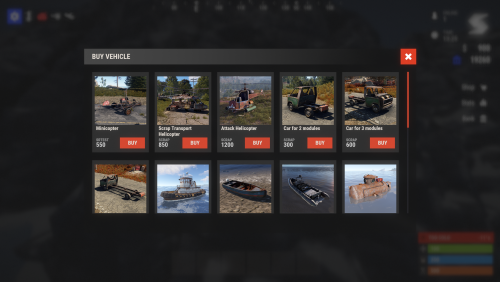
    Additionally, I can’t find such a setting in the server panel either. Could you please help me with this? { "ID": 775577453, "Enabled": true, "Permission": "", "Visible": true, "Title": "VEHICLES", "Icon": "", "Chat Button": false, "Show Pages?": false, "Commands": [ "vabuy", "vehicle", "vb", "vehiclebuy" ], "Pages": [ { "Title": "", "Icon": null, "Commands": [ "test_command_123" ], "Type (Plugin/UI)": "Plugin", "Plugin Name": "VehicleBuy", "Plugin Hook": "API_OpenPlugin", "UI Elements": [ { "Enabled?": true, "Visible": true, "Name": "Panel_93d0ec7692", "Type (Label/Panel/Button/Image)": "Panel", "Color": { "HEX": "#FFFFFF", "Opacity (0 - 100)": 100.0 }, "Text": [], "Font Size": 14, "Font": 0, "Align": "UpperLeft", "Text Color": { "HEX": "#FFFFFF", "Opacity (0 - 100)": 100.0 }, "Command ({user} - user steamid)": "", "Image": "", "Cursor Enabled": false, "Keyboard Enabled": false, "Sprite": "", "Material": "", "AnchorMin (X)": 0.5, "AnchorMin (Y)": 0.5, "AnchorMax (X)": 0.5, "AnchorMax (Y)": 0.5, "OffsetMin (X)": -50.0, "OffsetMin (Y)": -50.0, "OffsetMax (X)": 50.0, "OffsetMax (Y)": 50.0 } ], "Localizations": {} } ], "Localizations": {} },
  9. fullwiped

    Notify

    The sample configuration for VehicleBuy looks like this. Is there any setting here that would handle this? I set Cooldown to buy to 1800; this correctly applies a cooldown to vehicle purchases, but it does not prevent notification spam when the BUY button is repeatedly pressed. "motorbike_sidecar": { "Sound on purchase": true, "Order": 16, "Show": true, "Name": "motorbike_sidecar", "Prefab": "assets/content/vehicles/bikes/motorbike_sidecar.prefab", "Image link": "http://IP/vehicle/motobikeduo.png", "Spawn distance": 5.0, "Fuel": 25, "Currency: 0 - item, 1 - Economics, 2 - Server Rewards": 0, "If vehicle selling for item type him shortname": "scrap", "Price": 550, "Skin": 3281192470, "Command": "", "DeployableItemId": 833533164, "Need add engine parts if it possible?": false, "Engine parts": null, "Cooldown to buy (in seconds)": 1800, "Pickup type (0 - command, 1 - hammer)": 0, "Can pickup?": false, "Can recall?": false, "Recall price": 0, "Recall cost need?": false, "Pickup price": 0, "Enable decay?": true, "Permission (still empty if not need) ex. vehiclebuy.YOURPERMISSIONNAME": null, "Maximum number of purchases of one vehicle by one player": 0 },
  10. fullwiped

    Notify

    Is it not possible to set a limit on mouse clicks? For spam-testing purposes, I click 30 times. Even with the settings below, because I clicked 30 times, the same notification stays on screen for 30 × 4 seconds, meaning a total of 120 seconds, and 3 notifications remain visible the whole time. "Notify Cooldown": 4.0, "Max Notifications On Screen": 3
  11. fullwiped

    Headlight

    I’ve created a ticket. Thank you!
  12. Hello, sometimes the UI warning appears to become permanent and does not disappear after a certain period of time. This issue occurred when I initially joined the server.
  13. fullwiped

    Headlight

    Hello, sometimes the UI warning appears to become permanent and does not disappear after a certain period of time. This issue occurred when I initially joined the server.
    Automated Messages is an almost flawless plugin that runs smoothly without putting any load on the server. I have been using it for nearly a year and absolutely love it. I originally purchased it from Lone but out of respect for this developer I also bought it here to review it again because the plugin is extremely functional. For example, when a player buys a package from Tebex you can add messages such as “Your package has been activated” and you can choose which Oxide or Carbon groups can see or be excluded from these messages. Timer chats also work perfectly. There is only one small suggestion that would make the plugin absolutely perfect if added in the future. The Economics plugin uses the command format *deposit <player name or id | > <amount> when RP is added to a player. If Automated Messages could optionally detect this command as a trigger it would allow us to show a message such as “1000 RP has been added to your balance” when a player purchases RP from Tebex. It is a minor feature but would be incredibly useful for improving clarity and the overall player experience. Thank you again for this excellent plugin and your valuable work @beee
  14. After the latest Rust update, I updated the servers and the raid protection system appears to be working for now.
  15. What was the issue? It’s still not working for me, but maybe the information will help
  16. Has anyone been able to solve the offline protection issue?
  17. I even removed almost all plugins to avoid any possible conflicts, but that did not help either. Maybe this extra information will be useful for you. (22:34:30) | [RaidProtection] Saved 1/1 protected entities (22:34:30) | Unloaded plugin RaidProtection v3.4.18 by mr01sam (22:34:31) | Loaded plugin RaidProtection v3.4.18 by mr01sam [686ms] (22:34:31) | [RaidProtection] Registered permission raidprotection.level.1 (22:34:31) | [RaidProtection] Loaded 12/12 protected entities (22:34:45) | Reus disconnecting: disconnect Logs: [2025-12-09 02:51:19] 12/09/2025 02:51:19 883697 Loaded existing tool cupboard [2025-12-09 02:51:19] 12/09/2025 02:51:19 883697 Starting protection in 0s (Skipped) [2025-12-09 02:51:19] 12/09/2025 02:51:19 883697 Protection status updated from Unprotected to Protected [2025-12-09 02:51:19] 12/09/2025 02:51:19 883697 Starting collection loop balance is 2401.875 cost per interval is 0.5277778 [2025-12-09 02:51:19] 12/09/2025 02:51:19 883697 Initial status is Protected with reason NoReason and balance 2401.875 [2025-12-09 02:51:44] 12/09/2025 02:51:44 883697 Loaded existing tool cupboard [2025-12-09 02:51:44] 12/09/2025 02:51:44 883697 Starting protection in 0s (Skipped) [2025-12-09 02:51:44] 12/09/2025 02:51:44 883697 Protection status updated from Unprotected to Protected [2025-12-09 02:51:44] 12/09/2025 02:51:44 883697 Starting collection loop balance is 2399.236 cost per interval is 0.5277778 [2025-12-09 02:51:44] 12/09/2025 02:51:44 883697 Initial status is Protected with reason NoReason and balance 2399.236 [2025-12-09 02:52:10] 12/09/2025 02:52:10 883697 Stopping protection [2025-12-09 02:52:10] 12/09/2025 02:52:10 883697 Stopped collection loop that ran 5 times the balance is 2396.596 [2025-12-09 02:52:10] 12/09/2025 02:52:10 883697 Protection status updated from Protected to Unprotected [2025-12-09 02:52:10] 12/09/2025 02:52:10 883697 Destroyed by TESTPLAYER. Awarded 2396.596 [2025-12-09 02:52:10] 12/09/2025 02:52:10 883697 Stopping protection [2025-12-09 02:52:10] 12/09/2025 02:52:10 883697 Stopped collection loop that ran 0 times the balance is 2396.596 [2025-12-09 02:52:10] 12/09/2025 02:52:10 883697 Protection status updated from Unprotected to Unprotected
  18. same
  19. Hello, For the past few weeks players reported that their bases were raided. I tested it online and offline and even fully reset all config and data files but protection still does not activate. It should trigger after 60 seconds but it does not. It looks like this issue happens only in Carbon mode but I am not completely sure. Today I tested your plugin and several free offline protection plugins and none of them worked in Carbon. A few months ago everything was working fine. Any advice would help. "Protection Settings": { "Protected entities": { "Buildings": true, "Deployables": true, "Traps": true, "Loot Nodes": false, "Authed Players": false, "Unauthed Players": false, "NPCs": false, "Animals": true, "Vehicles": true, "Horses": true, "Electrical": true }, "Protected from": { "Authorized Players": false, "Unauthorized Players": true, "Attack Heli": true, "NPCs": true }, "Protection levels": [ { "Rank": 1, "Online protection percentage (0-100)": 0.0, "Offline protection percentage (0-100)": 100.0, "Hourly cost per authorized player": 240.0, "Hourly cost per floor": 0.0, "Hourly base cost": 140.0, "Cost per damage protected": 0.0, "Max protection time (hours)": 24, "Delay for offline protection (seconds)": 60, "Delay after taking damage (seconds)": 120, "Damage resets timer when owner is offline": true, "Allow tugboat protection": true, "Allow barge protection (requires Barges plugin)": false, "Founder Limit": null } ],
  20. fullwiped

    maximum protection time

    Hello, even though the settings are as below meaning the max protection time is 24 hours, some of my players said that some bases are never going offline, and are continuously protected because of the auto-loot transfer method shown in the screenshot. Is this a bug? If it’s not a bug, how can I fix it? "Protection levels": [ { "Rank": 1, "Online protection percentage (0-100)": 0.0, "Offline protection percentage (0-100)": 100.0, "Hourly cost per authorized player": 340.0, "Hourly cost per floor": 0.0, "Hourly base cost": 230.0, "Cost per damage protected": 0.0, "Max protection time (hours)": 24, "Delay for offline protection (seconds)": 240, "Delay after taking damage (seconds)": 120, "Damage resets timer when owner is offline": true, "Allow tugboat protection": true, "Allow barge protection (requires Barges plugin)": false, "Founder Limit": null } ],
  21. fullwiped

    Server Hud

    I agree with this recommendation, there absolutely needs to be local image support. Because of the images hosted on IBB, the panel becomes unusable in regions like Singapore and Australia. For this reason, I had to upload all the images to each local machine one by one and distribute them via links like http://IP/img/image.png
  22. fullwiped

    Server Hud

    in game time
  23. fullwiped

    unlimited loot bug.

    Hello, in version 2.8.5, the convoy got stuck near the Water Treatment Plant as shown on the screen. My players reported that the vehicles and NPCs in the convoy kept disappearing and respawning within seconds. The NPCs weren’t shooting, and the crates could be looted infinitely. I just wanted to report this issue.
2.1m

Downloads

Total number of downloads.

9.9k

Customers

Total customers served.

144.7k

Files Sold

Total number of files sold.

3.1m

Payments Processed

Total payments processed.

×
×
  • Create New...

Important Information

We have placed cookies on your device to help make this website better. You can adjust your cookie settings, otherwise we'll assume you're okay to continue.