


-
Posts
557 -
Joined
-
Last visited
-
Days Won
21
Content Type
Profiles
Warranty Claims
Downloads
Forums
Store
Services
Downloads Plus Support
DOWNLOADS EXTRA
Reels
Everything posted by DeutscherRitterPlatz
-
Version 1.0.0
171 downloads
This is an extension of the Magic Panel plugin that shows an icon for the Helipad Event plugin. The icon's color and position can be set individually in the configuration file. Please note: The Magic Heli Event Panel only works in conjunction with the "MagicPanel" and "LaunchSiteHelipadEvent" plugins. Make sure you have installed these plugins before using the Event Panel. The plugin also automatically checks if any of the required plugins are missing. If this is the case, the "LaunchSiteHelipadEvent" plugin will be automatically unloaded. #Configuration The settings and options can be configured in the MagicLaunchSiteHelipadEventPanel file under the config directory. The use of an editor and validator is recommended to avoid formatting issues and syntax errors. { "Active Color": "#00FF00FF", "Inactive Color": "#FFFFFF1A", "Panel Settings": { "Dock": "center", "Width": 0.02, "Order": 1, "BackgroundColor": "#FFF2DF08" }, "Panel Layout": { "Image": { "Url": "https://www.dropbox.com/scl/fi/3rjja8h81fp51o87okz31/helipadicon.png?rlkey=yr768krapvk9wx5867ogt56oe&dl=1", "Enabled": true, "Color": "#FFFFFFFF", "Order": 0, "Width": 1.0, "Padding": { "Left": 0.1, "Right": 0.1, "Top": 0.05, "Bottom": 0.05 } } } } #Credits Thanks to MJSU for the Magic Panel plugin. We reworked one of the plugin extensions so that MagicPanel now also supports the Helipad Event plugin. #Trailer If you're not satisfied with the icon, take a look here – you might find something more suitable.Free -
Version 1.0.0
202 downloads
This is an extension of the Magic Panel plugin that shows an icon for the Caravan Event plugin. The icon's color and position can be set individually in the configuration file. Please note: The MagicFerryTerminalEventPanel only works in conjunction with the "MagicPanel" and "Caravan Event" plugins. Make sure you have installed these plugins before using the Event Panel. The plugin also automatically checks if any of the required plugins are missing. If this is the case, the "Caravan" plugin will be automatically unloaded. #Configuration The settings and options can be configured in the MagicCaravanEventPanel file under the config directory. The use of an editor and validator is recommended to avoid formatting issues and syntax errors. { "Active Color": "#00FF00FF", "Inactive Color": "#FFFFFF1A", "Panel Settings": { "Dock": "center", "Width": 0.02, "Order": 1, "BackgroundColor": "#FFF2DF08" }, "Panel Layout": { "Image": { "Url": "https://www.dropbox.com/scl/fi/y56ohwzs3uzr1gc3bz6ie/MagicCaravanEventPanel_icon.png?rlkey=w2hsf96c9euzg6eewmdzgcxrd&dl=1", "Enabled": true, "Color": "#FFFFFFFF", "Order": 0, "Width": 1.0, "Padding": { "Left": 0.1, "Right": 0.1, "Top": 0.05, "Bottom": 0.05 } } } } #Credits Thanks to MJSU for the Magic Panel plugin. We reworked one of the plugin extensions so that MagicPanel now also supports the Caravan Event plugin. #Caravan Event Trailer If you're not satisfied with the icon, take a look here – you might find something more suitable.Free -
An interesting tool! It’s a great free alternative to the paid tools. I’ll see if I can create something nice with it. Thank you for making it available for free! P.S.: I think it deserves more attention because it looks very straightforward! ^^
-
Let’s put it this way: Nowadays, there are many tools that would support something like this. Sure, the developer could support all languages, but it might be more sensible to address the French administrators instead, since there is a demand there. Most plugins are written in English or Russian, and I haven’t seen any plugins written in French so far. Therefore, if the project costs money, I would close it. Maybe you could upload it directly here on Codefling and simply expand the ZIP file each time you translate a file. I think the ZIP can be uploaded here: Codefling Customizations. https://codefling.com/customizations Many people also don’t check the forum, which is why your post or offer may have gone unnoticed. So, you might want to post it again on Discord, where developers communicate more frequently.
- 3 replies
-
- 1
-

-
- #rust
- #translation
- (and 1 more)
-
It sounds like this server uses several different plugins to enable the described features. There are already many plugins that support such functionality. For example, the Command Items plugin allows you to assign commands to custom items. With the Custom Icon Creator tool, you can also create custom icons for these items. The Extra Loot plugin can be used to put the custom items into circulation. If a feature should only be available for a limited time, the IQPermissions plugin would definitely be interesting for that. You just need to familiarize yourself with these tools a bit. This has nothing to do with official Rust – the server is most likely fully modded. Here are the plugins: https://umod.org/plugins/extra-loot
-
Version 1.0.0
193 downloads
This is an extension of the Magic Panel plugin that shows an icon for the Ferry Terminal Event plugin. The icon's color and position can be set individually in the configuration file. Please note: The MagicFerryTerminalEventPanel only works in conjunction with the "MagicPanel" and "Ferry Terminal Event" plugins. Make sure you have installed these plugins before using the Event Panel. The plugin also automatically checks if any of the required plugins are missing. If this is the case, the "Ferry Terminal Event" plugin will be automatically unloaded. #Configuration The settings and options can be configured in the MagicFerryTerminalEventPanel file under the config directory. The use of an editor and validator is recommended to avoid formatting issues and syntax errors. { "Active Color": "#00FF00FF", "Inactive Color": "#FFFFFF1A", "Panel Settings": { "Dock": "center", "Width": 0.02, "Order": 1, "BackgroundColor": "#FFF2DF08" }, "Panel Layout": { "Image": { "Url": "https://www.dropbox.com/scl/fi/m5revdcp6j6e1qpra6b8e/MagicFerryTerminalEventPanel_icon.png?rlkey=g0w6wbqqbfvixce3kbz1tdfim&dl=1", "Enabled": true, "Color": "#FFFFFFFF", "Order": 0, "Width": 1.0, "Padding": { "Left": 0.1, "Right": 0.1, "Top": 0.05, "Bottom": 0.05 } } } } #Credits Thanks to MJSU for the Magic Panel plugin. We reworked one of the plugin extensions so that MagicPanel now also supports the Ferry Terminal Event plugin. #Ferry Terminal Event Trailer If you're not satisfied with the icon, take a look here – you might find something more suitable.Free -
Version 1.0.0
188 downloads
This is an extension of the Magic Panel plugin that shows an icon for the Flying Cargo Ship Event plugin. The icon's color and position can be set individually in the configuration file. Please note: The MagicFlyingCargoShipEventPanel only works in conjunction with the "MagicPanel" and "Flying Cargo Ship Event" plugins. Make sure you have installed these plugins before using the Event Panel. The plugin also automatically checks if any of the required plugins are missing. If this is the case, the "Flying Cargo Ship Event" plugin will be automatically unloaded. #Configuration The settings and options can be configured in the MagicFlyingCargoShipEventPanel file under the config directory. The use of an editor and validator is recommended to avoid formatting issues and syntax errors. { "Active Color": "#00FF00FF", "Inactive Color": "#FFFFFF1A", "Panel Settings": { "Dock": "center", "Width": 0.02, "Order": 1, "BackgroundColor": "#FFF2DF08" }, "Panel Layout": { "Image": { "Url": "https://www.dropbox.com/scl/fi/xlowal6iqvc9hl5831xco/MagicFlyingCargoShipEventPanel_Icon.png?rlkey=jc90tpxj29gdqvpg8or0s3wlb&dl=1", "Enabled": true, "Color": "#FFFFFFFF", "Order": 0, "Width": 1.0, "Padding": { "Left": 0.1, "Right": 0.1, "Top": 0.05, "Bottom": 0.05 } } } } #Credits Thanks to MJSU for the Magic Panel plugin. We reworked one of the plugin extensions so that MagicPanel now also supports the Flying Cargo Ship Event plugin. Buy Flying Cargo Ship Event by The_Kiiiing If you're not satisfied with the icon, take a look here – you might find something more suitable.Free -
Version 1.0.0
189 downloads
This is an extension of the Magic Panel plugin that shows an icon for the Radtown Event plugin. The icon's color and position can be set individually in the configuration file. Please note: The Magic Radtown Event Panel only works in conjunction with the "MagicPanel" and "RadtownEvent" plugins. Make sure you have installed these plugins before using the Event Panel. The plugin also automatically checks if any of the required plugins are missing. If this is the case, the "Radtown Event" plugin will be automatically unloaded. #Configuration The settings and options can be configured in the MagicRadtownEventPanel file under the config directory. The use of an editor and validator is recommended to avoid formatting issues and syntax errors. { "Active Color": "#00FF00FF", "Inactive Color": "#FFFFFF1A", "Panel Settings": { "Dock": "center", "Width": 0.02, "Order": 1, "BackgroundColor": "#FFF2DF08" }, "Panel Layout": { "Image": { "Url": "https://www.dropbox.com/scl/fi/va9fzk613ftwo6su1mfm4/RadtownEventMagicPanelIcon.png?rlkey=279j6cwx3v2lopirhgwfu55qq&dl=1", "Enabled": true, "Color": "#FFFFFFFF", "Order": 0, "Width": 1.0, "Padding": { "Left": 0.1, "Right": 0.1, "Top": 0.05, "Bottom": 0.05 } } } } #Credits Thanks to MJSU for the Magic Panel plugin. We reworked one of the plugin extensions so that MagicPanel now also supports the Radtown Event plugin. Strahlung Icons erstellt von keueo - Flaticon Buy Radtown Event by The_Kiiiing If you're not satisfied with the icon, take a look here – you might find something more suitable.Free -

Broken after the update + SERIOUS BUG!
DeutscherRitterPlatz replied to Namsaknoi's Support Report in Support
@Gold Mysterious For anyone experiencing issues with the plugin, user @FouDuGame360 has posted a more effective solution for both problems! Error: Error while compiling CustomPortals: 'PlayerInventory' does not contain a definition for 'AllItemsNoAlloc' and no accessible extension method 'AllItemsNoAlloc' accepting a first argument of type 'PlayerInventory' could be found (are you missing a using directive or an assembly reference?) | Line: 461, Pos: 50 Fix: line 482: player.inventory.AllItemsNoAlloc(ref playerItems); => player.inventory.GetAllItems(playerItems); Error: Players seem to get stuck in the floor. Fix: line 76: static Vector3 PORTAL_PLACEMENT_OFFSET = new Vector3(0, 0.35f, 0); => static Vector3 PORTAL_PLACEMENT_OFFSET = new Vector3(0, 0.10f, 0); -
For anyone experiencing issues with the plugin, user @FouDuGame360 has posted a more effective solution for both problems! Error: Error while compiling CustomPortals: 'PlayerInventory' does not contain a definition for 'AllItemsNoAlloc' and no accessible extension method 'AllItemsNoAlloc' accepting a first argument of type 'PlayerInventory' could be found (are you missing a using directive or an assembly reference?) | Line: 461, Pos: 50 Fix: line 482: player.inventory.AllItemsNoAlloc(ref playerItems); => player.inventory.GetAllItems(playerItems); Error: Players seem to get stuck in the floor. Fix: line 76: static Vector3 PORTAL_PLACEMENT_OFFSET = new Vector3(0, 0.35f, 0); => static Vector3 PORTAL_PLACEMENT_OFFSET = new Vector3(0, 0.10f, 0);
-
 For anyone experiencing issues with the plugin, user @FouDuGame360 has posted a more effective solution for both problems! Error: Error while compiling CustomPortals: 'PlayerInventory' does not contain a definition for 'AllItemsNoAlloc' and no accessible extension method 'AllItemsNoAlloc' accepting a first argument of type 'PlayerInventory' could be found (are you missing a using directive or an assembly reference?) | Line: 461, Pos: 50 Fix: line 482: player.inventory.AllItemsNoAlloc(ref playerItems); => player.inventory.GetAllItems(playerItems); Error: Players seem to get stuck in the floor. Fix: line 76: static Vector3 PORTAL_PLACEMENT_OFFSET = new Vector3(0, 0.35f, 0); => static Vector3 PORTAL_PLACEMENT_OFFSET = new Vector3(0, 0.10f, 0); Thanks for your quick solutions! @FouDuGame360
 -
Since @_senyaa was last active on July 8th, it's unlikely that an update will come anytime soon. Unless someone has another way to contact them besides through Codefling. I know from experience that email notifications can easily be overlooked.
-
Possible provisional fix: Simply comment out lines 478-505. Add /* at line 478 and */ at line 505. The plugin should load again, but you won't be able to use items.
-
Possible provisional fix: Simply comment out lines 478-505. Add /* at line 478 and */ at line 505. The plugin should load again, but you won't be able to use items.
-
Plugin installation error. Please fix the latest hook version
DeutscherRitterPlatz replied to Tnyrio22's Support Report in Support
For anyone experiencing issues with the plugin, user @FouDuGame360 has posted a more effective solution for both problems! Error: Error while compiling CustomPortals: 'PlayerInventory' does not contain a definition for 'AllItemsNoAlloc' and no accessible extension method 'AllItemsNoAlloc' accepting a first argument of type 'PlayerInventory' could be found (are you missing a using directive or an assembly reference?) | Line: 461, Pos: 50 Fix: line 482: player.inventory.AllItemsNoAlloc(ref playerItems); => player.inventory.GetAllItems(playerItems); Error: Players seem to get stuck in the floor. Fix: line 76: static Vector3 PORTAL_PLACEMENT_OFFSET = new Vector3(0, 0.35f, 0); => static Vector3 PORTAL_PLACEMENT_OFFSET = new Vector3(0, 0.10f, 0); -
 We used EarlyQ (Early Queue) for an extended period and were very satisfied with it. Unfortunately, after switching to Carbon, we had to stop using EarlyQ as it is currently not compatible. The Harmony mod works flawlessly, and the support is extremely friendly, which is why we give EarlyQ 4 stars. For a full 5-star rating, it just needs to become compatible with Carbon. If that gets addressed in the future, this plugin would be nearly perfect. Overall, a fantastic idea! We can definitely recommend EarlyQ for Oxide users.
- 46 comments
-
- 1
-
-
- #optimize
- #optimization
- (and 19 more)
-
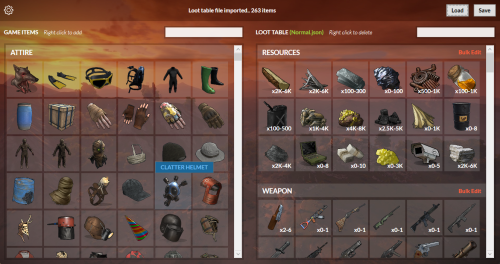 The loot table can quickly become cluttered, especially when adding multiple items. It can also take a lot of time to find the correct shortnames. This is where this tool comes in—it’s perfectly suited for the job. Simply search, click, and you’ll have your desired loot table in no time. The tool is perfect whether you’re using the free or paid version of the RaidableBases plugin. Thanks for this awesome tool!
 -
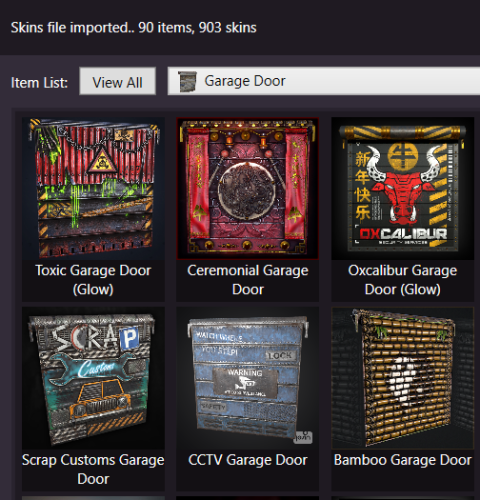 In my opinion, this tool is an essential resource for every server administrator. We've been using it since its release and are very satisfied. Although the XSkinMenu plugin isn't directly supported, with some configuration knowledge, it's easy to work around. We use the configuration from the SkinBox plugin and transfer the skins from XSkinMenu into its config, as the structure of both plugins is almost identical. After making the necessary changes, we copy the skins back into the original XSkinMenu config. Thank you for this fantastic tool! It allows for clean, clear, and fast skin management.
 -
 A great alternative to Discord and other monthly paid providers. After using Discord and Dropbox for a while, we switched to this solution – and it’s extremely user-friendly. The few euros we spent were absolutely worth it. For anyone already using web hosting and looking for an easy way to manage their data, this tool is a must in our opinion. The installation was very straightforward, although the integration of the Discord API was a bit tricky. However, this was quickly resolved after watching a few YouTube tutorials. Maybe the developer will create a full installation video in the future. We highly recommend this tool. Thank you for the excellent work!
 -
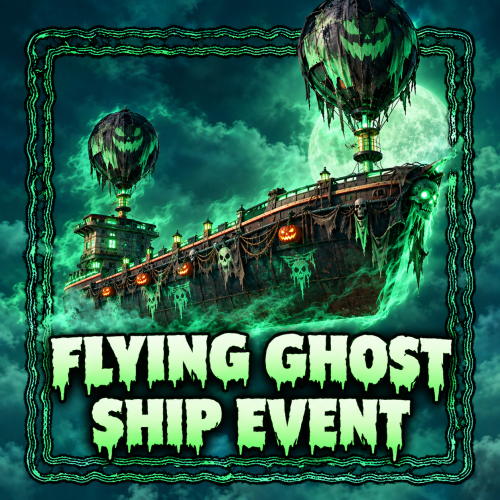 https://steamcommunity.com/sharedfiles/filedetails/?id=3151859094 CARD_SKIN: 3151859094
- 74 comments
-
- 1
-

-
- #cargo
- #cargo ship
- (and 5 more)
-
 If AhigaO hasn't added it to his plugin, it won't work. You need to contact AhigaO to see if he supports this plugin.
 -
I'll help you directly with your problem, so the developer doesn't need to release a fix for it, as they can't account for every plugin anyway. ^^ Open the plugin with Notepad++ and search for: new CuiRawImageComponent { Color = "1 1 1 1", Png = _imageUI.GetImage("14") }, Then replace: new CuiRectTransformComponent { AnchorMin = "1 1", AnchorMax = "1 1", OffsetMin = "-115.354 -36.798", OffsetMax = "-105.246 -27.942" } with: new CuiRectTransformComponent { AnchorMin = "1 1", AnchorMax = "1 1", OffsetMin = "-505.354 -76.798", OffsetMax = "-485.246 -67.942" } This way, the close button is located directly next to the search.
-
 Does the user or group have the 'AutoDungCollector.use' permission? I just tested the plugin, and it's working perfectly. We use it on our own server as well. oxide oxide.grant user SteamId AutoDungCollector.use carbon c.grant user SteamId AutoDungCollector.use oxide oxide.grant group groupename AutoDungCollector.use carbon c.grant group groupename AutoDungCollector.use
 -
[ERRO] Failed to call internal hook 'OnEntityBuilt' on plugin 'CustomRecycle v2.0.20' [641201665] (Object reference not set to an instance of an object) at BaseEntity UnityEngine.GameObjectEx.ToBaseEntity(GameObject go, bool allowDestroyed) at void Oxide.Plugins.CustomRecycle.OnEntityBuilt(Planner plan, GameObject go) in C:/MGCDRP/RustPvE/carbon/plugins/CustomRecycle.cs:line 156 at object Oxide.Plugins.CustomRecycle.InternalCallHook(uint hook, object[] args) in CustomRecycle.cs/Internal:line 152
-
 I have now tested it on oxide and carbon and it works perfectly. The following plugins must be installed! Pay attention to the order! 1. Image Library 2. Npc Spawn 3. Convoy 4. Magic Panel 5. Magic Convoy Event Panel