aimacak
-
Posts
1,846 -
Joined
-
Last visited
-
Days Won
13
Content Type
Profiles
Warranty Claims
Downloads
Forums
Store
Services
Downloads Plus Support
DOWNLOADS EXTRA
Reels
Everything posted by aimacak
-
Hello, are you sure that in time of testing you havnt active cooldown for this event? Can you check it via /eventstime commands for PveMode, make screen with output messages and try again to became owner? Also you can clear your cooldowns via command for PveMove: ClearTimePveMode {steamid} - clears the list of the time when the player with SteamID ({steamid}) participated in the event the last time

-
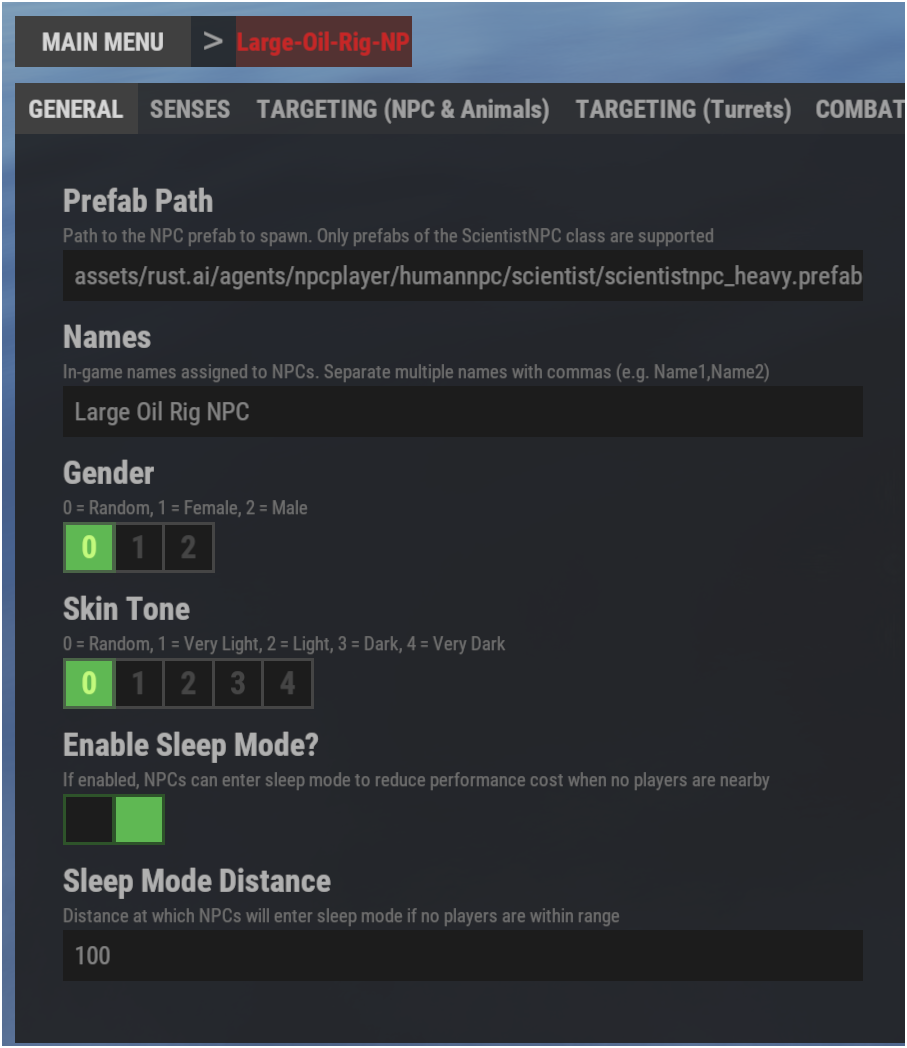
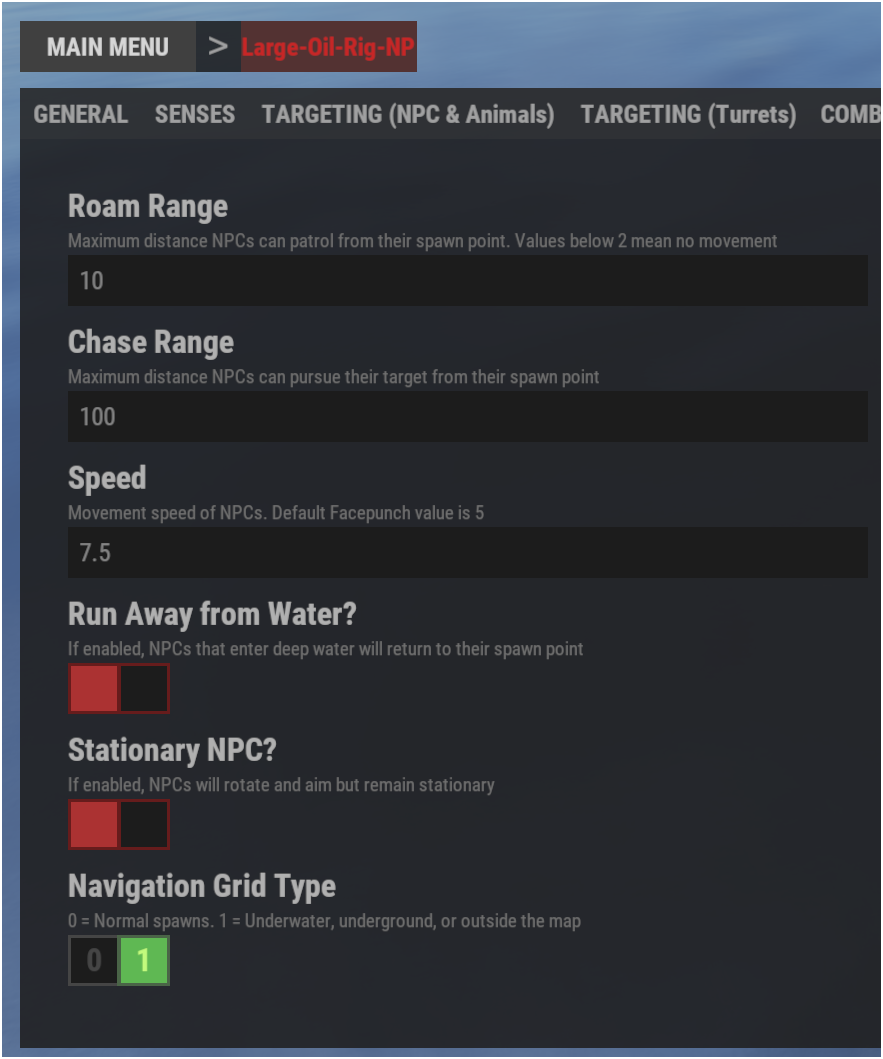
К плагинам KpucTaJI вы можете создавать запросы на русском языке По поводу навигационной сетки, ранее на Нефтяных вышках, Подводных лабораториях и в некоторых других местах могли передвигаться только НПЦ с навигационной сеткой 1, сейчас же я не замечаю разницы между ними, возможно мы узнаем какие-то подробности позже. Новая навигационная сетка генерирует навмеш автоматически, вы можете посмотреть на него выполнив в консоли клиента команду rustnav.draw. Вы можете использовать старую навигационную сетку используя параметр запуска сервера -useOldNavmesh, некоторые так и делают. Я использую новую, хоть на ней и есть некоторые баги и недочёты, зато раньше узнаем о различных ситуациях. По поводу вашего изначального вопроса, в ваших пресетах включен режим Сна, скорее всего вы проверяли их движение в ванише или инвизе, т.к. НПЦ просыпаются только при наличии видимого игрока в указанном в пресете радиусе.
-
It doesn't matter. Cargoship differs from regular spawn points because it has specific nuances related to the nav mesh, and it’s also constantly moving. For these reasons, if you’re using a preset that isn’t a stationary NPC, I advise you not to try to specify coordinates there — the coordinates will be searched for automatically. You can change the number of NPCs you want, as I did in my example for the first preset. I’ve also added a fourth NPC preset for you, in which I specified the coordinates I liked. I found them using RustEdit. You need to place cargoshiptest at the zero coordinates, and then use objects, for example, an Npc spawner, to place the NPC wherever you like. After that, you need to transfer the local coordinates to BetterNpc. But, as I mentioned above, there are some nuances with the navmesh in Cargo, so in the preset I’ve added, you can only use stationary NPCs. { "Enabled? [true/false]": true, "Remove default NPCs? [true/false]": true, "Respawn NPCs when the cargo ship docks at the harbor? [true/false]": true, "Respawn NPCs when new crates spawn? [true/false]": false, "Presets": [ { "Enabled? [true/false]": true, "Minimum numbers - Day": 50, "Maximum numbers - Day": 50, "Minimum numbers - Night": 50, "Maximum numbers - Night": 50, "The name of the NPC preset from the NpcSpawn plugin": "Scientist-Cargo-Moving", "NPC Configuration (used if preset is empty)": null, "Rewards for killing the NPC (key - plugin name, value - points to give)": {}, "List of spawn positions (X, Y, Z) (used if Spawn Type - Custom)": [] }, { "Enabled? [true/false]": true, "Minimum numbers - Day": 2, "Maximum numbers - Day": 2, "Minimum numbers - Night": 2, "Maximum numbers - Night": 2, "The name of the NPC preset from the NpcSpawn plugin": "Scientist-Cargo-Stationary-1", "NPC Configuration (used if preset is empty)": null, "Rewards for killing the NPC (key - plugin name, value - points to give)": {}, "List of spawn positions (X, Y, Z) (used if Spawn Type - Custom)": [ "(2.80, 24.69, -40.16)", "(1.49, 18.50, -38.79)" ] }, { "Enabled? [true/false]": true, "Minimum numbers - Day": 3, "Maximum numbers - Day": 3, "Minimum numbers - Night": 3, "Maximum numbers - Night": 3, "The name of the NPC preset from the NpcSpawn plugin": "Scientist-Cargo-Stationary-2", "NPC Configuration (used if preset is empty)": null, "Rewards for killing the NPC (key - plugin name, value - points to give)": {}, "List of spawn positions (X, Y, Z) (used if Spawn Type - Custom)": [ "(-0.18, 23.26, 67.59)", "(10.69, 27.61, -38.89)", "(-10.59, 27.61, -38.83)" ] }, { "Enabled? [true/false]": true, "Minimum numbers - Day": 21, "Maximum numbers - Day": 21, "Minimum numbers - Night": 21, "Maximum numbers - Night": 21, "The name of the NPC preset from the NpcSpawn plugin": "Scientist-Cargo-Stationary-1", "NPC Configuration (used if preset is empty)": null, "Rewards for killing the NPC (key - plugin name, value - points to give)": {}, "List of spawn positions (X, Y, Z) (used if Spawn Type - Custom)": [ "(6.0, 9.5, -57.0)", "(-6.0, 9.5, -57.0)", "(7.5, 12.5, -49.5)", "(-7.5, 12.5, -49.5)", "(0.0, 15.5, -49.5)", "(9.0, 24.5, -45.0)", "(-9.0, 24.5, -45.0)", "(9.0, 3.5, -42.0)", "(-9.0, 3.5, -42.0)", "(6.0, 0.5, -27.0)", "(-6.0, 0.5, -27.0)", "(6.0, 0.5, -12.0)", "(-6.0, 0.5, -12.0)", "(6.0, 0.5, 4.5)", "(-6.0, 0.5, 4.5)", "(0.0, 0.5, 13.5)", "(6.0, 0.5, 19.5)", "(-6.0, 0.5, 19.5)", "(6.0, 0.5, 39.0)", "(-6.0, 0.5, 39.0)", "(0.0, 3.5, 52.5)" ] } ] }
-
Hello, I’ve sent a friend request to your nickname on Discord, can you accept it? @shrpndfcsd
-
Console error -> Failed to call hook 'OnServerInitialized'
aimacak replied to StrongWolves's Support Report in Support
Hello, this error occurred only once when updating the BossMonster version, and most likely because you didn’t update NpcSpawn before updating BossMonster. You can reload the plugin, and this error won’t happen again. -
 Hello, this is most likely because you are like many others, including me you did not manually unload the plugin before updating the version, restart the plugin again, most likely there will be no error, as well as after restarting the server. Of course, you should have the latest version of NpcSpawn.
 -
Hello, my NPCs are behaving as usual.. What versions of NpcSpawn and BetterNpc are you using? What navigation mesh are you using on the server? Can you send the spawn point from BetterNpc and the presets for NpcSpawn that you are using at this spawn point?
-
stationary NPCs are re-projected onto the navmesh at spawn time and end up under dynamic monument floors
aimacak replied to tsuyoshi_ito's Support Report in Support
@tsuyoshi_ito Hello again, check it please in NpcSpawn 3.4.6 -
Actually, my language differs from almost all users who seek support, sooner or later understanding appears Anyway, it's easier to solve problems there because of the specifics of the forum.. I just want to understand the situation, and I ask you to double-check everything, because there are several feedback from other users, but I also always admit that the error may be on the side of the plugin, especially when such large-scale changes are made to the game in the middle of the month. You can attach the error logs, or at least, as you already did, a message after loading NpcSpawn with the number of found biome positions, but after first loading after server restart. Have a great day too
-
Changed Status from Pending to Closed
-
Changed Status from Pending to Closed
-
Can you add me in discord for realtime discuss? @shrpndfcsd If not, please let me know which of your plugins use random NPC spawning on the map—such as BossMonster. Ryuu asked a valid question; NpcSpawn itself didn't cause these issues, but the problem arose because NpcSpawn couldn't generate biome-specific spawn locations in time during server startup due to the lengthy process of generating the new navmesh. Consequently, if BossMonster attempted to find a random spawn point, the search would enter an infinite loop. All these nuances have been addressed in the latest plugin versions. Checks for the new navmesh generation were added to NpcSpawn so that it only begins generating biome spawn points once that process is complete; meanwhile, BossMonster now checks for NpcSpawn's full initialization and features improved position-finding code to completely prevent infinite loops.
-
Hello again, im writing here just in case for other peoples How we known from this ticket: https://codefling.com/files/support/31125-nullreferenceexception-upon-load/ This error appears only once during a hot plugin update; there is no error when the plugin is reloaded or when the server is restarted. This is likely due to the fact that new relationships with NpcSpawn have appeared in the OnServerInitialized method.
- 1 reply
-
- 1
-

-
How we known from this ticket: https://codefling.com/files/support/31125-nullreferenceexception-upon-load/ This error appears only once during a hot plugin update; there is no error when the plugin is reloaded or when the server is restarted. This is likely due to the fact that new relationships with NpcSpawn have appeared in the OnServerInitialized method.
-
Actually, I’m doing the same thing, and I think this is the cause of this error, since there are no errors on a second reboot, and everything works fine for people when they restart the server. Why did this error occur specifically with this update? Probably because some new relationships between plugins appeared in the OnServerInitialized method.
-
Then I’ll assume it’s related to updating the plugin on the fly; I think few people manually unload the previous version before loading the new one, right?
-
Hello, does the error occur every time the plugin is reloaded, or was it only once during the update? If it occurs every time the plugin is reloaded, please provide the exact sequence of actions, because I can’t reproduce it oxide or carbon? procedural or custom map?
-
Hello, does the error occur every time the plugin is reloaded, or was it only once during the update? If it occurs every time the plugin is reloaded, please provide the exact sequence of actions, because I can’t reproduce it oxide or carbon? procedural or custom map?
-
 You and KpucTaJI have similar tastes; he also loves updating the same plugin five times a day FP caught many people off guard with the new navigation system Now everything seems to have settled down..)
 -
Check updates for NpcSpawn, BetterNpc and BossMonster, please.
-
Check updates for NpcSpawn and BossMonster, please.
-
Changed Status from Pending to Closed
-
Yes, I’ve probably figured out what the problem is; I’m waiting for KpucTaJI.
-
Could you please tell me whether you use oxide or carbon?