


-
Posts
588 -
Joined
-
Days Won
7
Content Type
Profiles
Warranty Claims
Downloads
Forums
Store
Services
Downloads Plus Support
DOWNLOADS EXTRA
Everything posted by Mankus
-
 No problem. There are 4 island prefabs, each with this file path: "assets/bundled/prefabs/deepsea/islands/deepsea_island_tropical4.prefab" simply change the numeric value to 1, 2, 3 or 4 example from using admin commands in f1 console: spawn deepsea_island_tropical2 but placement will be tricky since its only line of sight, unless you can get the coordinates for rotation etc. console should suggest the correct format if its a little different Yes I'm pretty sure closing the deep sea will wipe what was there. Even if you have persist buildings on etc. in the plugin I think to identify the island yo ucan use something like "EntityOwner" from umod, the one with /prod chat command to identify any prefab you look at in game. Since the islands are prefabs, if there is another of the same type also spawned in your instance, you could rule it out quickly enough.
 -
The timer is the duration that the Deep Sea is open for, it disappears when the deepsea is closed in vanilla mode. So in this plugin when you have it set to always open, you can decide how much time is displayed here and at what time remaining it resets. Should be fairly clear on how to do that, check in the description page and in the config
-
Heya, only to answer about the islands, yes I've also made that mistake in admin remove mode hahah its frustrating - I believe you will have to manually clear and remove all other prefabs that were on the island, until the deepsea area reaspawns / server restarts. you can also attempt to paste it back, since all islands are prefabs, by spawning the relevant island through console or other means (This will spawn the missing water volume in the sea back too but not the entities or scientists. Can be useful for an emergency fix I suppose.) but I dont recommend as positioning it in a remotely similar position is very difficult at best. I have not attmpted to use the telkinesis plugin to move it, that could help actually. But might cause server instability. One note, the islands set up this way is how Facepunch implemented them, that risk will always be there so be careful with the remove tool. Safer to close the deepsea by convar or commands and restart if you can.
-

Linked Config files for The Dealer, Viper Crafting and Drugs Plugins by Wrecks
Mankus commented on Nobby's file in Customizations
.thumb.png.da7aabb766f25bb3e8bce857b2e1dfdb.png) Those nasty clientside errors, there seem to be new ones every wipe. Always some effects end up being unloaded from memory by new FP versions. Wrecks has a neat plugin, effectrunner, or something - exactly for this purpose. So you can test in game as an admin, which FX prefabs etc. can still run and not throw the red-client side errors when a player has a certain effect applied.
Those nasty clientside errors, there seem to be new ones every wipe. Always some effects end up being unloaded from memory by new FP versions. Wrecks has a neat plugin, effectrunner, or something - exactly for this purpose. So you can test in game as an admin, which FX prefabs etc. can still run and not throw the red-client side errors when a player has a certain effect applied. -
A well thought-out and balanced set up, Includes tons of recipies, creations, skin IDs for items with a loads of configured effects n recipies. All ready to use or adapt to your liking. Shared for FREE NOBBY NOBBY NOBBY
-
 Ahahaha, yes that was me also. I just happened to be around
 -
Not my plugin , its Adem's work - Im just posting any helpful info I can. But you're welcome. I can recommend it. Its pretty performant and easy to use.
-
Yes, they are fully functional without need for any specific configurations. However you can allow / block use of the pumpjacks with TC auth within the configuration .ie whoever might have built a base on an island with a Pumpjack, for example, would only be able to use it.
- 63 comments
-
- 1
-

-
- #adem
- #madmappers
- (and 6 more)
-
 Decent, ah yes thats the one by Dana. Its a good interactive way to let players interract with predefined commands through the button. Sounds like a fun setup! Oh yeah that was me (Mankus) writing to you in VisEntities discord, I didn't even realise haha, despite thefact you ahve the same alias there
 -
Yes it works fine. I've stress tested the hell out of a server with hundreds active highly customised BotReSpawn npcs, profiles, calls and hooks firing everywhere in Carbon, performs perfectly imo. Plus its been runing in a live Carbon setting for couple months, without issue I forgot to mention, as an alternative you could probably use something like TimedExecute to spawn or remove npcs, using the console commands. See the available commands on the description page, under console commands. Can enable / disable certain profiles One example of many, there are several sueful small plugins to trigger commands.
-
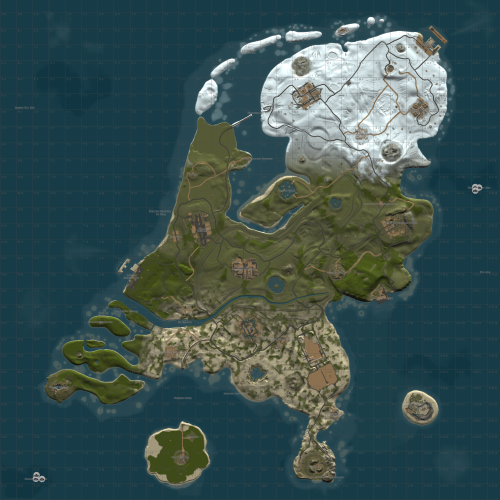 Very fun, quirky, plenty of flat terrain and full of character, just like the Netherlands The custom monuments that represent known areas of the Netherlands are very fun too. Author keeps the map updated with big fixes and tweaks too. Tried it on a couple of wipes and all players enjoyed it.
 -
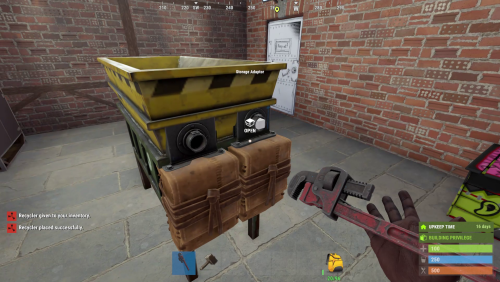 However being able to place the recycler as it is, should be possible and cause no other issues in itself
 -
I don't think so, at least not with the industrial I/O pipes set up. Having electrical entities with power cables or industrial eentities with piping is not really possible on boats, for good reason. Even if it was made to function, it would be a buggy mess.
-
By far the simplest solution
-
It looks like you're running Windows, like Ionut Shiro already suggested: there is a permissions problem (this is Windows related), the file path of your local server - it should not be in the root folder of your C:\ drive for general default security reasons. To simply avoid those permission issues (goverened by your OS) then move your local test server to another disk, or partition if possible. It will be simpler that way. instead of changing UAC application control and disk read write permissions, this will take more time but is relatively simple to do. Put the map in Dropbox also like IonutShiro suggested, it wont download correctly or even at all from GoogleDrive. make sure the end of the dropbox linik shows =1 and not =0 when you paste the link into your server levelurl startup line. If you only intend to run your RustDedicated instance on a local non networked or offline system, you can host the map locally on another drive instead of online. Simply add the drivepath like so: "file:///path/to/your/custom.map" ensure the path is appended by "file:///" path is your folder structure and location. Hopefully that helps further.
-
 I wish there were 751 reviews on this but us Admins are a painfully forgetful bunch, aren't we. Only took me 3 years to review... No seabass, all lasers and sharks, max performance, max fear, max quality
 -
Oops my bad, I didn't see the support popup notification.
-
There's a full example with examples explaining how to do what you ask in the most simple and useful way. Read the
-
.thumb.gif.639bad9e0c01fe84e49ee5afd0939b6f.gif) Only these related commands are available from the description /SPAWNBEAST- ADMINCOMMAND - WILL TRIGGER THE SPAWN METHOD TO ATTEMPT TO SPAWN AN ANIMAL BASED ON CHANCE spawns a beast from your list of possible beasts to spawn /SPAWNMAINTAINED - ADMINCOMMAND - WILL TRIGGER THE SPAWN METHOD FOR MAINTAINED BEAST, IF APPLICABLE so if you have beast that is in the "maintained" population as per yoru config, it will spawn one of them
Only these related commands are available from the description /SPAWNBEAST- ADMINCOMMAND - WILL TRIGGER THE SPAWN METHOD TO ATTEMPT TO SPAWN AN ANIMAL BASED ON CHANCE spawns a beast from your list of possible beasts to spawn /SPAWNMAINTAINED - ADMINCOMMAND - WILL TRIGGER THE SPAWN METHOD FOR MAINTAINED BEAST, IF APPLICABLE so if you have beast that is in the "maintained" population as per yoru config, it will spawn one of them -
.thumb.png.c7f4bb064c82c82a091c981534225577.png) I want to remind you and assure you, according to us, your customers and supporters that this should not affect your reputation, at least not with most of us. I am speaking for myself but I think others might think similarly. Yes many of us were disheartened by the plugin launch, how it functioned and how it occurred, this created a lot more work and problems for us. and many of us did not appreciate how it functioned, some did, that's fine but ultimately, if the plugin could have maintained standard features and configuration editing also with a GUI editor that would be acceptable and commendable compromise. The launch was rushed as far as most of us were aware here on Codefling, I now know after all this time it was discussed in the MadMappers discord, but I for one was not there. I'm not complaining, this is only some more feedback and a reminder why I think it didn't work out the best. Sorry that this has made you fall into this position to remove the plugin, I wont pretend to understand on a programming level why this is so, but I can still relate to and undertand all the processes involved, most server admins can, we have just as much work to do every wipe. At least heavily modded servers do. I think a lot of server owners and admins can understand the defeating feeling too, when spending a year settiing up work, for it to be badly recieved or not wanted. Please don't take this personally, I hope it doesn't affect you this way. Look at the multi-year long success of all your other work, move forward
I want to remind you and assure you, according to us, your customers and supporters that this should not affect your reputation, at least not with most of us. I am speaking for myself but I think others might think similarly. Yes many of us were disheartened by the plugin launch, how it functioned and how it occurred, this created a lot more work and problems for us. and many of us did not appreciate how it functioned, some did, that's fine but ultimately, if the plugin could have maintained standard features and configuration editing also with a GUI editor that would be acceptable and commendable compromise. The launch was rushed as far as most of us were aware here on Codefling, I now know after all this time it was discussed in the MadMappers discord, but I for one was not there. I'm not complaining, this is only some more feedback and a reminder why I think it didn't work out the best. Sorry that this has made you fall into this position to remove the plugin, I wont pretend to understand on a programming level why this is so, but I can still relate to and undertand all the processes involved, most server admins can, we have just as much work to do every wipe. At least heavily modded servers do. I think a lot of server owners and admins can understand the defeating feeling too, when spending a year settiing up work, for it to be badly recieved or not wanted. Please don't take this personally, I hope it doesn't affect you this way. Look at the multi-year long success of all your other work, move forward -
.thumb.jpg.e9d17b75aae5d2248cd203bab27522eb.jpg) Two stars for a nice ui design by a good developer. Minus 3 stars for plugin that has become an unnanounced forced dependency FacePunch for many plugins; which in effect, however unintentional, has taken away almost all organisatial control, efficacy and order from server admins. Resulting in a chaotic mess of server files. Could it be improved? Absolutely Do I want it, absolutely not. Does it help server owners and admins? no. Was it a good idea? In theory, I am sure. At least it helps the developers of MadMapers plugins who are using it, to unify their workflow but it does not do the work for us, so there must be more taken into consideration Please consider this: I have tried and tested LootManager, let's use one of Adem's decent plugins as an example, lets say Caravan. If I want to continue to use Caravan and customise the loot I must use LootManager. I have tried multiple versions of LootManager since Adem first published it on Codefling. The Result: I can no longer cleanly and efficiently edit the loot via a single .json configuration file. Using a GUI (user interface) to edit any configuration, in this case loot, is impractical, there are visual bugs, there is latency, a risk of misclicking, the inability to edit large amounts of data, it looks nice but it is very impractical! Not to mention that all the data files LootManager created, in this case have been misnamed and needlessly separated, like others have mentioned several times. That is a serious workflow and consistency problem. My main argument point is that LootManager itself, to configure as an admin is risky (by risky I mean there is too much room for error) and it is very time consuming and inefficient, but to what gain? I see no gain, as someone who needs to configure their loot files from a single file. I am certain the majority of people edit their work this way, not by a loot "menu" Pleasant easy on the eye GUI should be aimed at the use of the player, not used as the method to configure by an admin! I'm only talking from a configuration stand point. Its not because "I don't like it" its because the plugin causes practical issues. I can not keep track of my loot or organise it in anyway from this perspective, even if I manually reorganise and rename all of the data files lootmanager has created, so they are more recognisable, that doesn't solve the issue. In fact it would not even be possible with needlessly modifying a lot of the messy data, which would be erased when the plugin is updated (in its current state) If unifying everything through LootManager for performance gains, optimisations and workflow from your side as developers in beneficial, ok that's one positive aspect and I understand uit, that is good but it can't be the only consideration. The end users of these products are not players so please continue to design them for the people who use them. Is there some sort of compromise that could be made to the actual data or file storage order, to edit the data directly, so at least, each plugin has a singular editable file. I used to work with LootTable from Kiiiing, which has a very nice interface too but since they removed the ability to edit configuration files from the server and replaced everything with protobuf, a user must also log into the Game Client and use an interface to edit loot, skinID's, shortnames, etc. etc. Which is extremely problematic, Rust does not work well with interfaces in game at the best of times! (as another example of other popular plugins that heavily rely on in game User interfaces) - Mevent Team makes brilliant interfaces for Shop, ServerPanel and so on which too frequently break because Rust servers dont perform well with GUI in game as player logged into the client. But I can afford to continue to use those plugins from Mevent because they still allow full control and configuration from a data file and configuration file perspective. If this was not the case, they would also be abandoned. Please, on behalf of all past and future customers, at least consider these important facts to continue a positive and progressive relationship with us.
Two stars for a nice ui design by a good developer. Minus 3 stars for plugin that has become an unnanounced forced dependency FacePunch for many plugins; which in effect, however unintentional, has taken away almost all organisatial control, efficacy and order from server admins. Resulting in a chaotic mess of server files. Could it be improved? Absolutely Do I want it, absolutely not. Does it help server owners and admins? no. Was it a good idea? In theory, I am sure. At least it helps the developers of MadMapers plugins who are using it, to unify their workflow but it does not do the work for us, so there must be more taken into consideration Please consider this: I have tried and tested LootManager, let's use one of Adem's decent plugins as an example, lets say Caravan. If I want to continue to use Caravan and customise the loot I must use LootManager. I have tried multiple versions of LootManager since Adem first published it on Codefling. The Result: I can no longer cleanly and efficiently edit the loot via a single .json configuration file. Using a GUI (user interface) to edit any configuration, in this case loot, is impractical, there are visual bugs, there is latency, a risk of misclicking, the inability to edit large amounts of data, it looks nice but it is very impractical! Not to mention that all the data files LootManager created, in this case have been misnamed and needlessly separated, like others have mentioned several times. That is a serious workflow and consistency problem. My main argument point is that LootManager itself, to configure as an admin is risky (by risky I mean there is too much room for error) and it is very time consuming and inefficient, but to what gain? I see no gain, as someone who needs to configure their loot files from a single file. I am certain the majority of people edit their work this way, not by a loot "menu" Pleasant easy on the eye GUI should be aimed at the use of the player, not used as the method to configure by an admin! I'm only talking from a configuration stand point. Its not because "I don't like it" its because the plugin causes practical issues. I can not keep track of my loot or organise it in anyway from this perspective, even if I manually reorganise and rename all of the data files lootmanager has created, so they are more recognisable, that doesn't solve the issue. In fact it would not even be possible with needlessly modifying a lot of the messy data, which would be erased when the plugin is updated (in its current state) If unifying everything through LootManager for performance gains, optimisations and workflow from your side as developers in beneficial, ok that's one positive aspect and I understand uit, that is good but it can't be the only consideration. The end users of these products are not players so please continue to design them for the people who use them. Is there some sort of compromise that could be made to the actual data or file storage order, to edit the data directly, so at least, each plugin has a singular editable file. I used to work with LootTable from Kiiiing, which has a very nice interface too but since they removed the ability to edit configuration files from the server and replaced everything with protobuf, a user must also log into the Game Client and use an interface to edit loot, skinID's, shortnames, etc. etc. Which is extremely problematic, Rust does not work well with interfaces in game at the best of times! (as another example of other popular plugins that heavily rely on in game User interfaces) - Mevent Team makes brilliant interfaces for Shop, ServerPanel and so on which too frequently break because Rust servers dont perform well with GUI in game as player logged into the client. But I can afford to continue to use those plugins from Mevent because they still allow full control and configuration from a data file and configuration file perspective. If this was not the case, they would also be abandoned. Please, on behalf of all past and future customers, at least consider these important facts to continue a positive and progressive relationship with us.- 78 comments
-
- 13
-

-
-

-
- #loot
- #lootmanager
- (and 2 more)
-
 It should be pretty obvious by now, everyone who doesn't like, want or need LootManager has given a reason why in their own words or otherwise. Its been discussed in many places including of course the LootManager plugin page. My final feedback and advice is listen to the people who work with, support and use all the plugins that are now being made dependant on LootManager. Change is not always positive, this apparently unanimous, closed MadMappers decision was a poor one.
 -
Oh god no.... why.... goodbye NpcSpawn and everything that depends on Lootmanager
-
 Good ole facepunch have revisited their indie file naming system, remember when wolf2 was a thing and horse2 (which weer eveeeentually fixed) well now we have "..../scientist/gen2/scientist2.prefab" These are the ones now present on oil rig and in boats etc. Will require a few plugins to get up to date and of course FP will break it again when they finally decide to update the naming structure in a few months.
 -
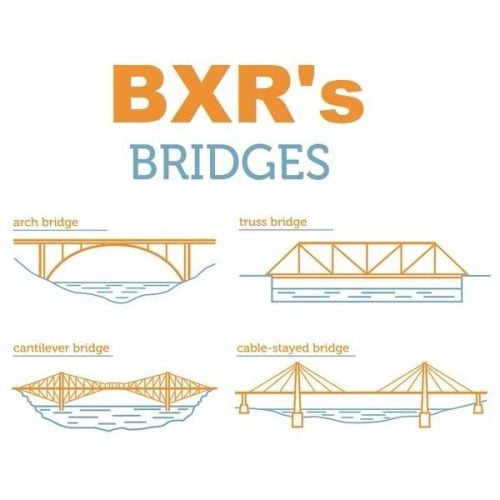 Excellent work, concise designs that add some great options to your server. - thanks for sharing!
