


-
Posts
588 -
Joined
-
Days Won
7
Content Type
Profiles
Warranty Claims
Downloads
Forums
Store
Services
Downloads Plus Support
DOWNLOADS EXTRA
Reels
Everything posted by Mankus
-
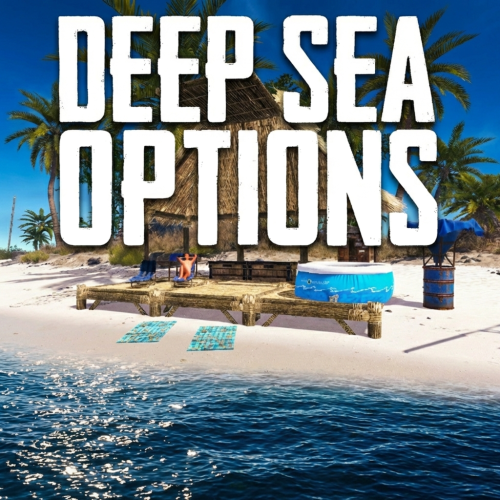 No problem. There are 4 island prefabs, each with this file path: "assets/bundled/prefabs/deepsea/islands/deepsea_island_tropical4.prefab" simply change the numeric value to 1, 2, 3 or 4 example from using admin commands in f1 console: spawn deepsea_island_tropical2 but placement will be tricky since its only line of sight, unless you can get the coordinates for rotation etc. console should suggest the correct format if its a little different Yes I'm pretty sure closing the deep sea will wipe what was there. Even if you have persist buildings on etc. in the plugin I think to identify the island yo ucan use something like "EntityOwner" from umod, the one with /prod chat command to identify any prefab you look at in game. Since the islands are prefabs, if there is another of the same type also spawned in your instance, you could rule it out quickly enough.
 -
The timer is the duration that the Deep Sea is open for, it disappears when the deepsea is closed in vanilla mode. So in this plugin when you have it set to always open, you can decide how much time is displayed here and at what time remaining it resets. Should be fairly clear on how to do that, check in the description page and in the config
-
Heya, only to answer about the islands, yes I've also made that mistake in admin remove mode hahah its frustrating - I believe you will have to manually clear and remove all other prefabs that were on the island, until the deepsea area reaspawns / server restarts. you can also attempt to paste it back, since all islands are prefabs, by spawning the relevant island through console or other means (This will spawn the missing water volume in the sea back too but not the entities or scientists. Can be useful for an emergency fix I suppose.) but I dont recommend as positioning it in a remotely similar position is very difficult at best. I have not attmpted to use the telkinesis plugin to move it, that could help actually. But might cause server instability. One note, the islands set up this way is how Facepunch implemented them, that risk will always be there so be careful with the remove tool. Safer to close the deepsea by convar or commands and restart if you can.
-

Linked Config files for The Dealer, Viper Crafting and Drugs Plugins by Wrecks
Mankus commented on Nobby's file in Customizations
.thumb.png.da7aabb766f25bb3e8bce857b2e1dfdb.png) Those nasty clientside errors, there seem to be new ones every wipe. Always some effects end up being unloaded from memory by new FP versions. Wrecks has a neat plugin, effectrunner, or something - exactly for this purpose. So you can test in game as an admin, which FX prefabs etc. can still run and not throw the red-client side errors when a player has a certain effect applied.
Those nasty clientside errors, there seem to be new ones every wipe. Always some effects end up being unloaded from memory by new FP versions. Wrecks has a neat plugin, effectrunner, or something - exactly for this purpose. So you can test in game as an admin, which FX prefabs etc. can still run and not throw the red-client side errors when a player has a certain effect applied. -
A well thought-out and balanced set up, Includes tons of recipies, creations, skin IDs for items with a loads of configured effects n recipies. All ready to use or adapt to your liking. Shared for FREE NOBBY NOBBY NOBBY
-
 Ahahaha, yes that was me also. I just happened to be around
 -
Not my plugin , its Adem's work - Im just posting any helpful info I can. But you're welcome. I can recommend it. Its pretty performant and easy to use.
-
Yes, they are fully functional without need for any specific configurations. However you can allow / block use of the pumpjacks with TC auth within the configuration .ie whoever might have built a base on an island with a Pumpjack, for example, would only be able to use it.
- 64 comments
-
- 1
-

-
- #adem
- #madmappers
- (and 6 more)
-
 Decent, ah yes thats the one by Dana. Its a good interactive way to let players interract with predefined commands through the button. Sounds like a fun setup! Oh yeah that was me (Mankus) writing to you in VisEntities discord, I didn't even realise haha, despite thefact you ahve the same alias there
 -
Yes it works fine. I've stress tested the hell out of a server with hundreds active highly customised BotReSpawn npcs, profiles, calls and hooks firing everywhere in Carbon, performs perfectly imo. Plus its been runing in a live Carbon setting for couple months, without issue I forgot to mention, as an alternative you could probably use something like TimedExecute to spawn or remove npcs, using the console commands. See the available commands on the description page, under console commands. Can enable / disable certain profiles One example of many, there are several sueful small plugins to trigger commands.
-
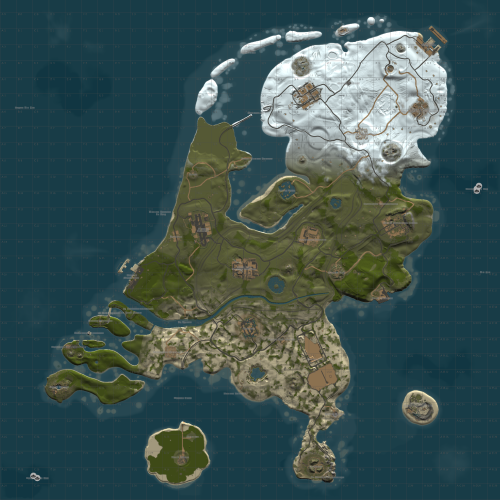 Very fun, quirky, plenty of flat terrain and full of character, just like the Netherlands The custom monuments that represent known areas of the Netherlands are very fun too. Author keeps the map updated with big fixes and tweaks too. Tried it on a couple of wipes and all players enjoyed it.
 -
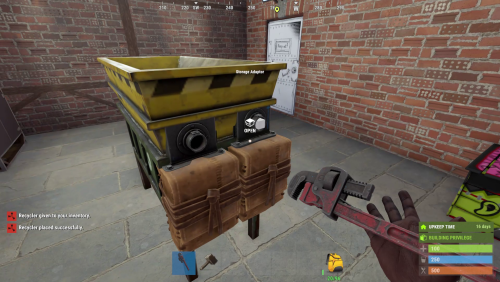 However being able to place the recycler as it is, should be possible and cause no other issues in itself
 -
I don't think so, at least not with the industrial I/O pipes set up. Having electrical entities with power cables or industrial eentities with piping is not really possible on boats, for good reason. Even if it was made to function, it would be a buggy mess.
-
By far the simplest solution
-
It looks like you're running Windows, like Ionut Shiro already suggested: there is a permissions problem (this is Windows related), the file path of your local server - it should not be in the root folder of your C:\ drive for general default security reasons. To simply avoid those permission issues (goverened by your OS) then move your local test server to another disk, or partition if possible. It will be simpler that way. instead of changing UAC application control and disk read write permissions, this will take more time but is relatively simple to do. Put the map in Dropbox also like IonutShiro suggested, it wont download correctly or even at all from GoogleDrive. make sure the end of the dropbox linik shows =1 and not =0 when you paste the link into your server levelurl startup line. If you only intend to run your RustDedicated instance on a local non networked or offline system, you can host the map locally on another drive instead of online. Simply add the drivepath like so: "file:///path/to/your/custom.map" ensure the path is appended by "file:///" path is your folder structure and location. Hopefully that helps further.
-
 I wish there were 751 reviews on this but us Admins are a painfully forgetful bunch, aren't we. Only took me 3 years to review... No seabass, all lasers and sharks, max performance, max fear, max quality
 -
Not exactly, it belongs to Mabel, if he has time to get in contact about it, then I will be in touch. Thanks for asking though!
-
I found we had CloseMonumentDoors.cs loaded, by @Mabel Neat plugin, normally fine. I removed it and did the same dungeon entrance, the entrance security doors did not close. Interesting, we've used this plugin by Mabel with DungeonBases for over 5 months, it never affected the DungeonBases doors or otehr Security doors until at least February I can be sure of that. Well I think that's the reason. Likely changes to Facepunch definitions of door entity and door.OwnerID You can close this request, thanks for the replies Fruster, Sorry for the inconvenience.
-
Hi Fruster, good to know, thank you for the quick reply. There definitely is not a plugin that directly affects security doors and it hasn't happened on the server before. I'm doing a troubleshoot through the serverfiles now and testing the same dungeon entrance again.
-
Hi Fruster, I updated today and the Dungeons Seem to be despawning properly now when the event timer ends. However I did a quick play test, all seemed perfect except one thing. In one of your Dungeon Entrances, the small 2x2 HQM entrance, with Blue Security Door. When the player is finished the Dungeon and comes back up the Security Door is closed. I dont remember should there be a button to open it from inside? Because I can not see one and have checked in vanish mode. So a regular player would not be able to leave and is trapped. Do you have any ideas on how we could troubleshoot this ? Thanks in advance, Manky
-
Oops my bad, I didn't see the support popup notification.
-
There's a full example with examples explaining how to do what you ask in the most simple and useful way. Read the
-
I'm sorry for the delay too, I didnt get notified of your replies, but I saw your updates to the map file Thanks a lot for the clean work and updates to the map! Best regards, Manky
-
Greetings, For safety XDQuest should be removed from any servers experincing problems, until its updated. Since the Facepunch player+npc id changes took effect, XDQuest needs to be updated. The predefined npc id for the questgiver npc of 21 needs to be removed from your code, or edited as you see fit. manually removing the predefined npc ID from the plugin, allowed us to continue to use XDQuest but the server had to be wiped. When Rustededicated starts and finds the saved Npc ID that overlaps with vanilla NPCids which are in this set of numbers, Then when a server sees this error it NUKES everything by doing a massive deletion of players entities in large strings, that part is a flaw or a simple disregard, in Facepunches code as this should not be possible on Vanilla and seems like a failsafe, However in the case of modded servers this can be a catastrophic mess. Thanks to @Steenamaroo for direct assistance & support in pinpointing the source of the npc id issue Anyhow, please change this npc ID line as soon as possible as it triggers this error and results in mass deletion of player entities. The error looks like this: Skipping entity 31434 - it's a player 21 who is in the save multiple times Skipping entity 31435 - it's a player 21 who is in the save multiple times Skipping entity 31436 - it's a player 21 who is in the save multiple times Skipping entity 31437 - it's a player 21 who is in the save multiple times Skipping entity 26866845 - it's a player 21 who is in the save multiple times Skipping entity 31439 - it's a player 21 who is in the save multiple times except it usually has between hundreds to thousands of entries. This affects the entire server save and cant be resolved until the save is wiped. Or manually injected with a script to clean up the problem, which in istself is difficult for most. Thanks in advance and I hope this can be updated soon.
-
I tested all of those and the ones with an elevator function. What's happening when you go to use the elevator? Can you press the buttons ? The timer counter on the buildings? That is only the event timer What other plugins do you run, output a list and send it surely there is another plugin interfering like BetterElevators or something ?

