

-
Posts
135 -
Joined
-
Last visited
-
Days Won
2
Content Type
Profiles
Warranty Claims
Downloads
Forums
Store
Services
Downloads Plus Support
DOWNLOADS EXTRA
Reels
Everything posted by Papa Bear
-
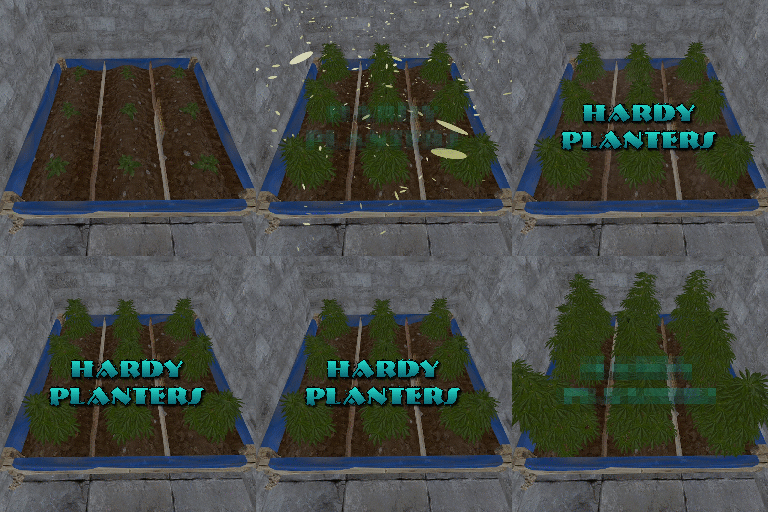 I thought Drop weight set to zero would mean not showing up in the loot table. I only wanted the Tier 1 to be in the crates, the rest of them I am selling in GUIShop. But, today, I looted both a Tier 1 and Tier 2 on the same run. I can't delete anything, because I need these to be here for the Tier I'm selling. Is there something I am missing or can we get a variable to exclude certain tiers from the loot table entirely? Thank you, Bear "Planterbox profiles": { "3647331888": { "Drop weight": 100, "Overall quality of the planterbox [responsible for growth speed]": 0.8, "Item display name": "large pandemic planter tier 1", "Item shortname": "planter.large", "Growth gene multiplier [default: 0.25]": 0.25, "Prevent aging on ripe?": false }, "3647342134": { "Drop weight": 0, "Overall quality of the planterbox [responsible for growth speed]": 1.0, "Item display name": "large pandemic planter tier 2", "Item shortname": "planter.large", "Growth gene multiplier [default: 0.25]": 0.25, "Prevent aging on ripe?": false }, "3647343141": { "Drop weight": 0, "Overall quality of the planterbox [responsible for growth speed]": 1.5, "Item display name": "large pandemic planter tier 3", "Item shortname": "planter.large", "Growth gene multiplier [default: 0.25]": 0.35, "Prevent aging on ripe?": true }, "3647343272": { "Drop weight": 0, "Overall quality of the planterbox [responsible for growth speed]": 2.0, "Item display name": "large pandemic planter tier 4", "Item shortname": "planter.large", "Growth gene multiplier [default: 0.25]": 0.5, "Prevent aging on ripe?": true }, "3647343446": { "Drop weight": 0, "Overall quality of the planterbox [responsible for growth speed]": 2.5, "Item display name": "large pandemic planter tier 5", "Item shortname": "planter.large", "Growth gene multiplier [default: 0.25]": 0.75, "Prevent aging on ripe?": true },
 -
 I can't seem to find where to turn off the UI on this plugin. I'm allowed to do this on Skill Tree & Epic Loot. If I am overlooking something, I'm sorry. But, I just can't find it.
 -
 I did do that, but it didn't stick. I think it's because the plugin is overriding the coordinates. It can be easily changed by the player, but I was hopping to have the default location not to share the same real estate as another. It is pretty straight forward on Skill Tree, but Epic Loot has a different approach.
 -
The Epic Loot Button, which I successfully change the icon is perfect. Only thing, I already have a Shop Button there now, so I would like to relocate this Epic Loot Button upward on the Ymin to about 80 Ymax 116 but the thing just will not budge. I had no issue moving the XP Bar in the Skill Tree Plugin, but this one has got me scratching my head. Can anyone point out, what I am doing wrong? }, "Button information": { "Enable use of the HUD button? Players can still disable it client side via the player settings": true, "Path of the icon button. You can use a SkinID, URL or assets/icons path": "3005538133", "Offset Min": "-351.4 20.7", "Offset Max": "-215.4 56.7" }, I am assuming from these numbers and the current location, -351.4 - 215.4 are the horizontal anchors and the 20.7 - 46.7 is the vertical. Well, I changed both ... just to see if it would move, I changed the first one to -651.5 -515.4 and it didn't move a spec. Thank you for any help that can come my way, Bear
-
 OK, looks like it's not the plugin. It's doing it to normal helis too. Tested by F1 command DROP. What's happening is once it takes damage, the Heli falls to the ground and then stays alive. I do have NPCs that show up via BotReSpawn, but I shut that plugin off and same thing. I also have Skill Tree (Talent for Heli Damage) .. shut it off, same thing. I'm just going to have to go through my plugins and see what's causing it. Sorry to concern you but, it looks like its not Heli Signals doing this. I'll find it and follow up later. U P D A T E: I had two plugins causing this, both from UMod. Loot Defender (set's ownership on Heli to first attacker) and No Unauthorized Damage. These two plugins didn't play nice. After Nivex helped me out with a quick patch and explanation, I took the corrected plugin to the Dev of No Unauthorized Damage, and he did an update on it. So, Kudos to those two for getting things done and I hope this doesn't happened to anyone else.
 -
A player reported that heli spawned really low and just clipped buildings and terrain for two days now. He made a short YT video showing this.
-
 Why does it say it's failed the Validation on both Main and Staging Branch? (just above the Download Button)
 -
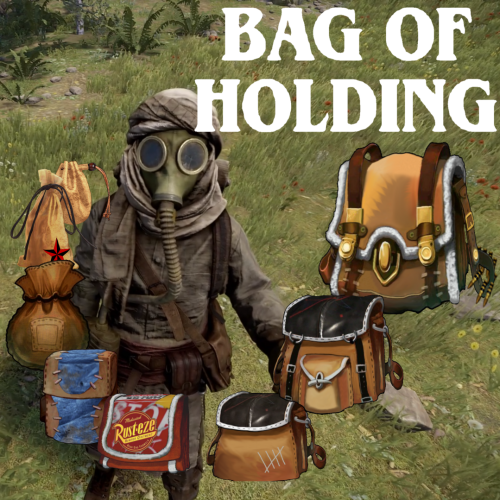 An Easy Five Stars I was intrigued with this plugin when it launched (Saw it on SRTBull's Channel) but the price was too high for me. At today's price, it's perfect, plus I had the opportunity to play with it on another server for a several months. I felt, on that server it was too OP, and I thought, if I could have less bags, it wouldn't be so confusing. I was misplacing bags in containers, my backpack (plugin) and in other bags ... I visited the description on Codefling and after reading how configurable this plugin was, I spent some time testing & adjusting the config until I got it just the way I wanted to use it for my server and it turned out great. I'm very restrictive, because I already use the "Keep on Death" feature Backpacks plugin I restrict the "non-empty" bags from everywhere but the Main Compartment. I limit the players to just (5) "non-empty" bags at one time. For me, this works out to be less over powered than I had experienced. I use the upgrade method of taking two of the same to make the next size up approach, which keeps things more linear and all bags become relevant, even though I restrict the players to five "non-empty" bags. But, they can have as many empty bags for the chance to eventually upgrade their desired bag. This approach is right for my server in lieu of using RP or scrap. I also layered XXSmall Bags in the basic crates, but Xsmall in Milatary crates and Small in Elites. I used the Xtra Loot Plugin to add a 1% chance for a Small or a Bag of Holding (48) slot to drop in an Air Drop or Timed Hackable Crate (currently, there is not option for this within the plugin, but it's on my wish list ... @BlackLightning) If you have zero experience with this, find a server that offers it and give it a try. And remember, it can be reconfigured to be more or less OP as you see fit.
 -
What you mentioned in the last paragraph would be how to solve this issue. Thank you for explaining this as thoroughly as you did. It's not a deal breaker if it's not achievable, but it would solve my issue.
-
Does anyone know how to limit non-empty bags in Main to 5, but when those 5 are in a Bag of Holding, all other bags are locked? I could have sworn this is how it was prior to Wipe & the last update. It used to be that the non-empty bags within the bag of holding (my limit is 5) would count towards the total count of bags. But, now after the Bag of holding has 5 bags that are non-empty in the Main Inventory Compartment, you add loot to more category bags that are outside the BoH, but are still in the Main Inventory Compartment. I don't remember this being "a thing" before. "Player bag limits": { "Default limits": { "Max total bags": 5, "Max bags by category name": {} Any suggestions would help, Thanks
-
 So, today with wipe, this plugin stopped me from looting crates in a monument I unlocked. I'm also using a plugin called Bag of Holding from Codefling's site and this is how I first noticed the issue. Players could no longer loot this bag from anywhere, even their own body. But, after turning off this plugin, it's all back to normal. not sure what's going on, and I really love this plugin. But, just thought you should know it does not work with Bag of Holding. U P D A T E : Problem solved since the Bag of Holding 1.10.6 Update.
 -
Can't they just type /mu and unlock the monument?
-
Loot populates into crates but when players try to loot the crate, this is the only thing they cannot loot. Most of the compartments in the loot crate are hash marked as well as the compartment with the bag. This hashmark is the same as you have too many bag, this cannot be looted for non-empty bags. But, these bags are empty. I tried this myself with every permission given me. I turned off my only loot plugin, Extra Loot, and did a Clear and reloaded as per your instructions ... still same issue. Please help. I just bought this plugin and I spent two weeks last wipe getting it ready and now I'm dead in the water. Thank you, Bear
-
 Murderer sound was removed by Facepunch recently. It won't work. Just have to turn it off for now.
 -
The bags in the crates are not able to be looted. Also, a player died and when he went to retrieve his loot, he couldn't retrieve his bag. I went into Silo and can confirm. I cleared the loot and reloaded it and it still did the same thing. Still testing this issue. U P D A T E : Found the problem. Monument Lock (Codefling Plugin) was preventing anyone from looting this bag from anywhere on the server, even their own corpse. After unloading the plugin and reloading BoH, all is good. @Blacklighting, I did a Support Ticket but it won't allow me to close it. F I N A L U P D A T E : Since update 1.10.6, my Monument Lock Plugin is now working as intended. Thank you for the update @BlackLightning
-
@BlackLightning Is todays update safe to install prior to wipe?
-
@SteenamarooSomething else I noticed this week. I run the plugin Airfield Event. Their NPCs land and act just fine. But, as for BotReSpawn, I have 5 paratroopers land with them, triggered by the air supply drop and the crate that lands over the puzzle, I lose two troopers to spawn underground along with the NPCs and three of them remain up top in Airfield ... on the other crate (I have two) I lose one of my paratroopers to the underground void, but keep four of them that land in the tunnel system underneath. Perhaps just another nav mesh issue. I am going to do some testing over mining tunnels and other places to see if the space above the tunnel is nav mesh free, where the tunnels themselves for some reason, are catching the NPCs and allowing them to roam underground. I am curious how this will affect train tunnels, or perhaps they're just too deep. I will test the above ground entrance area. Not a game changer, but I thought I would let you know. UPDATE: After more testing, it's just the Airdrop bots that go underground. I've copy/pasted the CH47, Heli, Hackable Crate triggers and they all fly in like they should, and land squarely on the ground. But, the Airdrop bots don't fall from the sky anymore. Their chutes open up on the ground and are subject to slipping beneath the terrain. This was true at the Underground Tunnels at the Top entrance where it is shallow. The deep areas, they stayed on the terrain, but they didn't fall from the sky like the others.
-
Yeah, I check the Navmesh and it doesn't exist. And I did the UI Check Spawnpoints and they were at least 150 meters below the monument.
-
So, today I found all my bots at Mil tunnels above ground, even though I had placed spawn points within the tunnels. I'm not sure how long (past wipes) this is been going on? I checked my spawn points and they are buried below the tunnels in empty space. I suppose, since they are that far down, that's why they are spawning above the tunnels. Is there a fix for this? Could it just be confused from where this months Military Tunnels are located? For now, I'm just going to shut them off and I will make my rounds to the other monuments. This is my only underground monument that I add NPCs to.
-
 I've just given up outright on this plugin. It's more reliable to corrupt the data file than save peoples gear. What's New in Version 1.5.4 Released 2 hours ago Rust update No notes about what we are having issues with and can highly NOT recommend this to servers that care about their player base.
 -
 Failure to compile (17:08:46) | Error while compiling SkillTree: ) expected | Line: 20274, Pos: 60 Since I couldn't get this one to compile, I just went back to the one that was compiling and add the comments myself. What confused me about that (Since I don't program in C# at all) is that the example above said 2f when it was 2 ... so I changed it to 2f thinking that would fix it, which it did not. But after adding in the // in front, that did work. Again, I don't know how to code at all, and I misunderstood the directions. But, the compiling issue only happened on the latest file and nobody address it? I was forced to use an older version to make this work.
 -
 https://rustplugins.net/ brought me to his discord link, but that is 2 years old and I hit the Create Ticket on his only channel, support and that was null.
 -
That's what I had to do too. What a pain in the ass. But,, all done, looks great and since I'm retired, gave me a project to keep me busy. But, that should have been a choice by me, not a requirement to running this plugin.
-
Are you using yesterdays updated version? 4.3.7?
-
Failed to call hook 'Unload' on plugin 'WelcomePanel v4.3.7' (NullReferenceException: Object reference not set to an instance of an object) at Oxide.Plugins.WelcomePanel.Unload () [0x0001a] in <5c6bcc80cfa34568b4e9baa18d542d64>:0 at Oxide.Plugins.WelcomePanel.DirectCallHook (System.String name, System.Object& ret, System.Object[] args) [0x0032a] in <5c6bcc80cfa34568b4e9baa18d542d64>:0 at Oxide.Plugins.CSharpPlugin.InvokeMethod (Oxide.Core.Plugins.HookMethod method, System.Object[] args) [0x00079] in <42f9bedc659b4f4786eb778d3cd58968>:0 at Oxide.Core.Plugins.CSPlugin.OnCallHook (System.String name, System.Object[] args) [0x000de] in <15f61ddda771464d8246ebdce8ff4811>:0 at Oxide.Core.Plugins.Plugin.CallHook (System.String hook, System.Object[] args) [0x00060] in <15f61ddda771464d8246ebdce8ff4811>:0 (09:05:31) | Unloaded plugin WelcomePanel v4.3.7 by David Problem Solved ... apparently the Config File I was already using was out of sorts and now I'm forced to rewrite my entire panel - Joys of being an Admin