
.jpg.cdea77ef4686015967fe3ee0666b60a1.jpg)
Iftebinjan
-
Posts
1,006 -
Joined
-
Last visited
-
Days Won
2
Content Type
Profiles
Warranty Claims
Downloads
Forums
Store
Services
Downloads Plus Support
DOWNLOADS EXTRA
Reels
Support Center
Everything posted by Iftebinjan
-
Hey, Are you using Facepunch Bahaviour version or Harmony version?
-
@Knusperkeks @devnull I didnt knew this, last i checked it was ok. I will be testing this and updating soon
-
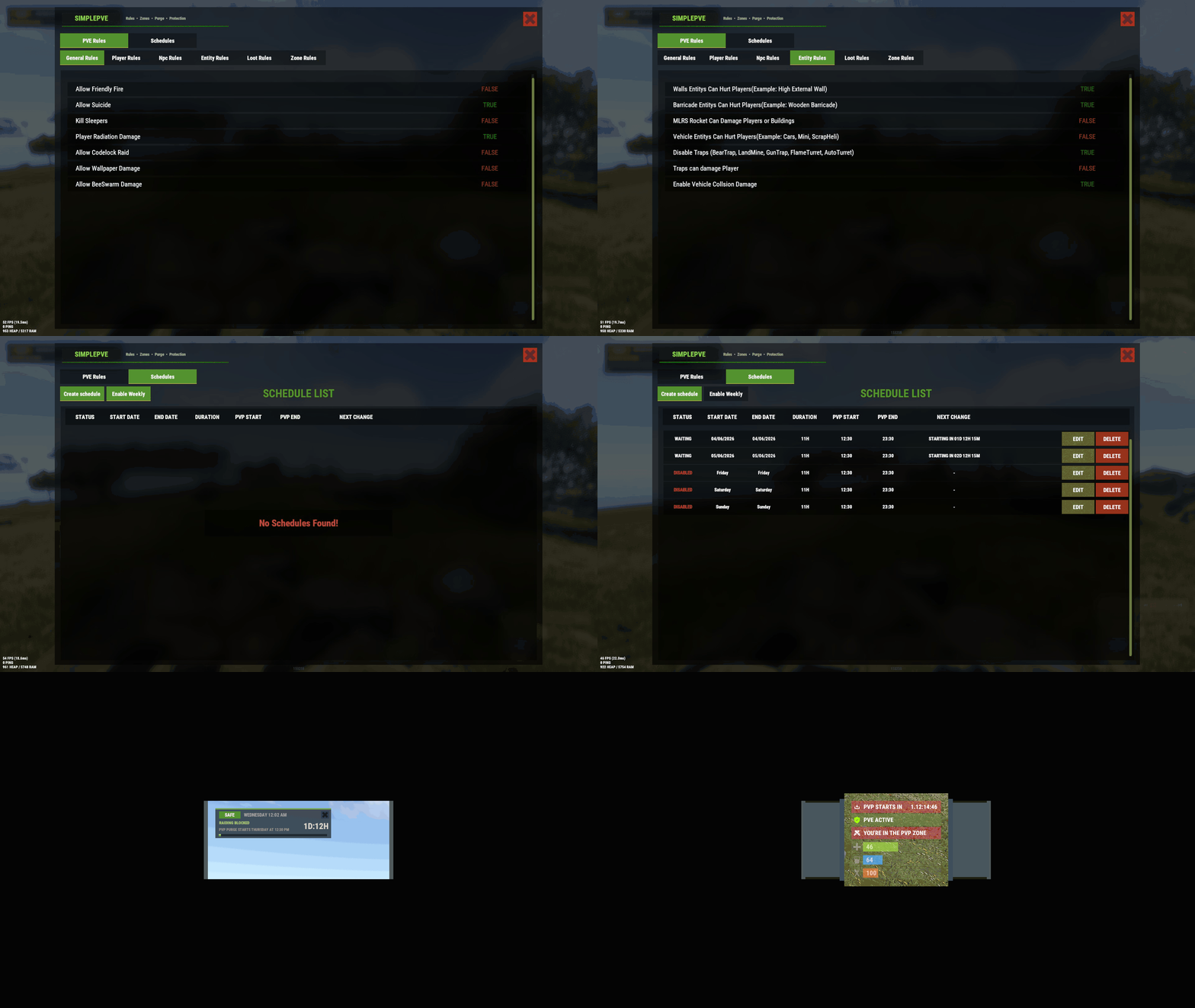 i think you have SimplePVE.admindamage permission on or something. Please let me know more info to help in your situation
 -
Are you using Facepunch behavior or Harmony method?
-
Please reload the imagelibrary then reload the FurnaceUpgrade, that should fix this
-
You mean, it didnt work or grab the kit for the npcs?
-
Is there any console error? Please send any screenshot you have Are you using ImageLibrary plugin? It will require for /sprules command Make sure you dont have `simplepve.admindamage` or `simplepve.adminloot` to default group Please give more details on your issue
-
No, there are no issues with the plugin. If you have any issues regarding the plugin, then open a ticket. Please read the Codefling Refund Policy No Refunds After Download Please note that due to the nature of digital goods, we cannot offer refunds once a product has been downloaded. This is because digital products, such as plugins, maps, and other tools, can be duplicated and used without any means to return the original item. Therefore, all sales are considered final once a download has been completed.
-
It seems you have some issue, you are having with SimplePVE, please open a ticket or dm in discord https://discord.gg/NJUHwEGeSD
-
Hey, Is there any issue?
-
.thumb.jpg.f2f378cbb4943d7036c8a674f8a23b40.jpg)
Vanilla Patrol Helicopter should only damage the caller’s TC-authorized base
Iftebinjan replied to romney's Support Report in Support
Hey, My reasoning is "It's not an intended feature from SimplePVE. It wasn't written anywhere that SimplePVE is going to control PatrolHelicopter behaviour". I took that as a suggestion for a future feature of SimplePVE. It was changed to pending to not a bug, just for that. Don't take it as salt. I can add that feature in SimplePVE. But it's just not that simple to do. It will require custom heli behaviour setup i think, and performance heavy. A lot of pve server uses custom helicopter plugin so it was never a question before, as the custom heli plugins already have this. I will test it out and see if that's doable in the plugin, & I will let you know. -
Can you send your config file of monumentevents pls
-
Yeah i did it and tested it, it was working fine, i will check again.
-
It seems you dont have ImageLibrary plugin loaded. Please install imagelibrary plugin then reload the plugin.
-
picking up a cooking station, gives a mixing table
Iftebinjan replied to tacman1981's Support Report in Support
Checking -
Vanilla Patrol Helicopter should only damage the caller’s TC-authorized base
Iftebinjan replied to romney's Support Report in Support
Changed Status from Pending to Not a Bug -
Its in the oxide/lang/en/MonumentEvents.json file. There you can change it
-
Heres is the new config for now
-
Latest staging result for August 2025 forced
Iftebinjan replied to MrLiquid's Support Report in Support
You are using old version, FurnaceUpgrades plugin already updated before force wipe. Please download the latest version -
I dont know what should be the winning factor as it has multiple hackable crates and many scientist, should we make it whoever loot the hackable crates be the winner? Or i can add a option whoever joins the monument area first gets to loot and kill the scientist?
-
Right now it doesnt have any loot configuration, it copies whatever loot system plugin you are using like betterloot, Loottable etcs plugin. For the economy and skilltree support, i can add a command list like this in the config Execute on won:[ "givemoney {PLAYER_ID} 100", "givexp {PLAYER_ID} 1000" ]
-
Duplication Exploit with Upgradable Items and /remove Command
Iftebinjan replied to SunShine ツ's Support Report in Support
Please make sure to set the furnaces items to stack to 1, which will prevent if there any duplication, if you are using any stacks plugin make sure to set these listed furnaces items to not stackable -
Updating now
-
 Hey, its purchaseable now, I was away few days so
 -
 It shouldn't lag or have much performance issues, please make sure there is 1 event running at a time. If you are still experiencing this issue, please contact me, I might be able to help.
