
CaptainNebulous
-
Posts
130 -
Joined
-
Last visited
Content Type
Profiles
Warranty Claims
Downloads
Forums
Store
Services
Downloads Plus Support
DOWNLOADS EXTRA
Reels
Everything posted by CaptainNebulous
-

Version 2.0.0
26 downloads
Track resource gathering, compare players, and see who's been farming the most on your Rust server. Resource Ranks is a resource-gathering statistics and leaderboard plugin for Rust. It tracks resources collected by individual players and provides an in-game interface for viewing personal statistics, comparing players, and browsing resource-specific rankings. Players can check their lifetime gathering totals, see how much they've collected recently, and compete for a place on the server's farming leaderboard. Features Resource Tracking — Records resources gathered from trees, ore nodes, animals, ground collectibles, and harvested crops. Player Leaderboards — Ranks players by the amount of resources they've gathered. Multiple Time Periods — View all-time totals, the last hour, or the last 24 hours. Individual Player Statistics — Browse a player's gathering history and resource totals. Resource-Specific Rankings — Compare players across individual resource types. Search and Pagination — Find players or resources without scrolling through long lists. Discord Integration — Post resource rankings to Discord using a webhook, manually or at configurable intervals. Persistent Statistics — Keeps lifetime gathering totals between server restarts, with optional map-wipe resets. Compact Data Storage — Uses an efficient JSON format to reduce storage requirements. Configurable Tracking — Enable or disable gathering sources, exclude specific items, or add custom harvestable resources. Permission Controls — Restrict access to the interface and Discord reporting commands. In-Game Interface The /farm command opens a menu containing four main sections: Farm Summary View the number of tracked farmers, total resources gathered across the server, and available resource types. My Harvest Review your personal gathering statistics, including lifetime totals and recent activity. Top Farmers Browse player rankings, switch between all-time and recent gathering totals, search for players, and open individual player statistics. Crop & Ore Index Browse and search available resources to view rankings for specific items. Commands /farm — Open the Resource Ranks interface. /farm top — Open the player leaderboard. /farm me — View your personal gathering statistics. /farm help — Display command help. /farm discord — Manually send resource rankings to Discord. Server Console resourceranks.discord — Send resource rankings to the configured Discord webhook. Permissions resourceranks.use — Allows players to access Resource Ranks. resourceranks.discord — Allows manual Discord reporting. resourceranks.admin — Registered administrative permission. Server administrators can also access the interface and Discord reporting functions. Configuration Resource Ranks provides settings for: Discord webhook URL and automatic reporting interval Discord report title Dispenser gathering and bonus hits Ground collectibles and harvested crops Quarry tracking setting Optional statistics reset on map wipe Automatic data-saving interval Excluded resource shortnames Additional harvestable item shortnames Note: Quarry output cannot reliably be attributed to an individual player, so it is not included in personal rankings. Statistics and Data Storage Resource Ranks stores permanent lifetime gathering totals alongside separate five-minute activity records used for the rolling one-hour and 24-hour statistics. Lifetime totals are preserved when old activity records expire. Statistics are stored locally in compact JSON format and do not require an external database. Installation Download ResourceRanks.cs. Place it in your server's oxide/plugins directory. Allow the plugin to compile and load. Grant resourceranks.use to the appropriate players or groups. Optionally configure Discord reporting and resource tracking. Requirements: Rust server running Oxide/uMod. No additional plugins or external database required. NOTE: A lot of AI was used in the creation of this pluginFree -
Version 1.9.14
21 downloads
A simple in-game clock and weather forecast for Rust. Nebulous Time gives players an easy way to check the current in-game time and see what weather is coming next, all with a single chat command. Instead of guessing how much daylight is left or waiting for the weather to change, players can quickly check the conditions without opening the console. Features In-Game Clock — Displays the current Rust server time in an easy-to-read 12-hour format with AM/PM. Current Weather — Shows the current weather state reported by Rust's climate system. Upcoming Weather — Displays the next scheduled weather state so players can prepare for changing conditions. Automatic Updates — Refreshes weather information every 20 seconds. Clean Chat Output — Uses simple, color-coded formatting that's easy to read without cluttering chat. Built-In Weather Detection — Reads Rust's native climate system without requiring another weather plugin. Graceful Fallbacks — If weather information isn't available on a particular server build, the plugin displays a clear message rather than reporting incorrect conditions. Lightweight Design — No database, external API, or additional plugin dependencies. Chat Command /time Displays the current in-game time, current weather, and upcoming weather. No additional commands are necessary. Example Chat Output TIME & WEATHER In-game time: 3:42 PM Current weather: Clear Upcoming weather: Light rain The values above are examples. Actual results reflect your server's current conditions. Weather Conditions Nebulous Time recognizes and displays readable names for Rust's weather presets, including: Clear Overcast Light rain Heavy rain Storm Fog Dust Other weather preset names can also be displayed when available. How It Works Nebulous Time reads the server's in-game clock directly from Rust's day/night system. For weather information, it accesses Rust's native climate component to retrieve the active weather target and the next scheduled weather preset. Weather information is refreshed automatically every 20 seconds, so players receive recently updated conditions whenever they use /time. Note: Upcoming weather refers to the next scheduled weather state, not an estimated time until that weather begins. Weather information depends on the climate data available in the installed Rust server build. Installation Download NebulousTime.cs. Upload it to your server's oxide/plugins directory. Allow Oxide/uMod to compile and load the plugin. Type /time in-game to check the time and weather. No additional setup is required. Compatibility & Dependencies Game: Rust (PC) Framework: Oxide/uMod Additional Plugin Dependencies: None External APIs: None Database: Not required Configuration: No configuration required Why Use Nebulous Time? Nebulous Time is useful for players planning a trip, preparing for nighttime, or checking the weather before heading out. It provides a small quality-of-life improvement without changing Rust's weather, day/night cycle, or gameplay balance. One command. Current time. Current weather. Upcoming weather. NOTE: A lot of AI was used in the creation of this pluginFree -

Version 1.9.19
37 downloads
Fair KD is a customizable PvP statistics and leaderboard plugin for Rust. It tracks player kills, deaths, and K/D ratios while providing configurable anti-farming protection to keep leaderboard rankings fair and meaningful. Unlike basic kill/death trackers, Fair KD separates total PvP kills from eligible kills. This allows server owners to prevent kill farming without losing track of players' overall PvP activity. Players can check their statistics, look up other players, and browse an in-game leaderboard. Optional Discord integration allows server owners to publish leaderboard results automatically or on demand. FEATURES • Tracks total PvP kills, eligible PvP kills, and deaths • Calculates K/D ratios and eligible-kill percentages • Ranks players by eligible K/D ratio • In-game leaderboard displaying 20 players per page • Player lookup by name or Steam64 ID • Configurable anti-farming restrictions • Support for Rust's native teams and clans • Excludes suicides from death statistics • Optional exclusion of sleeping and disconnected players • Configurable protection against repeated kill farming • Optional Discord webhook integration • Automatic Discord leaderboard posting at configurable intervals • Manual Discord leaderboard posting • Permission-controlled player commands and administrative functions • Persistent statistics with optional map-wipe resets • Compact JSON data storage ANTI-FARMING PROTECTION Fair KD includes several independently configurable restrictions designed to prevent players from artificially increasing their K/D ratios. • Team Kills — Exclude kills between members of the same native Rust team. • Clan Kills — Exclude kills between members of the same native Rust clan. • Spawn Protection — Exclude kills against players who recently respawned. • Naked Victims — Exclude kills against players without clothing. • Unarmed Victims — Exclude kills against players without qualifying weapons. • Sleeping Players — Exclude kills against sleeping or disconnected players. • Repeat Opponents — Apply a configurable cooldown to repeated kills involving the same pair of players. • Excluded Weapons — Prevent kills made with specified weapons from qualifying. • Suicides — Exclude self-inflicted deaths from death statistics. These restrictions can be enabled or disabled individually, allowing server owners to customize how strictly PvP statistics are calculated. STATISTICS AND RANKINGS Fair KD maintains separate statistics for total PvP activity and eligible PvP activity. Total PvP Kills: The total number of recorded PvP kills, including kills that may not qualify under the enabled anti-farming restrictions. Eligible PvP Kills: Kills that pass the configured anti-farming checks. These are used when calculating eligible K/D statistics. Deaths: Tracks player deaths while excluding suicides and other configured exceptions. K/D Ratio: Calculated using eligible kills and deaths. Leaderboard rankings prioritize K/D ratio rather than simply the total number of kills. Eligible Kill Percentage: Shows the percentage of a player's total PvP kills that qualify under the configured restrictions. IN-GAME LEADERBOARD Fair KD includes an in-game leaderboard that allows players to compare their PvP performance. • Displays 20 players per page • Supports multiple pages with navigation controls • Ranks players by K/D ratio • Displays relevant PvP statistics • Supports permission-controlled access Players can also view their own statistics or look up another player's record using a display name or Steam64 ID. COMMANDS /kd View your own PvP statistics. /kd <player> View another player's statistics by name or Steam64 ID. /kd top Display the ranked PvP leaderboard. /kdui Open the in-game leaderboard interface. /kd discord Manually post the leaderboard to Discord. /kd reset <Steam64 ID> Reset the specified player's stored statistics. Server Console Command: fairkd.discord Manually post the leaderboard to the configured Discord webhook. PERMISSIONS fairkd.use Allows players to use the /kd command. fairkd.viewothers Allows players to view other players' statistics and access leaderboard information. fairkd.ui Allows players to open the in-game leaderboard interface. fairkd.discord Allows manual Discord leaderboard posting. fairkd.admin Allows administrative statistics resets. Example permission commands: oxide.grant group default fairkd.use oxide.grant group default fairkd.viewothers oxide.grant group default fairkd.ui oxide.grant group admin fairkd.discord oxide.grant group admin fairkd.admin DISCORD INTEGRATION Fair KD supports optional Discord webhook integration for publishing leaderboard results. • Customizable Discord webhook URL • Configurable leaderboard title • Automatic leaderboard posting • Configurable posting interval in minutes • Manual posting through an in-game command • Manual posting through the server console • Support for sending larger leaderboards across multiple Discord messages Automatic posting can be disabled by setting the posting interval to 0. Discord integration is entirely optional. Fair KD does not require Discord to function. CONFIGURATION The plugin automatically generates its configuration file when first loaded. Configuration location: oxide/config/FairKD.json Configuration options include: • Suicide exclusion • Map-wipe statistics resets • Team kill restrictions • Clan kill restrictions • Spawn protection duration • Naked victim restrictions • Unarmed victim restrictions • Sleeping player restrictions • Repeat-opponent cooldowns • Excluded weapon lists • Discord webhook settings • Discord leaderboard title • Automatic Discord posting interval DATA STORAGE Fair KD uses compact JSON storage to preserve player statistics while minimizing unnecessary disk usage. • Persistent statistics across server restarts • Compact data representation • Support for migration from older supported data formats • Optional statistics resets on map wipes • No external database required INSTALLATION Download FairKD.cs. Upload the file to your server's oxide/plugins directory. Allow Oxide to compile and load the plugin. Open oxide/config/FairKD.json to review the settings. Grant the appropriate permissions to players or groups. Optionally configure a Discord webhook. Use /kd in-game to view your statistics. COMPATIBILITY AND DEPENDENCIES Game: Rust (PC) Framework: Oxide/uMod Additional Plugin Dependencies: None Discord Extension: Not required External Database: Not required Native Rust teams and clans are supported without requiring an additional clan-management plugin. Fair KD is designed for server owners who want meaningful PvP statistics, fair leaderboard rankings, configurable anti-farming protection, and straightforward administration without unnecessary complexity. NOTE: A lot of AI was used in the creation of this pluginFree -
Merged Outpost - Bandit Camp, Stables, Farm and Garage
CaptainNebulous commented on MrLou_'s file in Prefabs
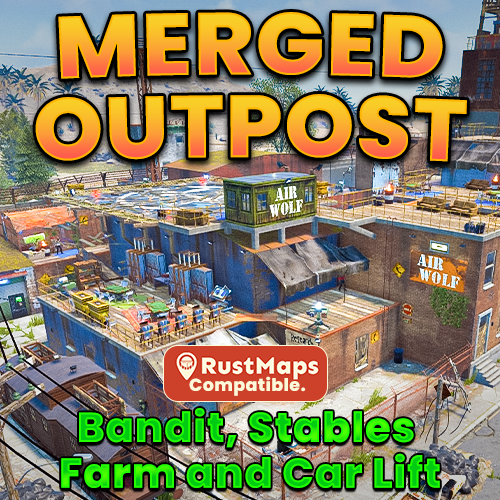 Oh ok! Had no idea you can't edit that! I could have sworn I've seen people use different styles before but I guess I'm wrong. Sorry to bug ya!
-
Merged Outpost - Bandit Camp, Stables, Farm and Garage
CaptainNebulous commented on MrLou_'s file in Prefabs
I do have one suggestion. IMO the font style for the text you have labeling the sections, and your credit for your plugin ("Made by Mr. Lou") should be a more natural looking style for a Rust monument. Currently it just looks like the text was directly pasted there, and is just kind of too generic and unworn... in a way. That's literally the only thing I found that I'd change about this. -
Merged Outpost - Bandit Camp, Stables, Farm and Garage
CaptainNebulous reviewed MrLou_'s file in Prefabs
This is a very nice rendition of Merged Outpost that fits great on a vanilla server or a modded server.... take your pick! Plus - the developer is great! They almost immediately responded and took action when I asked about their prefab being updated for a recent game change. Not only that but they worked with me for a couple of days to get it right. I enjoyed the interaction quite a bit. I highly recommend this product if you are looking for a nice addition to your server! If you have any problems this developer will respond very quickly!- 15 comments
-
- 1
-

-
- #merged outpost
- #compound
- (and 30 more)
-
Merged Outpost - Bandit Camp, Stables, Farm and Garage
CaptainNebulous commented on MrLou_'s file in Prefabs
Thanks for the heads up. I have an updated version of that as well, as the one of RustMaps was not working after September update. SaddleVendorFix.cs- 15 comments
-
- 1
-
-
- #merged outpost
- #compound
- (and 30 more)
-
Merged Outpost - Bandit Camp, Stables, Farm and Garage
CaptainNebulous commented on MrLou_'s file in Prefabs
Just one more question. Some of these custom outposts still require the old SaddleVendorFix plugin. Pretty sure facepunch fixed it so they don't need that anymore though.. I assume yours does not for the saddle vendor to work? -
Merged Outpost - Bandit Camp, Stables, Farm and Garage
CaptainNebulous commented on MrLou_'s file in Prefabs
Here in case RustMaps doesn't update the CustomMapVehicleVendorFix plugin, this is a fixed one someone posted in RustEdit discord https://github.com/rusthb/Rust-CustomMapVehicleVendorFix If you click on the file in the github there is a button to download it directly so you don't actually have to copy and paste the code -
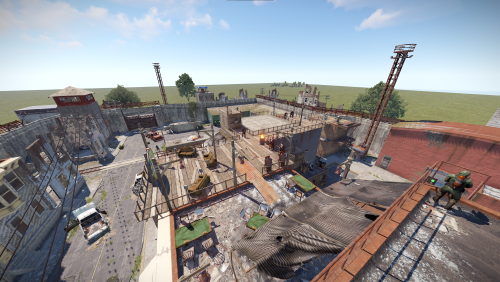 Hey I'm browsing around trying to decide which one of these to grab for my vanilla server. Was wondering if this will be updated with the new repairable heli pad for the next update? I know some devs are planning on it and some aren't. I want one that goes along with how it works in vanilla so I need one that will be updated with that new requirement.
-
Merged Outpost - Bandit Camp, Stables, Farm and Garage
CaptainNebulous commented on MrLou_'s file in Prefabs
That would be amazing! Thank you! -
Merged Outpost - Bandit Camp, Stables, Farm and Garage
CaptainNebulous commented on MrLou_'s file in Prefabs
I run a server that is more on the vanilla side of things so I'd like a merged outpost that abides by the new design.... At least unless players absolutely hate it next wipe. Thus far I haven't heard much negative feedback about it -
Merged Outpost - Bandit Camp, Stables, Farm and Garage
CaptainNebulous commented on MrLou_'s file in Prefabs
Hello! I am considering purchasing this for the next force wipe on my server. Will this be updated with the new heli pad functionality (players now need to repair the heli pad before using it) before the update is released? -
Saw a report in console but didn't send to discord
CaptainNebulous posted A Support Report in Support
So I've been using this plugin recently and for the first time ever I saw a non-test report in the console. But it didn't get sent to my discord. Used /testesp to make sure the webhook was still setup correctly and that worked. Just not the actual report. I also didn't see anything drawn on the screen when it happened and I happened to be pretty nearby -
 Works perfectly! Good plugin
-
 Players on my server loved this event!
-
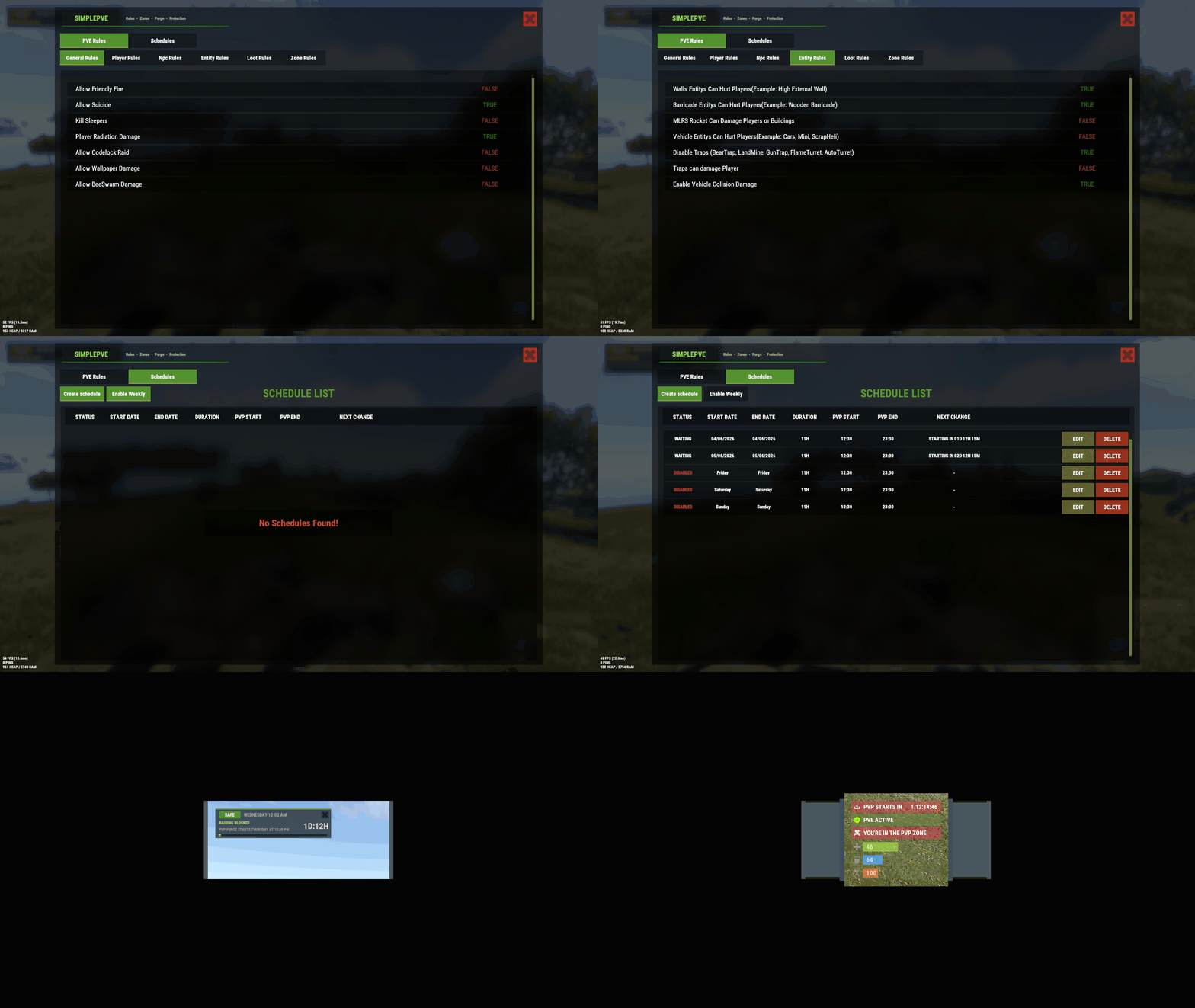 What it does it does perfectly. My only complaint really is I ended up having to use another PVE plugin in order to get the customization I wanted. So I do think this plugin leaves something to be desired in regards to features. Then again it's only $20 and like I said it worked perfectly!
-
Notifies me to update to 4.5.3 even though I already have
CaptainNebulous replied to CaptainNebulous's Support Report in Support
Disregard this. For some reason after server restart it started behaving. Makes no sense but it works now! -
Notifies me to update to 4.5.3 even though I already have
CaptainNebulous posted A Support Report in Support
As the title describes, I have already updated to Update Checker 4.5.3, yet it is sending me discord messages saying I'm still on Update Checker 4.5.2 and need to upgrade. I even went inside the CS file to make sure it said the right version lol. Additionally, in console it says all plugins are "up to date" -
AlphaLoot 2x Loot Table Advanced Config
CaptainNebulous commented on fullwiped's file in Customizations
 I've only made a few changes so far to the loot table. I'll just use yours on top of vanilla. Thanks for the quick response!
- 26 comments
-
- 1
-
-
- #alpha
- #alphaloot
- (and 45 more)
-
AlphaLoot 2x Loot Table Advanced Config
CaptainNebulous commented on fullwiped's file in Customizations
Hey just a couple of questions. Does this make it easier for players to get heavy fuses? Are they added to any of the loot tables? Also will this overwrite any changes I made to the loot table myself prior? -
Saw this pop up in the console Failed to call hook 'OnItemPickup' on plugin 'SimplePVE v1.3.3' (NullReferenceException: Object reference not set to an instance of an object) at Oxide.Plugins.SimplePVE.PlayersIsInZone (BasePlayer player) [0x00000] in <27cdc1b197034b8595730fe93c1c7234>:0 at Oxide.Plugins.SimplePVE.OnItemPickup (Item item, BasePlayer player) [0x000d4] in <27cdc1b197034b8595730fe93c1c7234>:0 at Oxide.Plugins.SimplePVE.DirectCallHook (System.String name, System.Object& ret, System.Object[] args) [0x06002] in <27cdc1b197034b8595730fe93c1c7234>:0 at Oxide.Plugins.CSharpPlugin.InvokeMethod (Oxide.Core.Plugins.HookMethod method, System.Object[] args) [0x00079] in <42f9bedc659b4f4786eb778d3cd58968>:0 at Oxide.Core.Plugins.CSPlugin.OnCallHook (System.String name, System.Object[] args) [0x000de] in <15f61ddda771464d8246ebdce8ff4811>:0 at Oxide.Core.Plugins.Plugin.CallHook (System.String hook, System.Object[] args) [0x00060] in <15f61ddda771464d8246ebdce8ff4811>:0
-
Failed to call hook 'OnItemPickup' on plugin 'SimplePVE v1.3.3' (NullReferenceException: Object reference not set to an instance of an object) at Oxide.Plugins.SimplePVE.PlayersIsInZone (BasePlayer player) [0x00000] in <f1abd9a639154fb080883267a70e0216>:0 at Oxide.Plugins.SimplePVE.OnItemPickup (Item item, BasePlayer player) [0x000d4] in <f1abd9a639154fb080883267a70e0216>:0 at Oxide.Plugins.SimplePVE.DirectCallHook (System.String name, System.Object& ret, System.Object[] args) [0x06002] in <f1abd9a639154fb080883267a70e0216>:0 at Oxide.Plugins.CSharpPlugin.InvokeMethod (Oxide.Core.Plugins.HookMethod method, System.Object[] args) [0x00079] in <42f9bedc659b4f4786eb778d3cd58968>:0 at Oxide.Core.Plugins.CSPlugin.OnCallHook (System.String name, System.Object[] args) [0x000de] in <15f61ddda771464d8246ebdce8ff4811>:0 at Oxide.Core.Plugins.Plugin.CallHook (System.String hook, System.Object[] args) [0x00060] in <15f61ddda771464d8246ebdce8ff4811>:0
-
So I've spawned this event several times and I have failed to spot it in the act of falling. Last time I had a server you could see the debris fall from the sky from quite a long distance away and it was pretty easy. Am I just missing it or is this effect possibly broken?
-
Sorry if this is a dumb question but I don't see in the UI how to create a separate schedule for raiding. I want daily PVP (4 times a day) and raiding on weekends. I also can't seem to create multiple events for the same day? I just got back into this stuff after a few years off and may be a little rusty XD