


About Nebulous Time
A simple in-game clock and weather forecast for Rust.
Nebulous Time gives players an easy way to check the current in-game time and see what weather is coming next, all with a single chat command.
Instead of guessing how much daylight is left or waiting for the weather to change, players can quickly check the conditions without opening the console.
Features
In-Game Clock — Displays the current Rust server time in an easy-to-read 12-hour format with AM/PM.
Current Weather — Shows the current weather state reported by Rust's climate system.
Upcoming Weather — Displays the next scheduled weather state so players can prepare for changing conditions.
Automatic Updates — Refreshes weather information every 20 seconds.
Clean Chat Output — Uses simple, color-coded formatting that's easy to read without cluttering chat.
Built-In Weather Detection — Reads Rust's native climate system without requiring another weather plugin.
Graceful Fallbacks — If weather information isn't available on a particular server build, the plugin displays a clear message rather than reporting incorrect conditions.
Lightweight Design — No database, external API, or additional plugin dependencies.
Chat Command
/time
Displays the current in-game time, current weather, and upcoming weather.
No additional commands are necessary.
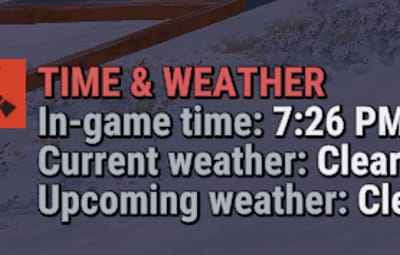
Example Chat Output
TIME & WEATHER
In-game time: 3:42 PM
Current weather: Clear
Upcoming weather: Light rain
The values above are examples. Actual results reflect your server's current conditions.
Weather Conditions
Nebulous Time recognizes and displays readable names for Rust's weather presets, including:
Clear
Overcast
Light rain
Heavy rain
Storm
Fog
Dust
Other weather preset names can also be displayed when available.
How It Works
Nebulous Time reads the server's in-game clock directly from Rust's day/night system.
For weather information, it accesses Rust's native climate component to retrieve the active weather target and the next scheduled weather preset.
Weather information is refreshed automatically every 20 seconds, so players receive recently updated conditions whenever they use /time.
Note: Upcoming weather refers to the next scheduled weather state, not an estimated time until that weather begins. Weather information depends on the climate data available in the installed Rust server build.
Installation
Download NebulousTime.cs.
Upload it to your server's oxide/plugins directory.
Allow Oxide/uMod to compile and load the plugin.
Type /time in-game to check the time and weather.
No additional setup is required.
Compatibility & Dependencies
Game: Rust (PC)
Framework: Oxide/uMod
Additional Plugin Dependencies: None
External APIs: None
Database: Not required
Configuration: No configuration required
Why Use Nebulous Time?
Nebulous Time is useful for players planning a trip, preparing for nighttime, or checking the weather before heading out.
It provides a small quality-of-life improvement without changing Rust's weather, day/night cycle, or gameplay balance.
One command. Current time. Current weather. Upcoming weather.
NOTE: A lot of AI was used in the creation of this plugin