


About Resource Ranks
Track resource gathering, compare players, and see who's been farming the most on your Rust server.
Resource Ranks is a resource-gathering statistics and leaderboard plugin for Rust. It tracks resources collected by individual players and provides an in-game interface for viewing personal statistics, comparing players, and browsing resource-specific rankings.
Players can check their lifetime gathering totals, see how much they've collected recently, and compete for a place on the server's farming leaderboard.
Features
Resource Tracking — Records resources gathered from trees, ore nodes, animals, ground collectibles, and harvested crops.
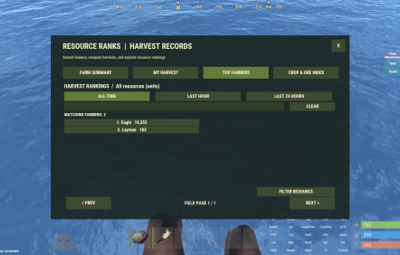
Player Leaderboards — Ranks players by the amount of resources they've gathered.
Multiple Time Periods — View all-time totals, the last hour, or the last 24 hours.
Individual Player Statistics — Browse a player's gathering history and resource totals.
Resource-Specific Rankings — Compare players across individual resource types.
Search and Pagination — Find players or resources without scrolling through long lists.
Discord Integration — Post resource rankings to Discord using a webhook, manually or at configurable intervals.
Persistent Statistics — Keeps lifetime gathering totals between server restarts, with optional map-wipe resets.
Compact Data Storage — Uses an efficient JSON format to reduce storage requirements.
Configurable Tracking — Enable or disable gathering sources, exclude specific items, or add custom harvestable resources.
Permission Controls — Restrict access to the interface and Discord reporting commands.
In-Game Interface
The /farm command opens a menu containing four main sections:
Farm Summary
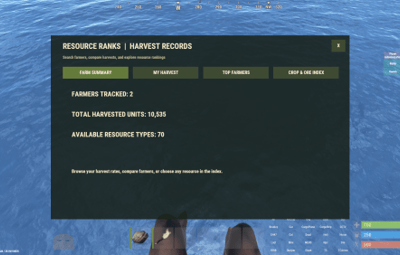
View the number of tracked farmers, total resources gathered across the server, and available resource types.
My Harvest
Review your personal gathering statistics, including lifetime totals and recent activity.
Top Farmers
Browse player rankings, switch between all-time and recent gathering totals, search for players, and open individual player statistics.
Crop & Ore Index
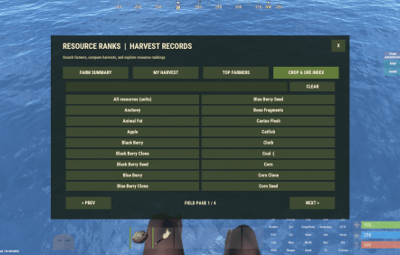
Browse and search available resources to view rankings for specific items.
Commands
/farm — Open the Resource Ranks interface.
/farm top — Open the player leaderboard.
/farm me — View your personal gathering statistics.
/farm help — Display command help.
/farm discord — Manually send resource rankings to Discord.
Server Console
resourceranks.discord — Send resource rankings to the configured Discord webhook.
Permissions
resourceranks.use — Allows players to access Resource Ranks.
resourceranks.discord — Allows manual Discord reporting.
resourceranks.admin — Registered administrative permission.
Server administrators can also access the interface and Discord reporting functions.
Configuration
Resource Ranks provides settings for:
Discord webhook URL and automatic reporting interval
Discord report title
Dispenser gathering and bonus hits
Ground collectibles and harvested crops
Quarry tracking setting
Optional statistics reset on map wipe
Automatic data-saving interval
Excluded resource shortnames
Additional harvestable item shortnames
Note: Quarry output cannot reliably be attributed to an individual player, so it is not included in personal rankings.
Statistics and Data Storage
Resource Ranks stores permanent lifetime gathering totals alongside separate five-minute activity records used for the rolling one-hour and 24-hour statistics.
Lifetime totals are preserved when old activity records expire. Statistics are stored locally in compact JSON format and do not require an external database.
Installation
Download ResourceRanks.cs.
Place it in your server's oxide/plugins directory.
Allow the plugin to compile and load.
Grant resourceranks.use to the appropriate players or groups.
Optionally configure Discord reporting and resource tracking.
Requirements: Rust server running Oxide/uMod. No additional plugins or external database required.
NOTE: A lot of AI was used in the creation of this plugin