

MeventSupport
-
Posts
2,001 -
Joined
-
Last visited
-
Days Won
9
Content Type
Profiles
Warranty Claims
Downloads
Forums
Store
Services
Downloads Plus Support
DOWNLOADS EXTRA
Reels
Everything posted by MeventSupport
-
Using `cases.trader move` puts a load on the client and reduces the frame rate to 15 FPS.
MeventSupport replied to hid333's Support Report in Support
Hi! We’ve tested this on our side, but unfortunately we were unable to reproduce the issue. However, we do believe that something like this could potentially occur under certain conditions. To help us investigate this further and be absolutely sure about the root cause, could you please create a ticket in our Discord? https://discord.gg/mevent -
Hey! That option actually already exists. In your config, find the craft item you want and set "Multiple Craft" to true. You can also set "Maximum number of crafts" to limit how many they can do at once (0 means no limit). After that just reload the plugin and youre good to go.
-
Glad you figured it out. If you run into any other issues, let me know. Happy gaming!
-
I'm very busy, will reply to you a little later! Thanks for understanding
-
.thumb.gif.4707aef13cba7c3b9ad410f5f982b71c.gif) We will fix this
We will fix this -
Please, could you send me a config?
-
Hello! We apologize that you encountered this issue. We will release a plugin update within 48 hours.
-
.thumb.png.bcb832e22f0a48b6833fee517e444bff.png) We apologize that you encountered this issue. We will release a plugin update within 48 hours.
We apologize that you encountered this issue. We will release a plugin update within 48 hours. -
 Пожалуйста, создайте тикет в нашем Discord. Также будем благодарны, если вы сможете прислать видео с демонстрацией бага, так как нам не удалось воспроизвести проблему и не до конца понятно, в чём именно она заключается. И прикрепите, пожалуйста, ваш конфиг https://discord.gg/mevent
 -
 Yes, we will release this hotfix in the next couple of days (we are testing it now)
 -
Hey! So basically what was happening, your config was in the old 1.1.5 format, and every time the plugin tried to load it on startup it couldnt parse some of the newer fields. That triggered the "config error" message you saw, and the plugin fell back to defaults. Then during runtime the default config would get written back to disk, overwriting your file. Thats why even manual edits kept getting wiped on restart. With the fixed 1.1.14 config this shouldnt happen anymore. If you ever need to edit the config manually, just make sure to reload the plugin right after so it picks up your changes before anything overwrites the file.
-
 Hey! Nope, actually its the opposite. You need "Automatically give rewards after the wipe" set to true AND "Claim Reward Settings" > "Enabled" set to true. The first one stores the rewards after wipe, and the second one makes players claim them manually with /claimreward instead of getting them automatically when they connect.
- 72 comments
-
- 1
-

-
- #ultimateleaderboard
- #leaderboard
- (and 22 more)
-
 While I can't give you a specific date today, I can tell you that we’re currently prioritizing performance updates and will be moving to new integrations right after. Stay tuned, it’s coming much sooner than that!
 -
Hey! So ServerPanel itself only includes the static info tabs like rules, server info, contacts etc. The plugin tabs like Shop, Kits, Cases, Daily Rewards and others need to be purchased separately. When you install them on your server, ServerPanel automatically detects them and adds the tab. If the plugin isnt installed, the tab just wont show up.
-
Hey! Found the problem. Your config file was still on version 1.1.5, and the plugin has been updated to 1.1.14 since then. A bunch of new settings were added and the old format was making the plugin throw a config error on startup, which caused it to reset to defaults every time. I took your config and migrated all your customizations into the new 1.1.14 format. All your daily rewards, UI colors, positions are preserved. Just drop this file in as your DailyRewards.json and you should be good to go. DailyRewards_fixed.json
-
Using `cases.trader move` puts a load on the client and reduces the frame rate to 15 FPS.
MeventSupport replied to hid333's Support Report in Support
Got it, that"s a bug on our end. We"ll fix the FPS drop during trader movement. -
There's no bulk sell price reset by percentage in the current version. The console command "shop.item" lets you adjust one item at a time with: shop.item ITEMID price sell = AMOUNT, but there's no mass operation. Your shop items are stored in the data file (oxide/data/Shop/Shops/Default.json or carbon/data/Shop/Shops/Default.json) where you can manually edit each "Sell Price" field if needed. I'll add a bulk reset tool that lets you set all sell prices to a percentage of buy price.
-
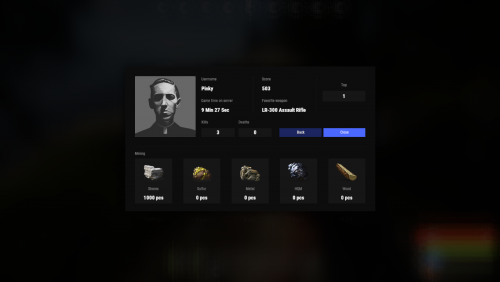 Not at the moment, but we will soon release Statistics V2, which is integrated into ServerPanel
 -
Hi! Yes of course
-
Thanks, I will check it out
-
Yeah, it’s not displayed directly on the skill level card right now. But you can manually enter the values in the Description field of each skill level in the config. For example, write something like “Level 4. +25% speed,” and the player will at least see it in the description
-
Could you please send me exactly what you are trying to change and how you are doing it? And could you also send the version of the config you are trying to apply, please?
-
This is hardcoded behavior, not a bug. When the shop is opened through an NPC, the favorite button is intentionally disabled and there's no way to turn it back on through config. Your data file looks correct by the way, the Favorites category is set up fine. If you want NPC shops to support favorites, I can add that as a feature request.
-
Hey sorry about that, I totally misread your question. You meant the favorite button on the items themselves, not the category. So two things that can cause this. First, if you open the shop through an NPC the favorite button wont show up at all, thats by design. Second, in your UI settings theres a ShopItem > Favorite > "Add To Favorites" section with its own Enabled toggle. Can you check both of those? And if youre not using NPCs, send me that part of your UI config and ill take a look.
-
 https://discord.gg/mevent Please create a ticket in our Discord channel
