aimacak
-
Posts
1,846 -
Joined
-
Last visited
-
Days Won
13
Content Type
Profiles
Warranty Claims
Downloads
Forums
Store
Services
Downloads Plus Support
DOWNLOADS EXTRA
Reels
Everything posted by aimacak
-
 Can you give any examples of incorrect deletion? How can I repeat what you are talking about?
 -
You've probably encountered exactly the same issues I mentioned to the developer. I tested this by spawning an NPC outside the navigation mesh, and after a few seconds, it would disappear. All I can say about AI is that, as with many other things in life, its use can be both appropriate and inappropriate; everything is a cure and everything is poison. I've talked to people whose half of the server is built using AI, and everything works great because they really took the time to find the tools and test many options. Try creating a full-fledged event using AI and share your experience I don't see anything wrong with creating tools to troubleshoot problems using AI, it's already commonplace. This developer simply decided to share what he came up with. He didn't deceive anyone, and I don't see anything wrong with some of the shortcomings, because even plugins from reputable developers without AI still encounter various issues after many years of support.
-
 @Goodwin This hook is tied directly to the method that is responsible for send various types of economics, and as far as I understand, the only condition under which this hook will not work is not to issue any economics at all, as in my example below, I specifically left the Economics plugin, but specified all the values for obtaining economics 0.0. "Economy setting (total values will be added up and rewarded at the end of the event)": { "Which economy plugins do you want to use? (Economics, Server Rewards, IQEconomic)": [ "Economics" ], "The minimum value that a player must collect to get points for the economy": 0.0, "Looting of crates": { "bradley_crate": 0.0, "heli_crate": 0.0 }, "Killing an NPC": 0.0, "Hacking a locked crate": 0.0, "Recycling car in a shredder": 0.0, "Recycling truck in a shredder": 0.0, "List of commands that are executed in the console at the end of the event ({steamid} - the player who collected the highest number of points)": [] },
 -
The plugin you wrote about (Console Filter) is just a filter, I don't want to offend the developer of this plugin in any way, but it's just a filter, and it can only mask the problem. And in BadConsoleFilter, as you said, there is a function to delete an NPC that is not on NavMesh and creates a flood either in the log file or in the console, and I do not understand why you assume that deleting it is just masks it. The plugin does find and remove such NPCs, and spam disappeared, there are some nuances that I have passed on to the developer and he will probably fix them later. Anyway, it's a free plugin.. If you have any example with the functionality of removing similar NPCs, please share it. In any case, new NavMesh will be completed soon, and these problems probably won't be there.. This is also just my opinion, without any negative
-
Thank you. And yes, you were right, this is indeed a custom map problem, so you can report such errors to the custom maps developers, specifying the exact places where this happens. Naturally, you first need to run the server without any plug-ins for NPCs, so that only default npcs and npcs from custom map are on the map. This plugin outputs, along with those errors about warp coordinates, where the broken NPC is located. Use it only to find such places, not using it all time, and I'm not sure if it works on carbon NpcWarpCheck.cs
-
KpucTaJI said there was no reason for it not to work. Do you have any problems using it?
-
 Hello, I will ask KpucTaJI about this, but it sounds doubtful, because I think that the number of crates is tied to the number of hostages, and this will not be so easy and will entail many other changes. Probably customizing loot in each hackablecrate would solve your problem too? It's just my idea, I don't mean that it can be added quickly.. ADDED: Yes, KpucTaJI confirmed my words, so we can only add individual loot settings for each hackable crate to the roadmap. And i cant say anything about timing, sorry.
 -
The plugin does remove NPCs that cause NavMesh spam: Failed to create agent because it is not close enough to the NavMesh For many it is a headache, but with this plugin you can easily find the location of problematic NPCs. Of course, it is better to use this functionality as a tool for finding problems, rather than as a tool that simply makes the problem invisible. Thank you.
-
Hello again, im sorry, what custom map it was?
-
BetterNPC Suggestion: Progressive NPC Difficulty Levels
aimacak replied to SpookyBoo12's Support Report in Support
Hello, sorry for a long answer, and thanks for the suggestion, I will discuss this with KpucTaJI. -
Hello, thank you for your concern, but please do not create support tickets about this. Firstly, KpucTaJI always checks all its plugins before updates, and secondly, in one of the previous updates, a premature bug fix on staging played a cruel joke at the time of the update itself. I hope you don't take this message as something negative..
-
 I answered the situation on that server above, it doesn't mean that your situation is the same. Everything is individual, but you still don't provide any specifics. No videos, no files with their settings, or any other information about the server. The default settings can be different, oddly enough. If your boss stops moving somewhere, obviously you, as an administrator, should know this, preferably at the setup stage, but at least at the first problematic case. We can talk endlessly about the problem abstractly, I would like to solve the problem, and not just discuss it, but you're just repeating the same thing, sorry. You can add me to discord if you don't just want to discuss the issue. I'll be home in 5-6 hours. @shrpndfcsd
 -
We contacted discord, the main problem with this behavior is the lack of nav mesh in the bottlenecks on the monuments, or the wrong type of navigation grid. The Bosses movement itself is also influenced by the total number of NPCs on the server, because they have a common queue for decision-making, the more NPCs on the server, the stupider and slower each of them is.
-
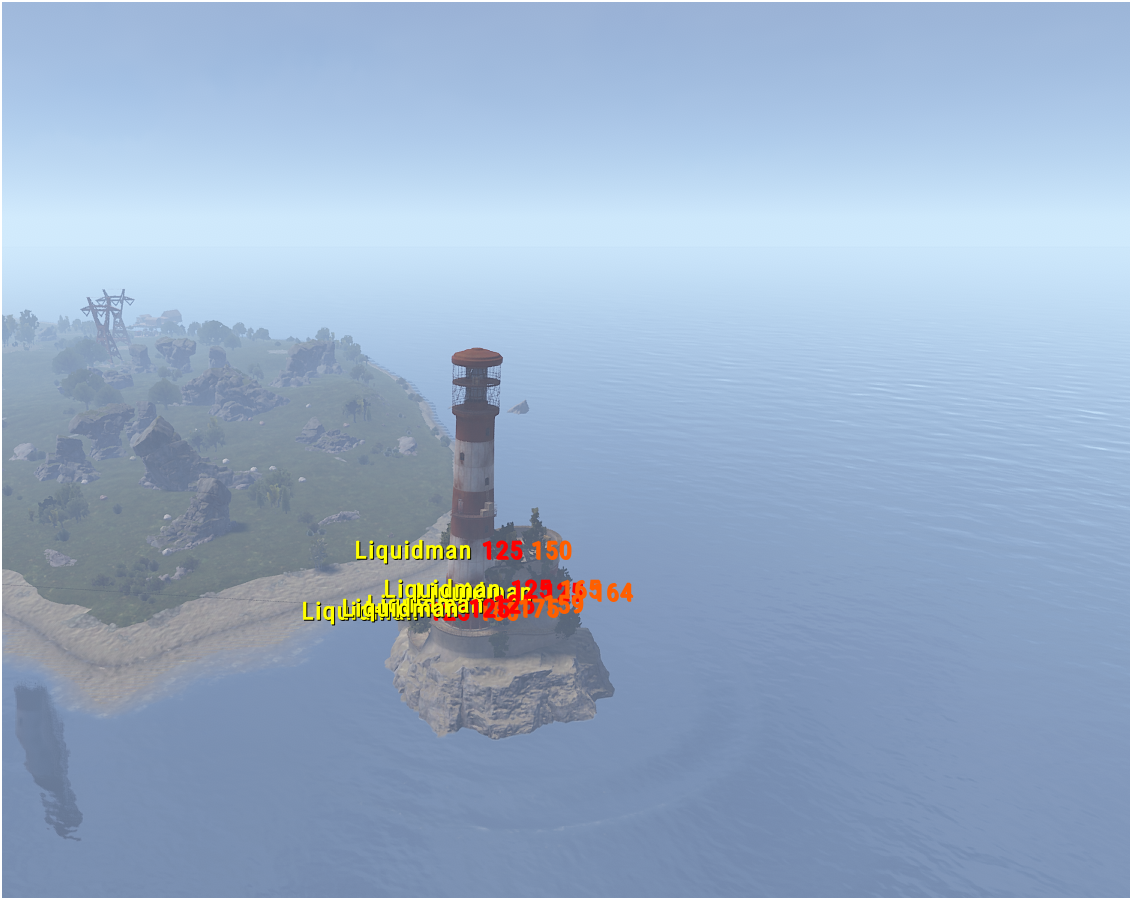
As you can see with your files everything fine for me, so i think that on you screenshot on Lighthouse situated another NPCs. You can try to send all data of BetterNpc and all Presets from NpcSpawn.

-
Send your boss's file so that I can look at it in the game in the same place.
-
Hello, are you sure this is a Lighthouse NPC? Please, send data/BetterNpc/Monument/Lighthouse.json and the NpcSpawn presets that it uses from the data/NpcSpawn/Preset/
-
NullReferenceException Error for HarborEvent
aimacak replied to SlayersRust's Support Report in Support
Hello, please try changing this value to 0.2. It was increased due to the occurrence of the same error among users, but as far as I understand in your case, this timer is too big, and the users had it too small, and due to server performance, they had an error. If 0.2 doesn't help you, you can try 0.6, i.e. on the contrary, increase it, then my assumption above will be incorrect. I understand that this should not happen, I will bring the information to KpucTaJI. string 2232: timer.In(0.4f, () => Controller.EnablePveMode(_config.PveMode, player)); -
Obviously, this should be done in all files where you are not satisfied with the NPCs settings, using the example of the SenseRange parameter, I will show you the command in the server console for mass edit: NpcEdit SenseRange 20
-
We contacted discord, the problem was in the menu plugin, which overlapped the Junkyard Event UI.
-
 Perhaps you were waiting for a response from the author of the previous message, but I do not have a continuation of this story, and this situation is unique.
 -
Hello, I need some details. What is mean LoadConfigs mean when config sections are missing?
-
I do not know such people, moreover, I do not know why you need this, I have lost the essence of your appeal
-
It was because of the old version of the plugin, thanks for trying to help
- 529 comments
-
- 1
-

-
- #abilities
- #boss
- (and 16 more)
-
I understood this from your first message, but you did not answer my previous question, what prevents you from adding needed items as Boss's loot?