aimacak
-
Posts
1,846 -
Joined
-
Last visited
-
Days Won
13
Content Type
Profiles
Warranty Claims
Downloads
Forums
Store
Services
Downloads Plus Support
DOWNLOADS EXTRA
Reels
Everything posted by aimacak
-
 No, KpucTaJI always upload same archives to all sites, when you can purchase it.
 -
Hello, sorry for the long reply, I'm glad that everything is working for you.
-
Hello, has this been fixed in the latest version (2.1.8)?
-
Hello, I will discuss this with KpucTaJI later.
-
 Переносит лутовые таблицы LootManager в файлы пресетов NpcSpawn, LM должен быть загружен на сервер, если не ошибаюсь
 -
Сами понимаете, теперь это самая вероятная причина, а применяли команду ConvertLootManager?
-
Здравствуйте, достаточно сложно что-то сказать по этой информации, как будто что-то случайное, возможно при не очень высоком среднем ФПС сервера при резкой нагрузки связанной со спавном чего-то, ивента например, или с удалением того же Карго. Попробуйте получить какую-то еще информацию, о каком-то поведении в игре или что-то в этом роде, возможно что-то удастся найти в логах перед этим спавном.
-
In folder with BetterNpc plugin, which your download from codefling, you can add me in discord if youll have any troubles: @shrpndfcsd
-
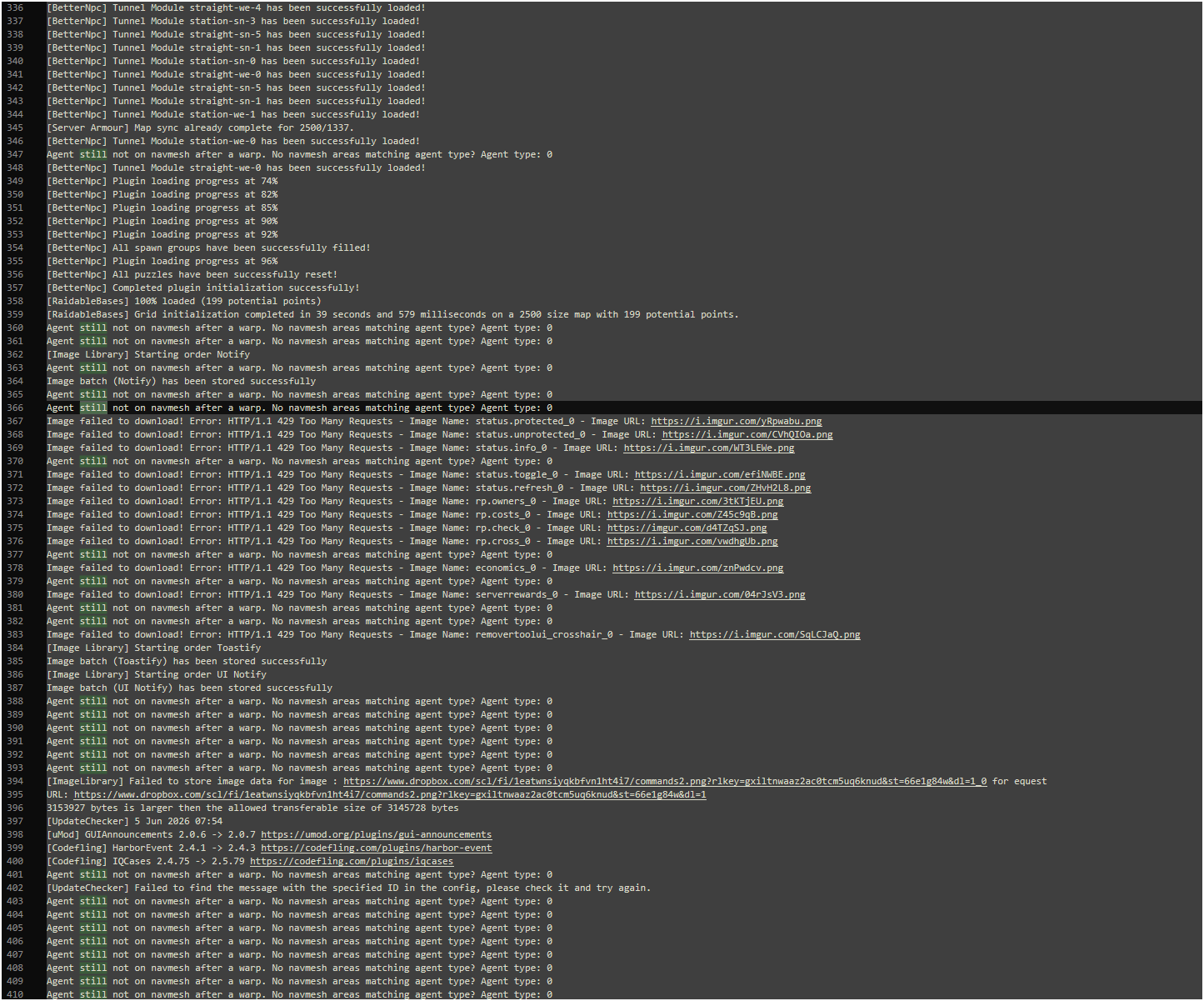
From this section, I would think more about RaidableBases, because it is after generating the grid that a lot of messages appear in RaidableBases, but I cannot confirm this. Can you unload RaidableBases and reload BetterNpc for test? Specify your custom map name please Send your data/BetterNpc/ and NpcSpawn/Preset/ please, so that I can check it myself exactly with your files. As you can see for me on procedural map with loaded only NpcSpawn and BetterNpc plugins with default configs and data files i havnt this messages:

-
Oh, my mistake, I got two navmesh messages mixed up. My previous message and the specified command refer to this message: Failed to create an agent because it is not close enough to NavMesh And about it: Agent still not on navmesh after a warp. No navmesh areas matching agent type? Agent type: 0 It's not even necessary that these messages are due to BetterNpc, we once discussed this with KpucTaJI, and in fact, we can only start from what is indicated in the message itself, that after teleportation, the NPC does not have a navigation grid, but it's probably impossible to say for sure about the reason, just test each location step by step, or a plugin. Are these messages only sent once when loading BetterNpc? Tell me in more detail everything you noticed, if you have any suspicions about any location, send it to me, or name it, but send all the files.
-
Hello, for fix this spam you need use correct coordinates and type of NavMesh grid, first you can fix all issue from ShowFailedNavMesh command.
-
Hello, you need to update NpcSpawn first.
-
 What kind of support request are you talking about? A ticket cannot be deleted on codefling, it can only be closed. About files, In such cases, it's better to watch how you reproduce it, unless of course you can give me precise instructions on how I can reproduce it with your files.
 -
They are must be same on server, except en | ru folders, because its two packs for different languages. First copy data folder to oxide folder and confirm replacement, then copy plugins folder to oxide folder
-
Hello, I'm sorry for the long answer, you can try to do a clean install and carefully start the setup over again, because most likely you made a mistake somewhere in the configuration or data files. You can send me all the files related to BossMonster, I'll try to find something.
-
Lootmanger - should i keep using it? or revert back?
aimacak replied to DrayTemplar's Support Report in Support
Hello, I apologize for the long answer, nothing has changed regarding LootManager, as soon as its participation in all plugins is completely canceled, it will be deleted. NpcSpawn currently does not have a GUI for configuring loot, i.e. after conversion, if you use loot tables in the NpcSpawn presets themselves, it will be difficult for you to change something there, it's up to you. -
 Hello, I will discuss this with KpucTaJI. Its already added in BossMonster, i dont think that it large problem, but i cant say anything now
 -
This shouldn't have happened at all, but it doesn't matter, I'm glad it helped you
-
Are you changed "Weapon Damage Multiplier" in NpcSpawn config? Its all = 0, its incorrect Try to delete NpcSpawn config and reload NpcSpawn for generating default this one
-
Interesting I gave you information about the convar server, you can switch it to check the behavior, I gave you information about how most PvE servers are configured, I do not know your goals and wishes for the server, I have not used your hosting. In addition, I specifically clarified with KpucTaJI once again, and using this plugin is more incompatible with the server.pve "true" convar parameter than compatible. Most likely, the parameter in your hosting's control panel is responsible for this server convar. And this is not a bad plugin, most likely you will have a lot of problems with most plugins when using this server convar with the true parameter. Try TruePVE or its analogues with server.pve "false".
-
Check with your hosting company what this setting does in their dashboard and review my previous post again please.
-
Hello, sorry for long answer, I checked this on the latest versions of the server and Carbon, everything is working correctly for me. Can you send your configs for NpcSpawn, BetterNpc, and folders data/BetterNpc/ and data/NpcSpawn/Preset/? And specify preset names please.
-
hello, whats you mean by PvE on? Server convar server.pve? Its must be false, all Pve server using TruePve or others similary plugins. NPCs from Raidable Bases works fine?