
Works with
Optional integrations and compatible files.


About Quarry Levels
Players upgrade a quarry or pumpjack with another quarry or pumpjack, so up to x of them stack into one instead of being placed one by one and cluttering the base. The plugin is light on performance and was designed for very high-pop servers.
A level 2 quarry will produce the same amount as 2 level 1 quarries. Same for pumpjacks. Each quarry level also unlocks the next tier of production: level 3 unlocks metal, level 4 sulfur and level 5 HQM. Every output has default production rates, and you can change them in the config.
The GUI displays the production amount, process rate, capacity and fuel consumption for each level. Each time fuel is consumed, the amount produced of each type is shown under its icon. The time it takes to complete 1 cycle is based on process rate.
Permissions
quarrylevels.use - Required to use the quarry levels system.
 Web Config Editor
Manage the QuarryLevels settings in our web config editor. You change the config in a browser form instead of editing files on the server by hand.
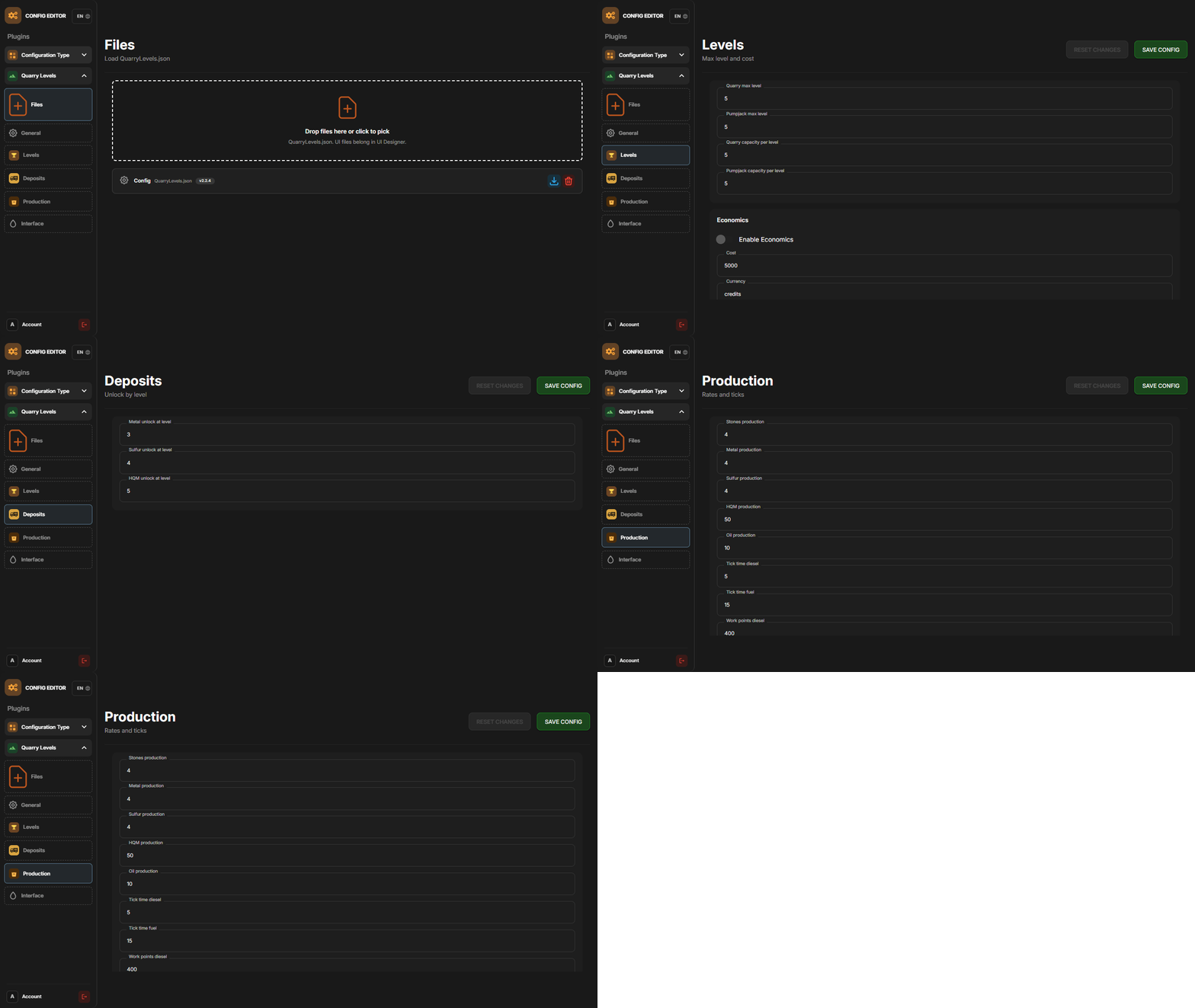
P.S. The web config editor is open to members of the "QuarryLevels" group in our Discord server. Join at https://discord.gg/mevent and ask for the group.
Config
ChatIconId - Set the Steam ID to the account with your server's icon.

UnlockMetalAtLevel - Set what level metal unlocks at while upgrading.
UnlockSulfurAtLevel - Set what level sulfur unlocks at while upgrading.
UnlockHQMAtLevel - Set what level HQM unlocks at while upgrading.

PreventUnauthorizedToggling - When enabled, only authorized players can toggle quarries/pumpjacks
PreventUnauthorizedLooting - When enabled, only authorized players can access the quarry/pumpjack.

EnableOilCraters - When enabled, oil craters will have a chance to spawn while surveying.
OilCraterChance - The chance an oil crater will spawn while surveying.

QuarryMaxLevel - Sets the maximum level a player can upgrade their quarry to.
PumpjackMaxLevel - Sets the maximum level a player can upgrade their pumpjack to.

QuarryCapacityPerLevel - Sets the number of slots unlocked per level.
PumpjackCapacityPerLevel - Sets the number of slots unlocked per level.

EnableEconomics - Enables the Economics plugin for upgrades. Leaving disable will use the old upgrade method.
EconomicsCost - Sets the price per upgrade for both quarries and pumpjacks.
EconomicsCurrency - Sets the vanity name of the currency to be displayed in the GUI and info text.

EnableServerRewards - Enables the ServerRewards plugin for upgrades. Leaving disable will use the old upgrade method.
ServerRewardsCost - Sets the price per upgrade for both quarries and pumpjacks.
ServerRewardsCurrency - Sets the vanity name of the currency to be displayed in the GUI and info text.

Metal_Production - Increases the amount produced each process rate. Lower = higher.
Sulfur_Production - Increases the amount produced each process rate. Lower = higher.
HQM_Production - Increases the amount produced each process rate. Lower = higher.

ButtonBounds - Change the position of the "upgrade" button.
ButtonColor - Change the container color of the "upgrade" button.
ButtonOpacity - Change the background opacity of the "upgrade" button.
ButtonFontColor - Change the font color of the "upgrade" button.
PanelBounds - Change the position of the upgrade panel.
PanelColor - Change the container color of the upgrade panel.
PanelOpacity - Change the background opacity of the upgrade panel.
PanelFontColor - Change the font color of the upgrade panel.
Commands
QL reload - Hot loads the config to apply config changes without having to reload the plugin. (Console command)






.thumb.gif.30bb4fb1ad6b9cbba98fad72b9533086.gif)
.thumb.png.bcb832e22f0a48b6833fee517e444bff.png)


.thumb.gif.4707aef13cba7c3b9ad410f5f982b71c.gif)