
Vinni_TV_'s Wishlist
-

$4.99
TC Stack Limiter
TC Stack Limiter lets you set custom stack limits for items inside the Tool Cupboard (TC).
It’s a great way to control how much stuff players can store in the TC and help keep the game balanced.
Can this plugin do that?
Server operators can manage game balance by adjusting the number of items that can be stored in a TC.
Key Future
* Change the global stack size of items: by setting a global stack multiplier, you can change the stack size of a particular item.
* Item Stack Limit in Tool Cabinet: Apply a specific maximum stack number to wood, stone, Metal Fragments, and HQMs set in the Cabinet Stack Override. (e.g. if wood: 1000 is set, only a maximum of 1000 pieces of wood can be stacked in the tool cabinet).
* Notification: If enable notification is set to true, items that exceed the stack limit will be automatically returned to the player's inventory and the player will be notified.
* Handling of items exceeding stack limit: If a player attempts to place an item in the tool cabinet that exceeds the limit, the excess will be returned to the player's inventory. If the player's inventory is full, the item will be dropped to the floor.
Compatibility
* StackSizeController
* Loot Table & Stacksize GUI
Although this plugin is compatible with StackSizeController, an error is triggered every time an item is placed into a Tool Cupboard due to an issue on StackSizeController's side. For this reason, we recommend using Loot Table & Stacksize GUI instead.
Admin Commands
/tcstack list - Displays the current configuration.
/tcstack set <item shortname> <amount> - Sets the TC stack limit for the specified item to <amount>.
/tcstack remove <item shortname> - Removes the stack limit (reverts to the normal stack size in the TC).
/tcstack reload - Reloads the configuration.
Config
{ "Cupboard Stack Overrides": { "wood": 1000, "stones": 1000, "metal.ore": 1000, "metal.fragments": 1000, "hq.metal.ore": 100, "metal.refined": 100, "lowgradefuel": 500, "crude.oil": 500 "fat.animal": 1000, "cloth": 1000, "bone.fragments": 1000, "charcoal": 1000, "horsedung": 500, "fertilizer": 1000, "scrap": 1000 }, "Enable Notifications": true, // Toggle whether players receive a message when an item exceeds the stack limit. "Priority Mode (TCFirst or InventoryFirst)": "TCFirst", // "TCFirst": Try placing excess items in other TC slots first, then. "InventoryFirst": Try returning to player's inventory first, then TC. "Enforce TC Limits": true, // Whether to actually apply stack limits in the TC. If disabled, limits are only visual. "Split Excess Stacks": true, // If enabled, automatically split items into valid stack sizes when inserting into the TC. "Override Other Plugins for TC": true // "true": Prioritize TCStackLimiter values inside the TC. "false": Use the minimum stack size between TCStackLimiter and other plugins. }- #toolcupboard
- #tc
- (and 2 more)
-

$19.99
Zombie Infection
By imthenewguy in Plugins
Zombie Infection is an arena style plugin that creates an arena high in the sky.
It pits 2 teams against each other: Survivors and Zombies.
All players spawn as Survivors when the game begins. The survivors must find weapons and ammunition to defend themselves from the oncoming Horde.
After 45 seconds (configurable), a random player is selected to become the leader of the Zombies, otherwise known as Zombie Prime. They are re-equipped and are allocated a large amount of health
When a zombie hits a survivor with a melee weapon, that player is infected and is re-spawned as a zombie.
Regular zombies do not have as much health as Zombie Prime, but they will re-spawn an infinite amount of times when killed.
The survivors win by surviving for the entire round (default 10 minutes), or by eliminating Zombie Prime.
The Zombies win by infecting all of the survivors.
It is worth mentioning that only Zombie Prime is rewarded for the zombie team win.
Regular zombies are instead rewarded based on the number of survivors they infect.
Each prize type can be changed via the config.
zistart <arena name> - Manually starts the Zombie Infection game [requires zombieinfection.admin] ziend - Manually ends the game [requires zombieinfection.admin] zisetcentrepoint - Changes the spawn location of the arena [requires zombieinfection.admin] ziwipeoldarena - Manually wipes old arena data [requires zombieinfection.admin] zijoin - Joins an active lobby zileave - Leaves the game and returns the player to their last location with all of their equipment ziprize - Redeems outstanding prizes to the players inventory
-
$19.99
Discord Link
Discord Link is a very simple, performant, and feature-rich Discord and Rust linking system. 2 Simple steps and a player can link to Discord!
NO DISCORD.DLL!!
FEATURES
- NO DISCORD.DLL REQUIRED!!! - Link Rust and Discord accounts - Grant a role in discord and group in game for linked players - Soft unlinking (All past data on a user's account links will be forever stored) - 2 Way role syncing between rust to discord and discord to rust - Supports multi server linking - Booster perks for linked players boosting your discord - Steam to discord name syncing (Auto renames users in discord to their steam name) - Admin perms to unlink players - Search link commands in discord and in game to get who a player is linked to - Logs to discord when players link and unlink - Auto remove players from being linked when they leave the Discord - Syncing your old database files from steamcord, discord auth, or discord core PERMISSIONS
discordlinkbot.search - ability to search players and use the UI
The Plugin and Discord Bot both have very simple installations.
We have included a readme.md file to make it even easier to setup!
Need support or want updates about what is coming to the bot? Join the support discord here https://discord.gg/ZsRgCUNv2x
This will require bot hosting to run the bot 24/7 since we do not use the Discord DLL therefore the server cannot host the bot.
Thanks to @shady14u for co-developing!!
-
$45.95$31.95Clans
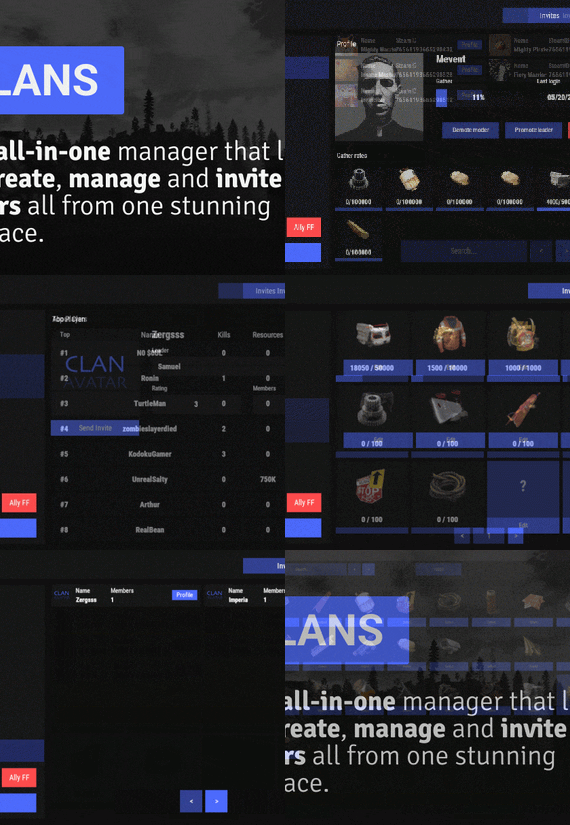
Clans is an all-in-one manager that lets you create, manage and invite players all from one stunning interface. Toggle friendly fire, view clan, and player leaderboards, create and break alliances, modify gather rates for clan members and set clan skins to identify clan members abroad easily.
Features
Beautiful user interface Performance Allied clans Gather rate for players (allows you to set how much each clan member must collect resources. For example: each member of the clan must collect 10 thousand sulfur, so that later it can be used to craft explosives and attack another clan) Clan skins (allows you to set common skins for all clan players. All the clothes on the players of the same clan will be the same, which allows you to distinguish your own from the enemies during the battle) The clan TAG min- and max-length can be defined in the config The clan overview shows offline member names Clan members can toggle friendly-fire protection for clan mates and allies Clan creation can check TAG’s against a blocked word list Clan tagging can be optionally disabled Old (not updated since x days) clans can be automatically purged Clans rating Players rating Setting a personal avatar for your clan Autowipe with wipe (optional)
Commands
clans (display clan menu) clans help (get information about commands) clan create (create a clan) clan leave (leave from your clan) clan join (open UI with invitations) clan ff (toggle friendlyfire status) clan allyff (toggle friendlyfire status for allies) clan invite <name/steamid> (invite a player) clan withdraw <name/steamid> (cancel an invite) clan kick <name/steamid> (kick a member) clan allyinvite <clanTag> (invite a clan to ally) clan allywithdraw <clanTag> (cancel the offer of an alliance) clan allyaccept <clanTag> (accept the offer of an alliance) clan allycancel <clanTag> (cancen the offer of an alliance) clan promote <name/steamid> (promote a member) clan demote <name/steamid> (demote a member) clan disband (disband your clan) clans.loadavatars (download avatars of all players) clans.manage list - lists all clans, their owners and their member-count clans.manage listex - lists all clans, their owners/members and their on-line status clans.manage show [name/userId] - lists the chosen clan (or clan by user) and the members with status clans.manage msg [clanTag] [message] - sends a clan message clans.manage create [name/userId] [clanTag] - creates a clan clans.manage rename [oldTag] [newTag] - renames a clan clans.manage disband [clanTag] - disbands a clan clans.manage invite [clanTag] [name/userId] - sends clan invitation to a player clans.manage join [clanTag] [name/userId] - joins a player into a clan clans.manage kick [clanTag] [name/userId] - kicks a member from a clan clans.manage owner [clanTag] [name/userId] - sets a new owner clans.manage promote [clanTag] [name/userId] - promotes a member clans.manage demote [clanTag] [name/userId] - demotes a member clans.reborn.convert (convert data from Clans Reborn plugin) clans.umod.convert (convert data from uMod Clans (v0.2.2+) plugin) clans.convert.olddata (convert data from old data) clans.convert.old.stats – used to update player data when upgrading from older versions of the game to 1.1.31 and above.
Permissions
clans.cancreate (permission to create a clan) clans.canjoin (permission to join a clan) clans.canleave (permission to leave a clan) clans.candisband (permission to disband a clan) clans.cankick (permission to kick a clan member) clans.admin (permission to use command 'clans.manage')
Loot Types
None – used for disabled loot Gather – used for gathering loot LootCrate – used for a loot crate Look – used to look at loot Kill – used to kill entities Craft – used for crafting items HackCrate – used for hacking a loot crate
FAQ
Q: Where can I see an example of a config?
A: Config
Q: Does the Clans plugin support other plugins?
A: Yes, this Clans plugin has an API similar to other popular clans plugins. If the plugin works with Clans - it works with this plugin too.
Q: How do I enable the display of clan ratings on the screen?
A: You need to install the Clans Top plugin
Q: Does the Clans plugin work with other Rust plugins?
A: The Clans plugin is designed to work with a wide range of other Rust plugins, but compatibility may vary depending on the specific plugins you are using.
-
$10.00
Watchlist
By rogder dodger in Plugins
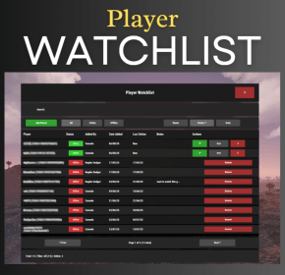
Watchlist is a lightweight but powerful tool that alerts admins when specific players connect to the server. Whether you're online or offline, you'll get real-time in-game notifications and Discord alerts with fully configurable message templates and role pings. The built-in UI makes managing the watchlist easy, with support for sorting, filtering, teleporting, and note-taking. Players can be added or removed manually or straight from RustAdmin with custom commands. Very useful tool to keep you and your staff one step ahead.
Configuration
{ "Discord Webhook URL": "https://discord.com/api/webhooks/your/webhook/url", (Your Webhook URL) "Ping Role": false, (Whether to ping a role when player comes online on discord, e.g: @Admin) "Role ID": 0, (Discord Roll Id to ping) "Purge Watchlist on Wipe": false, "Purge Players List on Wipe": false, "Enable UI": true, "UI Color Scheme (Options: dark, light, rust)": "dark", "Custom Colors": { "PrimaryBackground": "0 0 0 0.95", "SecondaryBackground": "0.15 0.15 0.15 1", "HeaderBackground": "0.1 0.1 0.1 1", "ButtonPrimary": "0.2 0.7 0.2 0.9", "ButtonSecondary": "0.3 0.3 0.3 1", "ButtonDanger": "0.7 0.2 0.2 0.9", "TextPrimary": "1 1 1 1", "TextSecondary": "0.7 0.7 0.7 1", "OnlineIndicator": "0.2 0.8 0.2 1", "OfflineIndicator": "0.8 0.2 0.2 1", "RowEven": "0.12 0.12 0.12 0.95", "RowOdd": "0.15 0.15 0.15 0.95", "ActiveItem": "0.4 0.4 0.4 1", "AlertBackground": "0.8 0.2 0.2 0.95", "AlertText": "1 1 1 1", "AlertPanel": "0.11 0.11 0.12 0.98", "AlertHeader": "0.62 0.17 0.17 1", "AlertDivider": "0.25 0.25 0.27 1", "AlertLabel": "0.6 0.6 0.63 1" }, "Alert Position": { "AnchorMin": "0.775 0.60", "AnchorMax": "0.985 0.90" }, "Alert Cursor Enabled": false, "UI Scale": 1.0, "Main UI Position": { "AnchorMin": "0.2 0.1", "AnchorMax": "0.8 0.9" }, "UI Scale": 1.0, "Main UI Position": { "AnchorMin": "0.2 0.1", "AnchorMax": "0.8 0.9" }, "Font Size": { "Title": 20, "Header": 14, "Normal": 12, "Small": 10 }, "UI Animation": true, "Enable Sound Alert": true, "Alert Sound": "assets/bundled/prefabs/fx/notice/item.select.fx.prefab", "Alert Duration (seconds)": 10.0, "Show Visual Alert": true, "Send Discord Add/Remove Notifications": true, "Max Cached Players": 3000, "Player Cache Retention Days (0 = disabled)": 30, "Player Cache Save Delay Seconds": 60, "Alert Cooldown Seconds": 120, "Startup Alert Grace Seconds": 60, "Auto Expire Days (0 = disabled)": 0, "Send Prune Discord Notifications": true, "Prune Report Max Per Embed": 10, "Prune Report Include Notes": false, "Enable Diagnostics": false, "Max Audit Log Entries": 500 } COMMANDS
Chat:
/watchlist
Opens the Watchlist UI (requires permission)
/wl <steamid> "<note>"
Adds a player to the watchlist with a note (requires watchlist.admin permission)
/wlr <steamid>
Removes a player from the watchlist (requires watchlist.admin permission)
/wlist
Lists all watched players in chat (requires watchlist.admin permission)
Console:
watchlist.add <steamid> "<note>"
Adds a player to the watchlist Example: watchlist.add 76561198000000000 "Suspected Cheater"
watchlist.remove <steamid>
Removes a player from the watchlist watchlist.list Lists all watched players in the server console
wl <steamid> "<note>"
Adds a player to the watchlist with a note (can be used via rcon)
wlr <steamid>
Removes a player from the watchlist (can be used via rcon)
wlist
Lists all watched players in the server console (can be used via rcon)
purgewl
Clears the entire watchlist (requires watchlist.admin permission)
watchlist.testalert
fires the alert at yourself with sample data so you can position and colour it without waiting for someone to log in.
You can also pass a Steam ID (watchlist.testalert 76561198000000000) to preview it with a real entry's details.
PERMISSIONS
watchlist.admin
Full access to all commands and features
watchlistui.toggle
Allows UI toggle via `/watchlist` command
RUSTADMIN INTEGRATION
You can integrate Watchlist directly with **RustAdmin** to add or remove players with a single click.
Add to Watchlist
Command to Execute: wl ${playerSteamid} "From RustAdmin"
Tick "Show Command Output in a Dialog" (optional)
Remove from Watchlist
Command to Execute: wlr ${playerSteamid}
Tick "Show Command Output in a Dialog" (optional)
- #admin
- #anticheat
- (and 22 more)