
Vinni_TV_'s Wishlist
-
$40.00
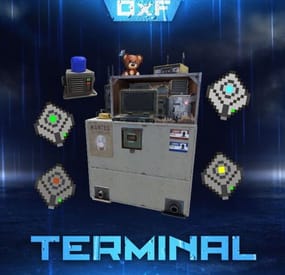
Terminal
Terminal is an indispensable item that will allow players to manage the resources of the house in one place! Just as importantly, it is not just a conditional button on the screen or something similar, but a complete new item that is placed in the house, which gives a nice user experience to any player that likes interaction. Its multifunctionality will allow the player to use it for a variety of purposes, from simple resource management to building a terminal-only resource factory. Interested? Then let's get to the details.
Examples of uses:
Getting remote access to resources, the ability to take resources from several storages at once, as well as put them in them. The ability to use the terminal as one big chest thanks to the cells of different levels, available import and export pipes will allow to realize the delivery of resources to the production tools Building a plant powered by terminal alone Many other clever uses, like a chest in the buffer of the house connected to the terminal. Combining uses Features:
Similar type items are displayed combined in one slot, where you can see the total quantity and take the required quantity. Two modes of operation: wireless and cellular. Full-featured new placeable item Works with industrial pipes Ability to create different cells (by standard there are 4 levels) Cells have their own stack size just for them. Intelligent movement that will not allow you to store more items in the boxes than allowed The terminal has a convenient search for items in the user's language, not only in English
Demo Video:
Installation instructions
Installing dependencies CustomEntities. Go to Github, click Clone -> Download ZIP, then transfer CustomEntities.cs to the folder with plugins.
CustomItemDefinitions. Go here, download and install in the plugins folder. Download purchased this plugin and install it in the plugins folder the same way. Done
Quick Start:
Prompt commands: give terminal give storage_cell.level1 give storageadaptor.wireless Place terminal, put the cell in the cell storage, install the adapter on the chest, enjoy. More about items:
[Terminal]
Terminal is a placeable item, with the ability to be placed both outside and in the house, serves for convenient management of all resources in the house. It has a certain amount of health (default 500), as well as the ability to pick up with a loss of strength. It has 2 modes of operation, wireless and cell, can work with industrial, by means of pipes to import and export items from cells.
The server owner can decide where to get this item from, it has its own short name and can be used in all plugins, the best option is to craft it.
The shortname of the item - terminal
Command to give:
give terminal
How to pick up a terminal?
For this we must have authorization in the cabinet.
Holding a mallet in your hand, point at the part of the terminal where the inscription Authorize appears, press the R button and select Turn.
How to switch modes of operation?
It is possible to do this by pressing the switch on the left side of the laptop, it looks like this:
What is needed to work in wireless mode?
To start working you need the item "Wireless Storage Adapter”, this item is part of the plugin. Can be obtained by any method of the server owner's choice.
The short name of the item - storageadapter.wireless.
Command to give out:
give storageadaptor.wireless Next, install the wireless storage adapter on the storage item you need. Such as: chests, furnaces, refineries, etc.
Next, select the wireless mode on the terminal by pressing the switch.
After entering the laptop, it will display all the items that are connected to the adapter in the range of the wireless mode of the terminal (customizable).
What is needed to work in the cell mode?
The first thing you need are the cells themselves, they can be obtained in any way the server owner chooses.
The short name of the item - storage_cell.{name from the config, by default it is level1-4}
Command to give out:
give storage_cell.level1 Cells should be put in the terminal cell storage, it looks like this:
It is recommended to put any kind of lock on the cell storage, otherwise they can be stolen!
Next, select the cell mode on the terminal by pressing the switch.
After entering the laptop, where you can now see what is in the cells, how many slots are available and you can put things there.
[Wireless Storage Adaptor]
Used for the wireless mode of the terminal. Installed on all storage items for which a regular storage adapter is available. Does not require additional connection.
The server owner can decide where to get this item from, it has its own short name and can be used in all plugins, the best option is to craft it.
The short name of the item - storageadapter.wireless.
Command to give out:
give storageadapter.wireless
[Storage Cells]
Cells hold items, have a certain number of slots and a maximum stack in each slot. These are special slots and only in them items can be stacked to their maximum. The maximum stack works on the principle of 1 type - 1 slot. That is, if the maximum stack is 5000 and the player puts there 10 new machine guns, they will occupy 1 slot and such can be put another 4990, if he puts a slightly broken machine gun, it will take another slot and will store the same machine guns. This is how it works with all items.
Another example; a level 1 cell has a maximum stack of 5000 and 8 slots, and if you store only sulfur in it, you can eventually store 40000 sulfur in it. Higher level cells have more stacks and slots.
Don't worry, the configured max stack won't be knocked down, items will unstack when they are laid down and taken out of the cell.
The server owner can decide where to get this item from, it has its own short name and can be used in all plugins, the best option is to craft it.
The short name of the item - storage_cell.{name from the config, by default it is level1-4}
Command to give out:
give storage_cell.level1
-

$20.00
Detective Stewie
The NpcDetective plugin adds a detective named Stewie, standing in the outpost and bandit camp.
Detective for a specified fee through time will send information about the location of the player, but there is a chance that the detective will not be able to find him, as well as that the target will feel the gaze of the detective directed at him.
The plugin is aimed at PVP content and will definitely be of interest to your players who love battles, because they will be able to find out the whereabouts of the obitchik or if they are lucky to find out where his house is, which will allow them to raid him.
Some details of the default plugin settings:
There are 2 spawn points on the monuments, in the outpost and the bandit camp. Default mission completion time is 5 to 10 minutes. Chance of mission failure - 30% Chance that the target will feel the detective's gaze - 10%. Kulldown 10 minutes Price for the service is 200 scrap Features:
The plugin supports 4 types of economics namely Economics, ServerRewards, IQEconomics, Items Has completely identical UI that Rust uses for conversations as well as for player selection. The UIs have been replicated from scratch and do not require extra dependencies. It has dialogs already ready to use. Provides the ability to translate each of the plugin texts, including the name of the bot above. A wide range of mission settings, including the chances of a variety of events, which greatly fuels interest. The plugin is immediately ready to use without further customization. Permissions:
npcdetective.allow - allows you to use the services of NPCs Commands:
getnpcpos - allows you to get a spawn point for an NPC, relative to a monument or world (in this case specified as "custom”)
Video:
Default Config:
{ "Spawn Points": { "assets/bundled/prefabs/autospawn/monument/medium/compound.prefab": "-26.38629 0.2249966 -20.25003 -6.138487 245.2638 7.046678", "assets/bundled/prefabs/autospawn/monument/medium/bandit_town.prefab": "42.65682 7.059561 -31.20314 8.198808 329.3285 7.740015" }, "Payment Settings": { "Provider (Economics | ServerRewards | IQEconomics | Item)": "Item", "Provider Currency Name": "scrap", "[Item Provider] Short Name": "scrap", "[Item Provider] Skin ID": 0, "Price of search service": 200 }, "Mission Properties": { "Information Accuracy Type (Mark | Grid)": "Mark", "Lead Time Range Min (in seconds)": 300.0, "Lead Time Range Max (in seconds)": 600.0, "Cooldown in seconds": 600.0, "Chance of mission failure (0-100%)": 30.0, "Сhance that the target will sense the presence (0-100%)": 10.0 } }
-

$10.00
Walkie-Talkie
Introducing the Walkie-Talkie Plugin: Seamlessly integrate real-time communication into your gaming experience! Stay connected with your teammates, strategize on-the-go, and coordinate your moves effortlessly with this immersive in-game communication tool. Whether you're navigating treacherous terrains or planning tactical maneuvers, the Walkie-Talkie keeps you in sync, enhancing teamwork and elevating your gaming adventure to a whole new level!
Features:
Gives players the ability to commiserate with each other, come up with strategies, and ambush each other. It is possible to create different variations of walkie-talkies for different distances. By default, 5 variations of walkie-talkies are given ready-made. Walkie-talkies can be both automatic and manual (in manual mode it is necessary to press LMB to hold the walkie-talkie, in automatic mode it is not required).
Installation:
Before installing the plugin, make sure you have the CustomItemDefinitions library installed.
It is necessary for the plugin to work. Download it here. Put this plugin in the plugins folder How does a walkie-talkie work?
Several players must have a walkie-talkie tuned to the same frequency in their inventory.
To start talking into the walkie-talkie you need to take it in your hand, then press LMB (in case of manual walkie-talkie, for automatic walkie-talkie it is not required) and then press V button (if the microphone mode is enabled), that's it, now you can start talking.
How do I get a walkie-talkie?
Since each walkie-talkie has its own unique shortname and ItemId you can receive it like any other item. That is, you can give it out via the give or giveto command, or add it to the loot table or other ways via plugins.
- #custom item
- #walkie
- (and 4 more)
-

$5.00
Wipe Timer Status
The plugin displays the time to wipe from the WipeTimer plugin
Features:
Shows the exact time before the wipe Ability to display the timer within the time specified in the config, after connecting the player Comprehensive setup of all aspects Option to tailor text for different languages to reach players from various countries Lang files for all languages are auto-generated, so you only need to write your text.
Important!
Time format for specifying the time to the second:
"Time Format": "d\\d\\ hh\\h\\ mm\\m\\ ss\\s",
-
$15.00
Permission Status
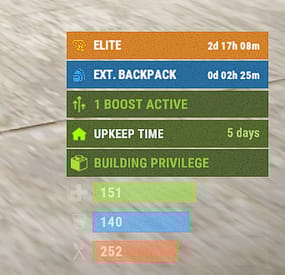
The plugin allows you to display time to expiration for permissions or groups.
Features:
Detailed and elegant display of your permissions and groups. Detailed customization of everything Ability to customize text for different languages to reach players from different countries. Ability to enable status display only in the authorized area of the cabinet Ability for a player to disable status display Optimized (static) status mode available Automatically generate language files for all languages, you just need to write your text. Permissions:
permissionstatus.hide - this permission is used for status switching by the player.
IMPORTANT: If you give this to any group, the statuses will not work. Chat Commands:
ps.toggle - status display switch for a player
Default Config
{ "ExampleGroupOrPerm": { "true - Group | false - Permission": true, "Display Mode (0 - Time, 1 - Static)": 0, "[Time display mode] Update Interval (in seconds)": 60.0, "Only show in authorized cupboard area": false, "Icon Url": "default", "Time Format": "d\\d\\ hh\\h\\ mm\\m", "Background Color": "0.16 0.44 0.63 0.85", "Icon Color": "0.22 0.63 0.90 0.9", "Title Color": "1 1 1 1", "Text Color": "1 1 1 1" } } Default Lang:
{ "HideMessage": "You have hidden the statuses of timed permissions.", "ShowMessage": "You have enabled the display of timed permissions statuses.", "ExampleGroupOrPerm": "ExampleGroupOrPerm" } Example Config:
{ "Elite": { "true - Group | false - Permission": true, "Display Mode (0 - Time, 1 - Static)": 0, "Only show in authorized cupboard area": false, "Icon Url": "default", "Time Format": "d\\d\\ hh\\h\\ mm\\m", "Color": "0.85 0.52 0.17 1", "Icon Color": "1 0.8 0 1", "Text Color": "1 1 1 1", "Subtext Color": "1 1 1 1" }, "backpackpro.size42": { "true - Group | false - Permission": false, "Display Mode (0 - Time, 1 - Static)": 0, "Only show in authorized cupboard area": false, "Icon Url": "https://static.thenounproject.com/png/74337-200.png", "Time Format": "d\\d\\ hh\\h\\ mm\\m", "Color": "0.16 0.44 0.63 1", "Icon Color": "0.22 0.63 0.90 1", "Text Color": "1 1 1 1", "Subtext Color": "1 1 1 1" } } Example Lang:
{ "Elite": "Elite", "backpackpro.size42": "Ext. backpack" }- #timedpermissions
- #statusbar
- (and 7 more)