Jump to content

molokatan

Member
  • Posts

    127
  • Joined

  • Last visited

  • Days Won

    1

Everything posted by molokatan

  1. Sorry, i missed to add a new perk to an enum in the plugin. It should work now again. If you have any other problems, feel free to reach out to me.

  2. molokatan

    Craft Menu

    Its also not working with tugboats. The box will be stuck in place when you move the boat.
  3. Since i am not using rp or eco, the pressure on this topic was not quite high. I have planned to add them later, but this still takes a while. Right now a bit difficult to find some free time to add new features, but hope its getting better soon. Can you maybe add a support request for this feature? then we cant miss it and you get additional infos when i start working on it.
  4. noted down. think i can add it as a configurable option. So players can decide to disable this "security layer". no ETA yet for it, since my week at work is kinda exploding right now.
  5. Best guess, i have to change how i load the config files from EpicLoot and ItemPerks. Will look into it tomorrow and let you know. Always better, if you open a support request. Easier for me to not forget about it.
  6. i should replace actually my image here, so that its more clear.
  7. It was somewhere from that page https://icons8.com/icons/set/shirt--gradient You would have to download it and put it on some file storage. Then you can use the link for the button in the config. Important: If you use free icons from that page, you have to give them credits. You can do that in a specific section of your info pages.
  8. molokatan

    Dynamic Monuments

    Your AlphaLoot Loottable has settings for different prefabs, npcs etc. like those They are considered a preset. if you put "crate_normal_2" it will spawn the loot from that container profile. You can even add presets that are not used for standard stuff of the game. technically you can create specific presets for all adem events
  9. molokatan

    Dynamic Monuments

    AlphaLoot is already integrated for it. You can use specific presets to roll the loot. From my tests, the monuments stay in position for the rest of the wipe like normal monuments. And you can configure how often the Loot respawns.
  10. Version 1.0.8

    1,018 downloads

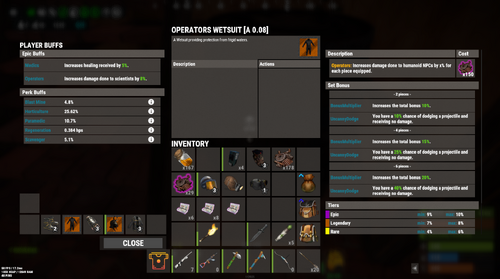
    User Interface and advanced crafting options for Item Perks and Epic Loot This plugin will not work without Epic Loot or Item Perks. One of these plugins has to be installed on the server. Features Combined Inventory-like View for Epic and Perk Items Advanced Crafting options for Perk Items Standard Crafting for Epic Items Reuse translations and mod configs Get Started You can drop the plugin onto your server, and you are almost good to go. There are just a few steps to get it running correct. Permissions If you want to use this mod, you should make sure that players dont have permissions listed below. Otherwise, they can bypass costs or functionality from that plugin. Epic Loot Item Perks Configurations We have to make sure that players dont see old UI Buttons anymore. Epic Loot Item Perks Combined Inventory-like View When you open the view the first time, you will notice that it looks similar to the players inventory. One of the main reasons why i implemented that plugin was exactly this feature. You can inspect each item and see additional informations in one place. Player Buff Panel Ever wanted to know all Epic buffs and Perk buffs affecting you? Just check out the full list on the left side. For Perks you can check out descriptions when clicking the info icon (i). Selected Items When you select items, you get a (short) overview of its buffs. For Perk Items it will show a list of all perks and rolls in the description section. When selecting Epic Items, a new Panel will be shown. It contains: - the name of the epic buff - a description - its upgrade costs - the set piece bonus - the tier ranges - the chances to hit a certain tier Quite some information right? Item Actions Following the mission, each possible action is right where you would expect them. Add-, remove- or randomize perks actions are shown in the Action Panel. For Epic Items you will find add- and recycle-action. Items other than Epic and Perk Items are NOT supported and most likely never will be supported. Perk Crafting This plugin supports some more advanced crafting options for perk items. Most actions can run in 2 different modes, weighted and unweighted. Unweighted Crafting for Perks Players have to select 1 Kit when modifying items. The kit defines the perk selected for the desired action and will be consumed. Weighted Crafting for Perks Players can select up to 3 Kits when modifying items. Each kit will add a defined value to the mod weight and increases the chance for the player to hit that mod. The additional mod weight value is based on the configuration for the desired action. You can make the selection of 1 kit mandatory for all weighted actions. Add Perks (For the basics) players can add perks to existing items. By default the player selects a kit and adds the mod. For more advanced usage, you can enabled weighted crafting. This will pick a random mod. Players can add Kits to that process to increase the chances of picking the desired mod. Depending on the configuration, you can enable perk crafting for epic items and "white" items. Crafting of perks respects your defined white- and blacklist from Item Perks. You can define additional costs for this process in the configuration. Remove Perks Players can remove existing perks from an item. By default the player selects a kit and removed the mod. Weighted Crafting will pick a random mod. Players can add Kits to that process to increase the chances of picking the desired mod. You can define additional costs for this process in the configuration. If configured, players can remove ALL mods from an item. Randomize Perk Values Players can reroll the values of perks on an item to (maybe) get better values. You can enable lucky rolls in the configuration. The player will be able to select 1 Kit for each mod to roll twice. The better roll will be used for the item. Commands nothing else needed Permissions You have several options to customize the user experience by giving different permissions. A good example is the permissions to make kit slots available for weighted crafting. Without perk.kit2 or perk.kit3 set, the player can only use 1 kit. You can then give perk.kit2 permission when the player reaches level 20 with skill tree. Configurations The plugin is reading configurations from Epic Loot and Item Perk when starting. All weights, chances and mod ranges are used from this configs. If you change anything on that configurations, you should restart the plugin. Crafting Costs Epic Loot For Epic Loot, the defined upgrade costs are taken from Epic Loot configuration. You dont have to change anything. Item Perks Because of the advanced crafting options for perks, this plugin will have its own cost configurations. You can add default additional costs for each craft type. Simply set the values for "Item to use when ... a perk". The default costs is set to use scrap. Additional costs can be increased for each kit used during crafting process depending on the perk of the kit. Translations You will find out when looking into the language file, that this plugin barely uses translations. One of the reasons is, that it reuses translations from Epic Loot and Item Perks. If you search for mod descriptions or mod names, please check out the language files of those plugins. Troubleshooting If you find issues during item generation processes, payments and views, its most likely caused by this plugin. Any functionality of buff effects remain part of the original plugin. If there is a Buff missing, you can simply check out the code and add it to the enums. And then contact me? Simply join discord of Epic Loot and Item Perks. I will support you right where its needed.
    Free
  11. i bought that plugin on lone, but since my comment is stuck there in moderation for over 10 days... ill post my question here: Any chance that you add custom names for currency items? I want to use the same item id and skin with different names to start events via console commands. f.e. this one to start the Ferry Terminal Event should use yellowidtag with custom name "Ferry Terminal Pass” "Server Commands”: [ "ftstart $userID” ], "Price”: 1, "Currency”: { "Item ID”: 81423963, "Skin ID”: 0, "Custom Name": "Ferry Terminal Pass” } Players will find those items on my map during normal gameplay for several events. Some of them will use the same skin, because they mark events for the same difficulty category.
  12. molokatan

    Nade Plus

    Just bought this plugin and thinking about a way to integrated it into my PVE server setup without bricking stuff for my players. The idea behind that plugin is really nice and can add some utility and usefull powers for them. However, it would be cool if there is an option for nades that can disable functionality against players. F.e. Radiation Nade, DropNGo Nade, Sleeper Nade, Gravity Nade should only work with bots. For Bots the DropNGo Nade is quite to powerfull. Imagine using it on oilrig heavy npcs and all drop their M249 and miniguns. They will not pick them up anymore and players can just grab them. What would be cool, if you remove the weapons for a defined time (default: 5 seconds) from bots and then add them agian to their inventory. This would give them a chance to get back into the fight.
  13. I really like how flexible this plugin is. Creating events for monuments is quite easy. You can even have different profiles for a monument to make it feel different each time. To make it the perfect plugin, It might need some additional features. 1. possibility to setup loot NPCs from NPC Spawn always use heavy scientist prefab. Therefore the loot can be quite too powerful. It would be awesome if we could change the prefab that is used when spawning in loot. Also adding additional items to the locked crates to improve rewards would be nice. 2. view spawn points for a monument profile Creating spawn points for NPCs is quite easy, but it could help to see all spawn points to figure out where you already placed one and where you might want to add others. Better NPCs has that kind of view where you see a circle box and the number of the spawn point. Something similar would be awesome. 3. option to add additional loot containers (barrels, military creates, normal crates, food boxes, etc) If we could set additional spawn points for additional crates could help to make loot more versatile. On an event profile with low level NPCs we could f.e. set up some additional barrels and maybe 2-3 military crates. On profiles with more heavy npcs we could add then additional elite crates, diesel barrels etc. So far i am very happy with what you can do. Adding the proposed changes would make this plugin a must have. 100% worth the money so far.
  14. molokatan

    Craft Menu

    if you ask me. those hacky "solutions" are just producing more issues than needed. @David you should have gone with my proposal. Its easy, keeps the UX just on another prefab and is solid. There is no room for bugs etc. The name of this is CraftMenu. Its not stating that you HAVE to have it on the workbench.
  15. molokatan

    Craft Menu

    i will join discord now... sorry if i exposed a fix to someone who is not owning the plugin
  16. molokatan

    Craft Menu

    TY, did not know that. So @Davidplease provide a useful fix for your plugin. Otherwise stop selling it, if its not working. Its a pain when such crucial plugin is bricked...
  17. molokatan

    Craft Menu

    sorry, could have been more precise. if you search for the methods CreateBaseCui(BasePlayer player, int tier = 1) its the second line. I changed it for my server to CUIClass.CreatePanel(ref _baseCraftCui, "baseCraft_main", "Overlay", "0 0 0 0.2", $"{db[2]}.{db[1]} 0.{db[23]}", $"{db[10]}.{db[1]} 0.{db[10]}", false, 0.1f, 0f, "assets/content/ui/uibackgroundblur.mat", $"-588 250", $"-210 610"); " 0 0 0 0.2" is the background color of this panel. Together with the change of the asset to "assets/content/ui/uibackgroundblur.mat" its a bit easier to read the content. I also adjusted the size a bit. Instead of 620, i am using now 610 for anchorMax Y value. So its not overlapping with the Name of the player.
  18. molokatan

    Craft Menu

    simply add it to repairbench and check if player has workbench level private void OnLootEntity(BasePlayer player, RepairBench bench) { if (!permission.UserHasPermission(player.UserIDString, "craftmenu.use")) return; if (!config.ct.craftQue) player.gameObject.GetOrAddComponent<CraftingQue>(); if (!playerBps.ContainsKey(player.userID)) { playerBps.Add(player.userID, new PlayerBps()); SavePlayerData(); } if (player.HasPlayerFlag(BasePlayer.PlayerFlags.Workbench1)) { CreateBaseCui(player, 1); ShowBps(player, 1, "all"); } if (player.HasPlayerFlag(BasePlayer.PlayerFlags.Workbench2)) { CreateBaseCui(player, 2); ShowBps(player, 2, "all"); } if (player.HasPlayerFlag(BasePlayer.PlayerFlags.Workbench3)) { CreateBaseCui(player, 3); ShowBps(player, 3, "all"); } } private void OnLootEntityEnd(BasePlayer player, RepairBench bench) { DestroyCui(player); } and move the panel above the player model anchormin: "-588 250" anchormax: "-210 620"
  19. ` "Enable Random Direct Falling Meteors On Mining Regular Ones": true,` set this to false.
  20. molokatan

    Npc Random Raids

    @Razor is it possible to make params from L2887 configurable? nextFireTime = Time.time + UnityEngine.Random.Range(5f, 10f); If i understand it correct, its the time between 2 Attacks of an npc with rockets or C4. Would be nice to have this configured by profiles.
  21. I have modified it for our server, so its working as i described for us. But i thought that this could be part of the plugin directly, so i dont have to fix it over and over again on updates. + others might use it too.
  22. Hi, i was searching for a replacement of the SkillTree Ultimate for mining and decided to use this plugin. What i did: 1. added a new permission: onkillshower 2. added hook OnEntityDeath for sulfur, metal and stone nodes to trigger a direct shower - permission validated - chance roll applied 3. on success, i added a new cooldown. My goal is that there are direct showers at the player position when someone is farming ressources. Might be an option to add smth like that to the plugin directly?
  23. Looked it on our test server and looks quite promising. Polished UI and exactly what i am missing on my server. If i have suggestions for improvements, should i create also tickets in support request?
  24. molokatan

    Npc Random Raids

    TY for the latest updates. Make my life so much easier.
    I wanted a simple plugin to show a status for our VIP group that has a kind of hardcore mode active (random raids etc.). All I had to do was that. Func<BasePlayer, bool> isVip = (basePlayer) => { if (basePlayer == null) { return false; } return basePlayer.IPlayer.BelongsToGroup("vip"); }; CustomStatusFramework?.Call("CreateStatus", "customstatus.vip", "0.7 0.4 0 1", "Hardcore", "1 1 1 1", "", "1 1 1 1", "hardcore", "1 1 1 1", isVip ); This is called `OnServerInitialized` and when unloading the plugin I call this: CustomStatusFramework?.Call("DeleteStatus","customstatus.vip"); I can recommend integrating this into other plugins. It keeps things simple and clean!
2.3m

Downloads

Total number of downloads.

10.5k

Customers

Total customers served.

152.1k

Files Sold

Total number of files sold.

3.2m

Payments Processed

Total payments processed.

×
×
  • Create New...

Important Information

We have placed cookies on your device to help make this website better. You can adjust your cookie settings, otherwise we'll assume you're okay to continue.