Featured framework
Carbon for modern Rust servers
Fast, self-updating, and built for performance with seamless in-game plugin and server management.
1,400+
servers powered by Carbon
$14.99
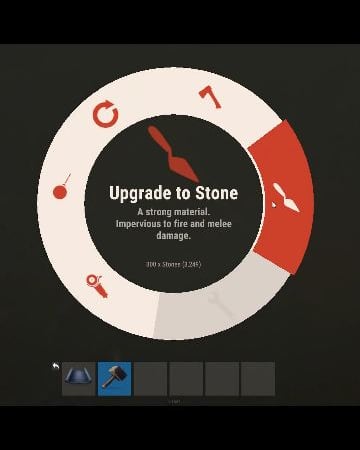
TC Upgrades provides an efficient and optimized way to enhance your base directly from the Tool Cupboard. With this plugin, you can easily change building grades, switch building skins, repair structures or deployables, and even set up wallpapers on your base, streamlining your base management process.
⭐ Key Features
Multi-TC Support
Authorization List on Tool Cupboard
Upgrade Building Grades
Change Building Skins
Repair Structures and Deployables
Apply Wallpapers
Detailed Permissions
VIP Features
User-Friendly UI
🎬 Video Showcase
📜 Permissions
TCUpgrades.admin- Shows a UI Change button when in admin mode (command: /tcuadmin)
TCUpgrades.authlist - Shows Authorization list button on TC
TCUpgrades.upgrade - Shows upgrade button on TC
TCUpgrades.repair - Shows repair button on TC
TCUpgrades.skin - Shows skin button on TC
TCUpgrades.wallpaper - Shows wallpaper button on TC
TCUpgrades.upgrade.nocost - Allows player to use no resources when upgrading
TCUpgrades.repair.nocost - Allows player to use no resources when repairing
TCUpgrades.reskin.nocost - Allows player to use no resources when reskining
TCUpgrades.wallpaper.nocost - Allows player to use no resources when setting wallpaper
TCUpgrades.default - Allows player to use (wood, stone, metal, hqm & deploy)
TCUpgrades.wood
TCUpgrades.stone
TCUpgrades.metal
TCUpgrades.hqm
TCUpgrades.deploy
⚙️ Configurations
💬 Support
This is a custom package designed by us, featuring 210 unique bases and a specialized loot setup for five different difficulty levels, ranging from Easy to Nightmare.
Note: The building skins in the package showcase images may differ from the spawned bases or use the default building skin.
This MEGA PACK is an upgraded version of the FullWiped-110 Bases + Loot Pack we previously offered. If you've already purchased the FullWiped-110 Bases + Loot Pack, you only need to buy the expansion pack, which includes 100 new bases ranging from Easy to Hard. Get it here: https://codefling.com/bases/raidable-bases-pack-100-bases-expanded-package-from-easy-to-hard
Warning: The Raidable Bases plugin requires the Copy Paste plugin to function. You must install both for this bases pack to work.
🔗Raidable Bases (Paid): https://codefling.com/plugins/raidable-bases
🔗Copy Paste (Free): https://umod.org/plugins/copy-paste
This Raidable Bases Pack & Loot Tables package includes:
🏡70 Easy Bases +🗡️Base_Loot Tables (Easy "Vanilla" and "Enhanced" tables included)
🏡60 Medium Bases +🗡️Base_Loot Tables (Medium "Vanilla" and "Enhanced" tables included)
🏡60 Hard Bases +🗡️Base_Loot Tables (Hard "Vanilla" and "Enhanced" tables included)
🏡10 Expert Bases +🗡️Base_Loot Tables (Expert "Vanilla" and "Enhanced" tables included)
🏡10 Nightmare Bases +🗡️Base_Loot Tables (Nightmare "Vanilla" and "Enhanced" tables included)
Beware: Our loot table package includes only the 5-tier loot tables within the Base_loot folder, ranging from easy to nightmare.
It does not include the loot tables from the Difficulty_Loot or Weekday_Loot folders.
VANILLA AND ENHANCED LOOT TABLES FOR RAIDABLE BASES
This package includes 10 different base loot table files, ensuring a well-structured and advanced configuration for every difficulty level, from Easy to Nightmare.
- 5 loot files for the Vanilla setup (Easy, Medium, Hard, Expert, Nightmare), offering a balanced loot experience with some junk items, staying close to a 1x rate.
- 5 loot files for the Enhanced setup (Easy, Medium, Hard, Expert, Nightmare), designed for modded servers with 2x, 3x, or higher gather rates, featuring cleaner loot tables with minimal junk and more valuable rewards.
📁Installation Path:
All loot table files are intended for the 📁/oxide/data/RaidableBases/Base_Loot directory.
⚠️Setup Requirement: You must choose and install only one loot table setup at a time—either Vanilla or Enhanced. If you want to switch, you can replace the current files with the other set, but both cannot be active simultaneously.
For those exclusively seeking the loot table, we offer it as a standalone product: https://codefling.com/customizations/raidable-bases-loot-tables-pack
(Note: If you've purchased our Raidable Bases Mega Pack & Loot Tables (210 Bases) package, there is no need to buy this separately.)
WARNING: TWO DIFFERENT INSTALLATION METHODS
(PLEASE READ BOTH AND APPLY ONLY THE ONE THAT FITS YOUR NEEDS)
⚙️INSTALLATION GUIDE 1:
(If you do not have a custom configuration and are not a professional in server configurations, choose this option. However, if you already have your own configuration and profile settings and do not wish to use the optional configs we provide—in other words, if you only need the bases and loot tables—use the second installation guide instead.)
▶ Step 1: Place the Config File
From the extracted ZIP files, locate the config folder and find the RaidableBases.json file. Move it to the following directory:
📁/serverfiles/oxide/config
▶ Step 2: Place the Bases
From the extracted ZIP files, locate the copypaste folder and move it to the following directory:
📁/serverfiles/oxide/data
▶ Step 3: Place the Base_Loot Tables
From the extracted ZIP files, locate the Base_Loot folder and move it to the following directory:
📁/serverfiles/oxide/data/RaidableBases
Important: If there are any existing JSON files inside this folder that are not part of our loot tables, delete them to ensure proper functionality.
Choose between Vanilla or Enhanced loot tables based on your preference.
If the folder is named "Base_Loot (Enhanced loot)", remove the text in parentheses so that the correct folder name is simply: "Base_Loot" (Otherwise, the loot tables will not work properly.)
▶ Step 4: Place the Profiles Folder
From the extracted ZIP files, locate the profiles folder and move it to the following directory:
📁/serverfiles/oxide/data/RaidableBases
Why Are Profiles Important?
The profiles folder contains crucial settings that allow you to:
✔️ Enable/disable the dome
✔️ Enable/disable NPCs
✔️ Adjust the number of lootable items
These are just a few examples—there are dozens of important settings that directly affect how raid bases function. The config file alone is not enough—these files play a major role in customizing your raid bases.
⚡ I strongly recommend reviewing each difficulty setting (Easy to Nightmare) inside the profiles folder and adjusting them based on your needs.
▶ Step 5: Restart the plugin via RCON:
o.reload RaidableBases
⚙️INSTALLATION GUIDE 2:
(Use this installation method if you do not want to use our configurations and instead prefer to use your own config files and your own 📁/oxide/data/RaidableBases/Profiles configurations.)
In this case, you only need to add the bases. To do this, use the following commands in RCON:
▶ Step 1:
You can add bases one by one or in bulk.
After executing the commands in RCON, the bases will be registered inside the Profiles configuration.
If you do not want to deal with these adjustments, it is recommended to use Installation Guide 1 instead.
A- Example RCON commands:
rb.config add "Easy Bases" fullwipedeasy1
rb.config add "Hard Bases" fullwipedhard1
B- Commands to Integrate Raid Bases in Bulk via RCON:
rb.config add "Easy Bases" fullwipedeasy1 fullwipedeasy2 fullwipedeasy3 fullwipedeasy4 fullwipedeasy5 fullwipedeasy6 fullwipedeasy7 fullwipedeasy8 fullwipedeasy9 fullwipedeasy10 fullwipedeasy11 fullwipedeasy12 fullwipedeasy13 fullwipedeasy14 fullwipedeasy15 fullwipedeasy16 fullwipedeasy17 fullwipedeasy18 fullwipedeasy19 fullwipedeasy20 fullwipedeasy21 fullwipedeasy22 fullwipedeasy23 fullwipedeasy24 fullwipedeasy25 fullwipedeasy26 fullwipedeasy27 fullwipedeasy28 fullwipedeasy29 fullwipedeasy30 fullwipedeasy31 fullwipedeasy32 fullwipedeasy33 fullwipedeasy34 fullwipedeasy35 fullwipedeasy36 fullwipedeasy37 fullwipedeasy38 fullwipedeasy39 fullwipedeasy40 fullwipedeasy41 fullwipedeasy42 fullwipedeasy43 fullwipedeasy44 fullwipedeasy45 fullwipedeasy46 fullwipedeasy47 fullwipedeasy48 fullwipedeasy49 fullwipedeasy50 fullwipedeasy51 fullwipedeasy52 fullwipedeasy53 fullwipedeasy54 fullwipedeasy55 fullwipedeasy56 fullwipedeasy57 fullwipedeasy58 fullwipedeasy59 fullwipedeasy60 fullwipedeasy61 fullwipedeasy62 fullwipedeasy63 fullwipedeasy64 fullwipedeasy65 fullwipedeasy66 fullwipedeasy67 fullwipedeasy68 fullwipedeasy69 fullwipedeasy70
rb.config add "Medium Bases" fullwipedmed1 fullwipedmed2 fullwipedmed3 fullwipedmed4 fullwipedmed5 fullwipedmed6 fullwipedmed7 fullwipedmed8 fullwipedmed9 fullwipedmed10 fullwipedmed11 fullwipedmed12 fullwipedmed13 fullwipedmed14 fullwipedmed15 fullwipedmed16 fullwipedmed17 fullwipedmed18 fullwipedmed19 fullwipedmed20 fullwipedmed21 fullwipedmed22 fullwipedmed23 fullwipedmed24 fullwipedmed25 fullwipedmed26 fullwipedmed27 fullwipedmed28 fullwipedmed29 fullwipedmed30 fullwipedmed31 fullwipedmed32 fullwipedmed33 fullwipedmed34 fullwipedmed35 fullwipedmed36 fullwipedmed37 fullwipedmed38 fullwipedmed39 fullwipedmed40 fullwipedmed41 fullwipedmed42 fullwipedmed43 fullwipedmed44 fullwipedmed45 fullwipedmed46 fullwipedmed47 fullwipedmed48 fullwipedmed49 fullwipedmed50 fullwipedmed51 fullwipedmed52 fullwipedmed53 fullwipedmed54 fullwipedmed55 fullwipedmed56 fullwipedmed57 fullwipedmed58 fullwipedmed59 fullwipedmed60
rb.config add "Hard Bases" fullwipedhard1 fullwipedhard2 fullwipedhard3 fullwipedhard4 fullwipedhard5 fullwipedhard6 fullwipedhard7 fullwipedhard8 fullwipedhard9 fullwipedhard10 fullwipedhard11 fullwipedhard12 fullwipedhard13 fullwipedhard14 fullwipedhard15 fullwipedhard16 fullwipedhard17 fullwipedhard18 fullwipedhard19 fullwipedhard20 fullwipedhard21 fullwipedhard22 fullwipedhard23 fullwipedhard24 fullwipedhard25 fullwipedhard26 fullwipedhard27 fullwipedhard28 fullwipedhard29 fullwipedhard30 fullwipedhard31 fullwipedhard32 fullwipedhard33 fullwipedhard34 fullwipedhard35 fullwipedhard36 fullwipedhard37 fullwipedhard38 fullwipedhard39 fullwipedhard40 fullwipedhard41 fullwipedhard42 fullwipedhard43 fullwipedhard44 fullwipedhard45 fullwipedhard46 fullwipedhard47 fullwipedhard48 fullwipedhard49 fullwipedhard50 fullwipedhard51 fullwipedhard52 fullwipedhard53 fullwipedhard54 fullwipedhard55 fullwipedhard56 fullwipedhard57 fullwipedhard58 fullwipedhard59 fullwipedhard60
rb.config add "Expert Bases" fullwipedexp1 fullwipedexp2 fullwipedexp3 fullwipedexp4 fullwipedexp5 fullwipedexp6 fullwipedexp7 fullwipedexp8 fullwipedexp9 fullwipedexp10
rb.config add "Nightmare Bases" fullwipednight1 fullwipednight2 fullwipednight3 fullwipednight4 fullwipednight5 fullwipednight6 fullwipednight7 fullwipednight8 fullwipednight9 fullwipednight10
▶ Step 2: Place the Base_Loot Tables
From the extracted ZIP files, locate the Base_Loot folder and move it to the following directory:
📁/serverfiles/oxide/data/RaidableBases
Important: If there are any existing JSON files inside this folder that are not part of our loot tables, delete them to ensure proper functionality.
Choose between Vanilla or Enhanced loot tables based on your preference.
If the folder is named "Base_Loot (Enhanced loot)", remove the text in parentheses so that the correct folder name is simply: "Base_Loot" (Otherwise, the loot tables will not work properly.)
▶ Step 3: Restart the plugin via RCON:
o.reload RaidableBases
EXTRA IMPORTANT INFORMATIONS:
We do not use a dome, NPCs, or arena walls around raid bases on our servers, and in the ZIP file we provided, these features are also disabled by default. If you want to enable them, you will need to adjust the settings accordingly.
For example, to enable the dome, follow the steps below:
Navigate to:
📁/oxide/data/RaidableBases/Profiles
Open the files inside the Profiles folder with a text editor.
Locate the following settings:
(This is already set to false because it is required for markers to appear on the map.)
"Spawn Silently (No Notification, No Dome, No Map Marker)": false,
"Create Dome Around Event Using Spheres (0 = disabled, recommended = 5)": 0,
Change the value from 0 to 5 as shown below:
"Create Dome Around Event Using Spheres (0 = disabled, recommended = 5)": 5,
Additionally, the loot amount for bases varies depending on the difficulty level (easy, medium, hard, expert, and nightmare). You can adjust this setting in the same Profiles location according to your needs:
"Amount Of Items To Spawn": 210,
For example, in medium bases, this value is set to 210, which determines the total number of items that will appear in crates, furnaces, and the cupboard.
Our current configuration is specifically adjusted to prevent players from feeling overwhelmed by massive buildings right after a wipe. We have configured Maintained Events accordingly to ensure a balanced experience.
In our setup:
- Timed events and purchasable events are disabled.
- After a wipe, easy bases will start spawning 30 minutes later.
- Nightmare bases will begin spawning 48 hours (2 days) later.
Imagine starting the game with just a torch in hand and immediately encountering a nightmare base on the shore.
You’d likely quit the game right away—this setting is crucial for us to avoid such scenarios.
Configuration Example: 📁/serverfiles/oxide/config
"Maintained Events": {
"Always Maintain Max Events": true,
"Max Maintained Events": 30,
"Enable X Hours After Wipe (0 = immediately)": {
"Easy": 0.5,
"Medium": 1.0,
"Hard": 3.0,
"Expert": 24.0,
"Nightmare": 48.0
All of our bases from Easy to Nightmare are equipped with turret protection.
If you do not want turrets to spawn in your raidable bases on your server, you can use the following method.
Go to the file path /data/RaidableBases/Profiles, open the JSON files inside with a text editor, and apply the following:
"Kill These Prefabs After Paste": [
"assets/prefabs/npc/autoturret/autoturret_deployed.prefab",
"autoturret_deployed"
],
If you are satisfied with this package, you can support us by leaving a 5-star review on the site where you purchased it. Your feedback motivates us to continue improving and providing even better configurations for dedicated server owners like you.
Thank you! ❤️
$15.00
SimplePVE is exactly what it says. An easy, simple PVE plugin for your server to modify or change PVE rules individually & now also have a Simple CUI to control PVE rules and create or edit Schedules.
⭐ Key Features
Control PVE Rules from in-game or in the config
Easy to understand each rule
Create PVP Schedules
Loot prevention
Automatic PVE/PVP purge events
Zone Manager support
Most event plugins support
Works without "server.pve true"
Discord Embed Messages on PurgeStart or End
Many more features are added with every update
📌 Commands
/simplepve - Use to enable or disable pve toggle (Chat & Console command)
/simplepve on or off - Use to enable disable pve (Chat & Console command)
/sprules - Use to Open a Cui to control PVE Rules & Creating Schedules (Chat command)
/spdebug - Use this for debuging rules
📜 Permissions
simplepve.admin - Required to enable or disable SimplePVE
simplepve.adminloot - Required to view Loots of other players
simplepve.admindamage - Required for Admin damages to any entity
🎬 Video Showcase
🚀 API & Hooks
void OnSPVEPurgeStarted()
void OnSPVEPurgeEnded()
TimeSpan GetPVPStartTimeRemaining()
TimeSpan GetPVPEndTimeRemaining()
⚙️ Configurations
💬 Support
Check Out My Other plugins as Well
HI ALL! DESIGN CREW WITH YOU! DESIGN STUDIO FOR RUST PROJECTS.
With this template you can make your own unique cases.
Bright and high-quality effects will highlight your products among other projects.
$26.49
IQTeleportation - is an advanced, optimized teleportation system that provides a wide range of features to improve player comfort and convenience.
Only the necessary, user-friendly features — the plugin isn’t overloaded with extras.
All capabilities are designed for stability and maximum player convenience.
Plugin Installation :
When you download the resource, you receive an archive with plugins and data folders.
Move the file from data strictly following the archive path: oxide/data/IQSystem/IQTeleportation.
If any of these files don’t exist on your server, create them.
Move IQTeleportation.cs from plugins strictly following the archive path: oxide/plugins.
Note for users who use a “web editor” on hosting panels.
Before uploading, unpack the archive locally in any convenient place, then upload the files from there.
Feature List :
Minimalist UI for the player :
The plugin supports UI for teleport requests and for setting a home point. These are optional and configured in the config.
Teleport directly into vehicles :
Optional feature.
Allows accepting a teleport while controlling a vehicle. The player will be teleported into a free seat; if there are no free seats, the teleport is canceled.
Sound effects :
Built-in sound effects for teleportation.
Players can feel the timer through sound: as teleport time approaches, the sound frequency increases.
This makes it clear when a teleport to a friend or home point will occur, without distracting from gameplay and keeping focus.
Home points on G-Map :
Optional feature.
Displays the last 6 home points the player teleported to directly on the G-Map, with the ability to teleport to them via the UI.
It fits the Rust and G-Map style nicely and is very convenient for players!
Teleport requests via G-Map :
Now you can simply right-click on a friend’s nickname (or near it) on the G-Map, and a teleport request will be sent automatically.
This helps players stay focused on gameplay and simplifies team interactions.
Automatic teleport between friends :
The plugin supports automatically accepting teleport requests from friends.
This feature can be toggled with the /atp command.
Players in a team no longer need to confirm requests manually — friend teleports will happen automatically, making co-op play even more comfortable.
Block teleporting from monuments :
You can forbid teleporting from specific monuments.
This improves gameplay and prevents using monument structures as a hideout followed by teleporting away from an opponent, creating a more balanced experience for everyone.
Home point marker :
After setting a home point, the player automatically gets a duplicate marker with the point’s name on their G-Map.
This improves visibility, helps orientation, and simplifies coordination with home points.
A temporary mark with a visual effect is also shown at the placement location.
Simplified commands :
The goal is to simplify usage and add convenience for players — commands weren’t overlooked:
/sethome has a shorter alias /sh
/removehome has a shorter alias /rh
/tpr has “built-in memory,” making player interaction easier.
You no longer need to specify a nickname every time you send a teleport request.
The command remembers the last player you teleported to, and when you run /tpr again without a name, it will send the request to that player.
This makes teleporting even faster and more convenient.
See the full command list in the “Commands” section.
WARP system :
The plugin includes a warp system with multiple points and convenient commands.
What is this system for?
For example, you want players to teleport to Outpost (or any other monument) with /compound — you can do this with the system: just create the points, and the commands will be registered automatically and will persist every server wipe!
Other uses?
Use it however you like: for events, create a teleport point for the event, then remove the warp after it’s over.
Points placed outside standard monuments will not be saved after a map change.
Logging system :
If you want to monitor the plugin and know about your players’ teleports to analyze activity, there’s an optional logging feature for teleport requests, accepted teleports, and home teleports.
There are many simple, clear configuration options — you can preview them in the “Configuration” section.
Permissions :
iqteleportation.gmap — permission to use /gmap and instant admin teleports via G-Map to any point on the map
iqteleportation.tp — permission to use /tp for instant teleport to a player
iqteleportation.warpadmin — for using WARP features and the /warp command
These permissions are intended for administrators only and do not affect player features.
Do not grant them to regular players!
Command List :
Chat Commands :
/atp – toggle automatic acceptance of teleport requests from friends
/sethome Name – set a home point at your current position
/sh Name – shorthand alias for /sethome
/removehome Name – remove a previously set home point
/rh Name – shorthand alias for /removehome
/home NameHome – teleport to your home point
/home NameHome FriendName – teleport to a friend’s home point
/homelist – view all your home points
/tpr Name – send a teleport request to a player
/tpr – send a teleport request to the last player who accepted your request
/tpa – accept a teleport request
/tpc – cancel a teleport request
Warp System :
/warp list – show all available warps
/warp points WarpName – show all teleport points for the specified warp
/warp add WarpName – create a new warp or add an extra teleport point to that warp
/warp edit WarpName PointNumber – edit a specific teleport point for the warp
/warp remove WarpName – remove the warp and all its teleport points
/warp remove WarpName PointNumber – remove the specified teleport point of the warp
/NAMEWARP – command to teleport to a warp; created automatically based on your warp name
For Administrators :
/gmap – enable teleporting to any position via G-Map by right-clicking the map
/tp Name – instantly teleport to a player
/tp Name NameTwo – instantly teleport player “Name” to player “NameTwo”
/mblock – block teleportation from the monument where the admin is currently standing
/a.home points NameOrID – show all named home points of the specified player
/a.home clear NameOrID – delete all home points of the specified player
Console Commands :
atp – toggle automatic acceptance of teleport requests from friends
sethome Name – set a home point at your current position
sh Name – shorthand alias for sethome
removehome Name – remove a previously set home point
rh Name – shorthand alias for removehome
home NameHome – teleport to your home point
home NameHome FriendName – teleport to a friend’s home point
homelist – view all your home points
tpr Name – send a teleport request to a player
tpr – send a teleport request to the last player who accepted your request
tpa – accept a teleport request
tpc – cancel a teleport request
For Administrators :
gmap – enable teleporting to any position via G-Map by right-clicking the map
tp Name – instantly teleport to a player
tp Name NameTwo – instantly teleport player “Name” to player “NameTwo”
Configuration :
{
"General plugin settings": {
"Log player actions to file (true = yes / false = no)": false,
"Use sound effects (true = yes / false = no)": true,
"Use GameTip messages instead of chat (true = yes / false = no)": false,
"Wake the player immediately after teleport (otherwise they remain 'sleeping') (true = yes / false = no)": false,
"List of monuments where teleportation is forbidden (applies to home points / teleport-to-player / warps)": [],
"IQChat settings": {
"IQChat : Custom prefix in the chat": "[IQTeleportation]",
"IQChat : Custom avatar in the chat (Steam64ID) (If required)": "0"
},
"SimpleStatus settings": {
"SimpleStatus: Enable plugin support": false,
"SimpleStatus: UI settings for teleportation": {
"SimpleStatus: Background panel color": "0.3 0.3 0.3 0.5",
"SimpleStatus: Prefix translations [LanguageKey] = Text": {
"ru": "Телепортация",
"en": "Teleporation"
},
"SimpleStatus: Prefix color": "0.5647059 0.5490196 0.5333334 1",
"SimpleStatus: UI sprite": "assets/icons/stopwatch.png",
"SimpleStatus: Sprite color": "0.5647059 0.5490196 0.5333334 1"
}
}
},
"Teleport-to-player settings": {
"Teleport request settings": {
"Offer to accept teleport requests in the UI (true = yes / false = no)": true,
"Teleportation mode: true — teleport the player to the position where the request was accepted; false — teleport the player to the other player regardless of where it was accepted": false,
"Allow players to send teleport requests via G-Map (true = yes / false = no)": true,
"Use instant teleport to a point via G-Map (true = yes / false = no) (requires admin rights or the iqteleportation.gmap permission)": true,
"Disable teleportation features on the server (tpr and tpa will be unavailable) (true = yes / false = no)": false,
"Forbid sending and accepting teleport requests while the player is in a vehicle (true); otherwise teleport directly into the vehicle if a seat is free (false)": true,
"Block sending and accepting teleport requests in a safe zone (true = yes / false = no)": false,
"Block sending and accepting teleport requests during raid block (true = yes / false = no)": true,
"Block sending and accepting teleport requests while the player is in the subway (train tunnels) (true = yes / false = no)": true,
"Block sending and accepting teleport requests while the player is in the Underwater Lab (true = yes / false = no)": true,
"Block sending and accepting teleport requests while the player is on the Cargo Ship (true = yes / false = no)": true,
"Block sending and accepting teleport requests while the player is in a hot air balloon (true = yes / false = no)": true,
"Block sending and accepting teleport requests while the player is cold (freezing) (true = yes / false = no)": true,
"Block sending and accepting teleport requests while the player is swimming (true = yes / false = no)": true,
"Block sending and accepting teleport requests while the player is under radiation (true = yes / false = no)": true,
"Block sending and accepting teleport requests while the player is bleeding (true = yes / false = no)": true,
"Block sending and accepting teleport requests while the player is in another player's building privilege area (building blocked) (true = yes / false = no)": true,
"Allow teleportation only to friends (true = yes / false = no)": false
},
"Teleport-to-player cooldown settings": {
"Default count for players without permissions": 60,
"Count overrides for players with permissions [Permission] = Count": {
"iqteleportation.vip": 45,
"iqteleportation.premium": 35,
"iqteleportation.gold": 25
}
},
"Teleport-to-player countdown settings": {
"Default count for players without permissions": 20,
"Count overrides for players with permissions [Permission] = Count": {
"iqteleportation.vip": 15,
"iqteleportation.premium": 10,
"iqteleportation.gold": 5
}
},
"Teleport-to-player limit settings": {
"Use player teleport-to-player limits (true = yes / false = no)": false,
"Hours until player limits are reset": 24,
"Player teleport limit settings": {
"Default count for players without permissions": 15,
"Count overrides for players with permissions [Permission] = Count": {
"iqteleportation.vip": 20,
"iqteleportation.premium": 25,
"iqteleportation.gold": 30
}
}
}
},
"Home points settings": {
"Allow teleporting to a friend's home point (true = yes / false = no)": true,
"Enable UI with recent home points on G-Map (true = yes / false = no)": true,
"Offer setting a home point in the UI after placing a bed or sleeping bag (true = yes / false = no)": true,
"Allow players to teleport to a home point via G-Map (true = yes / false = no)": false,
"Block home teleports in a safe zone (true = yes / false = no)": false,
"Add a visual ping effect to the home point after it’s set (true = yes / false = no)": true,
"Add a marker on the player’s G-Map after setting a home (true = yes / false = no)": true,
"Permissions for setting home points": {
"Block setting a home point during raid block (true = yes / false = no)": true,
"Allow setting home points on tugboats (true = yes / false = no)": false,
"Allow setting home points only when building privilege is present (true = yes / false = no)": true,
"Allow setting home points only when authorized in the building privilege area (true = yes / false = no)": true
},
"Home point count settings": {
"Default count for players without permissions": 2,
"Count overrides for players with permissions [Permission] = Count": {
"iqteleportation.vip": 3,
"iqteleportation.premium": 4,
"iqteleportation.gold": 5
}
},
"Home teleport cooldown settings": {
"Default count for players without permissions": 30,
"Count overrides for players with permissions [Permission] = Count": {
"iqteleportation.vip": 25,
"iqteleportation.premium": 20,
"iqteleportation.gold": 15
}
},
"Home teleport countdown settings": {
"Default count for players without permissions": 20,
"Count overrides for players with permissions [Permission] = Count": {
"iqteleportation.vip": 15,
"iqteleportation.premium": 10,
"iqteleportation.gold": 5
}
},
"Home teleport limit settings": {
"Use player home-teleport limits (true = yes / false = no)": false,
"Hours until player limits are reset": 12,
"Home teleport limit settings": {
"Default count for players without permissions": 15,
"Count overrides for players with permissions [Permission] = Count": {
"iqteleportation.vip": 20,
"iqteleportation.premium": 25,
"iqteleportation.gold": 30
}
}
}
},
"Warp system settings": {
"Enable warp support (true = yes / false = no)": false,
"Block teleport to a warp if the player is hostile (safe-zone aggression) (true = yes / false = no)": true,
"Teleport-to-warp cooldown settings": {
"Default count for players without permissions": 120,
"Count overrides for players with permissions [Permission] = Count": {
"iqteleportation.vip": 100,
"iqteleportation.premium": 80,
"iqteleportation.gold": 60
}
},
"Teleport-to-warp countdown settings": {
"Default count for players without permissions": 30,
"Count overrides for players with permissions [Permission] = Count": {
"iqteleportation.vip": 25,
"iqteleportation.premium": 20,
"iqteleportation.gold": 15
}
},
"Permissions for teleporting to specific warps: [WarpKey] = Permission (otherwise available to everyone)": {
"warpName": "iqteleportation.warpPermission"
},
"Teleport-to-warp limit settings": {
"Use player teleport-to-warp limits (true = yes / false = no)": false,
"Hours until player limits are reset": 6,
"Teleport-to-warp limit settings": {
"Default count for players without permissions": 15,
"Count overrides for players with permissions [Permission] = Count": {
"iqteleportation.vip": 20,
"iqteleportation.premium": 25,
"iqteleportation.gold": 30
}
}
}
}
}
For Developers :
API :
private void ClearHomesPlayer(UInt64 userID, String pluginName)
// Clears all home points of the player.
private Boolean API_HavePendingRequest(BasePlayer player)
// Returns true if the player has an active (pending) teleport request.
private Dictionary<String, Vector3> GetHomes(UInt64 userID)
// Returns all home points of the player.
Hooks :
private Object CanTeleport(BasePlayer player)
// Called when attempting to teleport to a player.
// Return a string with the reason to cancel the teleport.
private Object canTeleport(BasePlayer player)
// Same as above (alternate hook name).
// Return a string with the reason to cancel the teleport.
private Object OnTeleportRequested(BasePlayer player, BasePlayer requester)
// Called when a teleport request is sent to a player.
// You can cancel by returning false (bool) or a String (your message).
private Object CanTeleportHome(BasePlayer player, Vector3 positionHome)
// Called when attempting to teleport home.
// You can cancel by returning a String with the reason.
private Object OnHomeAdd(BasePlayer player, String homeName, Vector3 positionHome)
// Called when attempting to set a home point.
// You can cancel by returning a String with the reason.
private void OnTeleportRejected(BasePlayer player, BasePlayer requester)
// Called when a teleport request to a player is canceled/rejected.
private void OnTeleportAccepted(BasePlayer player, BasePlayer requester, Int32 countdown)
// Called when a teleport request is accepted.
private void OnPlayerTeleported(BasePlayer player, Vector3 playerPos, Vector3 teleportationPos)
// Called after the player has been teleported.
private void OnHomeAccepted(BasePlayer player, String homeName, Int32 countdown)
// Called after the player has sent a teleport-home request.
private void OnHomeAdded(BasePlayer player, Vector3 positionHome, String homeName)
// Called after a home point has been set.
private void OnHomeRemoved(BasePlayer player, Vector3 positionHome, String homeName)
// Called after a home point has been removed.
private Object CanTeleportWarp(BasePlayer player)
// Called when a player tries to teleport to a warp.
// Return a string to cancel; return null to ignore (allow).
private Object CanTeleportHome(BasePlayer player, Vector3 positionHome)
// Called when a player tries to teleport to a home point.
// Return a string to cancel; return null to ignore (allow).
private Object CanTeleportPlayer(BasePlayer player)
// Called when a player tries to teleport to another player.
// Return a string to cancel; return null to ignore (allow).
private void OnPlayerTeleported(BasePlayer player, BasePlayer target)
// Called when a player has teleported to another player.
private void OnPlayerTeleportedWarp(BasePlayer player, Vector3 positionWarp)
// Called when a player has teleported to a warp.
private void OnPlayerTeleportedHome(BasePlayer player, Vector3 positionHome)
// Called when a player has teleported to a home point.
🏗️ Complete Build System / Sandbox System 1.2.5
A premium all-in-one creative sandbox system for Rust build servers.
Personal and VIP build plots for monetization and tiered access
Built-in save/load system with share codes and native BuildSaves backend
Guest system with permissions for collaborative building
Basic symmetry tools, modern UI, and optimized build workflow
Designed for serious build servers, practice servers, and creative communities
Live Test:
client.connect 46.224.9.69:25015
✨ Core Features
- Personal build plots with automatic plot assignment
- Normal and VIP plots with separate radius and entity limits
- Plot categories and biome-based plot layouts
- Central lobby with teleport flow and optional respawn handling
- Optional randomized plot allocation
- Plot domes, map markers, radius control, and sound isolation
- Custom build kits for every player plot
- Included functional custom build map for a ready-to-run creative environment
💾 Save / Load / Share System
- Native `BuildSaves` backend built directly for BuildSystem
- No longer relies on CopyPaste as the active save/load dependency
- Save unlimited builds per player
- Load saved builds directly into your plot
- Rename and delete saves
- Category-aware last save loading for better biome/category continuity
- Share code generation and importing
- Guest restrictions enforced during save/load actions
- Faster load validation through stored entity metadata
- Safer queued save handling
- Improved shutdown and unload protection so plots save more reliably
- Legacy CopyPaste saves can be migrated with:
`buildsaves.migrate`
👥 Guest & Collaboration System
- Invite players to your plot
- Request access to another player's plot
- Accept or decline requests
- Granular guest permissions:
- Build
- Remove
- Demolish
- Craft
- Save copy
- Guests can be moved cleanly back to lobby when needed
- Better synchronization with `/leave`, disconnect cleanup, and plot ownership flow
🎛️ Creative Build Environment
- Full creative building workflow
- Free building and repairing
- Blueprint unlock support
- Noclip / fly support
- God mode support
- Optional off-plot restrictions
- Blacklisted item support
- Vehicle spawn whitelisting
- Per-player vehicle limits
- Built-in hammer remove support
- Auto-upgrade support
- Mass-upgrade support
- One-click power on/off support for IO entities
- Virtual item refresh support for reliable creative inventories
- Safe spawn logic and improved off-plot behavior
📊 Limits, Protection & Automation
- Separate normal and VIP entity limits
- Live entity counting
- Optional entity limit HUD
- Build cost calculation
- Upkeep calculation
- Plot radius damage restriction
- Auto-save interval support
- Spawned entity auto-cleanup in lobby, plots, and outside managed areas
- Player-owned and server/plugin-owned cleanup controls
- Improved restart and disconnect cleanup behavior
🪞 Plot Symmetry / Mirror Building
- Optional symmetry building system via `BuildMirror`
- Plot-based symmetry with hammer-selected pivot points
- Multiple symmetry modes
- Visual guide rendering
- Limit-aware mirrored placement
- Safer placement rejection when mirrored placement is invalid
- Designed for faster, cleaner base prototyping
🖥️ Modern UI
- Full Nexus-style graphical interface
- Lobby UI and build menu workflow
- Save/load/share management through UI
- Guest management through UI
- Tools and server info tabs
- Keyboard shortcut support
- Localized text system
- Optional middle-click menu opening
- Configurable footer text and layout
🗺️ Included Custom Build Map
Includes a functional custom build map designed specifically for creative build servers.
What the map provides:
- Organized plot layout
- Central lobby area
- Space for normal and VIP plots
- Cleaner server launch experience
- Ready-to-use build-focused environment
- Better structure for high-pop creative or practice servers
🧩 Included Modules
- `BuildConfig.cs` - central configuration provider
- `BuildCore.cs` - player flow, plot lifecycle, connect/leave handling
- `BuildPlots.cs` - lobby, plots, domes, markers, categories, teleport handling
- `BuildIO.cs` - save/load/share orchestration
- `BuildSaves.cs` - native save/load backend and legacy migration
- `BuildGuests.cs` - guest requests, invites, permissions, guest flow
- `BuildOptions.cs` - creative perks, restrictions, upgrades, god/fly, spawn controls
- `BuildCosts.cs` - build and upkeep calculations
- `BuildMirror.cs` - symmetry / mirror building
- `BuildUI.cs` - graphical interface
- `BuildLang.cs` - localization system
🔐 Permissions
- `buildcore.vip` - VIP plot size and VIP entity limit access
- `buildplots.freeroam` - allows freer off-plot movement behavior
- `buildplots.lobbyexit` - allows using the build menu flow from outside normal managed areas
🔄 Migration
Older installations that used CopyPaste-based saves can migrate to the new built-in save system with:
`buildsaves.migrate`
This makes upgrading older servers much easier while moving to the new native BuildSaves backend.
💬 Player Chat Commands
- `/build`
Open the lobby UI or build menu depending on where the player is.
- `/leave`
Leave the current plot.
- Guests return to lobby
- Plot owners save, clear, delete their active plot session, then return to lobby
- `/invite <player>`
Invite another player to join your plot as a guest.
- `/request <player>`
Request to join another player's plot.
- `/accept <player>`
Accept a pending request or invite.
- `/decline <player>`
Decline a pending request or invite.
- `/noclip`
- `/fly`
- `/f`
Toggle noclip/fly, depending on plot/off-plot restrictions.
- `/god`
- `/g`
Toggle god mode, depending on plot/off-plot restrictions.
⌨️ Player Console Commands
- `build`
Console version of `/build`.
- `leave`
Console version of `/leave`.
- `request <player>`
Console version of `/request`.
- `buildcost`
Console version of `/buildcost`.
- `fly`
Console version of noclip/fly toggle.
- `god`
Console version of god mode toggle.
🛠️ Server Owner / Admin Command
- `buildsaves.migrate [overwrite] [deleteOld]`
Migrate legacy CopyPaste save files into the new BuildSaves format.
- `overwrite` = optional true/false
- `deleteOld` = optional true/false
Example:
`buildsaves.migrate`
⚙️ Config Explanation
- `Server Settings - Name`
Server name field in config.
Currently mostly informational and not a major gameplay switch.
- `Lobby Settings - Spawn Position`
The world position for the lobby center and where players are teleported when sent to lobby.
- `Lobby Settings - Radius`
The size of the lobby area.
Also affects lobby zone checks, dome size, and marker area.
- `Plot Settings - Default Radius`
Radius used for normal player plots.
- `Plot Settings - VIP Radius`
Radius used for VIP plots.
- `Plot Settings - Randomize Plot Location`
If true, players get a random free plot slot instead of the first available slot.
- `CoolDown Settings - Share Code (Minutes)`
How long a player must wait before generating another share code.
- `Links - Discord`
Discord link shown in the UI/server info section.
- `Links - Website`
Website link shown in the UI/server info section.
- `Off Plot Settings - Allow F1 Spawn`
Controls whether players can use allowed spawn/give behavior outside their own plots.
- `Off Plot Settings - Force NoClip`
Controls whether noclip/fly is allowed outside plots unless freer permissions apply.
- `Off Plot Settings - Force GodMode`
Controls whether god mode is allowed outside plots unless freer permissions apply.
- `Lobby Settings - Force Teleport on Connect`
If true, players are automatically sent to the lobby when they connect.
- `Lobby Settings - Clear Inventory on Spawn`
If true, inventory is cleared when players are placed into the lobby.
- `Lobby Settings - Respawn in Lobby without Plot`
If true, players without a valid active/guest plot respawn in the lobby.
- `Map Markers - Enable`
Enables map markers for lobby/plots.
- `Plot Settings - Custom Kit Items`
Items automatically given to players when entering a plot.
In your example, players receive:
- planner in belt slot 5
- hammer in belt slot 4
- `Allowed Entities - F1 Spawn`
Whitelist of prefabs allowed through the plugin's F1/entity spawn behavior.
Anything not listed is blocked.
- `Item Settings - Blacklisted Items`
Items blocked from the creative build environment.
In your example:
- `supply.signal`
- `grenade.smoke`
- `Vehicle Settings - Max per Player`
Maximum number of spawned vehicles each player can own through the system.
- `Plot Settings - Limit Damage to Radius`
Restricts damage interactions to the plot radius so players cannot affect things outside their area.
- `Entity Limits - Normal Max Entities`
Max entity count for normal players.
- `Entity Limits - VIP Max Entities`
Max entity count for VIP players.
- `Dome Settings - Lobby Color`
Visual dome color for the lobby.
- `Dome Settings - Lobby Intensity`
Number/intensity of dome visuals in lobby.
Higher values create a stronger effect.
- `Dome Settings - Plot Color`
Visual dome color for plots.
- `Dome Settings - Plot Intensity`
Number/intensity of dome visuals for plots.
- `Plot Settings - Sound Isolation`
Helps isolate plot audio/effects so players mainly receive sounds from the relevant managed area.
- `UI Settings - Show Limit HUD`
Shows or hides the HUD that displays entity/vehicle limits.
- `UI Settings - Enable Middle Click`
Lets players open the menu with middle mouse click.
- `Compatibility - Disable Grade Control (for BuildTools compatibility)`
Disables the plugin's built-in grade control features so it does not conflict with BuildTools or similar systems.
- `Compatibility - Enable Built-in Hammer Remove (R)`
Enables the built-in hammer reload/remove behavior.
- `Plot Settings - Hammer Remove Distance`
Max distance for hammer-based removal checks.
- `Plot Settings - Auto-Save Interval Seconds (min time between auto-saves per player)`
Minimum delay between automatic saves for a player's dirty plot.
- `UI Settings - Footer Text Align`
Screen alignment for footer text.
- `UI Settings - Footer Anchor Min`
Lower anchor position for the footer UI panel.
- `UI Settings - Footer Anchor Max`
Upper anchor position for the footer UI panel.
- `UI Settings - Footer Text Color (R G B A)`
Footer text color and transparency.
- `UI Settings - Footer Font Size`
Footer text size.
- `Spawned Entities - Auto-Remove In Lobby`
Enables cleanup of eligible spawned entities in the lobby.
- `Spawned Entities - Auto-Remove Inside Plots`
Enables cleanup of eligible spawned entities inside plots.
- `Spawned Entities - Auto-Remove Outside Plots`
Enables cleanup of eligible spawned entities outside managed zones.
- `Spawned Entities - Apply Auto-Remove To Player-Owned`
Apply cleanup rules to player-owned spawned entities.
- `Spawned Entities - Apply Auto-Remove To Server/Plugin-Owned`
Apply cleanup rules to server/plugin-owned entities too.
- `Plot Symmetry - Enabled`
Master switch for the symmetry / mirror building system.
- `Plugin Version`
Internal config version entry used for config migration/bookkeeping.
Developer hooks for compatibility
- `CanBuildSystemKillEntity`
Lets other plugins prevent BuildSystem from deleting or killing a specific entity during cleanup, removal, or plot clearing actions.
- `CanBuildSystemHammerRemoveEntity`
Lets other plugins block the built-in hammer remove system before an entity is removed.
Example:
object CanBuildSystemKillEntity(BaseEntity entity)
{
if (entity == null) return null;
if (entity.ShortPrefabName == "autoturret_deployed")
return false; // block BuildSystem from removing it
return null; // allow normal BuildSystem behavior
}
object CanBuildSystemHammerRemoveEntity(BaseEntity entity)
{
if (entity == null) return null;
if (entity.ShortPrefabName == "wall.frame.shopfront")
return false; // prevent hammer remove for this entity
return null; // allow normal BuildSystem behavior
}
$33.99
XDQuest: A comprehensive and customizable quest system for your RUST server!
XDQuest is a powerful and flexible plugin that introduces a comprehensive and dynamic quest system into your game world.
With 31 different types of missions available for players, the possibilities are almost limitless.
Players receive various rewards for completing missions, adding even more incentive to accomplish tasks.
At the moment, this is the largest and only quest system available!
XDQuest is your key to creating endless adventures in the world of RUST.
List of features:
(The description briefly outlines the functionality and includes screenshots.)
Interactive website for creating quests:
XDQuest-Creater - On my website, you can easily and quickly create quests. Forget about manually editing JSON files — my user-friendly interface will make the quest creation process simple and enjoyable!
The plugin offers four types of rewards:
Items
Blueprints
Custom items
Commands
It integrates perfectly with various economic systems, and also supports Skill Tree and ZLevels.
List of missions
Mission setup
Reward setup
Detailed instructions and settings on the website:
XDQuest-Creater - My website features clear and informative instructions that will help you configure the plugin and master all types of missions.
You will gain access to it immediately after purchasing the plugin.
Discover the simplest and most effective way to configure using my guide!
Beautiful and modern UI:
The stylish and intuitive interface makes using XDQuest simple and enjoyable.
There is a mini-quest list that allows your players to remotely track the progress of their missions.
UI
UI
Mini quest list
Example of UI customization
(Rusty Wasteland PvE)
Capabilities and NPC settings:
NPCs have their own voice-overs; currently, they can respond to the user on 4 triggers:
1.Greetings
2.Farewells
3.Task acceptance
4.Task completion
You can also upload and use your own sounds for any of these 4 triggers, and the website will assist you with this as well.
Dress your NPC however you like and create a unique appearance for them.
There is an option to change the location of the NPC.
Your NPC resides in a unique dwelling created in accordance with their character and backstory.
Available types of missions:
Currently, there are 24 different types of tasks available:
(The types of missions are constantly being updated)
(16 pre-set quests included)
Command:
Chat commands:
/quest.saveposition - saves a custom position (available only to administrators).
/quest.saveposition.outpost - saves a custom position within the bounds of a peaceful town (available only to administrators).
/quest.tphouse - teleport to a building (available only to administrators).
Console commands:
xdquest.stat - publishes statistics.
xdquest.player.reset [steamid64] - Clears all of a player's missions and everything associated with them.
Configuration:
Discord - DezLife
Website editor - xdquest.skyplugins.ru
Galium — Anti-Cheat & Moderation Platform for Rust Organizations
Detection, intelligence, and enforcement — unified in one organizational dashboard.
Galium is a production anti-cheat service operating since 2022, built for Rust server organizations that need structured moderation at scale — across multiple servers, multiple staff teams, and high player volume.
Not a single plugin.
Operational infrastructure for Rust organizations.
Request Access Join Discord
Your browser does not support the video tag.
What Galium is
Galium is an anti-cheat at its core — designed to detect behavioral abuse through live production signals, risk modeling, and enforcement workflows.
Ahead of public launch, that proven detection foundation expanded into a full moderation and management platform — giving organizations one place to run their entire operational stack:
✓
Anti-cheat detection & risk scoring
✓
Teaming violation detection
✓
Toxicity and chat moderation
✓
Mute & ban management (history, reasons, evidence, traceability)
✓
Staff management & role-based permissions
✓
Organization & server management
✓
Automation rules and operational tooling
✓
Integrations (BattleMetrics + ecosystem-ready)
Galium doesn't replace "one feature."
It replaces fragmentation — plugins, spreadsheets, Discord-only logging, and inconsistent enforcement across servers.
Reputation and production history
Galium has been running in real competitive Rust environments since 2022 — refined through actual enforcement scenarios, edge cases, and the operational realities of moderating at scale.
Over years of production usage, Galium has:
✓
Processed millions of behavioral signals
✓
Evolved risk weighting through real-world outcomes
✓
Prioritized explainability and auditability, not black-box actions
✓
Maintained enforcement consistency across wipes, servers, and staff teams
This launch is not a new experiment — it's the public release of infrastructure that's already been proven in production.
Built for organizations, not single servers
Most "anti-cheat plugins" operate per server. Galium operates at the organization level. That means:
✓
One player identity across your entire org
✓
Risk follows the player, not the server they join
✓
Behavioral profiles persist beyond wipe cycles
✓
Policies and enforcement stay consistent across your infrastructure
✓
Staff actions and decisions are fully traceable across teams
No silos. No per-server blind spots. One structured organizational view.
Unified moderation control center
Galium centralizes your moderation stack into one dashboard — so your team can move fast without losing control.
Threat & moderation tools
Behavioral analytics and risk overview
Teaming detection and investigative context
Prioritized cases based on severity, frequency, and recency
Enforcement & logging
Ban history, mute history, and action timelines
Evidence linkage and structured reasons
Full audit trails across staff actions
Organization operations
Server management and org configuration
Staff roles, permissions, and governance
Subscription and infrastructure controls
Automation & integrations
Automation rules for repeatable enforcement
Sharing agreements and org-level controls
BattleMetrics integration + integration-ready architecture
Performance and infrastructure mindset
Galium is designed for high-population, high-activity environments.
✓
Detection and analysis are designed to avoid server-side performance degradation
✓
Signal processing and intelligence are built to scale with organizational concurrency
✓
Operational clarity is maintained even under peak load
✓
Performance integrity stays preserved — while visibility and enforcement improves.
Structured moderation at scale starts here
If you operate multiple Rust servers and require centralized visibility, cross-server risk intelligence, and controlled enforcement — Galium provides the infrastructure to support it.
Request Access Join Discord
Production anti-cheat since 2022 • Built for Rust server organizations
Free
StarGuard Platform
The RCON dashboard built for Rust server admins
Manage your servers from anywhere. Console, players, bans, reports, automated rules, analytics, one place, persistent across wipes.
Get Started Live Demo
Explore the Dashboard
Just a preview, countless other features integrated and planned.
Console Full RCON access from your browser
Players Live player list with deep profiles
Reports All F7 reports in one place
Statistics Live server KPIs and performance
Plugins Oxide and Carbon plugin management
Under the Hood
Built for speed and moderation workflows, with real-time data, automation, and persistent history.
🖥️
RCON Console
Full RCON from your browser. Command history, syntax highlighting, real-time output.
👥
Player Intel
Deep player profiles, alts, playtime, connections, ban history. One click to moderate.
🛡️
Threat Detection
Flags suspicious joins instantly. VPN detection, threat scoring, known cheater alerts.
⚡
Automation
Event-driven rules. Auto-kick, auto-ban, scheduled commands, runs 24/7.
📊
Analytics
Player counts, peak hours, retention, performance trends.
💾
Persistent Data
Persistent across wipes. Chat logs, bans, reports, events, all searchable.
Oxide Compatible
Carbon Compatible
Developer API
StarGuard hooks into global.playerlist and extends it. If you're building on top of this, here's what you get.
GetPlayerList(ConsoleSystem.Arg arg)
Replaces the default global.playerlist handler. Returns JSON with extended player data not available in the vanilla response.
Response Fields
SteamID · OwnerSteamID · DisplayName · Ping · Address · EntityId · ConnectedSeconds · ViolationLevel · Health · NetworkId · S_TeamId
TryGetCommand(out ConsoleSystem.Command command)
Scans ConsoleSystem.Index.All for global.playerlist. Returns true with the command reference via out, false otherwise.
Get set up in 2 minutes.
Create an account, connect your server, done.
Get Started Live Demo
CodeFling Creator Bot is a Discord bot, written in Python using Discord.py.
The bot monitors users specified in the config and using the CodeFling API, sends notifications to Discord for various actions:
New Releases (Plugins, Maps, Tools etc)
Plugin/Release Updates
New Comments/Discussion Posts
New Support requests and replies to threads
New Reviews
New Private Messages
The bot is lightweight and written with efficiency and reliability in mind. It makes only the API calls it needs and stores data in an SQLite database for use later. When guild members use the bot commands, the data is pulled from the local database and doesn’t make extra calls to the API, which means you don’t need to worry about rate limiting or getting banned by the API.
The bot polls the API looking for new content at set periods as set in the config, notifying about new content and then updating the database with new data.
PLEASE NOTE: Requires Python 3.6 or higher.
README:
CodeFling Creator Bot 1.1.1
Discord Bot by ZEODE
==========================================
Minimum requirements:
Python 3.6 or higher
Dependacies:
Discord.py
aiohttp
Using pip:
pip install -U discord.py
pip install -U aiohttp
The -U flag just means “upgrade to the latest version if already installed.”
Using apt:
apt install python3-discord
apt install python3-aiohttp
This file explains each configuration option in config.json
*************** DEFAULT CONFIG FILE IS CREATED ON FIRST RUN ***************
DISCORD SETTINGS
----------------
Make sure your Discord bot has at least "Send Messages", "Read Message History" and "Embed Links" permissions.
bot:
bot_token:
Your Discord bot token from the Discord Developer Portal.
Get it from: https://discord.com/developers/applications
channels:
release_channel_id:
Discord channel ID where file release/update notifications will be posted.
To get channel ID: Enable Developer Mode in Discord settings, right-click channel, "Copy ID"
purchase_channel_id:
Discord channel ID for purchase notifications (recommend private channel).
Shows when someone buys one of your paid plugins.
support_channel_id:
Discord channel ID for support request notifications.
comments_channel_id:
Discord channel ID for comment/discussion notifications.
Shows when users comment on your files (excludes file author replies).
downloads_channel_id:
Discord channel ID for file downloads notifications (recommend private channel).
Shows when users download your files.
reviews_channel_id:
Discord channel ID for file review notifications.
Shows when users review a monitored file.
messages_channel_id:
Discord channel ID for user message notifications (recommend private channel).
Notifys when a monitored user receives a message on CodeFling.
commands_channel_id:
Discord channel ID for people to use bot commands.
People can use bot ! commands here, all user messages can be cleaned automatically, see below.
admin_commands_channel_id:
Channel for users with the bot admin role to use admin commands away from public channels
All normal commands also work here for bot admin role users to use here too
NOTE:
- Leaving any of the channel IDs blank will disable notifications for those actions
- Although there are separate channels for each type in the config, this is just for anyone
wanting this, if you want you can put the same channel ID in more than one channel config
misc:
clean_commands_channel:
If true, users messages are automatically deleted shortly after they are sent to the channel.
max_number_files_to_list:
Number of files to return when users use the "!list plugins" command
bot_admin_role_id:
Users need this role to use the admin only commands
ping_release_channel:
If this is true, new releases or updates to files will be notified with the @everyone tag
presence:
enabled:
true or false to enable or disable Discord presence.
type:
Available options:
"playing"
"watching"
"listening"
"competing"
text:
The text to display, e.g. www.codefling.com
CODEFLING SETTINGS
------------------
monitored_users:
Dictionary of Codefling user IDs and their API tokens.
Format: "user_id": "api_token"
How to get your User ID:
- Visit your Codefling profile
- Hover over or click on "See my activity"
- Your user ID is in the URL: https://codefling.com/profile/USER_ID-username/content/
- Copy just the numbers, without the "-username" part
How to get API Token:
- Visit: https://codefling.com/settings/apps/
- Click "Add App" > "Creator API"
- Select "All" under scopes
- Copy the access token to paste in your config
NOTE: For message_buyer_on_purchase you will require a Creator Pro API token.
Example:
"monitored_users": {
"user_id_1": "your_api_token_here",
"user_id_2": "another_api_token"
}
Note: Each user needs to use their own API token.
poll_interval_seconds:
How often (in seconds) the bot checks Codefling for new content.
Default: 120 (2 minutes)
Suggested values:
| Type | Safe poll interval | Notes |
| ----------------------- | ------------------ | ----------------------------------- |
| Light use (1–2 authors) | 60 s | Feels instant, safe if few requests |
| Medium (3–5 authors) | 120 s | Recommended default |
| Heavy use (5+ authors) | 300 s | Low strain, good scaling |
| Massive / strict API | 600–900 s | Extremely safe |
Note: Too frequent polling may hit API rate limits. The more files a user has, the harder
it is on the API leading to possible rate limits or IP ban, so be cautious.
retention_days:
How many days of historical data to track and store.
Default: 7 days
The bot will:
- Only notify about content within this time window
- Automatically clean up older data daily
- On first run, load existing content from this period
Recommended values:
- 7 days (minimal storage)
- 30 days (balanced)
- 90 days (extended history)
NOTE: Monitored resource/file data is kept indefinitely for users !stats !list commands etc, but the bot
will only look for new actions within this period to send notifications to Discord or not. This maintains
speed and performance so the bot isn't retreiving more data than is necessary with each API call.
In most cases, 7 days should be more than sufficient for all use cases.
message_buyer_on_purchase:
If true, when a new purchase is detected, the bot will send a private message on the Codefling website
with the message content taken from users/{userid}/purchase_message.txt. This can be edited to whatever
you like, using html formatting and with available placeholders:
{buyer_name}
{resource_name}
{resource_url}
{support_url}
NOTE: You will require a Creator Pro API token to use this feature!!!
notify_support_request_replies:
Limitation of the API at present means that it is not possible to know the reply comment author in
support requests. Therefore we cannot filter replies by the file owner, so all replies will be
announced, inclduing from the file owner. If you do not want this, you can disable announcing replies
so that only new support requests are announced. If the API endpoint is updated in future this can
be improved.
LOGGING SETTINGS
----------------
timestamp_date_format:
The format for timestamps in the console/log output.
Availble:
- %d
- %m
- %y
e.g: %d-%m-%y would make something like 30-10-25
timestamp_time_format:
Specify the format for the timestamp.
- 12h
- 24h
log_file_path:
Set the path to the OPTIONAL log file. If left blank, no log file will be used.
API OPTIONS
-----------
Note: You can usually leave this as is and it will work absolutely fine.
max_attempts:
How many times to try an API request if it fails before giving up on that attempt
Useful for occasional CloudFare errors/timeouts
timeout_seconds:
How long to wait before retrying a API request due to timeout
DEBUG OPTIONS
------------------
enable_verbose_debug_logging:
As it says, enabled verbose loigging which can help in troubleshooting issues. Default is false.
config_version:
DO NOT EDIT THIS
COMMANDS
------------------
NOTE: Commands by users do not query the CodeFling API every time. They only retreive data from
the SQLite database, so you don't have to worry about rate limiting or banning from users abusing
the commands on Discord. This also means it is much quicker with results. The database is updated
with all the info every time the API is queried as per the poll rate in the config only.
Non-Admin Commands:
!help
Lists all available commands
!stats [username]
Get own stats without parameter if you are monitored by the bot or get stats for the user specified
!list files
List all files monitored by the plugin (config option to limit results)
!list authors
List all file authors/devs monitored by the bot
!file <FileName> / !file <file_id>
Give information about that file
Admin Commands:
!user add <user_id> <api_token>
Add the specified user ID and API token to the bot, save in the config and begin monitoring
!user remove <user_id>
Stops monitoring and removes the specified user ID from the bot and config
!rotate
Immediately rotate the log file and begin a new blank log file (rotated files saved in logs/)
!cleardb
Immediately clear the SQLite database and re-seed a new database (ALL DATA WILL BE CLEARED)
!test <review|download|purchase|comment|support|message>
Send a test notification to Discord for the most recent entry of the given type
!test <purchase_msg> <user_id> <purchaser_id>
Send a test purchase message by PM on CodeFling
!test <file> [new|updated]
Send a test notification to Discord for the most recent entry for files/releases,
using the new or updated parameter accordingly/
FIRST RUN BEHAVIOR
------------------
On first run, the bot will:
1. Create a SQLite database (codefling_bot.db)
2. Load/Cache all users existing files.
3. Load/Cache all existing content from the last N days (retention_days)
4. DOES NOT send any notifications for existing content
5. Only notify about NEW content after initialization
On subsequent runs:
1. Check for content created while bot was offline
2. Send notifications for missed content
3. Continue normal monitoring
TROUBLESHOOTING
---------------
No notifications appearing:
- Verify channel IDs are correct
- Check bot has "Send Messages", "Read Message History" and "Embed Links" permissions
- Confirm API tokens are valid and have correct scopes
Getting rate limited:
- Increase poll_interval_seconds value
- Default 300 seconds (5 minutes) should be safe
Bot sends old notifications on startup:
- This is normal if content was created while bot was offline
- Bot catches up on missed content within retention period
- On first run, no old notifications should appear
SUPPORT
-------
For issues with the bot, check console output for error messages.
Get more support in my Discord: https://discord.gg/jnyg3FvDnc
For Codefling API issues, see: https://codefling.com/developers
New Arrivals
What's New
Fresh uploads, new releases, and recently updated files.
-
$5.00$4.00By Ionut Shiro
-
$2.50
By WuyZar
-
$15.00$12.00By Ionut Shiro
-
$8.00$6.40By Ionut Shiro
-
$5.00$4.00By Ionut Shiro
-
$5.90
By willow
-
$2.50
By REZVAYA
-
$7.00$6.80By DesignCrew
-
$5.90
By willow
-
By GTx
-
$10.00$8.00By Ionut Shiro
-
$10.00$8.00By Ionut Shiro
-
$9.99$4.99
Community Picks
Highest Rated
Top-rated picks trusted and loved by the community.
-
$16.99
By David
-
$40.00$30.00By nivex
-
$29.99
By LosGranada
-
$29.99
By imthenewguy
-
$24.99
By Whispers88
-
$40.00$31.95By Mevent
-
Free
By Steenamaroo
-
$14.99
By AhigaO
-
$19.99$15.99By Fruster
-
$14.99
By David
-
$45.99
By Monster
-
$19.99$15.99By Fruster
-
$19.99
By ZEODE
Deals
Great Deals
Discounted picks, limited-time deals, and sale items worth grabbing now.
-
$12.99$9.99By fullwiped
-
$24.00$16.80By Tigernaut
-
$15.00$7.50By Martian
-
$8.00$6.40By Ionut Shiro
-
$7.00$5.60By Ionut Shiro
-
$10.00$8.00By Ionut Shiro
-
$14.99$9.99By SlayersRust
-
$6.00$4.00By Sukor
-
$5.00$4.00By Ionut Shiro
-
$6.00$5.10 -
$8.00$6.40By Ionut Shiro
-
$15.00$7.50By Martian
-
$20.00$17.00By Razor