


About Smart Anti Team (BM Bans)
[ ! ] The zip contains a DLL extension that goes into RustDedicated_Data/Managed. Some hosts do not allow uploading DLLs - check with your host before buying, or install it with the free VenuxUpdater that comes in the zip. [ ! ]
Smart Anti Team catches players who team past your group limit. Code locks, cupboards, turrets, shared vehicles, revives, team accepts, kills and raids done side by side, time spent together: every one of them adds weight to the pair of players it caught, and the heaviest pairs sit at the top of one admin window.
When a pair goes past your ban threshold, Smart Anti Team can ban them for you, or their whole linked team, natively or through BattleMetrics. Out of the box it only watches and alerts: auto-ban stays off until you turn it on, so you can look at the weights first.
Version 3.0 brings a new admin window with six tabs, a live alert popup for admins, every setting editable in game, and BattleMetrics intelligence on top of your own evidence: prior bans, co-play hours, new accounts, notes, flags and an evidence note on every ban.

| Works on Oxide and Carbon | Needs CrashExtensions (included) |
|---|---|
| 13 in-game signals, 4 from BattleMetrics | Auto-ban off until you turn it on |
Jump to: Features · Screenshots · Trailer · How the score works · Commands · Permissions · Install · Configuration · External services · Test server · FAQ
 Features
For admins
- One window, six tabs. OVERVIEW, PAIRS, PLAYERS, ALERTS, REPORTS and SETTINGS, opened with /sat.
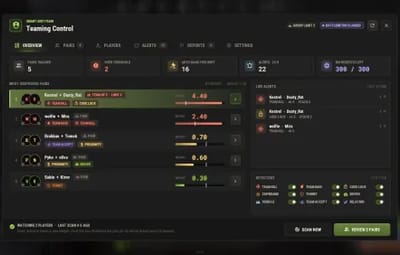
- Overview. The most suspicious pairs by weight, pairs tracked, pairs over the threshold, auto-bans this wipe, the last 24 hours of alerts, live alerts and every detector's switch.
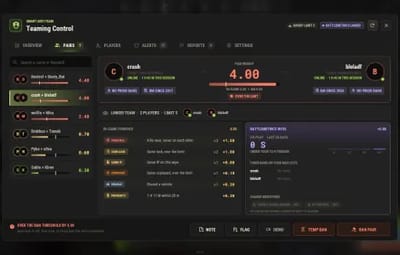
- Pair detail. Both players with their SteamID and session time, the pair weight against your ban threshold, the linked team and its size, every piece of in-game evidence with its count and weight, and the BattleMetrics intel next to it.
- Act from the pair. NOTE, FLAG, DEMO, TEMP BAN and BAN PAIR (or BAN TEAM OF N) buttons at the bottom of the pair.
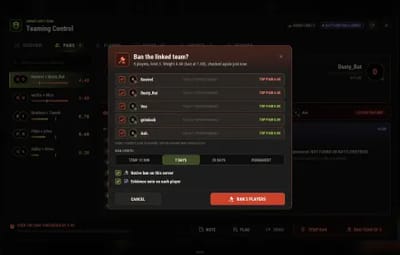
- A ban you can check first. The ban window lists every linked player with a tick, checks the weight again, and lets you pick 10 minutes, 7 days, 30 days or permanent, a native ban and an evidence note.
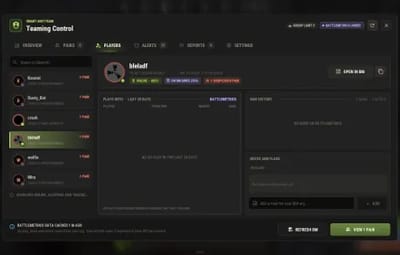
- Player profiles. Search any player by name or SteamID: their pairs, their team, BattleMetrics co-play, ban history, flags and notes, and a box to add a note for your BattleMetrics org.
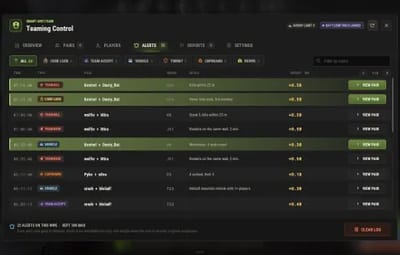
- Alert log. Every alert of the wipe with its time, type, pair, map grid, detail and weight, filtered by type or name, with VIEW PAIR on each row.
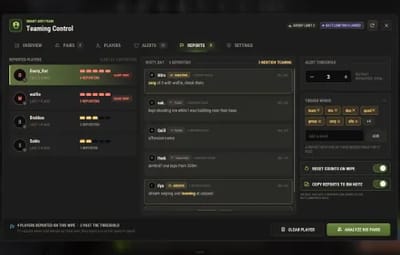
- F7 reports. Reported players with their count of distinct reporters, each report with the words that mention teaming highlighted, the alert threshold and your trigger words, editable in place.
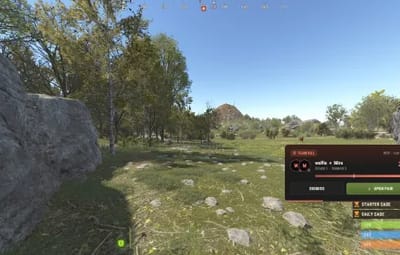
- Live alert popup. When an alert fires, online admins get a small card with the pair and its weight (one every 15 seconds at most). Type /sat within a minute and the window opens on that pair.
- Steam avatars. Real Steam pictures in the Players tab, off by default (letter circles until you turn it on).
For server owners
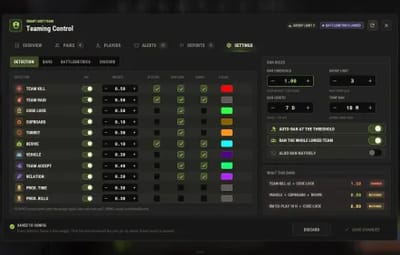
- Pair weight scoring. Every detector adds its weight to the pair it caught. You pick each weight, whether it stacks on repeats, whether it posts to Discord and whether it records a demo.
- Your group limit. Teammates count as friendly only while their team is within your limit (3 by default), so a team over the limit builds evidence like anyone else. Clanmates count as friendly when you run Clans.
- Auto-ban at your threshold. Off by default. When a pair reaches the threshold (1.0 by default) it bans the pair, or the whole linked team with "Ban the whole linked team" on. Admins are never banned while "Admins are never banned" is on.
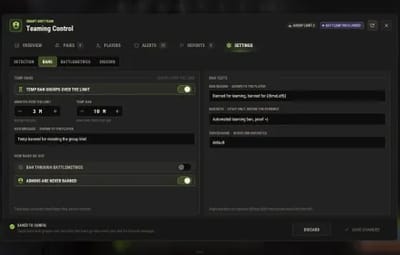
- Temp bans for teams over the limit. Off by default. A team that stays over the limit for a few minutes (3 by default) gets a native timed ban (10 minutes by default) with your kick message.
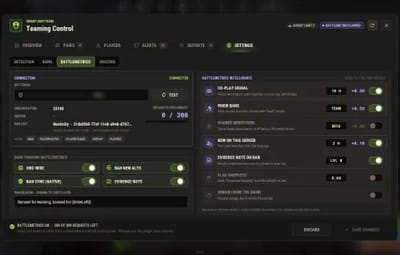
- BattleMetrics bans. With your token, bans go on your BattleMetrics ban list, org-wide, with new alts added automatically. Ban Sync (on by default) makes every BattleMetrics ban a game ban too.
- BattleMetrics intelligence. Prior bans, co-play hours on your org, new accounts and shared identifiers (beta) add their own weight. Evidence notes on every ban, a "Suspected teaming" flag past a weight you pick (no ban), and an UNBAN button for the plugin's own bans (off by default).
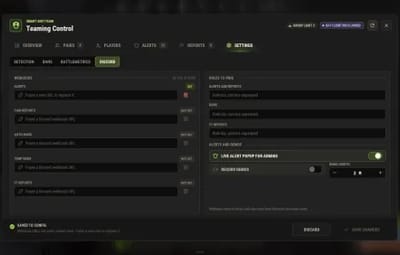
- Discord. Separate webhooks for alerts, pair reports, auto-bans, temp bans and F7 reports, with role pings for each. Empty webhooks send nothing, and webhook URLs are never shown back in the window.
- Settings in game. Detectors, weights, ban rules, temp bans, BattleMetrics and Discord, all in the SETTINGS tab. Changes are live right away; SAVE CHANGES writes them to the config and DISCARD throws them away.
-
Two permissions.
smartantiteam.adminto watch and ban,smartantiteam.settingsfor the people you trust with the config. - Works with Clans and AutoDemoRecord, both optional.
For developers
-
OnGroupViolationhook. Called for every player in a violation, with the player's SteamID, the violation type and its weight. See the FAQ.
 Screenshots
Every screen below is Smart Anti Team running in Rust.

|
|---|
| Overview: the most suspicious pairs, live alerts and every detector |

|

|
|---|---|
| A pair: in-game evidence and BattleMetrics intel | Ban the linked team: tick who goes, pick the length |

|

|
|---|---|
| A player: co-play, ban history, notes and flags | The alert log of the wipe, filtered by type |

|

|
|---|---|
| F7 reports, trigger words and the alert threshold | Settings: every detector, its weight and the ban rules |

|

|
|---|---|
| Settings: temp bans and the ban texts | Settings: your BattleMetrics token and intelligence |

|

|
|---|---|
| Settings: Discord webhooks, role pings and demos | The live alert popup admins get in game |
 Trailer
The Smart Anti Team trailer (click to play)

 How the score works
- Every detector adds weight to a pair. Out of the box: Code Lock 0.5, Team Kill 0.5, Team Raid 0.5, Team Accept 0.4, Shared Vehicle 0.3, Turret 0.3, Relationship Alert 0.2, Cupboard 0.1, Revive 0.1, Steam friends 0.5, proximity time 0.3, proximity kills 0.3, and same IP 0.8 (off by default).
- What they catch. The same code lock, cupboard or turret shared by more players than your limit, kills made near each other but never on each other, rockets on the same base, a shared vehicle, a revive, a team join, two players marking each other friendly in contacts, and 15 minutes spent within 20 m of each other.
- Repeats can stack. A detector set to stack adds its weight again on every repeat; otherwise it counts once per pair.
- BattleMetrics adds its own signals once you add a token: co-play on your org (0.3 from 10 hours in the last 28 days), a prior ban whose reason contains "team" (0.5), a new account on this server (0.1 under 2 hours) and shared identifiers (beta, 0.4).
- The threshold bans. At 1.0 by default, with auto-ban on, the pair is banned, or every player of their linked team. The ban window shows exactly who that is before you confirm one by hand.
- F7 reports point, they do not weigh. A report never adds weight on its own; past your threshold of distinct reporters (3 by default) it alerts you and points you at the pairs to check.
- Team over the limit. With temp bans on, a team that stays over the limit for 3 minutes is kicked with a 10 minute ban. Admin teams are exempt while "Admins are never banned" is on.
 Commands
- /sat - open the admin window.
- /prox <player1> <player2> - how long two players spent near each other, and their kills together.
- /alerts <player1> <player2> - the alerts stored for a pair.
- /teamscore <player1> <player2> - the pair's full score, signal by signal.
<player> is a name or a SteamID of an online player. All four need smartantiteam.admin (or admin). The window's buttons run a console command called smartantiteam.ui; the server checks your permission on every click, so do not bind or script it.
 Permissions
- smartantiteam.admin - open /sat, see pairs, players, alerts and reports, ban from the window and get the live alert popup. Server admins have it anyway.
- smartantiteam.settings - change settings (the SETTINGS tab and the report trigger words), clear the alert log and use the UNBAN button. Owners (auth level 2) can do this without it.
A typical setup:
oxide.grant user YOUR_STEAM_ID smartantiteam.admin
oxide.grant user YOUR_STEAM_ID smartantiteam.settings
oxide.grant group admin smartantiteam.admin
 Install
-
Install the extension, once per server. Stop the server, copy
Oxide.Ext.CrashExtensions.dllintoRustDedicated_Data/Managed(Carbon:carbon/extensions) and start it again. The console printsLoaded extension CrashExtensionswith its version. An older copy of the DLL is simply overwritten: it is one shared file for all our plugins. -
Install the plugin. Copy
SmartAntiTeam.csintooxide/plugins(Carbon:carbon/plugins). It compiles on its own and writes its config tooxide/config/SmartAntiTeam.json. -
Grant the permissions above and type
/sat. Look at the weights in SETTINGS, then turn auto-ban on when you are happy with them.
Host does not allow DLL uploads? Copy
VenuxUpdater.cs(free, in the zip) intooxide/pluginsnext to the plugin and runvenux.installonce in the server console. It downloads the extension, checks its signature, places it and loads it in place on Oxide. Restart the server when convenient. On Carbon copy the DLL by hand.
Plugin does not compile? The extension is missing or too old: Smart Anti Team needs CrashExtensions 1.12.12, the copy in the zip. Check the folder and restart again.
Updating from 2.x? Your config is upgraded in place and the old file is kept as
SmartAntiTeam.json.v2.bak. The new BattleMetrics flags and shared identifiers start off on an upgrade, evidence notes start on. Ban Sync is now on by default.
 Configuration
Everything lives in oxide/config/SmartAntiTeam.json, and the SETTINGS tab edits the main parts in game.
Config sections (click to expand)
- General Settings - server name, group limit, admin bypass, file logging, the live alert popup and Steam avatars
- Detection Systems - proximity time and kills (distance, triggers, weights, saved across reloads), team-kill geometry, Steam friends (needs a Steam Web API key), same IP, the unique IP check on connect and raid co-op detection
- Alert & Notification Settings - Discord webhooks and role ids, AutoDemoRecord demos and their length, F7 report tracking (trigger words, threshold, its webhook and role, reset on wipe)
- Auto Moderation Settings - auto-ban on or off, the threshold, the ban length in days, ban the whole linked team, native or BattleMetrics bans, each detector's weight, stacking, Discord and demo switches, temp bans for teams over the limit, and the BattleMetrics token, ban list, ban reason, note, org-wide, new alts and Ban Sync
- BattleMetrics Intelligence - co-play, prior bans, shared identifiers, new accounts, evidence notes, the suspect flag, unban from game, when to fetch on its own and how long to cache
 External services
Smart Anti Team only talks to a service you set up, plus our CDN for its pictures:
- cdn.crashplugins.space - the window's pictures (icons, buttons and the like), downloaded once at load and kept by your server. Nothing is sent but the request.
- api.battlemetrics.com - only with your token. Bans, revokes, evidence notes, flags, player lookups and the token check. It sends your token, the SteamIDs involved, the ban or note text, and your server's address to find it on BattleMetrics.
- api.steampowered.com - only with your Steam Web API key: the Steam friends check, with a player's SteamID.
- discord.com - only the webhooks you set: player names, SteamIDs, alert details and profile links.
- steamcommunity.com - only with "Steam avatars" on (off by default): a shown player's public SteamID, then the picture from Steam's image CDN.
-
VenuxUpdater (optional, free, in the zip). Installs the Oxide.Ext.CrashExtensions extension with one console command,
venux.install, and can keep it current and tell you about plugin updates. It makes no web request until you run a command or turn on one of its switches inoxide/config/VenuxUpdater.json(AutoInstallExtension,CheckForUpdates,ShowNews; all false by default). It contacts only venuxplugins.com (the public version list, the signed extension DLL and, with ShowNews, the news file) with plain GET requests that carry no server, player or plugin data (only the server's IP address and a standard User-Agent, as with any web request).
 Test server
Available on the new Meowcraft test server. The /sat window is for admins, so ask in our Discord if you want a look at it there.
client.connect 91.229.114.54:28015
 FAQ
FAQ
Q: Does it ban anyone on its own right after I install it?
A: No. Auto-ban is off until you turn it on in SETTINGS > BANS (or EnableAutoBan in the config). Until then you get alerts and scores only.
Q: Do I need BattleMetrics?
A: No. Without a token the plugin bans natively and never talks to BattleMetrics. With one you get bans on your ban list, Ban Sync, evidence notes, the suspect flag and the extra signals. BattleMetrics needs an RCON subscription for its API.
Q: How do I connect BattleMetrics?
A: Make a token at battlemetrics.com/developers with access to bans, player notes, player flags, co-play and players, paste it in /sat > SETTINGS > BATTLEMETRICS > API TOKEN and SAVE CHANGES. The panel shows CONNECTED and how many requests you have left. If your organization has no default ban list, the console prints your lists: copy one id into BanlistID and reload.
Q: Will my admins get banned?
A: Not while "Admins are never banned" is on (the default). Admin teams are also left out of the temp bans.
Q: Do F7 reports ban people?
A: No. Reports never add weight on their own. Past your threshold of distinct reporters they alert you and point you at that player's pairs.
Q: I run 2.x. What changes when I update?
A: Your config is upgraded in place and the old file is kept as SmartAntiTeam.json.v2.bak. You get the new window, the popup and in-game settings. Ban Sync is now on by default, so a BattleMetrics ban is also a game ban: turn it off in SETTINGS > BATTLEMETRICS if you only want the ban on BattleMetrics.
Q: Does it work on Carbon?
A: Yes. The extension goes into carbon/extensions instead of RustDedicated_Data/Managed, and the plugin into carbon/plugins.
Q: How do I translate it?
A: The texts are in English. Edit oxide/lang/en/SmartAntiTeam.json, or copy it into another language folder (oxide/lang/es, oxide/lang/ru...) and translate the values.
Q: Does it contact any outside service?
A: Only our CDN for its pictures, plus the services you set up yourself: BattleMetrics with a token, Steam with an API key or the avatar switch, and your Discord webhooks. The full list is in External services.
Q: Can other plugins react to a violation?
A: Yes. Smart Anti Team calls void OnGroupViolation(ulong steamId, string violationType, float weight) for each player in a violation.

Questions, ideas or bug reports? Use the Support tab of this file or join our Discord.