About NpcDialogue
[ ! ] The zip contains a DLL extension that goes into RustDedicated_Data/Managed. Some hosts do not allow uploading DLLs - check with your host first. [ ! ]

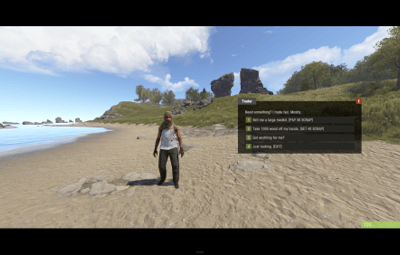
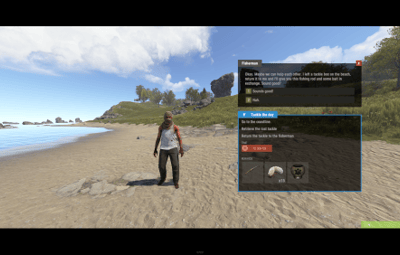
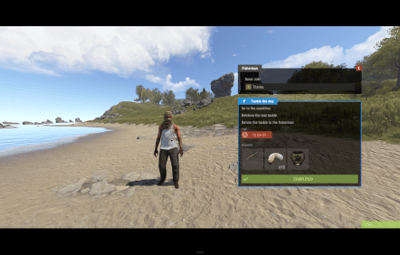
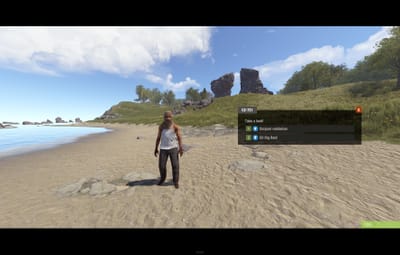
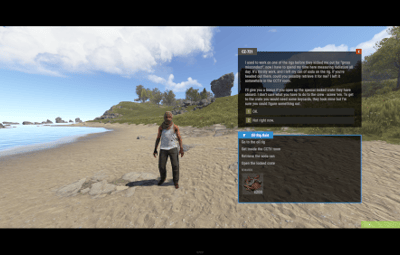
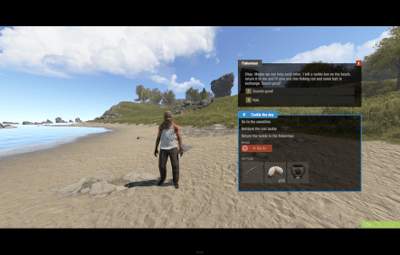
NpcDialogue gives your NPCs the game's own conversation screen. Rust only draws that screen for the talks it ships with, so a custom NPC normally gets a chat message or a generic panel. NpcDialogue rebuilds it one to one, measured from the game's own UI files: the black letterbox bars, the name tag on the panel's top edge, the red X, the lines that type themselves out, the numbered answers and the blue-framed mission panel with its objectives, time limit, reward slots and COMPLETED button.
Stand where an NPC should be, type /npcd add trader, and a talking NPC appears there. Inside a monument it is saved relative to it, so it comes back at every copy of that monument on every map and survives wipes. Its answers check things (a permission, a group, an item, money) and do things (charge or pay scrap, Economics or ServerRewards, give or take items, grant permissions), written as short lines in the config: pay 50, give largemedkit 1. Every check runs before anything happens, payments come first, and an answer that cannot finish undoes everything it did and hands back the very items it took.
Developers get an API to register conversations, missions, conditions and actions at runtime, spawn NPCs and follow every conversation through hooks. Our other plugins use it too: the Case Battles key dealer and the Relics black market broker talk through it.
| Works on Oxide and Carbon | No other plugin needed |
|---|---|
| Needs CrashExtensions (included in the zip) | 8 languages built in |
Jump to: Features · How an answer works · Screenshots · Commands · Permissions · Install · Configuration · Test server · FAQ · API
 Features
For players
- The vanilla screen. Letterbox bars, name tag, red X, typed lines and numbered answers, with the colours, sizes and fonts of the game's own conversation.
- Missions that look like missions. The blue panel shows up to 4 objectives, a time limit, up to 6 reward items with their amounts and a COMPLETED button.
- Your language. English, German, Spanish, French, Italian, Portuguese, Russian and Ukrainian, with the game's own words for TIME, REWARDS and COMPLETED.
- It gets out of the way. The screen closes by itself when you walk away from the NPC, die, go down or disconnect, and a fast double click never pays twice.
For server owners
-
Talking NPCs where you stand.
/npcd add <conversation>places one facing where you look. Inside a monument it is saved relative to it, so it stands at every copy of that monument, on every map, and survives wipes. -
Answers without code. Conditions hide a row (permission, group, item with skin, money, and
!in front to negate any of them). Actions do the work: pay, reward, give, take, grant and revoke. - Safe by design. Every check runs first, payments run before anything else, and an answer that cannot finish undoes everything it did (the same items come back, wear and attachments included) and shows its "fail" speech.
- Your currency. Scrap by default, any other item, Economics or ServerRewards.
- Vanilla NPCs too. The real texts of the Boat Vendor, Stable Master, Airwolf Vendor, Fisherman and CZ-721 scientist come ready, and you can give any vanilla NPC a new conversation.
- One-shot rewards. Mark a claim with a permission so a gift can only be taken once.
-
A broken config is never overwritten. The plugin saves a copy as
NpcDialogue.json.brokenand runs the defaults until you fix the file. -
Server commands on any answer, with
{steamid}for the player, and sounds for refused and completed answers.
For developers
- An API. Register conversations, missions, conditions and actions at runtime, spawn and remove NPCs, and open a screen you drive yourself. See the API.
- Hooks for every step. Start, pick and end of every conversation, plus a ready hook to register in.
- Clean unloads. Everything a plugin registers or spawns is dropped when it unloads.
 How an answer works
- The row shows or hides. An answer with Conditions shows only when every one of them passes. A condition that fails to run hides the row too.
- Checks first. When a player picks it, every action is checked before anything runs.
- Payments first. The debits are summed and taken first, then Economics or ServerRewards rewards, then other plugins' actions, then item gives, item rewards and permission changes. Inside each group the actions run in the order you wrote them.
-
A failure undoes it all. If a step cannot finish, payments come back, rewards are taken back and the very items taken return to their slots; the refused sound plays and the answer's "fail" speech shows. A give or item reward bigger than 30 stacks never runs (the player sees only the "fail" speech): split it. If Economics or ServerRewards refuses a refund, it is kept in
oxide/data/NpcDialogue_owed.jsonand paid the next time the player picks an answer or connects, also after a wipe. - Then the conversation moves on to the next speech, or ends. After a purchase the next pick waits half a second, so a fast double click never buys twice.
- Then its server commands run. They cannot fail the answer: if a command does nothing (a plugin not loaded, a wrong id), what the actions took is not given back, so test a command once from the console first.
The shipped trader conversation shows all of it: a large medkit for 50 scrap, 1000 wood for 40 scrap and a one-shot gift. This is its first answer as it sits in the config:
"Text": "Sell me a large medkit. [PAY 50 SCRAP]",
"Next speech id (empty = end conversation)": "sold",
"Actions (all checked first, then run in order)": [ "pay 50", "give largemedkit 1" ],
"Next speech id when an action cannot run (empty = stay)": "poor"
 Screenshots
Every screen below is NpcDialogue running in Rust.

|
|---|
| A placed trader: answers that sell, buy and give |

|

|
|---|---|
| The mission panel: objectives, time and rewards | COMPLETED closes the mission |

|

|
|---|---|
| Mission offers with their own icons | Long speeches wrap and type out line by line |

|
|---|
| In the player's language |
 Commands
-
/npcd add <conversation> [id]- place a talking NPC where you stand, facing where you look -
/npcd remove [id]- remove the NPC with that id, or the one next to you -
/npcd list- list the placed NPCs and the ones other plugins placed -
/npcd tp <id>- teleport to an NPC -
/npcd respawn- place every NPC again, reading the NPC list from the config file -
/npctalk [id] [speech]- preview a conversation: answers move between speeches but run no actions or commands
All of them need admin or the npcdialogue.admin permission.
 Permissions
-
npcdialogue.admin -
/npcdand/npctalk. Staff only (admins can always) - npcdialogue.gift - lets a player see the shipped trader's one-shot gift row
- npcdialogue.gift.claimed - written by the gift itself once it is taken. Do not grant it
A permission that starts with npcdialogue. and is used in a conversation is registered for you. A typical setup:
oxide.grant group admin npcdialogue.admin
oxide.grant group vip npcdialogue.gift
 Install
-
Install the extension, once per server. Stop the server, copy
Oxide.Ext.CrashExtensions.dllintoRustDedicated_Data/Managed(Carbon:carbon/extensions) and start it again. The console printsLoaded extension CrashExtensionswith its version. An older copy of the DLL is simply overwritten: it is one shared file for all our plugins. -
Install the plugin. Copy
NpcDialogue.csintooxide/plugins(Carbon:carbon/plugins). It compiles on its own and createsoxide/config/NpcDialogue.json. -
Try it. Grant
npcdialogue.adminto your staff, stand somewhere in game, type/npcd add traderand talk to the NPC that appears. Then write your own conversations, missions and NPCs in the config and runoxide.reload NpcDialogue.
Plugin does not compile? The extension is missing or too old: check the folder and restart again. On a hosting panel, upload the DLL with the file manager or SFTP, and keep a copy in case the panel resets that folder on an update.
 Configuration
Everything lives in oxide/config/NpcDialogue.json.
Config sections (click to expand)
-
Animations - timed like the game's own screen by default: the typewriter text at 72 characters per second, a short pause after
.,!?, the delay before the text starts and before the answers show. The letterbox slide-in and the fade-ins are off by default (the game has none), each on its own switch - Max talk distance - how far a player can walk from an NPC before the screen closes (5 meters, like the game)
-
Currency - what
pay,rewardandmoneyuse: an item (scrap by default), Economics or ServerRewards - Sounds - the effect for an answer that cannot run and the one for an answer whose actions ran, empty for none
- Vanilla NPC overrides - a vanilla conversation name and the conversation of yours that replaces it
- NPCs - the talking NPCs you placed, each with its conversation, name and position
- Conversations - speeches with their answers: text, next speech, Conditions, Actions, the "fail" speech, server commands, a required permission and the mission icon
- Missions - name, objectives, time limit, reward items (shortname, amount, skin) and other rewards (text and icon)
Conditions and actions
-
Conditions:
permission <perm>,group <group>,item <shortname> [amount] [skin],money <amount>. Put!in front to negate one, for example!permission vip -
Actions:
pay <amount>,reward <amount>,give <shortname> [amount] [skin],take <shortname> [amount] [skin],grant <perm>,revoke <perm> -
Without a skin,
itemandtakecount only plain items, so a skinned or renamed item is never taken by mistake -
One-shot rewards: mark the claim instead of revoking. Use the condition
!permission npcdialogue.gift.claimedand the actiongrant npcdialogue.gift.claimed. A revoke cannot take a permission a group gives, so the plugin refuses it then
 FAQ
FAQ
Q: I run NpcDialogue. What changes when I update?
A: Replace NpcDialogue.cs and, if you update the extension too, restart once. Your config, your conversations, missions and placed NPCs load as they are.
Q: Is it identical to the game's own screen?
A: The layout, colours, fonts and the typing animation are measured from the game's files. A server cannot do three things: hide the vitals and hotbar while you talk, answer to the number keys and close on ESC. The red X closes the screen and the answers are clicked.
Q: What happens to the vanilla NPCs?
A: Nothing, until you ask. The default conversations hold the real texts of the Boat Vendor, Stable Master, Airwolf Vendor, Fisherman and CZ-721 scientist, and their purchase answers are text only until you give them actions or server commands. An override replaces that NPC's whole vanilla conversation, including what its answers did (buying boats, opening its shop, handing out missions), on every NPC that carries it. The console says what an override drops the first time it runs.
Q: Do I need an economy plugin?
A: No. Money is scrap unless you pick another item, Economics or ServerRewards in the Currency section.
Q: Can another plugin use it?
A: Yes, that is what the API is for. Register conversations, missions, conditions and actions when OnNpcDialogueReady fires, spawn NPCs, or open a screen you drive yourself. The Case Battles key dealer and the Relics black market broker do exactly that.
Q: What if an NPC gets removed by another plugin?
A: A placed NPC is put back by itself, checked every minute. If a spot keeps losing its NPC right after it spawns, the plugin stops that spot with one warning until you run /npcd respawn or reload it.
Q: Does it contact any outside service?
A: No. It makes no web requests and sends nothing about your server or your players.
Q: Can I translate it?
A: Eight languages are built in, and each player sees the language of their own game. Your own conversations and missions show exactly as you write them.
Q: Does it work on Carbon?
A: Yes. The extension goes into carbon/extensions instead of RustDedicated_Data/Managed, and everything else is the same.
 API / Hooks
// Hooks
void OnNpcDialogueReady()
object CanNpcDialogueStart(BasePlayer player, string conversationId, BaseEntity npc)
void OnNpcDialogueStarted(BasePlayer player, string conversationId, BaseEntity npc)
object CanNpcDialoguePick(BasePlayer player, string conversationId, string speechId, int index)
void OnNpcDialoguePicked(BasePlayer player, string conversationId, string speechId, int index)
void OnNpcDialogueEnded(BasePlayer player, string conversationId)

// API: NpcDialogue?.Call("Method", ...)
bool API_StartConversation(BasePlayer player, string conversationId, BaseEntity npc = null, string speechId = null)
bool API_ShowDialogue(BasePlayer player, string npcName, string text, List<string> responses,
    Action<BasePlayer, int> onResponse, Dictionary<string, object> mission = null, BaseEntity npc = null)
void API_CloseDialogue(BasePlayer player)
bool API_RegisterConversation(Plugin owner, string id, object data)
bool API_RegisterMission(Plugin owner, string id, object data)
bool API_RegisterCondition(Plugin owner, string name, Func<BasePlayer, string[], bool> check)
bool API_RegisterAction(Plugin owner, string name, Func<BasePlayer, string[], bool> check,
    Action<BasePlayer, string[]> run, Action<BasePlayer, string[]> undo = null)
NPCTalking API_SpawnNpc(Plugin owner, string id, Vector3 position, float yaw, string conversationId,
    string name = null, string prefab = null, Action<BasePlayer> onTalk = null)
bool API_RemoveNpc(Plugin owner, string id)
bool API_IsTalking(BasePlayer player)
bool API_IsReady()
Conversations and missions take a dictionary, an anonymous object, a JObject or JSON text with short keys: name, start, speeches; each speech id, text, mission, claim, responses; each response text, next, conditions, actions, failNext, commands, permission, missionIcon. An action fails by throwing from run; give it an undo that reverses run, and it is called when a later action of the same answer fails. An action without undo can only be the last plugin action of an answer: an answer that puts one before another plugin action does not run. onResponse gets the picked index, -1 when the player leaves, dies, falls asleep, is wounded or walks away (also when another plugin's dialogue replaces yours) and -2 for COMPLETED; call API_ShowDialogue again from the callback to continue. CanNpcDialogueStart runs while the dialogue is opening, so a handler cannot open one from inside it: open yours from NextTick. Register in OnNpcDialogueReady: everything a plugin registered is cleared when NpcDialogue or that plugin unloads.

Questions, ideas or bug reports? Use the Support tab of this file or join our Discord.