


About Forge
[ ! ] The zip contains a DLL extension that goes into RustDedicated_Data/Managed. Some hosts do not allow uploading DLLs - check with your host before buying. [ ! ]
Forge lets your players make their weapons and armour stronger, one level at a time. They pick an item, pick what to improve (damage, magazine size, durability or protection), put a stone in and see their exact chance before they click. A win levels the item up and renames it, like "Assault Rifle +7". A fail burns the stone, and from +5 it can cost a level, unless a ward was in the slot.
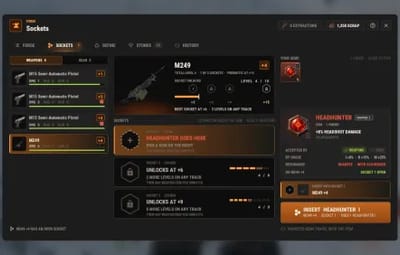
The levels live on the item itself, so a forged rifle keeps its bonus when it is traded, looted, dropped, stored or carried through a restart. At +3, +6 and +9 the item opens gem sockets, and at +15 a prismatic socket that takes cursed gems. Thirteen gems in three grades and three cursed gems add headshot damage, lifesteal, thorns, a second wind and more, and seven resonances reward the right gems sitting together in one item.
Stones, catalysts, wards and gems drop from crates, barrels and scientists, refine into better tiers and fuse into better grades. New players get a welcome card and a guided tour of the real window, and admins get a first-run setup with three presets that set the whole balance in one click.

| Works on Oxide and Carbon | Needs CrashExtensions (included) |
|---|---|
| 4 tracks, 4 stone tiers, 16 gems | Casual, Standard and Hardcore presets |
Jump to: Features · Screenshots · Trailer · How a forge works · Commands · Permissions · Install · Configuration · Test server · FAQ
 Features
For players
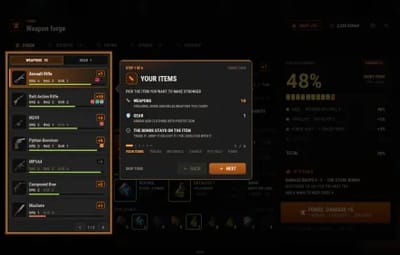
- One forge window. Your weapons and gear on the left, the item with its condition and sockets in the middle, the tracks, the materials and the success chance on the right. One button forges.
- Four tracks. DAMAGE (+4% per level, up to +10), MAGAZINE (+10% rounds per level, up to +5), DURABILITY (-8% wear per level, up to +5) and PROTECTION for gear (-2% attack damage taken per level, up to +10).
- Odds you can read. The chance is shown before you click, added up from the stone, the catalyst, forge heat and any VIP bonus, and the IF IT FAILS panel says exactly what a fail would cost.
- Four stone tiers. Rough, Refined, Flawless and Mythic. A better stone reaches higher (+4, +6, +8, +10) and has better odds at every level.
- Catalysts and wards. A catalyst adds +5, +10 or +15 points of chance. A ward keeps your level when a forge fails, and it is only used up when it actually saved something.
- Forge heat. Every failed forge makes that item's next try easier, up to a cap, so a bad run never feels like a dead loss. A win resets it.
- Stats that travel. Levels, heat and gems are stored on the item. Trade it, loot it, drop it or die with it: the bonus goes with it.
- Gem sockets. Sockets open at +3, +6 and +9, and a prismatic socket at +15. Thirteen gems in three grades, plus three cursed gems with a big upside and a real drawback.
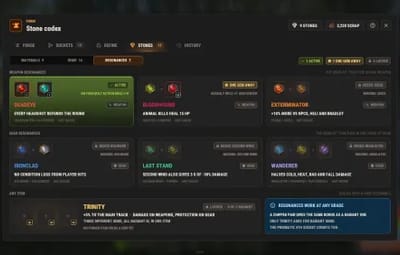
- Resonances. The right pair of gems in one item unlocks a bonus: a headshot that gives the round back, animal kills that heal you, no gear wear from player hits, and four more.
- Gems you can see. When a gem triggers, everyone nearby sees it: a headshot bursts in sparks, lifesteal draws blood, a thorn clangs the shield and cuts the attacker, a saved round ejects a shell, Second Wind injects and sparkles, Bloodhound howls. Each effect is a list of prefabs in the config, with one switch for all of them.
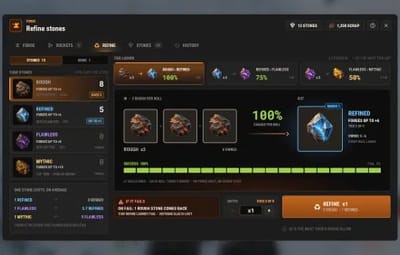
- Refine and fuse. Three stones make one of the next tier, three gems make one of the next grade, with the chance shown before you roll.
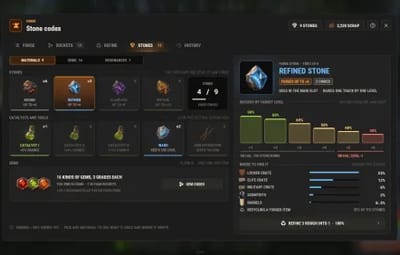
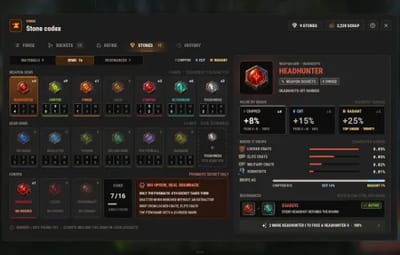
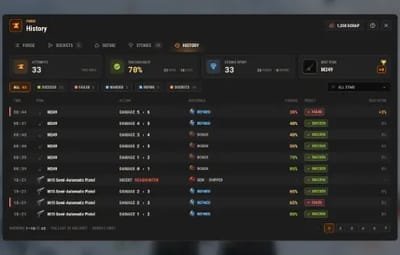
- Codex and history. Every material and gem with its odds and where it drops on your server, and your last 50 forges with your success rate and best item.
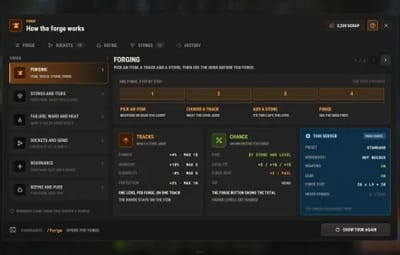
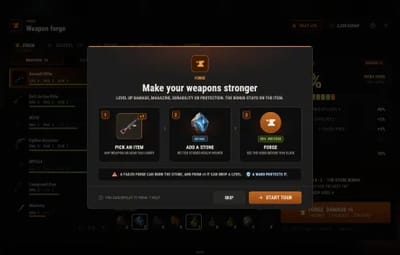
- Easy to learn. A welcome card on the first open, a guided tour that lights up each part of the real window, a sockets tour and a help page with your server's own numbers.
- Outside the window. A chip over the belt with the levels of the forged item you hold, result toasts, and a warning card before you recycle a forged item, with a KEEP IT button.
For server owners
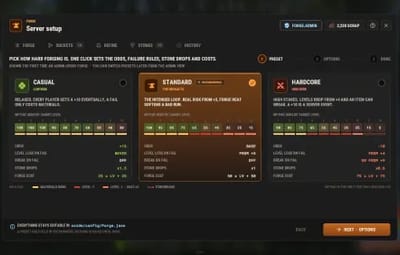
- First-run setup. The first time an admin opens Forge, three presets (Casual, Standard, Hardcore) set the odds, failure rules, drop rates, costs and heat in one click, with the three compared side by side, plus a page of on and off switches.
- Your risk, your rules. Failure bands by target level decide what a fail costs: nothing but the materials, a level, double heat or, on hardcore servers, the item itself behind a second click.
- Drops you control. A chance per material for every loot container (elite, military and locked crates and barrels by default; add any container by its prefab name) and for scientist kills. Gems drop mostly Chipped, rarely Radiant.
- Any currency. The forge cost in scrap, Economics, ServerRewards or free.
- Recycling that cannot be farmed. A recycled forged item gives back a share of the stones its levels needed, always less than what went in, and a warning card shows the player what they would lose first.
- VIP bonus. Extra chance per permission, off until you add one.
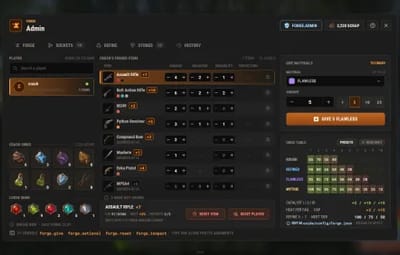
- Admin view. Look up any online or sleeping player, see every forged item and its levels, change a level, reset an item or a player, and give materials. Every action is logged.
-
Console and Tebex.
forge.givehands out stones, catalysts, wards, extractors and gems from the server console, RCON or a Tebex package. - Everything in the config. Every track, stone, catalyst, gem value, drop chance, cost, resonance, interface switch and sound, and every text in the lang file.
- Safe with other plugins. A name another plugin gave an item is left alone, an item whose data belongs to another plugin is never touched, and a broken config file is never overwritten.
For developers
-
OnForgeCompletedhook. Called after every forge with the player, the item uid, the track, its new level and the result (Success, Failed, Warded or Broken). See the FAQ.
 Screenshots
Every screen below is Forge running in Rust.

|
|---|
| The forge: item, tracks, materials and the success chance |

|

|
|---|---|
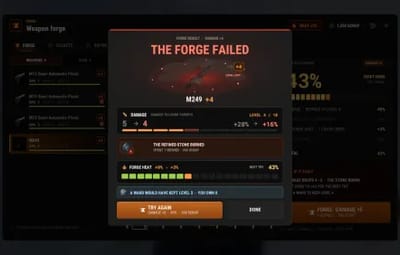
| A successful forge | A failed forge: what was lost and the heat it built |

|

|
|---|---|
| Sockets: gems, grades and resonances | Refine: three stones into the next tier |

|

|
|---|---|
| Stone codex: odds by level and where it drops | Gem codex: every gem and its value by grade |

|

|
|---|---|
| Resonances: the gems that work together | History: every forge, refine and gem change |

|

|
|---|---|
| How it works, with your server's numbers | The guided tour lights up the real window |

|

|
|---|---|
| The welcome card on the first open | First-run setup: pick a preset |

|

|
|---|---|
| Admin view: a player's forged items | The chip over the belt shows the levels of the forged item you hold |
 Trailer
The Forge trailer (click to play, 55 seconds)

 How a forge works
- Pick an item and a track. Firearms take DAMAGE, MAGAZINE and DURABILITY (a gun that holds one round, like the Eoka, skips MAGAZINE); bows and melee weapons DAMAGE and DURABILITY; armour and clothing PROTECTION and DURABILITY. Each forge raises one track by one level, and the item's name shows the total ("Assault Rifle +7").
- Add a stone. Its tier caps the level: Rough up to +4, Refined +6, Flawless +8, Mythic +10. A catalyst and a ward are optional.
- Read the chance. Default Mythic odds run from 100% at +1 down to 15% at +10, and heat adds +3 per failed try on that item, up to +15.
- Forge. By default the cost is 50 scrap plus 50 per target level. A win levels the track up at once.
- If it fails. Up to +4 only the materials burn. From +5 the track drops a level, and from +8 the heat gain doubles. A ward cancels the loss. On a Hardcore server an item can also break from +9, after a second click, and its attachments and ammo come back.
- Sockets. At +3, +6 and +9 the item opens a socket, and at +15 the prismatic one. A firearm can reach +20 in total, a bow, melee weapon or piece of gear +15.
 Commands
- /forge - open the forge. The name is configurable.
- /forgeadmin - the admin view, or the first-run setup until it is finished.
- /forge hud move - drag the held-item chip over the belt to a new place. /forge hud done saves the place, /forge hud reset puts it back.
Admin
From the server console, RCON, Tebex or a player with forge.admin (the player has to be online):
-
forge.give <player> <material> [amount]- give stones, catalysts, wards, extractors or gems (for exampleforge.give <steamid> stone.mythic 3, orgem.vampire.2for a Cut Vampire gem). -
forge.setlevel <player> <item uid> <track> <level>- set one track of an item: damage, magazine, durability or protection. -
forge.reset <player> [item uid]- clear the levels, heat and gems of a player's forged items, or of one item. -
forge.inspect <player>- list a player's forged items with their uid. -
forge.panel- open the admin view from the F1 console.
 Permissions
- forge.use - open the forge and forge items.
- forge.sockets - the SOCKETS tab: insert and extract gems.
- forge.refine - the REFINE tab: refine stones and fuse gems.
-
forge.admin - the setup, the admin view and the console commands. Admins need
forge.usetoo. -
A permission you add to the VIP bonus (for example
forge.vip) - extra chance on every forge. A permission that starts withforge.is registered for you.
A typical setup:
oxide.grant user YOUR_STEAM_ID forge.admin
oxide.grant group default forge.use
oxide.grant group default forge.sockets
oxide.grant group default forge.refine
 Install
-
Install the extension, once per server. Stop the server, copy
Oxide.Ext.CrashExtensions.dllintoRustDedicated_Data/Managed(Carbon:carbon/extensions) and start it again. The console printsLoaded extension CrashExtensionswith its version. An older copy of the DLL is simply overwritten: it is one shared file for all our plugins. -
Install the plugin. Copy
Forge.csintooxide/plugins(Carbon:carbon/plugins). It compiles on its own and creates its config. -
Grant the permissions above, give yourself
forge.useandforge.admin, and type/forge. The first-run setup opens: pick a preset, pick your options, press FINISH SETUP.
Plugin does not compile? The extension is missing or too old: check the folder and restart again. On a hosting panel, upload the DLL with the file manager or SFTP, and keep a copy in case the panel resets that folder on an update.
VenuxUpdater (optional, free, in the zip). Installs the Oxide.Ext.CrashExtensions extension with one console command,
venux.install, and can keep it current and tell you about plugin updates. It makes no web request until you run a command or turn on one of its switches inoxide/config/VenuxUpdater.json(AutoInstallExtension,CheckForUpdates,ShowNews; all false by default). It contacts only venuxplugins.com (the public version list, the signed extension DLL and, with ShowNews, the news file) with plain GET requests that carry no server, player or plugin data (only the server's IP address and a standard User-Agent, as with any web request).
 Configuration
Everything lives in oxide/config/Forge.json, and the first-run setup sets the main parts in game. Player history is stored in oxide/data/Forge; the forge levels themselves are stored on the items.
Config sections (click to expand)
- Preset - Casual, Standard, Hardcore or Custom
- Station - require standing at a workbench and its level, and the chat command
- Forgeable items - firearms, bows, melee weapons and gear on or off, and a blacklist of item shortnames
- Tracks - each track on or off, its bonus per level and its max level
- Stones - each tier's item, highest level and success chance at every level
- Catalysts, Ward and Extractor - their items and the catalysts' bonus chance; whether a ward is only spent when it saved a level
- Forge heat - on or off, the bonus per failed forge and its cap
- Failure - the failure bands, break on fail and from which level, and the confirm time
- Cost - Scrap, Economics, ServerRewards or None, the base cost and the cost per level
- VIP bonus chance by permission - extra chance per permission
- Sockets and gems - on or off, the unlock levels, the prismatic level, the extractor rule, Second Wind's timing, every gem's item and values by grade, and each resonance on or off
- Refine and fuse - on or off, the stones needed, the chance of each step and what comes back on a fail
- Where stones and gems come from - the gem grade split, each loot container's chances, NPC kills and the recycle return
- Announcements - the level that gets a chat broadcast
- Wipe - clear player history and counters on wipe
- Interface - animations, the held-item chip, toasts, the first stone hint, the welcome card and tour, and the recycler warning
- Sounds - one switch and the effect for each action
- World effects - one switch, the time between one player's bursts, and the prefabs each gem plays on its owner and on its target
 Test server
Available on the new Meowcraft test server. Try Forge before you buy: join and type /forge in chat.
client.connect 91.229.114.54:28015
 FAQ
FAQ
Q: Do I need Economics or ServerRewards?
A: No. The forge costs scrap by default. Economics and ServerRewards are optional, and the cost can also be turned off.
Q: Do the levels stay on the item?
A: Yes. Levels, heat and gems are stored on the item itself, so they follow it through trades, loot, boxes, deaths and restarts, and a skin change at the repair bench keeps them (a skin that would turn it into a different item is refused).
Q: Is it pay-to-win?
A: Only if you make it so. The VIP chance bonus is empty by default, and players get stones from loot, scientists, refining and recycling.
Q: Can I make it harder or easier?
A: Pick Casual, Standard or Hardcore in the first-run setup, then fine-tune any number in the config. Hand-edited odds, drops and costs are kept unless you ask the setup to put the preset's numbers back.
Q: Can I give stones from my store?
A: Yes. Run forge.give <steamid> <material> <amount> as the Tebex command while the player is online.
Q: What happens when a forged item is recycled?
A: The recycler gives back a share of the stones its levels needed (35% by default, rounded down), and its gems shatter. Before that, a warning card shows the player what they would lose and offers to move the item back.
Q: Does it work on Carbon?
A: Yes. The extension goes into carbon/extensions instead of RustDedicated_Data/Managed, and the plugin into carbon/plugins.
Q: How do I translate it?
A: English is built in. Edit oxide/lang/en/Forge.json, or copy it into another language folder and translate its values: each player reads their own game language.
Q: Does it contact any outside service?
A: Only to download its pictures (about 120 small images: icons, buttons and the stone and gem art) once from the Venux CDN, cdn.crashplugins.space, which your server then keeps. Nothing about your server or your players is sent. You do not need ImageLibrary.
Q: How do other plugins react to a forge?
A: Forge calls void OnForgeCompleted(BasePlayer player, ulong itemUid, string track, int level, string result) after every forge. track is damage, magazine, durability or protection, level is the track's new level and result is Success, Failed, Warded or Broken.

Questions, ideas or bug reports? Use the Support tab of this file or join our Discord.