thanks!

About Mlrs Map Marker
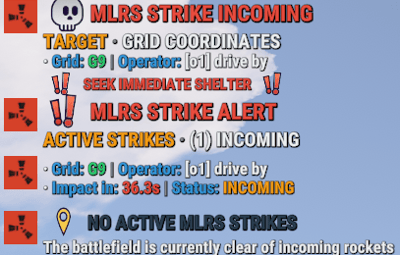
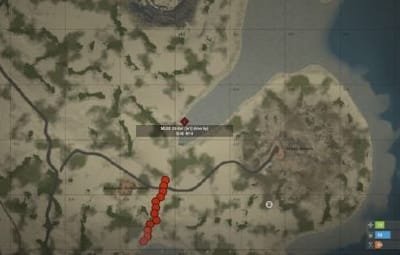
MlrsMapMarker is a plugin that provides real-time MLRS strike information on the in-game map. It uses advanced, non-intrusive Harmony patches to detect when an MLRS is fired, automatically creating a temporary map marker at the target location visible to all players, and broadcasting crucial strike details to the chat.
Main Features
-
 Automatic Map Markers: Instantly creates a visible marker on the map for all players the moment an MLRS is aimed and fired, showing the exact impact zone.
-
 Real-time Strike Alerts: Notifies the entire server via chat about incoming rocket strikes, increasing situational awareness.
-
 Impact Time Calculation: Features a sophisticated algorithm to calculate and announce the estimated time until rocket impact, allowing players to react.
-
 Customizable Notifications: Server owners can configure marker duration, icon, color, and label. Chat notifications can be toggled and customized to show either grid references or precise coordinates.
-
 Grid Reference System: Translates world coordinates into an easy-to-read map grid reference (e.g., H15) for quick communication.
-
 Performance Optimized: Built with a lightweight footprint, using an efficient timer to clean up expired map markers and ensure minimal server impact.
-
 Harmony-Powered: Utilizes Harmony patching for seamless and reliable integration with the game's core mechanics without altering game files.
Permissions
-
 mlrsmapmarker.admin: Allows an admin to use the mlrs.clear console command to remove all active markers from the map.
Chat Commands
-
 /mlrs: Displays a list of all currently active MLRS strikes, including their target grid, the name of the attacker (if enabled), and the time to impact.
Console Commands
-
mlrs.clear: Immediately removes all active MLRS markers from every player's map.
Config:
{
  "MarkerDuration": 45.0,
  "MarkerIcon": 4,
  "MarkerColor": 3,
  "MarkerLabel": "MLRS Strike!",
  "ShowChatNotification": true,
  "ShowPlayerName": true,
  "CleanupInterval": 10.0,
  "ShowGridReference": true,
  "AutoShowToAllPlayers": true
}
Lang:
{
  "NoActiveStrikes": "<size=14>:yellowpin: <color=#2C3E50>NO ACTIVE MLRS STRIKES</color></size>\n<size=7><color=#7F8C8D>\n</color></size><size=12><color=#ECF0F1>The battlefield is currently clear of incoming rockets</color></size>",
  "ActiveStrikesHeader": "<size=16>:exclamation: <color=#E74C3C>MLRS STRIKE ALERT</color></size>\n<size=7><color=#7F8C8D>\n</color></size><size=14><color=#F39C12>ACTIVE STRIKES </color><color=#7F8C8D>· </color><color=#ECF0F1>({0}) INCOMING</color></size>",
  "StrikeInfo": "<size=12>· <color=#3498DB>Grid: </color><color=#2ECC71>{0}</color> <color=#7F8C8D>| </color><color=#3498DB>Operator: </color><color=#ECF0F1>{1}</color></size>\n<size=12>· <color=#3498DB>Impact in: </color><color=#E74C3C>{2}s</color> <color=#7F8C8D>| </color><color=#3498DB>Status: </color><color=#F39C12>INCOMING</color></size>\n<size=7><color=#7F8C8D>\n</color></size>",
  "StrikeInfoNoPlayer": "<size=12>· <color=#3498DB>Grid: </color><color=#2ECC71>{0}</color> <color=#7F8C8D>| </color><color=#3498DB>Impact in: </color><color=#E74C3C>{1}s</color></size>\n<size=12>· <color=#3498DB>Status: </color><color=#F39C12>INCOMING</color> <color=#7F8C8D>| </color><color=#3498DB>Threat Level: </color><color=#E74C3C>HIGH</color></size>\n<size=7><color=#7F8C8D>\n</color></size>",
  "IncomingStrikeWithGrid": "<size=16>:skull: <color=#E74C3C>MLRS STRIKE INCOMING</color></size>\n<size=7><color=#7F8C8D>\n</color></size><size=14><color=#F39C12>TARGET </color><color=#7F8C8D>· </color><color=#ECF0F1>GRID COORDINATES</color></size>\n<size=12>· <color=#3498DB>Grid: </color><color=#2ECC71>{0}</color> <color=#7F8C8D>| </color><color=#3498DB>Operator: </color><color=#ECF0F1>{1}</color></size>\n<size=7><color=#7F8C8D>\n</color></size><size=11><color=#E74C3C>:exclamation: SEEK IMMEDIATE SHELTER :exclamation:</color></size>",
  "IncomingStrikeWithCoords": "<size=16>:skull: <color=#E74C3C>MLRS STRIKE INCOMING</color></size>\n<size=7><color=#7F8C8D>\n</color></size><size=14><color=#F39C12>TARGET </color><color=#7F8C8D>· </color><color=#ECF0F1>COORDINATES</color></size>\n<size=12>· <color=#3498DB>Position: </color><color=#2ECC71>{0}</color> <color=#7F8C8D>| </color><color=#3498DB>Operator: </color><color=#ECF0F1>{1}</color></size>\n<size=7><color=#7F8C8D>\n</color></size><size=11><color=#E74C3C>:exclamation: SEEK IMMEDIATE SHELTER :exclamation:</color></size>",
  "MarkersCleared": "<size=14>:coffeecan: <color=#2ECC71>MARKERS CLEARED</color></size>\n<size=12><color=#ECF0F1>All MLRS markers have been removed from the map</color></size>",
  "NoActiveMarkers": "<size=12>:yellowpin: <color=#7F8C8D>No active MLRS markers found</color></size>",
  "MarkersListHeader": "<size=14>:clipboard: <color=#2ECC71>MLRS TRACKING</color> <color=#7F8C8D>· </color><color=#ECF0F1>({0}) ACTIVE</color></size>",
  "MarkerListItem": "<size=11>· Grid {0} ({1}) by {2} ({3}s remaining)</size>",
  "TrackedTargetsHeader": "<size=12>:yellowpin: <color=#3498DB>Tracked MLRS targets: </color><color=#F39C12>{0}</color></size>",
  "TrackedTargetItem": "<size=11>· MLRS at {0} -> Target: {1}</size>"
}