




About Ore Spawn Controller
[ ✓ ] Works on any host. [ ✓ ]
The plugin needs the free CrashExtensions library. Can't upload DLLs on your host? No problem: the zip includes a small installer plugin. Drop it in your plugins folder, run crashext.install, restart once, and you're done.
Ore Spawn Controller replaces Rust's own ore spawning with a grid you control. Stone, metal, sulfur and high quality metal each get their own spacing and their own odds in every biome, so every wipe has the same balanced spread of ore instead of whatever the vanilla populations happen to roll.
Nodes keep away from players, bases, water and steep slopes. The grid gets denser as your server fills up, mined nodes come back after the interval you pick, and a new node can turn into a rich vein. Each ore can also drop bonus loot. The nodes are saved with every server save, so a restart keeps the same ones, and a new wipe gets a fresh grid.
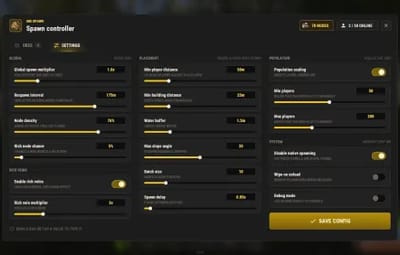
You set all of it in game from one admin window: click an ore, drag its grid spacing, set its odds per biome with one click, watch the live node counts, respawn the whole grid, and ping every node on your map.

| Works on Oxide and Carbon | Needs CrashExtensions (included) |
|---|---|
| Stone, metal, sulfur and HQ metal | 5 biomes, population scaling, rich veins |
Jump to: Features · Screenshots · Commands · Permissions · Install · Configuration · FAQ
 Features
- A grid per ore. Stone, metal, sulfur and HQ metal each have their own spacing (150, 200, 180 and 300 m by default). Smaller spacing means more nodes.
- Odds per biome. Arid, temperate, arctic, tundra and jungle each get their own chance for every ore, set in steps of 0.05.
- Clean placement. Nodes keep a distance from players and bases, stay above the water line and skip slopes steeper than your limit.
- Population scaling. The grid is sparse at low population and dense when the server is full, and the window shows the live factor.
- Respawns that hold. A mined node comes back in its own grid cell after the interval you set, and pending respawns survive restarts and reloads.
- Rich veins. A chance for a new node to give more ore per hit, with a small effect when it is gathered.
- Bonus loot. Any item, with its own chance and amount, for each ore.
- Vanilla ore off. The native ore populations stop spawning and the ones already on the map are cleared.
- Map pings. One click shows every spawned node on your map for 30 seconds.
- Light on the server. Nodes spawn in small batches spread over frames, and the admin pictures only go to admins.
- Safe config. A config file that is not valid JSON is set aside, never overwritten.
 Screenshots
Every screen below is Ore Spawn Controller running in Rust.

|

|
|---|---|
| ORES: the ore list, the grid, biome odds and live counts | High quality metal with its own grid and odds |

|

|
|---|---|
| An ore switched off keeps its values | Type an exact value |

|
|---|
| SETTINGS: placement, population, rich veins and system |
 Commands
- /oregen - open the admin window.
- /oreshow - show every spawned node on your map for 30 seconds.
- /orehide - clear the node markers.
- /orehelp - list the commands.
 Permissions
- orespawncontroller.use - the admin window and every button in it.
-
orespawncontroller.show -
/oreshowand/orehide.
oxide.grant user YOUR_STEAM_ID orespawncontroller.use
oxide.grant user YOUR_STEAM_ID orespawncontroller.show
 Install
-
Install the extension, once per server. Stop the server, copy
Oxide.Ext.CrashExtensions.dllintoRustDedicated_Data/Managed(Carbon:carbon/extensions) and start it again. The console printsLoaded extension CrashExtensionswith its version. An older copy of the DLL is simply overwritten: it is one shared file for all our plugins. -
Install the plugin. Copy
OreSpawnController.csintooxide/plugins(Carbon:carbon/plugins). It compiles on its own and creates its config. -
Grant the permissions above and type
/oregen.
Updating from 4.x? Drop the new file over the old one. Your config, your spawned nodes and the permission names stay the same, and the new settings are added with their defaults.
 Configuration
Everything lives in oxide/config/OreSpawnController.json, and the admin window sets almost all of it in game. The spawned nodes are saved in oxide/data/OreSpawnController.
Config sections (click to expand)
- Stone, Metal, Sulfur and HQM Settings - on or off, grid size, prefab, the odds for each biome and the bonus loot list
- Global Spawn Multiplier - scales every ore grid at once
- Respawn Interval (minutes) - how long a mined node takes to come back
- Node Density - the share of grid spots that get a node
- Placement - min distance from players and buildings, water buffer, max slope, batch size and spawn delay
- Population Scaling Settings - on or off, the min and max players and the grid factor at each end
- Rich Vein Settings - on or off, chance, gather multiplier and the effect
- Disable Native Ore Spawning - stop the vanilla ore populations
- Wipe Ores On Plugin Unload - remove the plugin's nodes when it unloads
- UI Sounds - one switch and the effect for each action
 FAQ
FAQ
Q: What happens to the vanilla ore?
A: With "Disable Native Ore Spawning" on (the default), the vanilla ore populations stop spawning and the ones already on the map are cleared, then the grid is laid.
Q: I run 4.x. What changes when I update?
A: The admin window is new, HQ metal joins the other ores, respawns and population scaling were rebuilt, and the admin pictures only go to admins. Your config, nodes and permissions carry over; press RESPAWN ALL once to lay the new grid.
Q: Can I get more nodes when the server is full?
A: Yes, that is population scaling: the grid factor moves from sparse at the minimum player count to dense at the maximum.
Q: Does it work on Carbon?
A: Yes. The extension goes into carbon/extensions instead of RustDedicated_Data/Managed, and the plugin into carbon/plugins.
Q: How do I translate it?
A: English is built in. Edit oxide/lang/en/OreSpawnController.json, or copy it into another language folder and translate its values: each player reads their own game language.
Q: Does it contact any outside service?
A: Only to download its pictures (32 small images) once from the Venux CDN, cdn.crashplugins.space, and only admins receive them. Nothing about your server or your players is sent. You do not need ImageLibrary.

Questions, ideas or bug reports? Use the Support tab of this file or join our Discord.