




Works with
Optional integrations and compatible files.

About Plant Spawn Controller
[ ✓ ] Works on any host. The zip includes a small installer plugin: run crashext.install once and restart. [ ✓ ]

Plant Spawn Controller lets you decide how much grows on your map. Hemp, corn, pumpkins, potatoes, wheat, every berry colour, mushrooms, flowers, the stone, metal, sulfur, wood and HQM pickups, and the wood piles, dead logs and driftwood: each group gets its own density and its own respawn speed, so you can have twice the berries and half the logs with two drags.
It doesn't replace Rust's spawning. It tunes the vanilla populations and lets vanilla do the spawning, so plants keep appearing where they always do, and unloading the plugin puts every vanilla value back. Nothing is written to your server.cfg.
Everything happens in one admin window: pick a preset, drag a slider, weight hemp against corn, scale it all with your player count, give wipe day a boost, refill a group right now or trim the extras, and ping the nearest plants on your map.
| Works on Oxide and Carbon | Needs CrashExtensions (included) |
|---|---|
| 6 groups, 28 vanilla populations | Presets, player curve, wipe boost |
Jump to: Features · Screenshots · Trailer · Commands · Permissions · Install · Configuration · Test server · FAQ
 Features
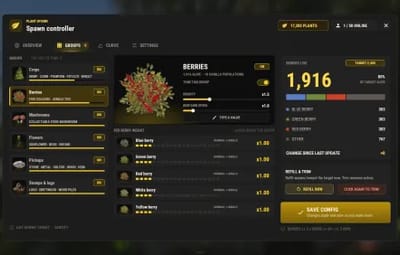
- Six groups. Crops (hemp, corn, pumpkin, potato, wheat), Berries (five colours, normal and jungle), Mushrooms, Flowers (sunflower, rose, orchid), Pickups (stone, metal, sulfur, wood, HQM) and Stumps & logs (wood piles, dead logs, driftwood).
- Density per group. From 0x to 5x of vanilla. 0 empties a group, 3x triples it.
- Respawn speed per group. From 0.25x to 10x, so picked plants come back slower or faster.
- Weights inside a group. Give hemp more of the Crops share, or make yellow berries rare. The group total stays where the density puts it.
- Hard cap. A max alive per group, so a high density never runs away on a big map.
- Player curve. 2 to 5 points on players online: more plants when the server is empty, fewer when it's full, or the other way round. Each group opts in.
- Wipe boost. An extra multiplier for the first hours after a wipe, on the groups you pick.
- Presets. Vanilla, Farming, Survival, Cooking, Barren, 2X and Low pop, one click each. Great with cooking plugins that need lots of berries and mushrooms.
- Refill now. Fills a group up to its new target in small steps, and pauses when the server FPS drops.
- Trim. Removes the extras over the target, never within 60 m of a player and never inside building privilege. It asks for a second click before it runs.
- Live counts. Alive and target per group and per population, the mix of each kind, and how many entities you are adding over vanilla.
-
Map markers.
/plants show cropspings the nearest plants of a group on your map for 30 seconds. - Clean restore. Unload or reload and every vanilla value is back. A group you switch off goes back to vanilla too.
- Plays nice. Built to run next to Ore Spawn Controller and the other Spawn Controllers, and it warns you if another spawn plugin is loaded.
- Light on the server. One small update every 30 seconds, refill and trim spread over frames, and the admin pictures only go to admins.
 Screenshots
Every screen below is Plant Spawn Controller running in Rust.

|

|
|---|---|
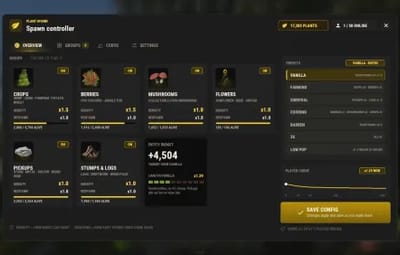
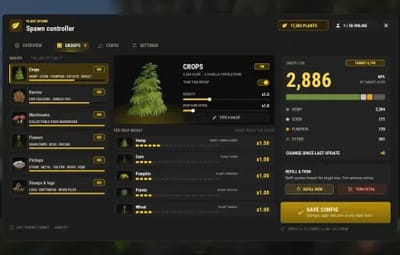
| OVERVIEW: every group, the entity budget and the presets | GROUPS: density, respawn and a weight per crop |

|

|
|---|---|
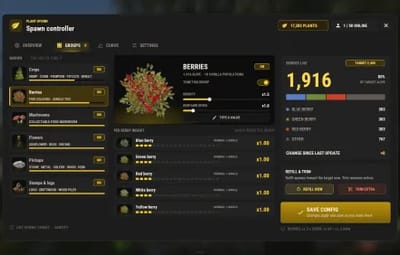
| Berries at x2 with the live mix of every colour | CURVE: drag the points, pick the groups, set the wipe boost |

|

|
|---|---|
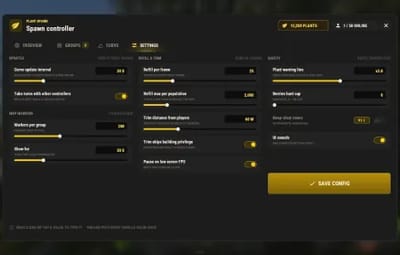
| SETTINGS: updates, markers, refill and trim, safety | Type an exact value |

|

|
|---|---|
| Trim asks for a second click | /plants show crops: the nearest crops on your map |
 Trailer
The Plant Spawn Controller trailer (click to play, 55 seconds)

 Commands
Chat:
- /plants - open the admin window.
- /plants show <group> - ping the nearest plants of a group on your map (groups: crops, berries, mushrooms, flowers, pickups, logs).
- /plants hide - clear the markers.
- /plants help - list the commands.
Console (server console, RCON or an admin in F1):
- psc.preset <id> - apply a preset: vanilla, farming, survival, cooking, barren, 2x, lowpop.
-
psc.set <group> <density|respawn|cap|curve|enabled|boost> <value> - change one value of a group, like
psc.set berries density 2. -
psc.set <group> weight <kind> <value> - change one weight, like
psc.set crops weight hemp 1.5. - psc.refill [group|all] - fill toward the target now.
- psc.trim [group|all] - remove the extras over the target.
- psc.report - alive, target and vanilla numbers for every group and population.
 Permissions
- plantspawncontroller.admin - the window, every button in it and the console commands.
-
plantspawncontroller.show -
/plants showand/plants hidewithout the rest (admins have them already).
oxide.grant user YOUR_STEAM_ID plantspawncontroller.admin
oxide.grant user YOUR_STEAM_ID plantspawncontroller.show
 Install
-
Install the extension, once per server. Stop the server, copy
Oxide.Ext.CrashExtensions.dllintoRustDedicated_Data/Managed(Carbon:carbon/extensions) and start it again. The console printsLoaded extension CrashExtensionswith its version. An older copy of the DLL is simply overwritten: it's one shared file for all our plugins. -
Install the plugin. Copy
PlantSpawnController.csintooxide/plugins(Carbon:carbon/plugins). It compiles on its own and creates its config. -
Grant the permission above and type
/plants.
Host doesn't allow DLL uploads? Put
CrashExtInstaller.csfrom the zip in your plugins folder and runcrashext.installonce in the server console: it downloads the extension from GitHub, checks it and puts it in place. Restart once and you're done.
 Configuration
Everything lives in oxide/config/PlantSpawnController.json, and the window sets all of it in game. Changes apply and save the moment you make them.
Config sections (click to expand)
- Groups - for each group: on or off, density multiplier, respawn multiplier, hard cap (0 = no cap), follows the player curve, and a weight for each kind
- Player curve - 2 to 5 points of players online and a multiplier (0.5x to 2x)
- Wipe boost - on or off, the first hours after the wipe, the extra multiplier and the groups it boosts
- Curve update interval - how often targets are recomputed (30 s by default)
- Take turns with other controllers - refills and trims wait while a sibling Spawn Controller is running one
- Markers - how many per group (50 by default) and for how long (30 s)
- Refill and trim - spawns per frame, max per population, trim distance from players (60 m), skip building privilege, kills per frame, pause on low server FPS and its floor
- Warning line - the multiplier where the window warns you that a group is very high
- UI Sounds - one switch and the effect for each action
 Test server
Available on our test server. Type /plants in chat to open the window and play with the sliders, presets and map markers. The test server puts its settings back on its own from time to time.
client.connect 91.229.114.54:28015
 FAQ
FAQ
Q: Does it replace Rust's plant spawning?
A: No. Vanilla still does all the spawning, in the same places. The plugin only changes how many of each population vanilla aims for and how fast it brings them back.
Q: What happens when I unload it?
A: Every vanilla value goes back the moment it unloads. Plants that already exist stay until they're picked, and vanilla keeps the map at its normal numbers from there.
Q: I raised a group. Why isn't the map full yet?
A: Vanilla fills toward the new target over time. Press REFILL NOW to get there right away, in small steps that pause when the server FPS drops.
Q: I lowered a group. Do the extras disappear?
A: Not by themselves. Press TRIM EXTRA twice (the second click confirms) and it removes the extras far from players and outside bases.
Q: Does it touch ore nodes?
A: No. The Pickups group is the small stone, metal and sulfur pickups on the ground, not ore nodes. Ore nodes belong to Ore Spawn Controller.
Q: Why does the stone pickup count read 0 during Halloween?
A: That's vanilla: during Halloween the stone pickup population spawns stone, metal, sulfur, wood and bone evenly, so the plain stone row can read low. Your density and weights still apply.
Q: Can I run it with other spawn plugins?
A: It's made to run next to the other Spawn Controllers. If SpawnControl, ServerPopulation or PopulationControl is loaded it warns you in the console, because two plugins changing the same populations will fight.
Q: Does it work on Carbon?
A: Yes. The extension goes into carbon/extensions instead of RustDedicated_Data/Managed, and the plugin into carbon/plugins.
Q: How do I translate it?
A: English is built in. Edit oxide/lang/en/PlantSpawnController.json, or copy it into another language folder and translate its values: each player reads their own game language.
Q: My config file broke. Will it get overwritten?
A: Never. A config that isn't valid JSON is copied aside, left untouched, and the plugin waits for you to fix it and reload.
Q: Does it contact any outside service?
A: Only to download its pictures (about 50 small images) once from the Venux CDN, cdn.crashplugins.space, and only admins receive them. Nothing about your server or your players is sent. You don't need ImageLibrary.
Q: Can other plugins read it?
A: Yes: GetMultiplier(group), GetAlive(group) and the hook OnPlantSpawnControllerApplied(string group, float multiplier).
 The Spawn Controller family
Plant Spawn Controller is the first of a family that tunes Rust's world populations the same way, each with the same window:
- Ore Spawn Controller - your own ore grid: spacing per ore, odds per biome, population scaling. Out now.
- Tree Spawn Controller - forests, palms, cactus and bushes per biome. Coming soon.
- Loot Spawn Controller - roadside barrels, junkpiles, shore crates and dive sites. Coming soon.
- Animal Spawn Controller - predators, game, livestock and critters, with a safe wipe start. Coming soon.
- Vehicle Spawn Controller - minicopters, boats, cars, horses and trains, with late air. Coming soon.
They share one engine, take turns so they never refill at the same time, and you can run any mix of them. Want all of them? The Spawn Controller Bundle (all five plus Ore Spawn Controller) is on venuxplugins.com.

Questions, ideas or bug reports? Use the Support tab of this file or join our Discord.