Works with
Optional integrations and compatible files.


[ ✓ ] Works on any host. [ ✓ ]
The plugin needs the free CrashExtensions library. Can't upload DLLs on your host? No problem: the zip includes a small installer plugin. Drop it in your plugins folder, run crashext.install, restart once, and you're done.
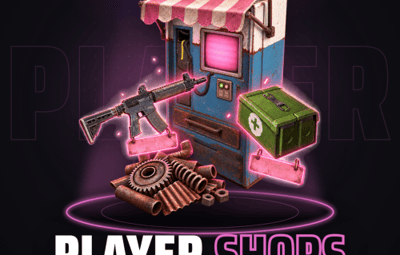
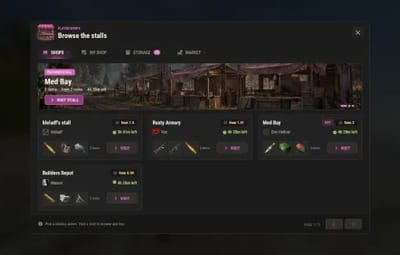
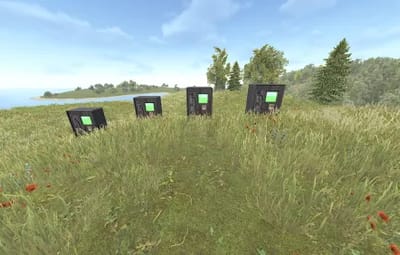
Player Shops turns your players into traders. You place stalls in the world, a row of vending machines in your outpost, your safe zone or your hub, and players rent one by the hour with your server's currency. While the rent runs the stall is theirs: they list items from their inventory, set the price, the stock and a limit per buyer, and every other player can walk up and buy, or browse every open stall from one window.
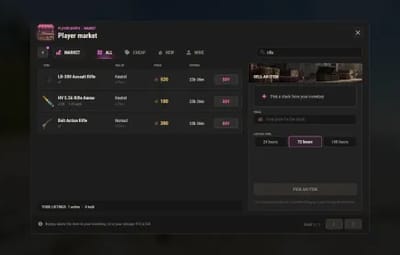
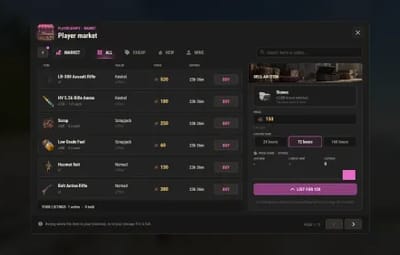
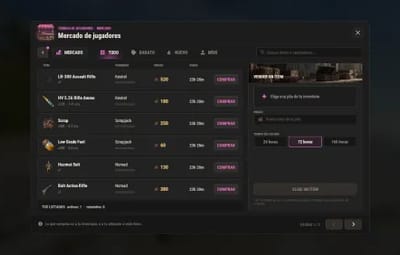
Next to the stalls sits a player market. No stall needed: anybody lists a stack for the whole server for 24, 72 or 168 hours, and everybody else searches, filters and buys, with a price guide that shows what the item sells for right now.
Nothing is ever lost. Sales go into the stall's cash box and wait for the owner to collect them. When the rent ends, unsold items go to the owner's virtual storage, and a purchase that does not fit a buyer's inventory goes to his storage too, never on the ground. Every money movement is journaled, so a server crash in the middle of a sale is recovered at the next start instead of being lost or doubled. It needs one currency plugin: Relics, Economics or ServerRewards. The default is Relics, so on an Economics or ServerRewards server set Currency first.

| Works on Oxide and Carbon | Needs CrashExtensions (included) |
|---|---|
| Relics, Economics or ServerRewards | English and Spanish built in |
Jump to: Features · How it plays · Screenshots · Trailer · Commands · Permissions · Works with · Install · Configuration · FAQ · API / Hooks
 Features
For players
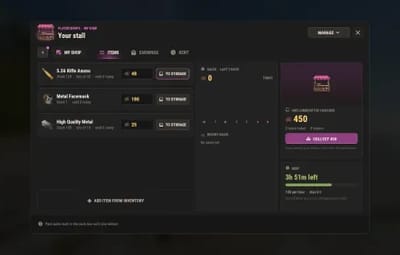
- A shop of your own. Rent a free stall for a few hours, pay the rent up front and it is yours until the time runs out. Renew before it ends or close it when you are done.
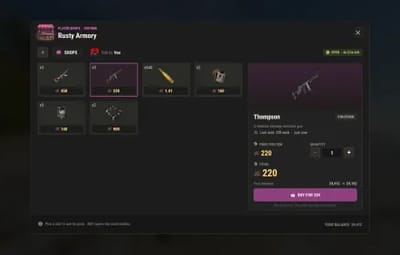
- Your items, your prices. List items straight from your inventory: how many per sale, the price, the stock and a limit per buyer. Up to 24 listings per stall.
- Sell while you are away. Buyers pay into your stall's cash box whether you are online or not. Press COLLECT whenever you want; a cash box you forgot is paid to you by itself after the stall closes.
- Browse every stall from one window. The shops list shows every open stall with its owner, his Steam picture, the cheapest price and the time left, with a search, filters, a featured stall and a HOT tag on the ones that sell.
- Or walk up to it. Every stall is a real vending machine in the world: press USE and you are in that shop.
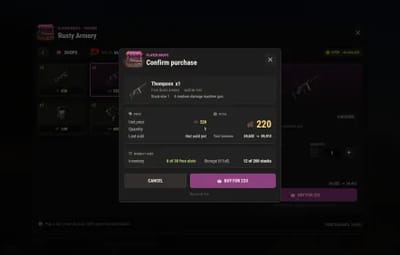
- No surprises at the till. A confirm shows the item, the total, your balance before and after and where the items will go, before a single coin moves.
- A player market. Sell a stack to the whole server without a stall: pick it, type a price, choose 24, 72 or 168 hours. A price guide shows the average and the lowest price of that item right now.
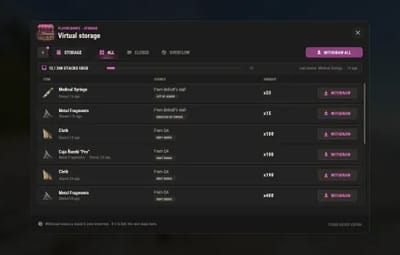
- A storage that keeps everything. Unsold items, removed listings, expired market stacks and purchases that did not fit wait in your virtual storage. Take back one stack or all of it; items there never expire.
- You get what the listing shows. Only items exactly as new can be sold, so nobody buys a broken gun or a half-used tool.
For server owners
-
One command per stall. Stand where you want it, look the way it should face and type
shopsadmin stall addin the F1 console. Move it, remove it or give it to a player for free the same way. - A money sink you control. Rent per hour, the longest rent, listings per stall and the lowest and highest price are yours to set, from the config or from the admin panel in game.
- Your economy. Rent, sales and payouts run on Relics, Economics or ServerRewards, picked in the config. The coin drawn next to every price is any item you choose.
- No fee on sales. The seller gets the full amount of every sale, in a stall and on the market.
- Stalls that stay put. They cannot be damaged, picked up or looted, they do not decay and they show no marker on the map.
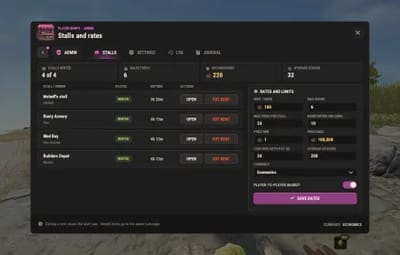
- An admin panel. Every stall at a glance with its owner, status and time left, the sales of the day, the money waiting in cash boxes, the rates and limits, the currency, the full sales log, and a two-step cut for any stall.
- Honest items only. A damaged, repaired, loaded, filled or modified item is refused with the reason, and so is food that spoils. Explosives such as C4 can be sold. Stalls and the market take items with a custom name; one switch turns that off.
- Crash safe. Every purchase, rent, collect and payout is journaled before the money moves and replayed after a crash. The few entries the plugin cannot know about are put to an admin, one question each.
- Wipe aware. On a new map the items are cleared and the money owed is kept and paid. One switch keeps the items too.
- Raid and combat block. With NoEscape loaded, a blocked player cannot list, buy or withdraw, so nobody hides loot in a shop during a raid.
- Two-step confirms. With a countdown, for anything that moves money or closes a stall.
- Your art. The logo, the featured banner and the market picture are three config keys: a web address or a file in the data folder.
- Two languages. English and Spanish built in, every text editable in the lang file.
For developers
-
Hooks.
CanUsePlayerShopskeeps a player out of the shops with your own message, andCanListPlayerShopsItemkeeps your plugin's named items out of the stalls and the market. See API / Hooks.
 How it plays
- You place the stalls. One console command each. A stall nobody rents shows as free to rent.
-
A player rents one. He opens
/myshop, picks a free stall and a rent time and pays up front: 100 per hour and up to 6 hours by default. One stall per player. - He lists his items. From his inventory, with the items per sale, the price, the stock and a limit per buyer. The items leave his inventory and wait in the stall.
-
Others buy. At the machine with USE, or from the shops list with
/shops. The confirm shows the total and the balance before and after. What does not fit in the buyer's inventory goes to his storage. - The money waits in the cash box. The owner collects it when he wants. A warning in chat reaches him 10 minutes before the rent ends, and he can renew up to the maximum.
- The rent ends. Unsold items go to the owner's storage and the stall is free for the next player. A cash box nobody collected is paid to the owner 24 hours later.
-
The market runs beside it. Any player lists a stack for the whole server with
/market. It sells, expires or is cancelled; whatever comes back goes to the seller's storage.
 Screenshots
Every screen below is Player Shops running in Rust.

|
|---|
| The shops list: a featured stall and every open stall with its owner |

|

|
|---|---|
| A stall's listings, one item picked with its price and stock | The confirm: the total and the balance before and after |

|

|
|---|---|
| The player market, searched for rifles | Selling a stack on the market, with the price guide |

|

|
|---|---|
| My shop: the listings, the sales and the cash box | The virtual storage where unsold items wait |

|

|
|---|---|
| The admin panel: every stall at a glance, and the rates | The market in Spanish: English and Spanish are built in |

|
|---|
| The stalls in the world: a row of vending machines, placed with one command each |
 Trailer
The Player Shops trailer (click to play, 55 seconds)

 Commands
Chat, for every player:
- /shops - opens the Player Shops window. Everything is in it: the SHOPS, MY SHOP, STORAGE and MARKET tabs (and ADMIN for admins).
Shortcuts that open a tab directly, handy for a key bind: /myshop, /storage, /market (and /shopslist, the same as /shops).
Admin
Chat, with playershops.admin:
- /shopsadmin - open the admin panel: stalls, settings, the sales log and the journal.
In the F1 console in game, with playershops.admin, standing where the stall goes:
-
shopsadmin stall add- place a stall where you stand, facing where you look. -
shopsadmin stall move <id>- move a stall to where you stand.
From the server console, RCON or the F1 console:
-
shopsadmin stall list- every stall with its owner, time left and cash box. -
shopsadmin stall rent <id> <steamid> <hours> [name]- give a stall to a player, free. -
shopsadmin stall close <id>- close a stall now; the unsold items go to the owner's storage. -
shopsadmin stall clear <id>- free a closed stall that still holds stock or cash: the stock goes to the owner's storage, the cash box to his pending payout. -
shopsadmin stall remove <id>- remove a free stall. -
shopsadmin journal list- the open money entries after a crash. -
shopsadmin journal resolve <id> paid|unpaid|delivered- settle one of them. -
shopsadmin journal resolve all paid|unpaid [kind]- settle the open ones in order, 40 a run.
 Permissions
-
playershops.admin - the admin panel and the
shopsadmincommands. The server console and RCON do not need it. Players need no permission to rent, sell or buy.
oxide.grant user YOUR_STEAM_ID playershops.admin
 Works with
-
Relics / Economics / ServerRewards: one of the three is required. It is the currency of the rent, the sales and the payouts; Relics is the default, set
Currencyto the one you run - Forge: Forge stones, catalysts and gems can be sold in stalls and on the market and arrive as Forge materials; forged weapons are refused (their level would be lost)
- NoEscape: optional: no listing, buying or withdrawing while a player is raid or combat blocked
- Carbon: same code path as Oxide
 Install
-
Install the extension, once per server. Stop the server, copy
Oxide.Ext.CrashExtensions.dllintoRustDedicated_Data/Managed(Carbon:carbon/extensions) and start it again. The console printsLoaded extension CrashExtensionswith its version. An older copy of the DLL is simply overwritten: it is one shared file for all our plugins. -
Install the plugin. Copy
PlayerShops.csintooxide/plugins(Carbon:carbon/plugins). It compiles on its own and creates its config. -
Set the currency first. The default is Relics. If you run Economics or ServerRewards, set
Currencyinoxide/config/PlayerShops.jsonand reload the plugin before anybody trades. While the currency plugin is not loaded, purchases and payouts are refused. -
Place the stalls. Give yourself
playershops.admin, stand where a stall should go and typeshopsadmin stall addin the F1 console, once per stall. Players then open/shopsor walk up to a stall.
Plugin does not compile? The extension is missing or too old: check the folder and restart again. On a hosting panel, upload the DLL with the file manager or SFTP, and keep a copy in case the panel resets that folder on an update.
Host doesn't allow DLL uploads? Put
CrashExtInstaller.csfrom the zip in your plugins folder and runcrashext.installonce in the server console: it downloads the extension from GitHub, checks it and puts it in place. Restart once and Player Shops loads.
 Configuration
Everything lives in oxide/config/PlayerShops.json (Carbon: carbon/configs/PlayerShops.json). A number out of range is changed to the nearest value that works and the console tells you which one, and the rates can be edited in game from the admin panel too. Every key is explained in the README.
Config keys (click to expand)
-
Rent -
RentPerHour(100),MaxRentHours(6),WarnMinutes(10): the price of an hour, the longest rent a player can hold and the warning before it ends -
Listings -
MaxItemsPerStall(24),PriceMin(1),PriceMax(100000),AllowNamedItems(on) -
Currency -
Currency(Relics, Economics or ServerRewards),CurrencyIconShortname(scrap) andCurrencyIconSkin: the item drawn as the coin -
Market -
MarketEnabled(on),MarketListingHours(72, the time picked by default),MarketMaxListings(10 per player) -
Cash box and storage -
CashboxAutoPayHours(24, 0 = never),StorageMaxStacks(200 per player) -
Admin log -
SaleLogRetentionDays(30) -
Art -
LogoImage,BannerImage,MarketHeroImage: a web address or a file inoxide/data/PlayerShops/ -
Steam pictures -
SteamAvatars(on): the stall owners' Steam pictures on the cards -
Wipes -
KeepItemsOnWipe(off): on a new map the items are cleared and the money is kept; on keeps the items too -
NoEscape -
NoEscapeBlock(on): the raid and combat block while NoEscape is loaded
 FAQ
Q: Which economy does it use?
A: One of three, picked with Currency in the config: Relics, Economics or ServerRewards. It is required: Player Shops has no money of its own. The default is Relics, so on an Economics or ServerRewards server set Currency first. While that plugin is not loaded, purchases and payouts are refused and the console says so.
Q: Can I change the currency later?
A: Yes, but pick it before your players start trading. Prices are plain numbers, so a switch only goes through once nothing is priced or owed in the old currency: no stock listed, nothing for sale on the market, cash boxes and payouts paid, no open journal entry. Until then the old currency stays in use, and the console and the admin panel tell you what is still waiting.
Q: What can players sell?
A: Any item that is exactly as a new one of its kind, so a buyer always gets what the listing shows. A damaged or repaired item, a loaded gun, a filled container, an item with attachments, a blueprint and armor with insert slots are refused, and the picker says why. Food that spoils is never sold. Explosives such as C4 can be. Stalls and the market take items with a custom name (AllowNamedItems).
Q: Can items or money get lost?
A: No. Sales wait in the cash box until the owner collects them, and a cash box nobody collected is paid by itself after the stall closes. Unsold items, expired market stacks and purchases that do not fit go to a virtual storage, never on the ground, and items there never expire.
Q: Does the server take a cut of the sales?
A: No. The seller gets the full amount, in a stall and on the market. The rent is the money sink, and you set it.
Q: What happens on a wipe?
A: On a new map the items are cleared (stall stock, market listings, storage) and the money owed is kept: every cash box is paid to its owner. Set KeepItemsOnWipe to keep the items too. The stalls stay where they are when the new map is the same one; on a different map they stay in your list and are put back with shopsadmin stall move <id> at their new spot.
Q: What if the server crashes in the middle of a sale?
A: Every purchase, rent, collect and payout is written to a journal before the money moves, and it is replayed at the next start, so no sale is lost or doubled. What the plugin cannot know is whether your currency plugin kept a payment made after the last save. Those few entries are shown to an admin (/shopsadmin, JOURNAL, or shopsadmin journal list), who checks the player's balance and answers paid, unpaid or delivered. The stall of an open entry is frozen until then.
Q: Can players trade while they are raid blocked?
A: Not with NoEscape loaded: a raid or combat blocked player cannot list, buy or withdraw from storage (NoEscapeBlock). His stall keeps selling to others. Without NoEscape nothing is blocked.
Q: Can the stalls be destroyed or raided?
A: No. They cannot be damaged, picked up or looted and they do not decay. The items of a stall are not inside the machine.
Q: Does it work with Forge?
A: Yes. Forge stones, catalysts and gems can be listed in a stall or on the market, and the buyer gets a material Forge recognises. A forged weapon is refused: its level and gems live in the item and would be lost.
Q: Does it work on Carbon?
A: Yes. The extension goes into carbon/extensions instead of RustDedicated_Data/Managed, and the plugin into carbon/plugins.
Q: How do I translate it?
A: English and Spanish are built in. Edit oxide/lang/en/PlayerShops.json, or copy it into another language folder and translate its values: each player reads his own game language. Item names in the window are the server's English ones.
Q: Does it contact any outside service?
A: Two, both for pictures. It downloads its window icons and its three default pictures once from the my CDN, cdn.crashplugins.space; nothing about your server or your players is sent there. And with SteamAvatars on (the default) it reads each stall owner's public Steam profile (steamcommunity.com/profiles/<SteamID64>?xml=1) to find his picture and downloads it from Steam's image host, so Steam receives the SteamID64 of your stall owners. Set SteamAvatars to false and no such request is made.
 API / Hooks
Two hooks let another plugin set its own rules. There is no other API.
// Asked when a player opens the window and before every action that moves items or money
// through his inventory. Return anything but null to keep him out; a string is shown to him.
object CanUsePlayerShops(BasePlayer player)

// Asked for an item with a custom name before a stall or the market lists it.
// Return anything but null to keep it out, and null for items that are not yours.
object CanListPlayerShopsItem(BasePlayer player, Item item)
Stalls and the market re-create the units they sell from the shortname, the skin and the name only. A plugin whose named items keep their real state somewhere else should answer CanListPlayerShopsItem for them, or the owner turns AllowNamedItems off.

Questions, ideas or bug reports? Use the Support tab of this file or join our Discord.