
Jump to content

4 Screenshots

  • 1.3k
  • 3
  • 16.05 MB
  • Update details
    v1.0.1
    Released
    Download size 16.05 MB
    Total versions 3
    Typical update pace About every 52 days
    Freshness Updated 222 days ago

About WINTER BANNERS / TEMPLATE PSD

WINTER BANNERS / TEMPLATE PSD
                                                               

▌ Design studio  ·  Est. 2015  ·  Winter banners

About the product

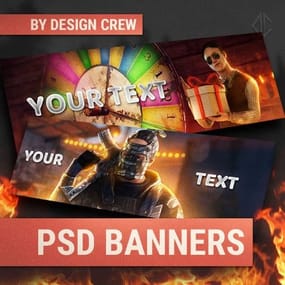
Christmas and winter banners for your server: snowy village scenes, festive titles and an editable text template. Ready-made pictures and a PSD to write your own text.


Table of contents

Jump to any section of this page

01  Overview 02  Features 03  How to use 04  Gallery
05  What's included 06  Changelog

▌ Winter banners

Overview

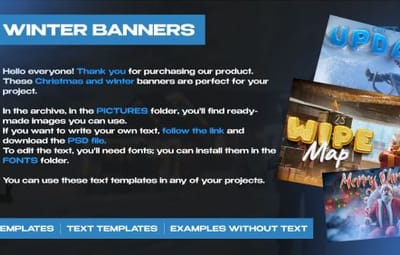
Hello everyone! Thank you for purchasing our product. These Christmas and winter banners are perfect for your project.

PSD   Ready pictures
 
Editable text   Winter and Christmas

What you need

▸  Adobe Photoshop (new version)


What is included

▸  Ready-made banner pictures in the PICTURES folder

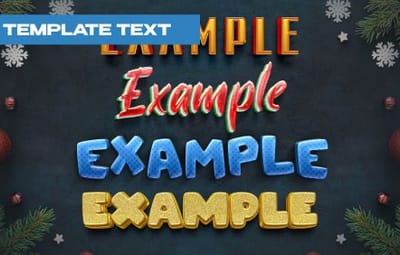
▸  Editable PSD text template

▸  Fonts in the FONTS folder


Highlights

▸  Christmas and winter banners

▸  Ready pictures to use as they are

▸  Text template for your own text


▌ Why it stands out

Built to look great

FEATURE 01

Ready pictures

In the PICTURES folder you will find ready-made banners you can use right away.

FEATURE 02

Your own text

Follow the link, download the PSD and write your own text in the template.

FEATURE 03

Fonts included

Install the fonts from the FONTS folder to edit the text.

▌ Instructions

How to use them

01

Ready banners

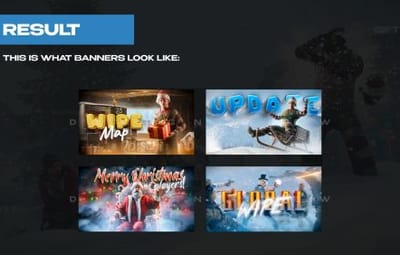
Unpack the archive and open the PICTURES folder. The banners there are ready to post as they are: Merry Christmas, Wipe Map, Global Wipe, Update, plus clean winter backgrounds without text.


02

Install the fonts

Open the FONTS folder and install every font in it (double-click a font file → Install). Without them the text in the PSD will not look right.


03

Write your own text

Download the PSD by the link in the archive and open it in Adobe Photoshop. Pick the text style you like, choose the Type tool (T) and type your words. The effects stay on the new text.


04

Save and use

Put the text on one of the backgrounds and go to File → Export → Export As to save it as PNG or JPG. You can use the text templates in any of your projects.


▌ Full gallery

Every banner in one place

Merry Christmas Wipe Map Global Wipe
Update

▌ Contents

What's included

Item Details
Format Editable Photoshop PSD
Pictures Ready banners in PICTURES folder
Fonts FONTS folder
Archive size 16.05 MB
Price $10.00

▌ Updates

Changelog

1.0.1 March 28, 2026  —  Latest update.

▌ Stay in touch

Questions, custom work, new releases

Discord · DesignCrew ↗   Discord · MadMappers ↗   VK · DesignCrew ↗   Telegram · DesignCrew ↗
DESIGN CREW  ·  DESIGN STUDIO SINCE 2015 · THANK YOU FOR YOUR SUPPORT
  • Like 1
  • Love 1

User Feedback

About Us

Codefling is the largest marketplace for plugins, maps, tools, and more, making it easy for customers to discover new content and for creators to monetize their work.

Downloads
3.2m
Total downloads
Customers
12.3k
Customers served
Files Sold
175.1k
Total sales
Payments
3.8m
Processed total
×
×
  • Create New...

Important Information

We have placed cookies on your device to help make this website better. You can adjust your cookie settings, otherwise we'll assume you're okay to continue.