
Works with
Optional integrations and compatible files.
About Weapons Turbo
Weapons Turbo
Bigger magazines. Faster reloads. Eight VIP tiers you control in-game.
Give your Rust players a combat perk they can feel every time they reload. Weapons Turbo lets you set magazine capacity and enable fast reload separately for each supported weapon across 8 permission-based VIP tiers.
Build a simple supporter perk or a full progression of weapon benefits. Open the admin panel, choose a tier, find a weapon, and set the capacity and reload option that fit your server.
Make each VIP tier worth choosing
- Create distinct rewards: give each tier its own magazine capacities and fast reload settings.
- Balance weapon by weapon: increase rifle capacity while keeping other weapons closer to their standard settings.
- Separate the perks: offer larger magazines without fast reload, or enable fast reload while keeping standard capacity.
- Choose who gets access: assign tiers through Oxide permissions to individual players or groups.
For example, you could configure an Assault Rifle with 40 rounds for VIP1, 50 for VIP2, and 60 plus fast reload for VIP3, then build additional tiers up to VIP8.
These are example settings, not included presets. You choose the values and reload options for your server.
Configure your weapons without leaving the game
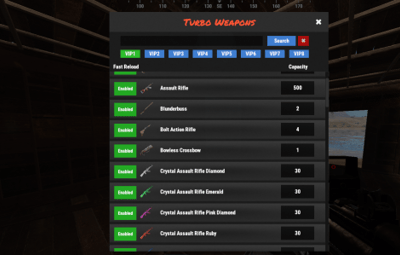
The admin UI brings weapon settings into one searchable panel:
- Switch between VIP1–VIP8.
- Search for weapons instead of scrolling through a long configuration file.
- Identify weapons by their item icons and names.
- Enter a magazine capacity for the selected weapon and tier.
- Toggle fast reload independently for each weapon and tier.
- Save changes through the panel.
Open it with /turboweapons. Access requires turboweapons.admin.
More control over your server's combat
- Automatic weapon discovery: generates configuration entries for supported weapons found on your server at startup, adding missing entries as needed.
- Ammo is still required: fast reload uses compatible ammunition available to the player.
- Attachment support: magazine-capacity attachment multipliers are included in the final capacity calculation.
-
SkillTree integration: accounts for the
Extended_Magbuff when calculating capacity. - Event options: includes settings to skip weapon modifications for participants detected in SurvivalArena and Trials events.
- Built-in translations: English, Portuguese (Brazil), Spanish, Russian, and German messages.
Note
No required companion plugins. Weapon icons use Rust's built-in item icons, so ImageLibrary is not required. The integrations listed below are optional.
Optional integrations
| Plugin | Integration |
|---|---|
| SkillTree |
Includes the Extended_Mag buff in magazine capacity calculations.
|
| ItemRetriever | Can locate and consume reload ammunition through its API when inventory ammunition is insufficient. |
| SurvivalArena | Option to skip modifications for detected event participants. |
| Trials | Option to skip modifications for detected event participants. |
| LangAPI | Additional weapon-name localization. |
| Notify | Optional notification integration; chat messages are used as a fallback. |
Setup and reference
Quick setup
-
Install
TurboWeapons.csinoxide/pluginson your Oxide/uMod Rust server. - Allow the plugin to load and generate its weapon configuration.
-
Grant your administrator
turboweapons.admin. -
Open
/turboweaponsand configure the tiers you want to use. - Grant the corresponding VIP permissions to your player groups.
Example server-console commands, using your administrator's Steam ID and an existing group named vip:
oxide.grant user STEAM_ID turboweapons.admin
oxide.grant group vip turboweapons.vip1
Commands
| Command | Action |
|---|---|
/turbo
|
Opens the admin configuration UI; this alias can be changed in the configuration. |
/turboweapons
|
Opens the admin configuration UI. |
/turboweapons vip3
|
Opens the UI with VIP3 selected; accepts VIP1–VIP8. |
Permissions
| Permission | Access |
|---|---|
turboweapons.admin
|
Opens and edits the admin UI. |
turboweapons.vip1
|
VIP1 weapon settings. |
turboweapons.vip2
|
VIP2 weapon settings. |
turboweapons.vip3
|
VIP3 weapon settings. |
turboweapons.vip4
|
VIP4 weapon settings. |
turboweapons.vip5
|
VIP5 weapon settings. |
turboweapons.vip6
|
VIP6 weapon settings. |
turboweapons.vip7
|
VIP7 weapon settings. |
turboweapons.vip8
|
VIP8 weapon settings. |
When a player has multiple VIP permissions, the highest numbered tier takes priority for both capacity and fast reload. Admin permission controls the panel; grant a VIP permission separately to receive that tier's weapon perks.
Configuration
The plugin generates per-weapon magazine capacity and fast reload settings for all eight tiers. You can edit them through the admin UI or in oxide/config/TurboWeapons.json.
Global options include:
-
OpenUI Chat Command— defaults toturboweapons. -
Use Notify Plugin— enables the optional notification integration. -
Use LangAPI Plugin— enables the optional weapon-name localization integration. -
Disable weapon modifications in SurvivalArena events— enabled by default. -
Disable weapon modifications in Trials events— enabled by default.
Newly generated weapon entries start with the weapon's built-in magazine capacity and fast reload enabled for every VIP tier. Review your tier settings before granting permissions.
Before you buy
Can I use only one or two VIP tiers?
Yes. Configure and grant only the tiers you need. All eight are available if you want to expand later.
Does this give players unlimited ammo?
No. Fast reload consumes compatible ammunition. Increasing magazine capacity does not supply free ammunition.
Can players without VIP permissions use the perks?
Players without a TurboWeapons VIP permission use the weapon's built-in base capacity and do not receive its fast reload perk. Attachment multipliers and the optional SkillTree capacity buff are still included in capacity calculations.
Which weapons are supported?
The plugin discovers weapon-category items that use Rust's projectile weapon system. Bows, crossbows, and the blowpipe are excluded from automatic discovery. It does not modify melee weapons.
Can I set a custom reload duration?
Fast reload is an on/off setting for each weapon and VIP tier. It does not provide an adjustable reload-time multiplier.
Build your VIP weapon perks around your server's balance—with eight tiers and an in-game panel to manage them.