Jump to content

HunterZ

Member
  • Posts

    290
  • Joined

  • Last visited

  • Days Won

    3

Everything posted by HunterZ

  1. HunterZ

    Super PVx Info

    @ShadoW6 As expected, Zone Manager Auto Zones has a number of shortcomings that make SuperPVxInfo integration more challenging: It calls TruePVE/NextGenPVE directly instead of using a general hook call, so SuperPVxInfo can't intercept its mappings as a means of learning about PvP zones. It does not include "PVP" in the names of the created zones, so SuperPVxInfo can't determine their nature from zone names either (note that this also breaks compatibility with Zone PVx Info). If you are not willing to ditch ZoneManagerAutoZones in favor of DynamicPVP, then your only option is as follows: Open `data/ZoneManager/zone_data.json` under your oxide or carbon directory, and note down the "Name" value for every PVP zone created by Zone Manager Auto Zones. Open `SuperPVxInfo.json` in your plugin configs directory, and add each of the zone names to the PVP Zone Names list. Reload SuperPVxInfo or restart the server.
  2. HunterZ

    Super PVx Info

    I'll try to take a look. I would strongly recommend replacing Zone Manager Auto Zones with Dynamic PVP: https://umod.org/plugins/dynamic-pvp Zone Manager Auto Zones is not currently being maintained, and Dynamic PVP is a higher quality implementation of the same features.
  3. HunterZ

    Update Checker

    Lots of people are asking for this, but the author is shutting down / ignoring all requests. The reason seems to be that Update Checker depends on ServerArmour's website under the hood, and SA doesn't support Game4Freak. I bet if someone were to get SA to add LD support, UpdateChecker would follow suit.
  4. HunterZ

    Super PVx Info

    Update: I revisited the Zone Manager Auto Zones documentation, and it claims to register TruePVE "exclude" mappings for its zones. Super PVx Info listens for these mappings as one of multiple ways to learn about PvP zones, so it should "just work".
  5. HunterZ

    Super PVx Info

    I originally started creating this because Zone Manager Auto Zones didn't work with Zone PVx Info - but then I switched to Dynamic PVP which is a much better implemented plugin. It should be possible to support Zone Manager Auto Zones, however: If it creates TruePVE "exclude" mappings or includes "PVP" in its zone names then it should "just work". Otherwise, you may need to add part or all of its zone names to the matcher list in Super PVx Info's configuration.
  6. HunterZ

    Super PVx Info

    It says right there in the message that you've enabled Popup Notifications support, but have not installed Popup Notifications. Check the "works with" list in this plugin's description - or disable Popup Notifications support. Edit: I should probably disable Popup Notifications support by default, since I only provide it for feature parity with Zone Manager. I don't understand the question. What PVE/PVP plugins are you running?
  7. HunterZ

    Raidable Bases

    It sounds like you'd also need to enable "Use Grid Locations In Allowed Zone Manager Zones Only".
  8. HunterZ

    Raidable Bases

    Thanks! I can confirm this is fixed: I added "DynamicPVP" to the allowed zones list and gained an additional number of potential spawn locations on my server's current map.
  9. HunterZ

    Update Checker

    Where did you get that weird URL? The plugin appears to live at https://codefling.com/plugins/wipeblock
  10. HunterZ

    Road Bradley

    ThePitereq's Carbon Aliases plugin is required when running Road Bradley under Oxide.
  11. HunterZ

    Raidable Bases

    Nivex: Something is wrong with `AddZone()`'s matching on Zone Manager zone names against `Instance.config.Settings.Inclusions`. I've added logging to show that it's blocking zones with names in the inclusion list in the config file in order to produce the attached screenshots. Edit: it looks like "*" doesn't work either.
  12. HunterZ

    Super PVx Info

    Can you link which ones you'd like supported? Feel free to open support tickets as well.
  13. HunterZ

    Super PVx Info

    @BadLandPVE Dangerous Treasures now supported in version 1.2.0.
  14. HunterZ

    Super PVx Info

    I'll take a look, but can't make any promises because it doesn't use Zone Manager or provide a documented API.
  15. HunterZ

    Road Bradley

    I wish it were possible to either edit automatically generated routes, or to blacklist them from the list of routes that Bradley can randomly spawn on (I don't use the purchase feature on my server). My current procedural map has a bad road that runs through a building at Harbor, and Bradley keeps getting stuck on it. Alternatively, it would be nice if the un-stick feature could detect if Bradley hasn't moved for a couple of minutes regardless of reason. Edit: Also verified that enabling the obstacle check config options doesn't help. Check out the Q11 end of `4_Edited` on procedural map with seed 775103760, size 2800.
  16. HunterZ

    Any Map Vendor

    I was hoping someone would make this, because I just started leaning into smaller maps for our low pop casual server. Thanks for creating and publishing it - and for free, no less! I noticed that this seems to implement custom logic that simply stops every once in a while in lieu of the vanilla behavior of pulling over when a player approaches. I wonder if it's possible to activate or replicate more of the vanilla logic. I'm also super-impressed that this seems to be able to cobble together a path that spawns multiple roads. I purchased Road Bradley for my server because my players missed the vanilla Launch Site one on smaller maps, and that plugin seems to confine the Bradley to single road spans unless you create custom paths for it.
    Do you run custom maps? Do you run procedural maps that are too small to have ring roads? If your answer to either question is "yes", then this plugin is worth checking out as a way to provide your players with access to this otherwise-inaccessible content added by Facepunch. The spawned vendor seems to be able to navigate across connections between multiple roads in order to drive a significant distance across the map, which is quite impressive since conceptually similar plugins like Road Bradley don't currently manage to do this on their own. On the other hand, version 1.0.0 seems to be missing the vanilla behavior of pulling over when a player approaches. To make up for this, it stops at configurable intervals for a configurable amount of time. I also noticed that the vendor's turrets attack scarecrows (Halloween zombies). This is probably vanilla behavior, but I figured some folks might be interested to know. By default this plugin also unloads itself if a ring road is detected, in order to work seamlessly on servers that alternate between large maps and small/custom ones. This behavior is also configurable. Verified working with Carbon as well.
  17. I have released an update to fix this. Turns out I did some stuff that works in Carbon but not in Oxide, but it was minor and easy to fix.
  18. HunterZ

    Super PVx Info

    All: I screwed up the config file defaults in versions prior to 1.1.1. To fix, please update and regenerate your config file, or manually apply the suggested fix in the 1.1.1 update note or the plugin docs.
  19. HunterZ

    Super PVx Info

    @Stark okay, I've released version 1.1.0 with Simple Status support. Let me know what you think. Note that Simple Status support is disabled by default, so you will have to do the following: Load up the new version to update the config file Edit the config file to toggle UI and/or Simple Status displays on and off for each PVx status Reload the plugin for your changes to take effect
  20. HunterZ

    Super PVx Info

    Will do. It looks like SimpleStatus provides its own bridge to AdvancedStatus, so I may only need to add support for the first one to get it working with either?
  21. HunterZ

    Super PVx Info

    Honestly my plugin probably ought to be broken apart into a library and a GUI, but it's hard to get stuff approved so I just wanted to get something out there. I can probably work out adding support for other front-ends and letting people choose between them and the default GUI though.
  22. Thanks, I hope you like it! The funny thing is I'm not in it for money - running a Rust server and making plugins is a hobby for me. I created this because players on my own causal hybrid PvE/PvP server wanted me to look into plugin enforcement of our rules, and I couldn't find anything that did everything I wanted.
  23. Version 1.9.0

    549 downloads

    Adds a highly configurable GUI to players' HUDs indicating whether they are currently in a PvE, PvP, or Safe Zone area, or are currently subject to a PvP expiration delay. Features: Complete control of GUI indicators for each status PvE/PvP status for Zone Manager zones Supports matching on zone name, True PVE exclusion mappings, or zone flags Tested with Dynamic PVP, but should also work with Agile Zones, Zone Manager Auto Zones, etc. PvE/PvP status detection for various plugins: Abandoned Bases (untested) Dangerous Treasures Dynamic PVP Player Base PVP Zones Raidable Bases PvP status detection for various plugins and locations: Adem event plugins (Caravan, Convoy Reforged) (untested) KpucTaJl event plugins (Air Event, Arctic Base Event, Ferry Terminal Event, Gas Station Event, Harbor Event, Junkyard Event, Power Plant Event, Satellite Dish Event, Supermarket Event, Water Event) (untested) Cargo Train Event (untested) Player height (sky / seasonal dungeons, train tunnels, etc.) Deep Sea PvP expiration delay status detection for: Abandoned Bases (untested) Dynamic PVP Player Base PVP Zones Raidable Bases True PVE Safe Zone status detection Tutorial Island detection (treated as PVE) Player notification on state changes not covered by other plugins (e.g. holiday dungeon / train tunnel / safe zone entry/exit) Can be enabled in chat and/or in Popup Notifications Optional Simple Status support Optional support for reading altitude and Deep Sea PVP settings from True PVE Commands: /pvxui (configurable) toggles the UI off and back on Configuration: { "Server Default PVx (PVP or PVE)": "PVE", "Assume PVP Below Height": -50.0, "Assume PVP Above Height": 1000.0, "Assume PVP In Deep Sea": false, "Prefer TruePVE Config Over Assumptions": true, "Toggle UI Command (empty string to disable)": "pvxui", "Seconds Between Updates": 1.0, "Force Updates On State Change": true, "Minimum Seconds Data File Saves": 5.0, "PVE Exclusion Mapping Names (case insensitive substrings / none to disable)": [ "exclude" ], "PVE Zone Names (case insensitive substrings / none to disable)": [ "PVE" ], "PVP Zone Names (case insensitive substrings / none to disable)": [ "PVP" ], "Notification Settings": { "Chat notify enabled": false, "Chat notify prefix (empty string to disable)": "[SuperPVxInfo]: ", "PopupNotifications notify enabled": true, "PopupNotifications notify prefix (empty string to disable)": "", "Individual Notification Toggles": { "Unexpected Exit From Abandoned Or Raidable Base": true, "Unexpected Exit From Dangerous Treasures Event": true, "Safe Zone Entry": true, "Safe Zone Exit": true, "PVP Height Entry": true, "PVP Height Exit": true, "PVP Depth Entry": true, "PVP Depth Exit": true, "Unexpected Exit From Dangerous Treasures Event": true, "PVP Deep Sea Entry": true, "PVP Deep Sea Exit": true } }, "Default UI Settings": { "PVE": { "Enabled": true, "Min Anchor": "0.5 0", "Max Anchor": "0.5 0", "Min Offset": "190 30", "Max Offset": "250 60", "Layer": "Hud", "Text": "PVE", "Text Size": 14, "Text Color": "1.0 1.0 1.0 1.0", "Background Color": "0.0 1.0 0.0 0.8", "Fade In": 0.25, "Fade Out": 0.25 }, "PVP": { "Enabled": true, "Min Anchor": "0.5 0", "Max Anchor": "0.5 0", "Min Offset": "190 30", "Max Offset": "250 60", "Layer": "Hud", "Text": "PVP", "Text Size": 14, "Text Color": "1.0 1.0 1.0 1.0", "Background Color": "1.0 0.0 0.0 0.8", "Fade In": 0.25, "Fade Out": 0.25 }, "PVPDelay": { "Enabled": true, "Min Anchor": "0.5 0", "Max Anchor": "0.5 0", "Min Offset": "190 30", "Max Offset": "250 60", "Layer": "Hud", "Text": "WAIT", "Text Size": 14, "Text Color": "1.0 1.0 1.0 1.0", "Background Color": "1.0 0.5 0.0 0.8", "Fade In": 0.25, "Fade Out": 0.25 }, "SafeZone": { "Enabled": true, "Min Anchor": "0.5 0", "Max Anchor": "0.5 0", "Min Offset": "190 30", "Max Offset": "250 60", "Layer": "Hud", "Text": "SAFE", "Text Size": 14, "Text Color": "1.0 1.0 1.0 1.0", "Background Color": "0.0 0.0 1.0 0.8", "Fade In": 0.25, "Fade Out": 0.25 } }, "Simple Status UI Settings": { "PVE": { "Enabled": false, "Background Color": "0.0 0.7 0.0 0.8", "Title Text": "PVE", "Title Color": "1.0 1.0 1.0 1.0", "Status Text": "SuperPVxInfo", "Status Color": "0.0 1.0 0.0 0.2", "Icon Path": "assets/icons/resource.png", "Icon Color": "0.5 1.0 0.5 1.0" }, "PVP": { "Enabled": false, "Background Color": "0.7 0.0 0.0 0.8", "Title Text": "PVP", "Title Color": "1.0 1.0 1.0 1.0", "Status Text": "SuperPVxInfo", "Status Color": "1.0 0.0 0.0 0.2", "Icon Path": "assets/icons/warning_2.png", "Icon Color": "1.0 0.5 0.5 1.0" }, "PVPDelay": { "Enabled": false, "Background Color": "0.7 0.7 0.0 0.8", "Title Text": "WAIT", "Title Color": "1.0 1.0 1.0 1.0", "Status Text": "SuperPVxInfo", "Status Color": "1.0 1.0 0.0 0.2", "Icon Path": "assets/icons/stopwatch.png", "Icon Color": "1.0 1.0 0.5 1.0" }, "SafeZone": { "Enabled": false, "Background Color": "0.0 0.0 0.7 0.8", "Title Text": "SAFE", "Title Color": "1.0 1.0 1.0 1.0", "Status Text": "SuperPVxInfo", "Status Color": "0.0 0.0 1.0 0.2", "Icon Path": "assets/icons/peace.png", "Icon Color": "0.5 0.5 1.0 1.0" } } } Background: Super PVx Info attaches a watcher to each player on login that monitors for any changes to PvE/PvP/delay/safezone state, and updates the player's HUD. By default this is done once per second, or as soon as possible after a hook-based change has occurred - but both of these behaviors are configurable, so you can reduce server load (at the cost of reduced GUI responsiveness) by increasing "Seconds Between Updates" and/or disabling "Force Updates On State Change". This approach is needed to monitor the player's height, and for more accurate safe zone detection (Facepunch is bad at providing triggers for things like exiting Train Tunnels into Outpost). This plugin is a complete overhaul of Zone PVx Info by BuzZ[PHOQUE]/Arainrr, which I was inspired to attempt after struggling to get it to work with Zone Manager Auto Zones (since abandoned in favor of DynamicPVP). Credits: BuzZ[PHOQUE] & Arainrr for creating Zone PVx Info Bug Man & Cannabis on Carbon's Discord server for suggesting the FacepunchBehavior approach and offering examples Nivex for putting up with all of my Abandoned/Raidable Bases and TruePVE questions and fixing/enhancing/documenting those plugins KpucTaJl for providing API clarification
    Free
  24. Version 1.5.0

    577 downloads

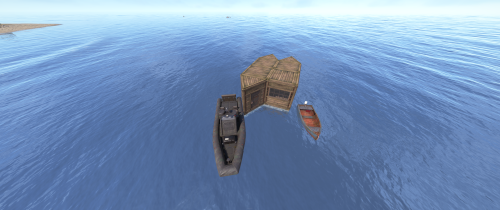
    Introduction Automatically manages PVP zones for player bases, legacy shelters, tugboats, and modular boats. Background/Compatibility Player Base PVP Zones is meant for hybrid PVP servers that want to allow online raiding. It is meant to complement Dynamic PVP which only provides zones for monuments and events. Zone Manager is a hard requirement in order to implement moving zones for tugboats and modular boats, as it doesn't officially support this feature. A PVE mod is required to make this useful. I only tested with True PVE for various reasons. Others have reported success with SimplePVE. Features Manages its own Zone Manager zones and maps them as True PVE exclusion zones (Re)creates zones on plugin load and cleans them up on unload Provides tool cupboard based zones: Configurable creation & deletion delays Automatic resizing to always encompass the base as building blocks are added/destroyed, with configurable delay Configurable minimum total base and per-building-block buffer sizes Provides legacy shelter based zones: Configurable zone size Provides tugboat based zones: Configurable zone size Zone moves with the tugboat Provides modular boat based zones: Configurable zone size Zone moves with the modular boat Optional support for visible zone spheres: Configurable sphere darkness Optional support for language file based zone creation/deletion and entry/exit notifications Configurable PVP expiration delay on player exit from zones Optional support for toggling zones on and off via a permission-controlled command Zone Toggling Notes In order for players to toggle zones, they must have the `PlayerBasePvpZones.toggleZones` Oxide permission, or be in an Oxide group that has that permission. The `/pbpz toggle` command will attempt to toggle a zone if the player is doing one of the following: Looking at and authorized to a Tool Cupboard within interaction range Within building privilege of a Legacy Shelter Mounted to the steering wheel of a Tugboat Mounted to a steering wheel of a Modular Boat If a zone creation/deletion timer is in effect, toggling will cancel it; otherwise, PBPZ will act as if the associated entity (TC/shelter/tugboat) just (de)spawned, applying any appropriate delays. Besides standard zone creation/deletion delays, exploitation of the toggle feature can be discouraged by configuring timed toggle lockouts that are triggered by toggling and/or by damage being done to building blocks, Tool Cupboards, Shelters, Tugboats, or Modular Boats. Admins can bypass the standard creation/deletion delays by reloading the plugin after running the toggle command. Admins can also toggle Tool Cupboard zones for other players by temporarily authorizing on the TC, and of course anyone with permission can toggle the zone for any Tugboat or Modular Boat that they are able to mount. Admin toggling of other players' shelter zones is currently not supported (if someone really needs it, I can implement it). Permissions `PlayerBasePvpZones.toggleZones` controls whether a player/group can use the `/pbpz toggle` command Commands `/pbpz` in chat supports the following sub-commands: `/pbpz help` shows info on currently available sub-commands (if any) `/pbpz toggle` attempts to toggle a zone on or off Configuration Default configuration: { "Zone creation delay in seconds (excludes tugboat)": 60.0, "Zone creation delay notifications (owner only, excludes tugboat)": true, "Zone deletion delay in seconds": 300.0, "Zone deletion delay notifications (all players in zone)": true, "Zone creation/deletion notification prefix": "[PBPZ] ", "Zone exit PvP delay in seconds (0 for none)": 5.0, "Zone sphere darkness (0 to disable, maximum 10)": 0, "Zone entry/exit ZoneManager messages": true, "Zone TruePVE mappings ruleset name": "exclude", "Building settings": { "Building update check delay in seconds": 5.0, "Building zone overall minimum radius": 16.0, "Building zone per-block minimum radius": 16.0 }, "Modular boat settings": { "Modular boat zone radius": 32.0 }, "Shelter settings": { "Shelter zone radius": 8.0 }, "Tugboat settings": { "Tugboat force global rendering on/off when spheres enabled (null=skip)": null, "Tugboat force enable buoyancy when forcing global rendering": false, "Tugboat zone radius": 32.0 }, "Zone toggle settings": { "Zone toggle lockout seconds after damage": 60.0, "Zone toggle lockout seconds after toggle": 60.0 } } NOTE: The tugboat rendering options should be left at defaults. The options are provided for the case that you are running other plugins that force global networking/rendering for tugboats, which can cause spheres to disappear when a tugboat comes back into client render range.This plugin will automatically attempt to synchronize tugboat sphere networking with each tugboat's networking type when (re)creating the spheres. Developer API Supported API calls: bool IsUsingExcludePlayer() Returns whether True PVE 2.2.3+ ExcludePlayer() PVP delay API is being used. string OnPlayerBasePvpDelayQuery(ulong playerID) Provides the ability to query whether a player has an active PVP delay Returns the triggering zone ID if the referenced player has an active PVP delay Returns an empty string If no PVP delay is active Hooks: void OnPlayerBasePvpDelayStart(ulong playerID, string zoneID) Called when PVP exit delay is applied to a player as a result of their exiting a base zone playerID is the ID of the triggering player zoneID is the Zone Manager zone ID whose exit triggered the delay void OnPlayerBasePvpDelayStop(ulong playerID, string zoneID) Called when PVP exit delay expires from a player playerID is the ID of the triggering player zoneID is the Zone Manager zone ID whose exit triggered the delay Zone Manager / PVE Plugin Integration Direct Zone Manager API calls are used to maintain zones for all bases, and indirect True PVE API calls are used to map those zones to the configured True PVE ruleset (`exclude` by default). This will cause True PVE (or other PVE plugins that implement a compatible API) to treat them as PVP areas. Zone names are broken into categories in case you want other plugins to recognize them separately: `PlayerBasePVP:building` for building block bases `PlayerBasePVP:shelter` for legacy wood shelters `PlayerBasePVP:tugboat` for tugboats `PlayerBasePVP:modularboat` for modular boats Developer note: Zone IDs are `PlayerBasePVP:` followed by a unique identifier. Credits Thanks to the following folks for making this plugin possible: bmgjet (help with / code for tugboat sphere issues) CatMeat & Arainrr (moving Zone Manager zones code examples in Dynamic PVP) Karuza (help with unique entity identifiers & tugboat sphere issues) Kulltero (help with TC/building relationship) WhiteThunder (help with tugboat sphere issues) AFKBank and Mooselips whose bases I took screenshots of on my server during testing
    Free
2.3m

Downloads

Total number of downloads.

10.7k

Customers

Total customers served.

154.3k

Files Sold

Total number of files sold.

3.3m

Payments Processed

Total payments processed.

×
×
  • Create New...

Important Information

We have placed cookies on your device to help make this website better. You can adjust your cookie settings, otherwise we'll assume you're okay to continue.