
Tikomatura's Wishlist
-
$29.99
Admin Tools
By ViolationHandler.exe in Plugins
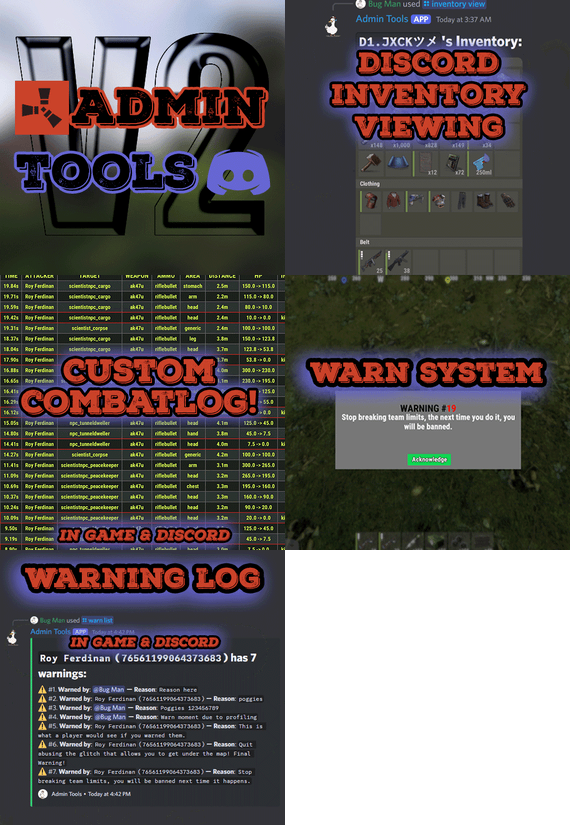
Admin Tools is an all-in-one plugin designed to make your job as a server owner/admin easier. This plugin has a wide range of features and commands that allow you to control your server easily, both in-game and via Discord. It also adds custom quality of life features exclusive to this plugin!
★ Inventory Viewing System - View an NPC or player's inventory in Discord and in-game
★ Multi-Server Support - Allows you to manage multiple Rust servers from a single bot
★ Custom Combatlog System - View a player's combatlog in Discord and in-game
★ Backpack Viewing System - View a player's backpack (uMod plugin) in Discord
★ Custom ID System - Get the ID of players on your server quick and easy, copy directly from chat
★ Warn System - Inform players of their wrongdoings and keep track of them (Warn Visuals: UI, Chat, Chat + Toast/Gametip)
★ Watchlist System - Lets you put suspicious players on a list for you to monitor, logs in-game and to discord
★ Server Command System - Reload/load/unload plugins and other console commands in Discord and in-game
★ F7 Report Logging System - Log F7 reports to discord with their combat log attached (if enabled)
★ and more! (Rest of features below)
Please note, the Permissions UI Shown on screen towards the start of this video is FROM CARBON, NOT THE PLUGIN
Please note, the Permissions UI Shown on screen towards the start of this video is FROM CARBON, NOT THE PLUGIN
(Changed/Exclusive):
* Timestamps for video in video's description - Make sure to up video quality if watching from this site.
* Timestamps for video in video's description - Make sure to up video quality if watching from this site.
★ Permission System - Grant/revoke permissions to groups and players from Discord and in-game
★ Minecraft Creative System - While enabled, hold middle click to get the item you're looking at
★ Rename System - Rename the players who think they are funny (toggle in config)
★ Tempban System - Tempban players with no database required
★ Unique ID System - Find players even when they have the same or similar names -- Thanks to nivex ❤️
★ Kill, Wound, Revive & Respawn System - Kill, wound (down), revive and respawn players from Discord and in-game
★ Team Viewing System - View a player's team members from Discord and in-game
Q: Does this plugin have a GUI or do its commands use GUI?
A: No. The only UI in-game for this plugin is the warning screens. Please do not purchase this plugin thinking it has GUI for its commands, they are ALL commands entered into chat, Discord, or RCON. There are however, 'modals' for Discord, but nothing GUI based for within the game other than the warning screens displayed when '/warn'ing a user (which can be configured by the user).
Q: How do I set up the bot?
A: Set Up Instructions - If you miss any permissions, can always add them to the Admin Tools role in discord after you invite the bot.
Q: Does this plugin link players to Rust?
A: No. You can use the free plugin DiscordCore by MJSU if you would like to link your players.
Q: Does this plugin log kills/PMs/F1 Spawn/chat?
A: No. Admin Tools only logs the following if enabled: F7 Reports, Bans, commands from this plugin, and players who are watchlisted. You can always view a player's combatlog from discord though. You can use the free logging plugins DiscordLogger by MONoH or DiscordChat by MJSU depending on your goal. However, personally, I recommend against using logging functionality that would be occurring very frequently due to Discord's rate limiting. Though, DIscordLogger is made in a way that combines messages if possible to prevent limiting.
Q: Can this log to multiple Discord servers?
A: YES. All you need to put for logging to multiple servers is the channel ID you want to log to in the list of channel IDs in the config.
Q: Does this plugin ONLY work with Discord Extension 3.0.0+?
A: YES. You need to download the 3.0.0+ version from GitHub, it is linked at the top (and right here) as a required dependency. Any version prior to 3.0.0 will not work with this plugin, but any version 3.0.0 and later will.
Q: Will this work on a shared hosting server?
A: Yes, BUT you will not be able to take advantage of the threading done within the plugin. It should still work fine, but when you're on a shared host, you may only have access to a single core/thread (not positive on which) and as a result the threading I am doing in the plugin will just be ran on the main thread. As a result some of the discord functionality (ie: image generation) may affect the server as its now running on the main thread (what the server uses to run the game on) instead of a separate thread which would normally not affect the server. The image generation stuff (backpack and inventory) is normally pretty quick depending on number of items and pictures being used/sent, and can be between 100-250ms to generate on my server, however that was while no players were on.
Q: How do I fix this error Response Code: Forbidden Discord Error Code: 50001 Discord Error: Missing Access ?
A: All you need to fix this issue is MFA/2FA on the account used to create the bot. This issue is caused by Discord requiring your account to have either MFA or 2FA due to the bot being in a Community Discord server. After you add 2FA/MFA this error will go away.
Q: Renaming isn't working, how do I fix this?
A: The issue is likely that you don't have it enabled in the config, make sure to enable it in the config, its above the warning options and the discord API options.
Q: My commands aren't appearing, how do I fix this?
A: You can do the following in an attempt to try and force the bot to update its commands:
Discord > Server Settings > Integrations > Admin Tools Bot > Toggle one of the checkboxes it shows in either Roles & Members or Channels > Save > Undo toggle > Save again.
Q: Does this work with Rustcord?
A: Yes, however you need this version here by MJSU as it has been updated to work with DiscordExtension 3.0.0+ versions.
Q: How do I set up Multi-Server Support?
A: Do as follows:
Enable the bool (true/false) config option for multi-server system. Fill and keep the list of servers order the same if possible between configs (not required, but recommended). Use the /server command in discord to swap to the server you want to start listening to/sending commands to. On first use of command, it will error in all but one server console (tries to reply to a message more than once), that is expected and doesn't do that after that first command. It is used to set it up. If you want the activity information to change when swapping servers, make sure to enable that functionality in the config.
Special thanks to Nivex for both creating and allowing me to use the method used to generate unique IDs for players.
For support, please make a support ticket or join the Cobalt Studios Discord.
-
$39.99
Convoy
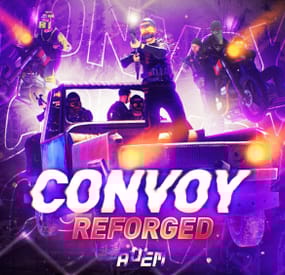
Set your server apart with a roaming mobile event that has nearly endless configuration options! Configure the loot truck as well as the Convoy of protection vehicles ranging from sedans, module cars, Bradley tanks, motorbikes, vendor trucks, to a patrol helicopter! The plugin runs on custom and procedural generated maps, can use custom routes or let the plugin find a random route based on your configuration.
You can make yours an aggressive or a peaceful Convoy, who shoots first? You can set all kinds of parameters regarding the many pieces of the event, how to beat it, whether destroying the loot truck destroys the loot or not for example. There are many compatible plugins like TruePVE, GUIAnnouncements, Notify, DiscordMessages, and RustCord to name a few. The plugin has a built in UI that will give you important information about the event as you are inside it's zone. Check the map to see the location of the event as a marker and even see the timer on the event! All of the ground vehicles are driven and filled with NPCs. Every vehicle, the NPCs, and the loot as well as all timers can be configured to suit your server. A PvP zone can be created within the event area for those of you who use TruePVE to control damage on your servers. The limits are nearly endless!
If you have some players on your server that you want to really send everything you have at, this is the plugin for you. Watch players crap their pants when they first encounter a full Convoy with multiple tanks and a Patrol Heli all attacking at once. Sit back and delight in their fear as all of the vehicles empty their occupants and NPCs swarm them mercilessly!
Required Dependency (must install this free plugin)
NpcSpawn – link is included and can be found in the ReadMe file included with download
Chat commands (admin only)
/convoystart - launches the event using a random preset based on your configuration /convoystart PresetName - add the name of a preset from the configuration to launch a specific preset /convoystop - stops the event /convoyroadblock - the event will not be held on the road where you are standing (clear the Blocked roads section of config when you change maps) /convoypathstart - stand at starting point and enter command to start recording a custom route /convoypathsave RoutePresetName - to save a custom route (enter anything you'd like in place of RoutePresetName) multiple routes can be added to one route preset, one will be selected at random in this case /convoypathcancel - to reset the route
Console commands (RCON only)
convoystart - launches the event using a random preset based on your configuration convoystart PresetName - add the name of a preset from the configuration to launch a specific preset convoystop - stops the event
Plugin Config
en – example of plugin configuration in English ru – example of plugin configuration in Russian
API
bool IsConvoyVehicle(BaseEntity entity) bool IsConvoyCrate(BaseEntity crate) bool IsConvoyHeli(BaseHelicopter baseHelicopter) bool IsConvoyNpc(ScientistNPC scientistNPC) Hooks
void OnConvoyStart() - яalled when a convoy appears void OnConvoyStop() - яalled when a convoy disappears void OnPlayerEnterConvoy(BasePlayer player) - яalled when a player enters the event area void OnPlayerExitConvoy(BasePlayer player) - яalled when the player leaves the event area void OnConvoyEventWin(ulong userId) - called at the end of the event and informs about its winner void OnConvoyStartMoving(Vector3 convoyPosition) void OnConvoyStopMoving(Vector3 convoyPosition) void OnConvoyAttacked(BasePlayer player, Vector3 convoyPosition)
Check out the rest of my work: Adem's Codefling Library
You can reach out to me in Discord: Adem's Discord Profile
Thanks to Jbird for writing, translation, & support: Jbird's Discord Profile
Join the Mad Mappers Discord!
-

$29.99
Total Control
Introducing Total Control – The Ultimate Rust Server Admin Tool
Total Control is a powerful full GUI admin plugin for Rust servers.
Whether you run hardcore PvP or relaxed PvE, Total Control gives you complete live control over every major system directly in-game, with zero config files or reloading after changes.
📅 Dynamic Schedule System:
•Plan your entire wipe and let the plugin do the work for you.
•Create up to 5 scheduled sets (plus the default) Automatically change gather rates, stack sizes, smelting, rewards, PvE/PvP mode, raid protection, and more at exact dates and times.
•Use real-world time or server time.
•Enable only the pages you want for each set everything else stays on your default settings.
•Run your server exactly how you want.
⚒️ Gather Rates & Stack Sizes:
•Full control over every item (ore, plants, crates, quarries, excavator, etc.) Quick multiplier buttons or type exact values.
•Category multipliers with individual item overrides.
•Add or remove any item instantly with chat commands.
🔥 Smelting & Cooking:
•Adjust speed, charcoal output, fuel usage, and resource output for every furnace type.
•Full control over the Mixing Table and Cooking Workbench.
🎁 Rewards System:
•Reward players for gathering, killing animals/NPCs/players, destroying barrels, emptying crates, Bradley/Heli loot, and playtime.
•Support for Scrap, Economics, and ServerRewards (use any or all three) Optional UI Notify integration with custom message styles.
⚙️ Settings Page:
•Auto or voted night skip. Time freeze, custom day/night lengths, and server date.
•PvE/PvP mode switching (manual or timed).
•Full raid protection (manual or timed).
•Offline raid protection (with adjustable cooldown timer).
•Option to disable shotgun traps, flame turrets, auto turrets, and SAM sites.
Any admin with the correct permission can open the Total Control GUI with /tc and modify everything, without requiring data file access or plugin reload. Ideal for administrators worldwide.
🔑 Permissions & Commands:
Permission: TotalControl.OpenGui
Chat Commands:
/tc Open the GUI
/addgather <shortname> /removegather <shortname> Add/Remove items to GatherRates page.
/addstack <shortname> /removestack <shortname> Add/Remove items to StackSize page.
/addreward <shortname or prefab> /removereward <shortname or prefab> Add/Remove items to Rewards page.
/raid help
/raid list List all excluded prefabs from Raid Protection.
/raid include <shortname | itemID | prefabID> /raid exclude <shortname | itemID | prefabID> Add/Remove items to or from Raid Protection.
/raid include <building.grade prefabID> /raid exclude <building.grade prefabID> Add/Remove Building blocks to or from Raid Protection.
(Shortnames list: https://www.corrosionhour.com/rust-item-list)
💬 Join the Community
Stay up to date, get support, make suggestions, report bugs, or promote your server.
🔗 https://discord.gg/AkwHUs8Qma
-

$20.00
Admin Eye
This plugin adds logs of players action and convenient control panel for viewing them.
Features
Logs KIlls + Destruction of buildings (detailed description of the killed / destroyed, distance and what killed 'weapon, damage type etc.') Death (detailed description of the killer, the distance and how player was killed 'weapon, damage type etc.') Respawn (location of respawn and on the sleeping bag or not) Teams (create, invite, accept, leave) Loot (crates, personal boxes, wounded players and all other "lootable" entities) Authorization (in code locks, tool cups, turrets) Construction (everything that builds) Transport (the moment of boarding the transport) Convenient and functional control panel Convenient search for online players Search by name or steam ID throughout the database The ability to conveniently select the date and time, as well as view individual categories of logs Teleport to the log location and its visualization (available only for admins) The history of searching and viewing profiles Save of all the nicknames of the player with whom he logged into the server The first and last connection The database is optimized as much as possible, the data is split, which allows you to store a large number of logs for a long time The ability to clear the database on wipe and players who have not logged on server for a long time, in automatic mode The ability to turn off the log globally and turn it on for certain players Filters for logs The plugin is fully localized for EN and RU languages Permission
admineye.usemenu - for open and use panel Command
/ae - for open panel Time Zones
Time zone its different time between 0 UTC and player time UTC.
You need add to configuration all time zones of your admins in seconds.
How do it? Go to site UTC Time Standart select city, then you will get the difference in hours
behind its + ahead its - Then you need multiply hours to second ( -6 * 3600 )
Done - its difference between zones. Write in config "Washington" : -21600
Then administrator must select (only once) his zone in menu "Time Zones", else plugin use default time zone config
Discord
At first you must create and copy discord Webhook, then paste url at config (you can use different channels)
if you want change color, choose Colors, copy 0xNNNNNN, then paste Here, copy number and paste at config ^_^
Filters
If you dont want use filters, set it EMPTY
If you want have specific logs, then add short prefabs names to filter
EX.
For kills - player, scientistnpc_bradley, wall and etc. For loots - names of crates, names of looting ents and etc. For auths - turrets, toolcups For builts - wall, floor and other deployeble entities
🧪TEST SERVER
Join our test server to view and experience all our unique features yourself!
Copy the IP Address below to start playing!
connect 194.147.90.147:28015
Future plans
Add console commands for search logs Add discord support for send logs (implemented) Add more logs I am waiting for your suggestions for improvement in the discussions
Video
Config
{ "Main settings": { "Enable delete all data on wipe": false, "Delete old players data every X hours [0 - off](It works on server startup or plugin reload)": 40, "After how many days the player's data is considered old": 14, "Time zone difference in seconds (set automatically by server zone)": 10800.0, "Time zone of counties (in seconds)": { "New York": -18000, "Moscow": 10800, "Berlin": 3600, "Paris": 3600, "Canberra": 39600, "London": 0, "Beijing": 28800, "Rome": 3600, "Washington": -21600 }, "Permission for use menu": "admineye.usemenu" }, "Log settings": { "Enable logging of kill for all": true, "Enable logging of death for all": true, "Enable logging of respawn for all": true, "Enable logging of team for all": true, "Enable logging of loot for all": true, "Enable logging of auth for all": true, "Enable logging of buildings for all": true, "Enable logging of mount for all": true, "Discord webhooks for logs": { "kills": { "Webhook url": "", "Color": 15105570 }, "deaths": { "Webhook url": "", "Color": 15548997 }, "respawns": { "Webhook url": "", "Color": 2067276 }, "teams": { "Webhook url": "", "Color": 3066993 }, "loots": { "Webhook url": "", "Color": 3447003 }, "auths": { "Webhook url": "", "Color": 9807270 }, "builts": { "Webhook url": "", "Color": 15658993 }, "mounts": { "Webhook url": "", "Color": 10181046 } } }, "Config version": { "Major": 1, "Minor": 2, "Patch": 0 } }
-
$21.95$15.95Events Manager
Meet EventsManager: the unified command center for your Rust server. Seamlessly orchestrate both official Facepunch events and custom plugin activities through a single, pixel-perfect in-game interface. Ditch the clunky, scattered timers—build dynamic event rotations and fine-tune your wipe schedules with a fluid, human-centric design that keeps your players consistently engaged.
🌟 Features of Events Manager
Multi-Event Support: Seamlessly manage multiple events, each with customizable settings. Customizable Display: Assign distinct names, commands, and colors for UI buttons to each event. Scheduling Flexibility: Schedule events to run on specific days and at designated hours. Administrative Control: Utilize commands to launch events, providing server admins with ultimate flexibility. Enhanced Player Experience: Introduce regular events to boost player engagement within the Rust environment. Random Event Start: Introduce surprise elements by allowing the plugin to randomly select events from a pool. Integration of Facepunch Events: Enjoy a dynamic gameplay experience with popular Facepunch events now included in the plugin.
🎮 Commands
/em: Set up events, including start time and day. eventmanager.convert.v2: Migrates V2 data to V3 (console only)
💬 Permissions
eventsmanager.use: This permission allows users to access the event management features and open the menu.
🎥 Video Overview
📚 FAQ
Q: Where can I see an example of a config?
A: Config
Q: Do I need to configure anything special for events?
A: Yes, it's important to disable autostart in your events when using EventsManager. The plugin handles the scheduling and starting of events, so having autostart enabled could cause conflicts or unexpected behavior.
- #eventmanager
- #manager
- (and 5 more)