

-
Posts
175 -
Joined
-
Last visited
Content Type
Profiles
Warranty Claims
Downloads
Forums
Store
Services
Downloads Plus Support
DOWNLOADS EXTRA
Reels
Everything posted by miniMe_rust
-
 Hi @kasvoton, would it be possible to add support for "Travelling Vendors"? In July-2024 update notes (rust.facepunch.com/news/road-renegades) it says that the "Travelling Vendor" spawns if there is a ring road present on the map, which should be the case on maps >= 4000. However, most of us use your excellent Harmony plugin to enrich our maps with surface train rails, even though map size would be too small. It would be awesome if you could update (or make another paid plugin) so that we also get a ring road. server.worldsize server.worldsize: "3750" travellingvendor.startevent Can't spawn Travelling Vendor: No roads available to spawn on. Failed to spawn Travelling Vendor. I wonder if we can trick the "Travelling Vendor" to spawn if we manage to get a ring road. Thanks in advance for looking.
- 31 comments
-
- 2
-

-
- #trainyard
- #rail
- (and 5 more)
-

Ownership stuck on players after update
miniMe_rust replied to miniMe_rust's Support Report in Support
Hey thanks for getting back to me. I had this problem with several players. Already went back to version 1.4.1 which resolved the problem for me. I didn't record any clips. Checking logs from this morning (nightly server restart till I downgraded Monument Owner from 1.5.5 to 1.4.1) I don't see any errors. Hence whatever it is, it happens silently. Monuments locked by a player stay locked. The map markers still said monuments were locked to players with 572 or so seconds left. The player was logged off for hours already. After server restart monuments were still locked to the same players. I attach the relevant part of the logs. Before I went back to 1.4.1 I unloaded version 1.5.5 and deleted all the config, language and data files. Then I copied the files back fresh from the ZIP file, and configured the monuments (no domes, cooldown set to 1 second as players should immediately be able to re-gain ownership, and 60 points needed to gain ownership). I also made sure files are owned by the server. No errors in the logs that I could find. That was last night. This morning monument locks were frozen in time, no errors in logs, hence I decided to go back to 1.4.1. Here is an exemplary monument config (Airfield.json) - I set them all in a similar fashion { "On/Off": true, "Local position (regarding the monument)": "(0, 0, -26.673)", "Zone shape settings": { "Type (0 - Sphere, 1 - Box)": 0, "Size": "(100, 100, 100)", "Radius": 205.0, "Zone dimmer (0 - remove the dimmer)": 0, "Use colored spheres to display the status of the monument (Green - free; Red - Busy)": true }, "Display settings": { "Enable the display of the radius of the zone on the map": true, "Enable the display of the zone marker on the map": true, "The position of the marker relative to the position of the monument": "(0, 0, 0)" }, "Monument settings": { "Timers": { "Cooldown timer after becoming monument owner during which the player cannot claim the title again in seconds": 1.0, "Timed duration which the player will retaion ownership of the monument in seconds": 600, "The amount of time which the owner can leave the monument area and retain their title in seconds": 300 }, "Settings for obtaining monument owner status": { "The number of points that the player must receive to become the owner of the monument": 60, "Points for time": { "On/Off": true, "Number of points per 1 sec": 1 }, "Points for NPC damage": { "On/Off": true, "Number of points per 1 damage": 1 }, "Points for Boss damage (Settings for the \"BossMonster\" plugin)": { "On/Off": true, "Number of points per 1 damage": 1 }, "Points for Bradley damage": { "On/Off": true, "Number of points per 1 damage": 1 }, "Points for crates": { "On/Off": true, "Default number of points (if the entity name is not in the list below)": 5, "Entities": { "assets/bundled/prefabs/radtown/crate_normal_2.prefab": 10, "assets/bundled/prefabs/radtown/crate_normal.prefab": 20, "assets/bundled/prefabs/radtown/crate_elite.prefab": 30 } }, "Points for open doors": { "On/Off": true, "Default number of points (if the entity name is not in the list below)": 5, "Entities": { "Green": 10, "Blue": 20, "Red": 30 } }, "Points for collectable items": { "On/Off": true, "Default number of points (if the entity name is not in the list below)": 5, "Entities": { "assets/bundled/prefabs/autospawn/collectable/hemp/hemp-collectable.prefab": 10, "assets/bundled/prefabs/autospawn/collectable/wood/wood-collectable.prefab": 10, "assets/bundled/prefabs/autospawn/collectable/stone/metal-collectable.prefab": 10, "assets/bundled/prefabs/autospawn/collectable/stone/sulfur-collectable.prefab": 10, "assets/bundled/prefabs/autospawn/collectable/stone/stone-collectable.prefab": 10, "assets/content/structures/excavator/prefabs/diesel_collectable.prefab": 10 } }, "Points for start hacking the crate": { "On/Off": true, "Number of points per launch": 50 } }, "Settings for Monument guests": { "Can a non owner enter or stay in the zone": true, "Can deal damage to NPCs if not an owner": false, "Can deal damage to tanks if not an owner": false, "Can deal damage to barrel if not an owner": false, "Can crates be looted if not an owner": false, "Can collectable items (diesel, cards) be pickup if not an owner": false, "Can crates be hacked if not an owner": false, "Can the doors be opened with a card": true, "Can backpacks be looted if not an owner": false, "Can recycler be used if not an owner": true, "Can NPCs target players if not an owner": true, "Can tanks target players if not an owner": true } } } log.txt -
Dears, despite "MonumentOwner" (1.4.1) being bugged badly I will have to go back to that version as it at least handled locking and relesing ownerships somewhat ok-ish and problems can be worked around. In the new version 1.5.5 I'm missing proper announcements for monument locks in global chat, and in addition ownership is not released from monuments even if the player logs off and the server does it's nightly restart. Although I like some of the new ideas, especially having points to lock a monument rather than doing a series of things, locking and unlocking as a core feature has to work reliably.
-
Missing PlayersData.json file after update
miniMe_rust replied to miniMe_rust's Support Report in Support
Hi all, you can disregard this and close. The problem came from Pterodactyl, where I created folders and copied files through their GUI. Files and folders were owned by root and not by the Rust server, which led to the error message. I corrected ownership for files and folders, and now the PlayersData.json file is automatically created as it should be. Sorry for the noise. -
 You sure can. Check your config folder in oxide/data/RaidableBases/Profiles and find the json files per difficulty. You can either choose to spawn your bases "silently" as the line says, with no visible dome, no map markers and no announcements in chat. That is what I do with easy, medium and hard raidable bases. Or you can use the other switch to disable the domes. There are also switches for arena walls and NPCs to spawn. ... "Spawn Silently (No Notifcation, No Dome, No Map Marker)": true, ... "Create Dome Around Event Using Spheres (0 = disabled, recommended = 5)": 5, ...
 -
I've done basically a clean install by removing the old plugin version and deleting each and every file (oxide/data/MM_Data, oxide/config, /oxide/lang, oxide/plugins) related to Monument Owner. Then copied the new files of the ZIP archive into their respective locations (English version) and configured each monument. Finally I copied the .cs file into the plugins folder. After first run the default config was created (oxide/config/MonumentOwner.json) - configuration is set like in previous versions, so players becoming owners or losing ownership should be announced in global chat. This is not the case. I did reload the plugin several times, but no chat notifications showing. What is the problem here? "Notification Settings": { "Prefix": "[MonumentOwner]", "Chat Message setting": { "Use chat notifications": true }, "Facepunch Game Tips setting": { "Use Facepunch Game Tips (notification bar above hotbar)": false, "Style (0 - Blue Normal, 1 - Red Normal, 2 - Blue Long, 3 - Blue Short, 4 - Server Event)": 2 }, "GUI Announcements setting (only for GUIAnnouncements plugin)": { "Do you use GUI Announcements integration": false, "Banner color": "Grey", "Text color": "White", "Adjust Vertical Position": 0.03 }, "Notify setting (only for Notify plugin)": { "Do you use Notify integration": false, "Type": "0" },
-
This problem report is a bit paradox, because jtedal explicitly requests users to delete the MM_Data/MonumentOwner/PlayersData.json file upon updating to 1.5.5 - however, if you do that there is a lengthy error showing when the plugin is supposed to initialize. I made sure the path oxide/data/MM_Data/MonumentOwner/ exists, and the file PlayersData.json actually does not exist. Then I loaded the plugin which threw below error message. Rust server is running inside a default Pterodactyl Wings node, mostly vanilla. The only way to bypass below error is to manually create an (empty) PlayersData.json in the respective location, and then reload the plugin. [MonumentOwner] Creating a default config... [MonumentOwner] Creation of the default config completed! Failed to call hook 'OnServerInitialized' on plugin 'MonumentOwner v1.5.5' (UnauthorizedAccessException: Access to the path "/home/container/oxide/data/MM_Data/MonumentOwner/PlayersData.json" is denied.) at System.IO.FileStream..ctor (System.String path, System.IO.FileMode mode, System.IO.FileAccess access, System.IO.FileShare share, System.Int32 bufferSize, System.Boolean anonymous, System.IO.FileOptions options) [0x0019e] in <e3aa8db986d7457ca73f10110f1283f5>:0 at System.IO.FileStream..ctor (System.String path, System.IO.FileMode mode, System.IO.FileAccess access, System.IO.FileShare share, System.Int32 bufferSize, System.IO.FileOptions options) [0x00000] in <e3aa8db986d7457ca73f10110f1283f5>:0 at (wrapper remoting-invoke-with-check) System.IO.FileStream..ctor(string,System.IO.FileMode,System.IO.FileAccess,System.IO.FileShare,int,System.IO.FileOptions) at System.IO.StreamWriter..ctor (System.String path, System.Boolean append, System.Text.Encoding encoding, System.Int32 bufferSize) [0x00055] in <e3aa8db986d7457ca73f10110f1283f5>:0 at System.IO.StreamWriter..ctor (System.String path) [0x00008] in <e3aa8db986d7457ca73f10110f1283f5>:0 at (wrapper remoting-invoke-with-check) System.IO.StreamWriter..ctor(string) at System.IO.File.WriteAllText (System.String path, System.String contents) [0x00026] in <e3aa8db986d7457ca73f10110f1283f5>:0 at Oxide.Core.Configuration.DynamicConfigFile.WriteObject[T] (T config, System.Boolean sync, System.String filename) [0x0003f] in <beb2b64691c64e2b95b99491bd85442c>:0 at Oxide.Core.DataFileSystem.WriteObject[T] (System.String name, T Object, System.Boolean sync) [0x00007] in <beb2b64691c64e2b95b99491bd85442c>:0 at Oxide.Core.DataFileSystem.ReadObject[T] (System.String name) [0x0000f] in <beb2b64691c64e2b95b99491bd85442c>:0 at Oxide.Plugins.MonumentOwner+PlayerDataManager.LoadFiles () [0x0001b] in <7a50ab0e20f34d74be6f8445060ef41f>:0 at Oxide.Plugins.MonumentOwner.OnServerInitialized () [0x0003a] in <7a50ab0e20f34d74be6f8445060ef41f>:0 at Oxide.Plugins.MonumentOwner.DirectCallHook (System.String name, System.Object& ret, System.Object[] args) [0x00165] in <7a50ab0e20f34d74be6f8445060ef41f>:0 at Oxide.Plugins.CSharpPlugin.InvokeMethod (Oxide.Core.Plugins.HookMethod method, System.Object[] args) [0x00079] in <795304323ac74a298b8ed190a1dfa739>:0 at Oxide.Core.Plugins.CSPlugin.OnCallHook (System.String name, System.Object[] args) [0x000de] in <beb2b64691c64e2b95b99491bd85442c>:0 at Oxide.Core.Plugins.Plugin.CallHook (System.String hook, System.Object[] args) [0x00060] in <beb2b64691c64e2b95b99491bd85442c>:0 Loaded plugin MonumentOwner v1.5.5 by jtedal [MonumentOwner] Image Scores_jtedal download is completed. [MonumentOwner] Image Crown_jtedal download is completed. [MonumentOwner] Image ExitTime_jtedal download is completed. [MonumentOwner] Image Guest_jtedal download is completed.
-
You sure can - check the config files for each zone in "oxide/data/MM_Data/MonumentOwner/Monuments" and set the value in the "Zone dimmer" line to 0. I did the same. If you leave the "Use colored spheres" setting true, the plugin will draw red or green borders around monuments, depending on whether it is busy or free. Pretty neat, "Zone shape settings": { "Type (0 - Sphere, 1 - Box)": 0, "Size": "(100, 100, 100)", "Radius": 90.0, "Zone dimmer (0 - remove the dimmer)": 0, "Use colored spheres to display the status of the monument (Green - free; Red - Busy)": true },
-
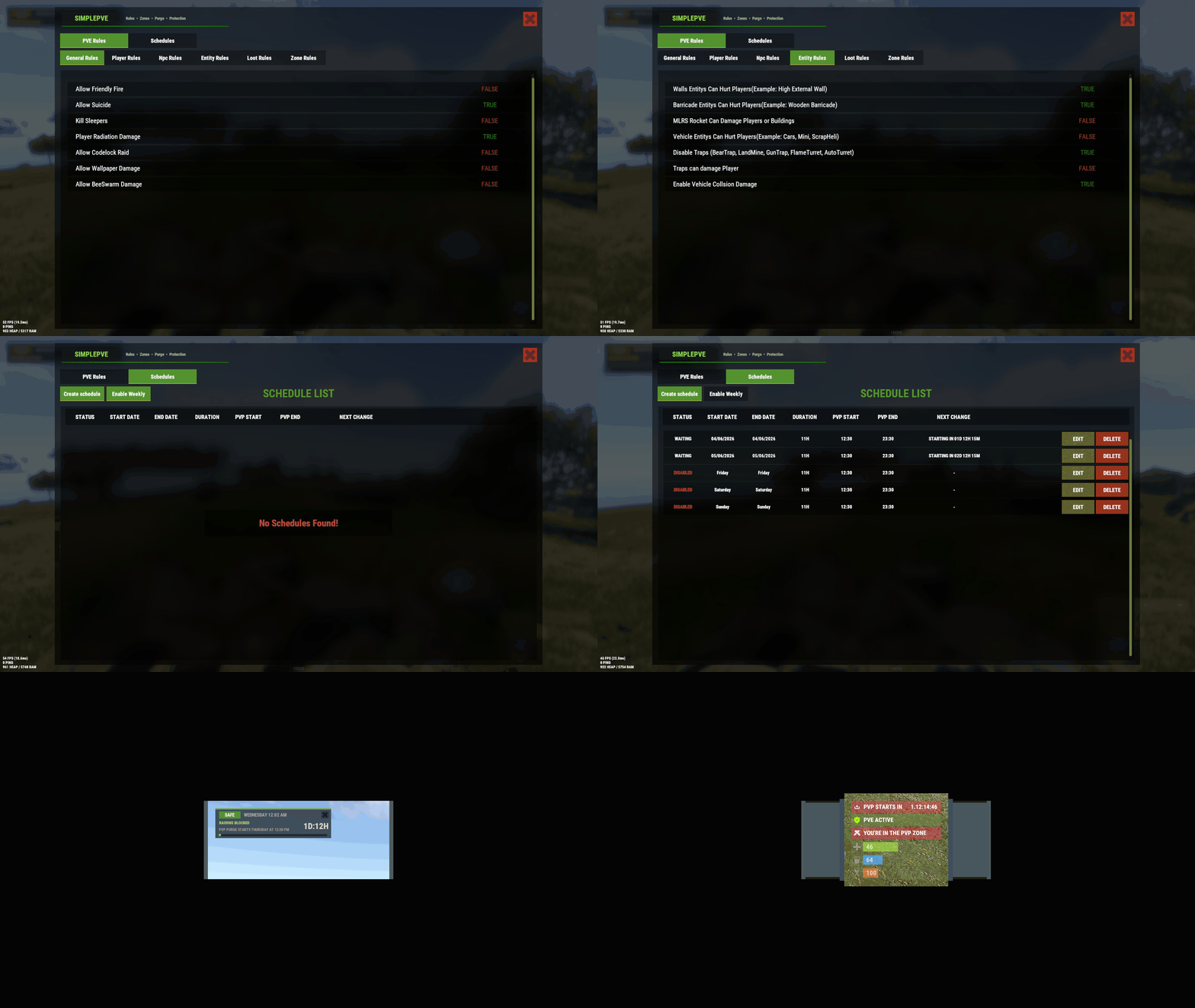 Just checking the update plugin - kudos to Iftebinjan "Loot Protection Excluded Entitys": [ "mailbox.deployed", "dropbox.deployed" ], In the config you can now specify loot container to exclude from loot protection. I will give it a spin and see how it is received by my players. Only downside is that again parts of the configuration are hidden in the oxide/config/SimplePVE.json file.. No problem if you know where to look, but could be a hurdle for less savvy users. Thanks for a great plugin.
 -
 Hi poebny, as far as I understand the config you need to edit your "HarmonyMods/Oxidation.Wiper.json" and insert a map URL instead of a map seed into the list "Maps": [ "29764255", "http://your.server.url/yourAwesomeRustMapGoesHere.map" ] The list should contain your current seed and the map you're gonna use. Then issue the "wipe forced" or "wipe weekly" command through rcon. Your server should then wipe and use the custom map you specified. Be aware this is untested, as I exclusively use procedurally generated maps (seeds).
 -
Hi, I'm currently having silently spawning raidable bases enabled. Our players love it, and I'm trying to figure out how to use for higher tier bases. As far as I found out this option does a little more than it advertises: "Spawn Silently (No Notifcation, No Dome, No Map Marker)": true, - edit - nevermind, I found it. I had walls and NPCs disabled on medium and easy bases and forgot about it. Thanks for a great plugin!
-
Hi @Iftebinjan, regarding preventLooting it would be a nice addition to be able to exclude certain containers, e.g. small boxes, from that protection so that you can actually share items with other players. The way it is handled now appears to overshoot the target, and will drive players to use other plugins and not use the built-in features. Pretty sure that this is not intended. Other than that your plugin works great for me - did not hear a single complaint so far.
-
The "Server Wipe System" plugin works flawlessly and on top lets you specify which files to explicitly remove on wipe - or keep, despite of the other settings. The author is active and also provided an update right in time for the 2-May update, where FP updated the Harmony version. Thanks to this plugin all wipes are now fully automated and all that is left for me to do is to take care of applying updates to the host machine once in a month. A true time saver! Only thing I still couldn't figure out yet is whether I can use wildcards to exclude e.g. oxide/data/RaidableBases/Profiles/*.json from being deleted, where all other data is completely wiped, or if you can exclude an entire folder. Other than that I'm pretty happy with my purchase, even after a bumpy start where I struggled to set which seed to use on the subsequent wipe. That was clearly a "me" problem, not the author's fault. Highly recommended purchase!
-
This plugin works great for me. I've got 2 servers with map size 3750. When picking seeds from rustmaps.com and comparing maps between what I get on my servers and what I can see on rustmaps.com, I practically always have all the monuments on the map that are also shown in rustmaps. Plus the fully functional rail ring. Truly happy with this plugin. The plugin author is actively updating his plugins, and also provided an update just in time for 2-May force wipe. I'm using 2 plugins from this author (railroads and server wiper) and so far I am happy with my purchases. Keep up the good work!
-
Hi guys, I love the idea of having dynamic difficulties, even though it is not clear to me what the consequence of it would be. Like, adjust difficulties based on player count / time of day / weekday / player raid statistics / player in team yes or no / you-name-it. However, adding even more classes of difficulty wouldn't have an impact on how well such an "inferno" base for instance is built, and how difficult it would be for a seasoned player to beat it. In other words, I do believe that the existing 5 levels of difficulty already offer a wide spectrum to play with if used consequently. Also great input @PistOffBastd didn't even think of removing the map markers and domes. Our players love raidable bases, and jump on it when they pop up on the map. Do you also remove the NPCs guarding the base, and the ring walls around it, so that it looks like a player base?
-
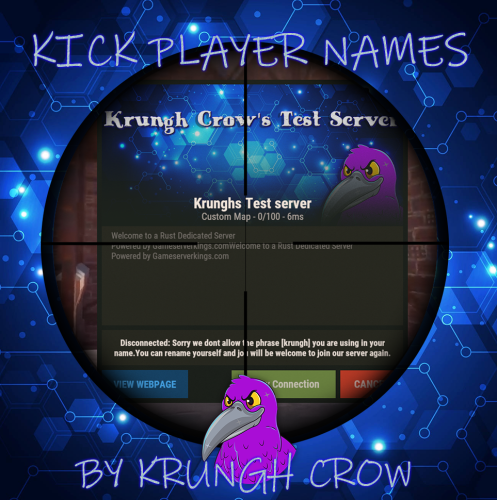 This plugin does a very good job limiting "spamvertising" through my servers through user names. Also helps prevent users showing up with user names similar to the server owner's or staff members. Highly recommended.
 -
You get what you pay for, but nothing more, which is a bit disappointing. When I had questions with the plugin and joined the author's Discord, I quickly found it was mostly dead. From 2 questions asked I only got 1 delayed answer. Don't buy if you've got questions and expect any (timely) help. Other than that I can recommend this plugin, which I'm currently testing on my secondary server which ran the vanilla PvE mode before. This plugin requires you to set "server.pve = false" to work correctly No more unability for players to remove their own structures, and no need to install extra plugins like the uMod remover tool Damage is no longer reflected back to the player, while preventing damage or looting of players, boxes, sleepers or backpacks If you check the discussions there seem to be some issues when used together with Raidable Bases, especially such PvP bases Plays nicely together with plugins like Monument Owner Compared to other plugins SimplePVE is much easier to set up, and configuration options are easily accessible The /sprules command gives you access to most of the configuration in a GUI, but for some of the config you will have to edit a file Nonetheless the author did an outstanding job to make configuration accessible, which should be more than enough for most usecases In my eyes would be worth 5 stars with a more active community, or better commitment of the author to answer questions and provide all necessary info to users for an exceptional experience. I can't see any ambitions to improve documentation or build and facilitate a community where users help other users. In total you really get what you pay for, but nothing extra. You will need to accept "trial and error" with configuration options due to lack of commitment to help users set up their usecase, or answer questions.
-
Hi kasvoton, I think I worked out how to configure. My mistake was that I set the "Seed" line to "null" before wipe, and gave the plugin only 1 seed in the "Maps" array. I managed to successfully wipe my server by leaving the current seed on top of the json config file, and added my new seed alongside the current seed into the "Maps" array. Upon wipe the wiper plugin successfully chose the new (correct) seed. I think that solved it for me, and this ticket can be closed. Thanks again!
-
Hi ChickenNugget, I just checked your json and find sftp links in the "Files" section. Pretty sure you need to put in relative paths seen from the root directory of your game server. Hence instead of e.g. "sftp://[email protected]:2022/oxide/data/SkillTree.json" the line should rather read "oxide/data/SkillTree.json" because that is how it is seen from the Wiper plugin. The rest of your json looks pretty good to me. Though I'm not the plugin author I'm pretty sure you need to configure your game server to run the wipe command for you in your preferred rhythm - e.g. biweekly. You might want to take a look at umod.org "Timed Execute" which can do that for you. You're probably running the Rust server off Pterodactyl Panel / Wings and might be able to use Ptero's scheduler to issue the wipe command, and this way don't need additional plugins like "Timed Execute" BR
-
deleted - I solved it, see below Just one question remains: For the "Files" and "Blacklist" sections, is it possible to use wildcards or exclude entire directories from deletion? Example Blacklist lines: "oxide/data/RaidableBases/" to exclude that entire folder plus subfolders from deletion "oxide/data/copypaste/*.json" to exclude my copied structured from deletion
-
Hi kasvoton, when I try to "ping" you Discord keeps telling me I can't send a message to you, because you only accept messages from friends.
-
please remove this - mistakenly posted my review under discussions
-
Plugin causes "inside terrain violation" player kicks since March 7th force wipe
miniMe_rust replied to miniMe_rust's Support Report in Support
Current status for this plugin: Still waiting for your update, eager to test it. Managed to get the current plugin version work somewhat stable by unloading plugin on initial server start after wipe deletion of "oxide/data/MM_Data/MonumentOwner/CooldownPlayers.json" doing a nightly restart of my server. Upon restart the plugin loads and works fine for the rest of the wipe The problem stays reproducible and causes "inside terrain violation" and "flyhack" kicks right after the server wiped. By doing beforementioned steps the problem can be worked around, even though it does not explain or appear understandable why the workaround works. Not going to question this, patiently waiting for the update to come, and provide more feedback once it arrived. If you want to check / reproduce it yourself, set up a Rust server with oxide/uMod plugin support in Pterodactyl Panel/Wings, install the Monument Owner plugin and wipe your server. After wipe hell breaks loose, and your players get constantly kicked. You can also verify my workaround, and probably find why it works, and use that to solve the underlying problem. Remark: Disabling map markers as I said in my previous post seems to be a red herring and does not solve the problem. I still have markers disabled, as I don't need the extra info they give. The trick appears to be to unload the plugin immediately after wipe, and keep it unloaded until next server restart (which happens to be nightly in my case) Keep up the good work! Love your plugin. -
Dears, this has probably been asked a million times, but I'm really struggling with the setup of this plugin. Trouble begins with the seed I want to use after the wipe. In previous tickets it was said "do no populate the seed and task entries in the json, use the seeds array in the bottom instead". Alright. Looking at my json, there is no "seeds" array anywhere. Instead the part which used to be for the seeds is now called "maps". If I insert my next seed there, it is getting ignored and the wiper sets some random seed. The only success I got so far was by shutting down the server and then populating the "seed" entry with the seed I want to have. Upon reboot a map with the correct seed is getting generated, and I'm good for the wipe. However, when the next wipe comes I enter my new seed into the json "seed" line on top, and run the "wipe" command. When the server restarts, the wiper replaced my manually set seed with something else, only heaven knows where it came from. Hence shut down the server, replace the seed and start it up again. I'm sure I'm doing something wrong. The wiper itself seems to work perfectly fine, and I love it so far. Would it be possible to put out a one-pager which explains configuration? It could be part of the (paid) download. Thanks for a great plugin!
-
Plugin causes "inside terrain violation" player kicks since March 7th force wipe
miniMe_rust replied to miniMe_rust's Support Report in Support
Thanks for taking the time and checking my log. Interesting that you say my server is incorrectly installed. It is a fresh install - Pterodactyl "wings-in-docker" - where the entire stack is dockerized. I even tested and reproduced the bug on a 2nd server of mine. The moment I remove your plugin, players are no longer kicked. Foreseeable that you say the error must be on my side, rather than fixing a problem which clearly comes from your plugin. Cheap, that you don't even ask a single question and simply claim my installation is broken. This is simply not true. I understand that you're not interested in sorting these problems. Therefore this has been my first and last purchase. Amendment: Re-enabled the plugin, but reconfigured it not to use map markers. Without markers it seems to work.
