

tacman1981
-
Posts
415 -
Joined
-
Last visited
Content Type
Profiles
Warranty Claims
Downloads
Forums
Store
Services
Downloads Plus Support
DOWNLOADS EXTRA
Reels
Everything posted by tacman1981
-
Changed Fixed In from 1.3.1 to 1.4.6
-
ok i will push the update to mark this fixed. thank you for your assistance.
-
Give this 1 a try. I separated wood and ore logic so they don't try to fight each other. I think I done the check wrong in the previous update by combining them. FurnaceNoOreStop.cs
-
i have no intention to remove it, but I will make a config setting for it, so others aren't forced to deal with this 1. thank you for your suggestion, expect an update soon
-
i wont be editing quicksmelt, that previous fix I offered before, was temporary until I could figure out the problem in my code. you can try this 1, It checks for wood being removed, then toggle ovens off, in theory. FurnaceNoOreStop.cs
-
hmmm, I'll look into it tonight, I think I got an idea how to handle this, but I want to test it first. ill push an update either tonight or tomorrow morning once I confirm it works.
-
 more like this "List of rewards the player receives based on level": { "200": { "List of commands and chat messages that the player receives when reaching the specified level [Left = command. Right = Private message to player]. {id} = steam ID. {name} == name.": { "say <color=#ffae00>{name}</color> reached level <color=#4cff03>200</color>!": "You have reached a milestone level!" }, "List of commands that are fired off when the player data is reset": [ "say Test data reset." ] }, "400": { "List of commands and chat messages that the player receives when reaching the specified level [Left = command. Right = Private message to player]. {id} = steam ID. {name} == name.": { "say <color=#ffae00>{name}</color> reached level <color=#4cff03>400</color>!": "You have reached a milestone level!" }, "List of commands that are fired off when the player data is reset": [ "say Test data reset." ] }, "600": { "List of commands and chat messages that the player receives when reaching the specified level [Left = command. Right = Private message to player]. {id} = steam ID. {name} == name.": { "say <color=#ffae00>{name}</color> reached level <color=#4cff03>600</color>!": "You have reached a milestone level!" }, "List of commands that are fired off when the player data is reset": [ "say Test data reset." ] } },
- 1,651 comments
-
- 1
-

-
- #leveling
- #progression
- (and 19 more)
-
if you use heli signals plugin, that 1 has a skill tree xp feature for killing heli. if this helps any
-
While it compiles, it has nothing new included. we have tons of new stuff that should be optional too. canyons are buggy and even naturally generated, they have flaws that cause players to be kicked for "inside terrain violation". Basically, this should be updated to include all new stuff. Letting us server owner remove certain objects from terrain, just like it was when I bought it.
-
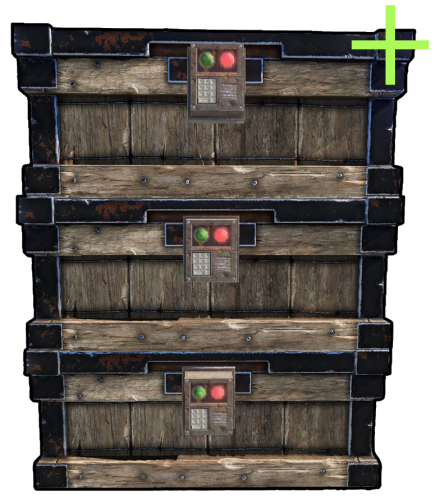 upodating the plugin mid wipe, causes these box issues where they break. i dont know why, it just happens when the plugin is updated and boxes are already placed.
 -
it should be fixed soon. there is a fix on the discord server for it.
-
the xp given is related to the time spent crafting it. so less time = less xp. its been that way for some time now
-
Changed Status from Not a Bug to Fixed Changed Fixed In from 1.3.0 to 1.3.1
-
I have added a way for Quick Smelt to control the furnaces being turned off and on, if quick smelt is installed. thanks to your report I figured out a way to add it to mine, so this will work with the default quick smelt plugin now. No longer requiring users to edit in a snippet to another plugin. Marking as fixed
-
inside the quick smelt plugin itself. look for "public void Cook()" and add the piece of code just after the { under the method name. this will force it to check if the furnace is off, and deactivate the repeating timer.
-
Changed Status from Pending to Not a Bug Changed Fixed In to 1.3.0
-
There is a possible fix for quick smelt so it doesn't continue to repeat the cook timer. inside Cook in quick smelt, you could add this guard to prevent it looping while turned off. if (Furnace == null || !Furnace.IsOn()) { StopCooking(); return; } This should prevent the timer from continuing after my plugin turns the furnace off.
-
Like I suspected, Quick Smelt uses a repeating timer to keep things burning. It doesnt check if the oven is off and continues with the InvokeRepeating which keeps burning things in the furnaces. Quick Smelt must add a proper guard that stops it from cooking while turned off
-
 you should not delete FreeList, but change it to FreeUnmanaged. otherwise you risk memory bloat.
 -
 https://umod.org/plugins/tc-range-workbench this 1 uses harmony and has been around for 11 months on umod. you should not try to monetize free plugins.
- 10 comments
-
- 4
-

-
- #buildingworkbench
- #workbench
- (and 2 more)
-
ive sent you a private message with the section below "Prestige Levels".
- 1,651 comments
-
- 1
-
-
- #leveling
- #progression
- (and 19 more)
-
this is exactly what i thought too, ive had paid plugins rejected because "umod has a better 1 for free". the 1 on umod wasnt compiling when i wrote and and published it, and also didnt have half of my features. related to this plugin, im using a custom 1 i got for free from a discord server, i think from the skilltree discord.
- 10 comments
-
- 1
-
-
- #buildingworkbench
- #workbench
- (and 2 more)
-
.thumb.png.a13ff2f1f0d2ff4d157e384f052c92e0.png) thats funny, facepunch broke this by fixing the typo lol
thats funny, facepunch broke this by fixing the typo lol -

Error while compiling StaticLootables: Invalid expression term '[' | Line: 43, Pos: 35
tacman1981 replied to ChardaZAR's Support Report in Support
same here. hopefully this gets fixed soon -
 isnt the boombox a dlc item?