
Paws4Luv's Wishlist
-
$19.99$14.99SimplePVE
By Iftebinjan in Plugins
SimplePVE
Simple, powerful PVE for Rust. Control every damage, raid, loot and protection rule from a clean in-game menu. Save rules as profiles and switch between them on a schedule. Run a full PVE server, weekend purges or a hybrid PVE/PVP server, all from one plugin.
Tip
No server.pve needed. SimplePVE handles everything itself. Keep server.pve false.
Video Showcase
Features
Rules and profiles
In-game rule manager (/sprules). Toggle every rule with one click, no config editing needed. Rule profiles. Save several rule sets (for example Normal PVE, Raid Weekend, Event Night), then duplicate, rename and switch them live. Easy rule categories. Damage, raiding, looting, NPCs, traps, vehicles, Deep Sea and Apartments. Debug mode (/spdebug). Shows exactly which rule blocked or allowed a hit. Schedules and purges
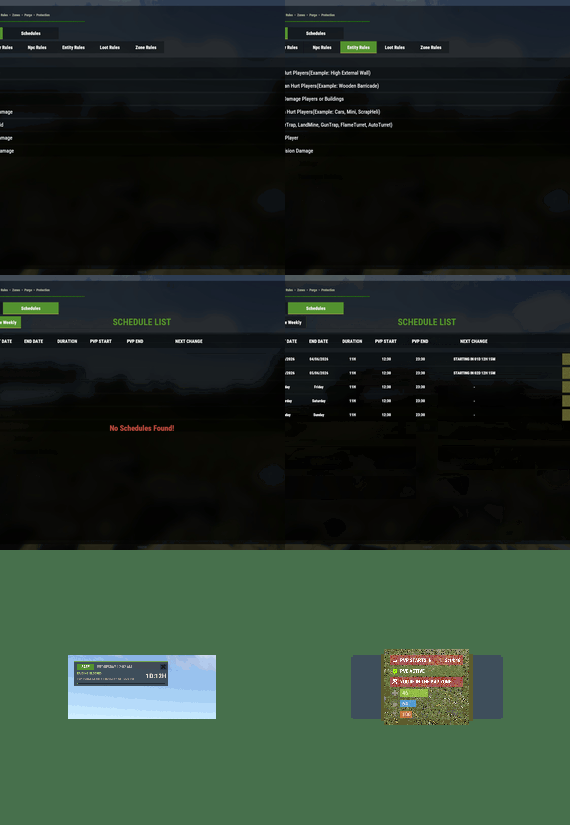
Automatic PVE/PVP purges. PVP turns on and off by itself on your schedule. Weekly schedules. Pick days and times, like Friday 18:00 → Sunday 22:00 or weekends only. Dated schedules. For example January 1 → January 7, holiday events or wipe weekends. Priorities. Several schedules can overlap and the highest priority wins. Outside every schedule, your base profile runs. Run commands when a purge starts or ends. Master switch (/simplepve on|off). Pauses everything and turns the server vanilla in one command. Protection
Loot protection. Corpses, backpacks, boxes and supply drops are protected from other players, with team access. Building, vehicle and boat protection. Separate rules for your own, your team's and other players' property. Vehicle auto-claim. Vehicles are claimed when you start the engine. You can also lock claimed vehicles to the owner and their team. Admin bypass permissions for loot and damage. Zones and events
ZoneManager support. Create PVP zones inside your PVE server. Exclude zones from the global PVE rules. PVP delay when leaving a PVP zone. Nobody can escape a fight by stepping out. Works with many popular event plugins. HUD, status and notifications
SimplePVE HUD. Shows the current mode, what's next, a live countdown and a progress bar. Green when safe, red during raid time. In-game HUD editor (/sp_change). Move it and save it without touching the config. Status UI for PVE/PVP, PVP zones, PVP delay, purge countdown and Deep Sea (via CustomVitalsManager). Discord embeds when a purge starts or ends, plus optional early warnings. In-game warnings before every schedule change. Chat, UI, Toastify or Notify for warning messages. Multi-language. Every message is in the lang file, sent in each player's language. Profile names can be translated too. How it works
Rules. Open /sprules and set what players can and can't do. Profiles. Save those rules as a profile, and create more for different situations. Schedules. Tell SimplePVE when each profile (or full PVP) should run. Players see it. The HUD shows the current mode and counts down to the next change, with chat and Discord warnings ahead of time. Note
Example setup: Base profile PVE all week. A weekly schedule switches to PVE OFF (full PVP and raiding) every Saturday 18:00 → Sunday 23:00. Players get a warning 30 minutes before, and Discord announces the purge.
Rule categories
Category What it controls General Friendly fire, suicide, sleepers, radiation, codelock raids, wallpaper, bee swarms, clan support Player Player vs player, animals, NPCs, vehicles, boats, buildings (own / team / others), twigs Deep Sea PVP and boat damage out in the Deep Sea NPC NPCs, animals, Patrol Heli, Bradley and SAM sites vs players and buildings Entity Walls, barricades, MLRS, vehicle collisions and all traps Loot Loot protection, team access, PVP-zone looting, supply drops, Deep Sea looting Zone ZoneManager integration and the PVP delay Apartment Apartment combat zones, master keys, break-ins, rental shops, basement bribes Commands
Command Type Description /sprules Chat Open the menu for rules, profiles and schedules /simplepve Chat & Console Toggle SimplePVE on or off /simplepve on / /simplepve off Chat & Console Turn SimplePVE on, or turn it off (vanilla, schedules paused) /spdebug Chat & Console Debug mode: shows why damage was blocked or allowed /sp_change Chat Open the in-game HUD position editor /sp_hide Chat Hide or show the SimplePVE HUD (players, name set in the config) /spve.langkeys Chat & Console Create lang keys for your profile names so they can be translated /resetsprules Chat & Console Reset the rules to default Permissions
Permission Allows simplepve.admin Using the admin commands and the /sprules menu simplepve.adminloot Looting other players' protected containers and using their claimed vehicles simplepve.admindamage Damaging any entity while PVE is on Hosting partner
Installation
Upload SimplePVE.cs to oxide/plugins. Make sure server.pve is false. Grant yourself admin: oxide.grant user YourName simplepve.admin Type /sprules in game and set up your rules. (Optional) Create profiles and schedules in the same menu. (Optional) Set your timezone (see below) if you use schedules. Schedule timezone
Schedules use UTC plus your offset in minutes. Set it in the config under Schedules Setting → UTC Time Difference.
Your timezone Calculation Value UTC 60 × 0 0 United Kingdom (GMT+1, summer) 60 × 1 60 Central Europe (UTC+2) 60 × 2 120 Bangladesh (UTC+6) 60 × 6 360 US Eastern (UTC−4) 60 × −4 -240 US Pacific (UTC−7) 60 × −7 -420 Warning
Schedules starting at the wrong time? Your UTC Time Difference doesn't match your timezone. Fix it and reload the plugin.
Configuration
Tip
Translating: copy the lang file to another folder (for example oxide/lang/de/SimplePVE.json) and translate the values. Each player gets their own language. Run /spve.langkeys to add lang keys for your profile names too.
FAQ
Does SimplePVE need server.pve?
No. Keep server.pve set to false. SimplePVE does all the protection itself.
Where do I change the rules?
Type /sprules in game (needs simplepve.admin). Every rule is a toggle, and changes save to the profile you're editing.
What are profiles?
A profile is a saved set of rules. Make one for normal PVE days and one for raid weekends, then switch them by hand or let a schedule switch them.
Can I make automatic purges?
Yes. Create a schedule in /sprules → Schedules, pick what it runs (a profile, PVE ON or PVE OFF) and when. Outside every schedule, your base profile runs.
Weekly or date-based schedules?
Both. A schedule's time windows can be weekly (days and times, or a day-to-day span) or dated (a date range, or a daily time inside a date range). When schedules overlap, the one with the highest priority wins.
My schedules start at the wrong time.
Your UTC Time Difference doesn't match your timezone. See Schedule timezone above.
How do I turn PVE on or off by hand?
/simplepve on or /simplepve off (needs simplepve.admin). Off makes the server vanilla and pauses all schedules until you turn it back on.
Damage still happens in PVE mode. Why?
Either one of your rules allows that damage, or another plugin changes damage too. Turn on /spdebug to see which rule decided each hit, and turn it off again when you're done.
How does loot protection work?
Players can't loot other players' corpses, backpacks, containers and called supply drops. Teammates can if you allow it. Admins with simplepve.adminloot can bypass it. Add entity short names to Loot Protection Excluded Entitys to keep them open to everyone (mailboxes and drop boxes by default).
Can admins damage things while PVE is on?
Yes, with the simplepve.admindamage permission.
Does it support ZoneManager?
Yes. ZoneManager zones can run PVP inside your PVE server, with an optional PVP delay when players leave. List zone IDs under Exclude Zone IDs From Rules to keep SimplePVE out of them completely.
Can it post to Discord?
Yes. It sends embeds when a purge starts or ends, and optional warnings a set number of minutes before. In-game warnings work without Discord too (Warn Players Before Schedule Change).
Can I run commands when a purge starts or ends?
Yes. Add them to Commands when PVP Purge Starts and Commands when PVP Purge Ends.
The menu or HUD looks see-through.
Keep UI - Use blur materials set to false. Blur is broken on Rust's new render pipeline.
For developers
Hooks and API
void OnSPVEPurgeStarted() void OnSPVEPurgeEnded() TimeSpan GetPVPStartTimeRemaining() TimeSpan GetPVPEndTimeRemaining() bool IsServerPVE() bool IsStatusEnabled_API() bool AddToExcludeZone(string zoneId) bool RemoveFromExcludeZone(string zoneId) Override hooks. Return true or false to force the result and skip SimplePVE's own checks. Return null to let SimplePVE decide.
object CanEntityTakeDamage(BaseCombatEntity entity, HitInfo hitInfo) // true = allow damage, false = block object CanEntityBeTargeted(BasePlayer player, BaseEntity entity) // true = allow targeting, false = block object CanEntityTrapTrigger(BaseTrap trap, BasePlayer player) // true = allow trigger, false = block Support
Need help or found a bug? Open a support ticket on this page or join the Discord.
Check out my other plugins
-
$19.99
Property Buying
Put in sale properties (house, building, etc) so that players can buy them, rented.
Work with all doors that can include a lock code, Works with Economics
Permissions
propertybuying.manager.use - Gives access to the (creates, suprimed ) properties propertybuying.manager.admin - See all properties created and (creates , suprimed ) properties Commands
/property - Accesses the property management ( added, removed )
How to add a property ?
CopyPaste
Decay
Config
Payment Time Model
Lang
-

$9.90
PNPC Helicopter AI
Let your Personal NPCs fly helicopters for you with the Heli AI Addon! This addon for Personal NPC enables your bots to take control of helicopters, allowing you to sit back and enjoy the flight while they fly to the destination.
Features:
🚁 Fully Automated AI Pilots
• Spawn a Personal NPC bot
• Select a point on the in-game map, and the bot will fly there.
• Works perfect with all helicopters in Rust.
🎯 Smooth Flight Controls
• Adjustable altitude, flight speed, and maneuverability.
• Setup pitch, throttle, and rotation for better control.
• Automatically adjusts height above the ground to avoid obstacles.
⚙ Other Customization
• Set minimum and maximum flight altitude.
• Adjust landing speed, flight slope, and pitch strength.
• Optimize rotation and throttle power for smoother navigation.
How to Use:
1️⃣ Spawn a bot using the PersonalNPC plugin.
2️⃣ Enter the helicopter as a passenger.
3️⃣ Mark your destination on the in-game map.
4️⃣ Sit back and let your AI pilot handle the flight!
📜 Requirements:
✔️ PersonalNPC Plugin (must be installed & enabled).
✔️ Addon must be activated in bot settings.
📸 See It in Action! Watch the Video
📃 Configuration:
{ "Max height above the ground": 25.0, "Minimum height to fly forward/backward": 15.0, "Max slope by forward axis": 0.3, "Pitch strength": 0.2, "Throttle strength": 1.0, "Land throttle strength": 0.5, "YAW strength (rotation around its axis)": 1.0 }
-

$15.00
Lock Me Up - Handcuffs
Lock Up the nasty players! Admins or players with permissions will have the ability to spawn handcuffs and use them to lock up victims or npc's while also giving them the ability to escort or loot their target. This system was heavily inspired by the Rustoria/OTV developers.
Usage
Equip the handcuff item in your belt and make sure it's selected, go near a player/npc and hold E button.
Current Futures Include (check the config bellow as well)
Support for permissions Handcuff item type, skin & stack are changeble Handcuffed player can be looted Handcuffed player can be escorted - By Foot - In Vehicle Ground/Air/Water - Dragged behind the Vehicle with adjustable distance NPCs can be handcuffed as well (all the above apply) Adjustable on handcuff time Option to cancel on spotted Option to escort the player floating or stick to ground Inventory slots can be locked on handcuffed Handcuff message changable Adjustable access to locked player Adjustable lock/cuff protection Configurable blocked Chat & Console commands for handcuffed players Handcuff item stack can be made unlimited Option to unlock player on warden death Option to keep victim locked on death Option to change victim clothes on handcuff More futures may be taken in consideration after they are suggested and discussed.
Commands [Chat & Console]
cuff _all|PlayerName|SteamID - Lock the target through a Server Console or F1 Console command (Admin Only)
(Chat: /hcuffs | Console hcuffs) ~
~ /hcuffs _self Amount - Give yourself handcuffs (Chat only)
~ /hcuffs PlayerName|SteamID Amount - Give the target player handcuffs
~ /hcuffs _all Amount - Give everyone in the server handcuffs (Admin Only)
/lock - Lock|Unlock yourself
:: Example Command for Server Rewards: hcuffs $player.id 1
API
Check if target is Restrained
Restrain Player - For self-restrain use player as attacker
Unrestrain Player
- save = Saves the player into the data, usually used when player disconnect
- ride = Additional checks for players inside a vehicle
Default Config
Config is pretty much self explementary.
-

$11.99
Plex Tickets | Discord Ticket Bot
An advanced ticket bot made with simplicity it brings to users both in use within discord and installation, The bot runs on the latest version of Discord.js and is fully customizable with 50+ features and no watermarks!
Elevate your server's support experience with our professional and advanced ticket system. Your users can seamlessly create tailored support tickets from a variety of categories, while you enjoy the ease of managing their needs through our feature-rich and user-friendly bot. Simplify support, elevate satisfaction
Features:
- Buttons, Modals, Menus - Custom Emojis - Multiple Categories - Logs of everything - Notify if ticket creators leave - Support roles for each category - Pin Tickets - Custom channel names - Claiming System - Auto responses - Web dashboard (addon) - Ticket Review System - Archive Tickets - Questions System (per category) - Setup working hours - Fully Customizable - Self Hosted - Paypal/stripe/crypto invoices - Easily translatable - Advanced suggestions - MongoDB - Custom Commands - Addons System - Rename Tickets - Statistics - Blacklist users/roles - 1-8 Categories - Discord Timestamps - Discord Modals - Ticket Required Roles - Transcripts (HTML, TXT) - View Transcripts online
Discord Server:
https://discord.gg/plexdev