

beee
-
Posts
643 -
Joined
-
Days Won
7
Content Type
Profiles
Warranty Claims
Downloads
Forums
Store
Services
Downloads Plus Support
DOWNLOADS EXTRA
Reels
Everything posted by beee
-
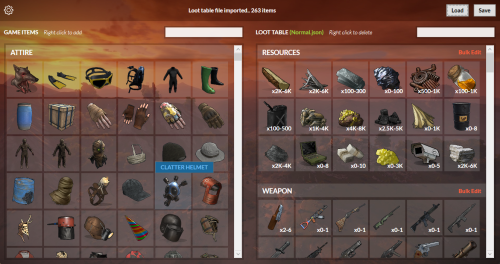 Only loot files.
 -
Changed Status from Pending to Can't Reproduce
-
Hey @hid333 sorry for the late reply. Haven't been able to reproduce that problem, only reason it can happen if the oxide hook got called when it shouldn't or if file got corrupted. If this happens again let me know and I will find a way to not rely on that hook.
-
Ok then it's possible OnNewSave hook was called incorrectly without a new map file (which would wipe other plugins data too that do auto wipe), that or the data file got corrupted somehow and had to be recreated. Are you using oxide or carbon and will investigate.
-
Hi, Were they players who just joined before the restart you mean? or it randomly sends to some old players because that shouldn't happen if they are in the data\AutomatedMessages\PlayerData.json file. Did this start happening with last version or has it been an issue for a while?
-
 Fixed thanks for the report.
 -
They are not decaying? Will check.
-
Hello, On server restart, i noticed that plugins that registers permissions in OnServerInitialized will not be picked up if their plugin name came after PermissionsManager alphabetically due to load order. I register sometimes at OnServerInitialized as some perms depend on config so i just handle it here. Maybe can wrap GetPlugs with a NextTick? Example of a plugin that has that issue is PlayerHealth if you want to check. Thank you.
-
@rustplugins If you want to pay I believe this one is well maintained json sold here, it's for SkinBox plugin but you can simply import SkinBox json and export for Skins. Goodluck.
-
Changed Status from Pending to Closed
-
Now it's your job to add skins from https://steamcommunity.com/app/252490/workshop/, you can also browse collections here https://steamcommunity.com/workshop/browse/?appid=252490&browsesort=trend§ion=collections.
-
Use last version i uploaded an hour ago @rustplugins, it will show you all available items even if your imported json is empty like yours.
-
@rustplugins all set here?
-
Download and install the dependency mentioned in the description -> https://dotnet.microsoft.com/en-us/download/dotnet/thank-you/runtime-desktop-9.0.11-windows-x64-installer
-
Works fine with permissions manager
-
There are existing ConVars in the game you can play around with to achieve this, mainly powergrid.fuseFullDecayCount, powergrid.fuseSlowDecayFractionMin, powergrid.fuseSlowDecayFractionMax, and powergrid.fuseLifespanSeconds. To understand how it works, there is a full decay and slow decay. By default it is set that 3 of the fuses only decay at full decay speed (which is set at 9600 seconds or 160 minutes). The rest will decay in the slow rate which is a random number between 8% and 12% of the full rate. Now if you want that only one decays at a time to have the time scale in a linear fashion, you can do the following: set powergrid.fuseFullDecayCount 1 - only allows one fuse to decay at full rate at a time. set powergrid.fuseSlowDecayFractionMin 0 and powergrid.fuseSlowDecayFractionMax 0 - this will prevent other fuses from decaying at all till it comes their time to decay at full rate. set powergrid.fuseLifespanSeconds - to whatever you want the only decaying fuse to take to full decay, there is 25 slots for fuses i believe in one powerplant, so if you set that at 3600 (1 hour), then it will take total 25 hours for the powergrid to run out if it had a full set of fuses inserted. Goodluck.
-
Version 1.1.3
110 downloads
Control the power grid stages, recycler mechanics, and powerline outputs directly from your server config. The plugin lets you easily add, edit, or remove grid stages, customize how each recycler type behaves as the grid powers up, and includes a shared Virtual Fusebox so players can contribute fuses to power the grid even on maps without a Powerplant monument. How it works Open the config file. Under "Powergrid Stages", you can add new stage blocks or edit existing ones. Under "Recyclers", you can configure powergrid-based settings for each recycler type (Green, Yellow, Red). Under "Virtual Fuse Box", you can enable/disable the virtual fuse box feature and customize its commands. Reload the plugin for the changes to take effect. The plugin will automatically sort your configured stages based on the required fuses and apply them directly to the server's power grid . You can set power to whatever you want, here I set "Powerline Available Power": 500 as an example. Recycler Powergrid Settings Configure how each recycler type behaves based on the current powergrid stage. For each recycler type (Green, Yellow, Red), you can control: Required Powergrid Stage To Operate - The minimum powergrid stage required for this recycler to function. Set to 0 to allow the recycler to work regardless of powergrid state. Required Powergrid Stage For Efficiency Override - The powergrid stage at which the custom recycling efficiency kicks in. Set to 0 to disable the efficiency override. Recycling Efficiency Override - The recycling efficiency when the efficiency stage is reached. Value from 0.0 to 1.0 where 1.0 = 100% resource return. Required Powergrid Stage For Duration Override - The powergrid stage at which the custom recycling duration kicks in. Set to 0 to disable the duration override. Recycling Duration Override - The recycling speed in seconds per cycle when the duration stage is reached. Default behavior (matching vanilla Rust): Green recyclers — Always usable. At stage 2, efficiency is overridden to 60%. At stage 4, duration is overridden to 4.5s. Yellow recyclers — Always usable. No powergrid-based overrides. Red recyclers — Requires powergrid stage 4 to operate. No efficiency/duration overrides. Chat Commands /recyclerinfo - Look at a recycler and use this command to see its type (Green/Yellow/Red), current powergrid stage, and all powergrid-related config values applied to it. Useful for verifying your configuration is working correctly. Requires permission: powergridstages.recyclerinfo /fusebox or /fb (or your custom alias) - Opens the virtual powergrid fusebox UI. Requires permission: powergridstages.fusebox /fusebox reset [1/2] - Admin command to instantly clear and reset the virtual fuseboxes. Requires Admin privileges. Useful Rust ConVars & Commands (Note: These are existing Rust convars and commands, not part of this plugin) powergrid.enabled - If disabled power grid functionality will be disabled. powergrid.status - A console command provides information about the current state of the server's power grid, including the active progression stage, the number of inserted fuses, and the total available electrical power. (This is a good place to go to verify the plugin applied changes properly) powergrid.simulatepowerplantfuses - Pretend there are this many additional heavy fuses currently plugged into the power plant. Can input negative numbers to negate the effect of any currently plugged in fuses. Default Config { "Virtual Fuse Box": { "Enabled": false, "Command": "fusebox, fb" }, "Enable Powerline Stage Mode": true, "Powergrid Stages": [ { "Required Fuses": 1, "Powerline Available Power (Only used if Powerline Stage Mode is enabled)": 15 }, { "Required Fuses": 4, "Powerline Available Power (Only used if Powerline Stage Mode is enabled)": 18 }, { "Required Fuses": 10, "Powerline Available Power (Only used if Powerline Stage Mode is enabled)": 24 }, { "Required Fuses": 18, "Powerline Available Power (Only used if Powerline Stage Mode is enabled)": 30 } ], "Recyclers": { "Green Recycler": { "Required Powergrid Stage To Operate (0 = No Powergrid Required)": 0, "Required Powergrid Stage For Efficiency Override (0 = No Override)": 2, "Recycling Efficiency Override (0.0 to 1.0, 1.0 = 100% Resource Return)": 0.6, "Required Powergrid Stage For Duration Override (0 = No Override)": 4, "Recycling Duration Override in Seconds": 4.5 }, "Yellow Recycler": { "Required Powergrid Stage To Operate (0 = No Powergrid Required)": 0, "Required Powergrid Stage For Efficiency Override (0 = No Override)": 0, "Recycling Efficiency Override (0.0 to 1.0, 1.0 = 100% Resource Return)": 0.0, "Required Powergrid Stage For Duration Override (0 = No Override)": 0, "Recycling Duration Override in Seconds": 0.0 }, "Red Recycler": { "Required Powergrid Stage To Operate (0 = No Powergrid Required)": 4, "Required Powergrid Stage For Efficiency Override (0 = No Override)": 0, "Recycling Efficiency Override (0.0 to 1.0, 1.0 = 100% Resource Return)": 0.0, "Required Powergrid Stage For Duration Override (0 = No Override)": 0, "Recycling Duration Override in Seconds": 0.0 } }, "Version": { "Major": 1, "Minor": 1, "Patch": 1 } }$9.99- 16 comments
- 2 reviews
-
- 4
-

-

-
- #powergrid
- #power
- (and 15 more)
-
 Fp don't give an option for anything other than a steamid for icons.
 -
Changed Status from Pending to Closed Changed Fixed In to 1.1.3
-
Will try, was working on the scheduler for it last year then got distracted. Can't remember what the progress is in the implementation, will look into it.
-
Not possible now unfortunately from this plugin, I started working at some point on an "Automated Commands" version of this plugin because it felt out of place here but never got around to finishing it.
-
Hey @Marsdon Rhekhu, please confirm when you can if this issue is resolved for you with latest versions posted so I can close the ticket. Thanks.
-
Hey @Marsdon Rhekhu, Night time calculation should be fixed now in v1.1.2, and added "Automatically determine night time (via in-game sky)" so you won't have to define time yourself.
-
Sorry haven't had time to look into this, will try to do so soon (around a week or so).