




About Powergrid Stages
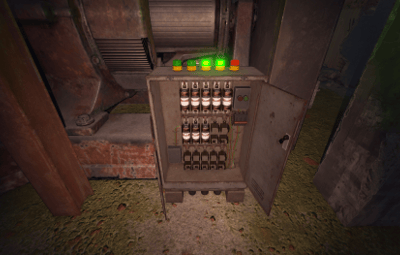
Control the power grid stages, recycler mechanics, and powerline outputs directly from your server config. The plugin lets you easily add, edit, or remove grid stages, customize how each recycler type behaves as the grid powers up, and includes a shared Virtual Fusebox so players can contribute fuses to power the grid even on maps without a Powerplant monument.
How it works
- Open the config file.
- Under "Powergrid Stages", you can add new stage blocks or edit existing ones.
- Under "Recyclers", you can configure powergrid-based settings for each recycler type (Green, Yellow, Red).
- Under "Virtual Fuse Box", you can enable/disable the virtual fuse box feature and customize its commands.
- Reload the plugin for the changes to take effect.
The plugin will automatically sort your configured stages based on the required fuses and apply them directly to the server's power grid .
QuoteHighly recommended to have atleast 4 stages in the config as parts of the game relies on it. (Some monuments only operate based on specific stages)
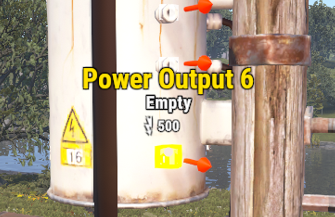
You can set power to whatever you want, here I set "Powerline Available Power": 500 as an example.
Recycler Powergrid Settings
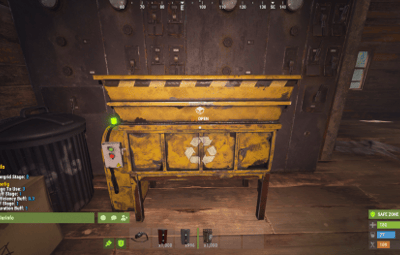
Configure how each recycler type behaves based on the current powergrid stage. For each recycler type (Green, Yellow, Red), you can control:
- Required Powergrid Stage To Operate - The minimum powergrid stage required for this recycler to function. Set to 0 to allow the recycler to work regardless of powergrid state.
- Required Powergrid Stage For Efficiency Override - The powergrid stage at which the custom recycling efficiency kicks in. Set to 0 to disable the efficiency override.
- Recycling Efficiency Override - The recycling efficiency when the efficiency stage is reached. Value from 0.0 to 1.0 where 1.0 = 100% resource return.
- Required Powergrid Stage For Duration Override - The powergrid stage at which the custom recycling duration kicks in. Set to 0 to disable the duration override.
- Recycling Duration Override - The recycling speed in seconds per cycle when the duration stage is reached.
Default behavior (matching vanilla Rust):
- Green recyclers — Always usable. At stage 2, efficiency is overridden to 60%. At stage 4, duration is overridden to 4.5s.
- Yellow recyclers — Always usable. No powergrid-based overrides.
- Red recyclers — Requires powergrid stage 4 to operate. No efficiency/duration overrides.
Chat Commands
- /recyclerinfo - Look at a recycler and use this command to see its type (Green/Yellow/Red), current powergrid stage, and all powergrid-related config values applied to it. Useful for verifying your configuration is working correctly. Requires permission: powergridstages.recyclerinfo
- /fusebox or /fb (or your custom alias) - Opens the virtual powergrid fusebox UI. Requires permission: powergridstages.fusebox
- /fusebox reset [1/2] - Admin command to instantly clear and reset the virtual fuseboxes. Requires Admin privileges.
Useful Rust ConVars & Commands (Note: These are existing Rust convars and commands, not part of this plugin)
- powergrid.enabled - If disabled power grid functionality will be disabled.
- powergrid.status - A console command provides information about the current state of the server's power grid, including the active progression stage, the number of inserted fuses, and the total available electrical power. (This is a good place to go to verify the plugin applied changes properly)
- powergrid.simulatepowerplantfuses - Pretend there are this many additional heavy fuses currently plugged into the power plant. Can input negative numbers to negate the effect of any currently plugged in fuses.
Default Config
{
  "Virtual Fuse Box": {
    "Enabled": false,
    "Command": "fusebox, fb"
  },
  "Enable Powerline Stage Mode": true,
  "Powergrid Stages": [
    {
      "Required Fuses": 1,
      "Powerline Available Power (Only used if Powerline Stage Mode is enabled)": 15
    },
    {
      "Required Fuses": 4,
      "Powerline Available Power (Only used if Powerline Stage Mode is enabled)": 18
    },
    {
      "Required Fuses": 10,
      "Powerline Available Power (Only used if Powerline Stage Mode is enabled)": 24
    },
    {
      "Required Fuses": 18,
      "Powerline Available Power (Only used if Powerline Stage Mode is enabled)": 30
    }
  ],
  "Recyclers": {
    "Green Recycler": {
      "Required Powergrid Stage To Operate (0 = No Powergrid Required)": 0,
      "Required Powergrid Stage For Efficiency Override (0 = No Override)": 2,
      "Recycling Efficiency Override (0.0 to 1.0, 1.0 = 100% Resource Return)": 0.6,
      "Required Powergrid Stage For Duration Override (0 = No Override)": 4,
      "Recycling Duration Override in Seconds": 4.5
    },
    "Yellow Recycler": {
      "Required Powergrid Stage To Operate (0 = No Powergrid Required)": 0,
      "Required Powergrid Stage For Efficiency Override (0 = No Override)": 0,
      "Recycling Efficiency Override (0.0 to 1.0, 1.0 = 100% Resource Return)": 0.0,
      "Required Powergrid Stage For Duration Override (0 = No Override)": 0,
      "Recycling Duration Override in Seconds": 0.0
    },
    "Red Recycler": {
      "Required Powergrid Stage To Operate (0 = No Powergrid Required)": 4,
      "Required Powergrid Stage For Efficiency Override (0 = No Override)": 0,
      "Recycling Efficiency Override (0.0 to 1.0, 1.0 = 100% Resource Return)": 0.0,
      "Required Powergrid Stage For Duration Override (0 = No Override)": 0,
      "Recycling Duration Override in Seconds": 0.0
    }
  },
  "Version": {
    "Major": 1,
    "Minor": 1,
    "Patch": 1
  }
}