
-
Posts
1,859 -
Joined
-
Last visited
-
Days Won
6
Content Type
Profiles
Warranty Claims
Downloads
Forums
Store
Services
Downloads Plus Support
DOWNLOADS EXTRA
Reels
Everything posted by MrLiquid
-
NullReferenceException: Object reference not set to an instance of an object at Oxide.Plugins.BossMonster+ControllerBoss.RadiusActions () [0x003fb] in <b17dd6febf1c46a49bf1a16d56ed6597>:0 at InvokeHandlerBase1[T].DoTick () [0x00120] in <9af42e0489ee47e08d6c7099c5bb8736>:0 at InvokeHandlerBase1[T].LateUpdate () [0x0002b] in <9af42e0489ee47e08d6c7099c5bb8736>:0 I suspect the update broken it BossMonster’s animal summon ability assumed the spawned animal always had a fully initialized AI brain. It immediately accessed: animal.brain.Senses.Memory.SetKnown(...) If the brain, senses, or memory was missing, that caused the repeated RadiusActions() exception. Newer Gen2 animals also use a different AI system, so the legacy assumption was unsafe.
-
 LuffyRust PvE players absolutely love Boss Monster! We’re currently running 13 different bosses, each with their own abilities, mechanics, surprises, and tricks that keep encounters fresh and exciting. It has added a whole new layer of PvE content to our servers and gives players something genuinely fun to hunt, fight, and prepare for. The plugin offers a huge amount of flexibility and has allowed us to create some very memorable encounters across the Luffy Gaming Network. Our community has really embraced it, and the bosses have quickly become one of the standout features of our PvE experience. Fantastic plugin, Developer VERY responsive, tons of possibilities, and highly recommended for any Rust server wanting to add challenging and entertaining PvE boss content. — Luffy Gaming Network / LuffyRust
- 533 comments
-
- 1
-

-
- #abilities
- #boss
- (and 16 more)
-
Failed to call hook 'OnEntityTakeDamage' on plugin 'BossMonster v2.2.1' (NullReferenceException: Object reference not set to an instance of an object.) at Oxide.Plugins.BossMonster.OnEntityTakeDamage (ScientistNPC entity, HitInfo info) [0x00020] in <6d0ae9c698024ee89c03236815ca5321>:0 at Oxide.Plugins.BossMonster.DirectCallHook (System.String name, System.Object& ret, System.Object[] args) [0x009bb] in <6d0ae9c698024ee89c03236815ca5321>:0 at Oxide.Plugins.CSharpPlugin.InvokeMethod (Oxide.Core.Plugins.HookMethod method, System.Object[] args) [0x00079] in <42f9bedc659b4f4786eb778d3cd58968>:0 at Oxide.Core.Plugins.CSPlugin.OnCallHook (System.String name, System.Object[] args) [0x000de] in <15f61ddda771464d8246ebdce8ff4811>:0 at Oxide.Core.Plugins.Plugin.CallHook (System.String hook, System.Object[] args) [0x00060] in <15f61ddda771464d8246ebdce8ff4811>:0 NullReferenceException: Object reference not set to an instance of an object The likely cause was accessing entity.net.ID when entity.net was null. Unsure the cause, found this in server log and thought id report it
-
same Failed to run a 6.75 timer in 'MonumentEvents v1.1.13' (NullReferenceException: Object reference not set to an instance of an object) at Oxide.Plugins.MonumentEvents+MilitaryCH47NPCs+<>c__DisplayClass13_0.<DropNPCS>b__0 () [0x00067] in <9c1642fe29d146e4977ee099766db6be>:0 at Oxide.Core.Libraries.Timer+TimerInstance.FireCallback () [0x00018] in <15f61ddda771464d8246ebdce8ff4811>:0 Failed to run a 7.00 timer in 'MonumentEvents v1.1.13' (NullReferenceException: Object reference not set to an instance of an object) at Oxide.Plugins.MonumentEvents+MilitaryCH47NPCs+<>c__DisplayClass13_0.<DropNPCS>b__0 () [0x00067] in <9c1642fe29d146e4977ee099766db6be>:0 at Oxide.Core.Libraries.Timer+TimerInstance.FireCallback () [0x00018] in <15f61ddda771464d8246ebdce8ff4811>:0 Failed to run a 7.25 timer in 'MonumentEvents v1.1.13' (NullReferenceException: Object reference not set to an instance of an object) at Oxide.Plugins.MonumentEvents+MilitaryCH47NPCs+<>c__DisplayClass13_0.<DropNPCS>b__0 () [0x00067] in <9c1642fe29d146e4977ee099766db6be>:0 at Oxide.Core.Libraries.Timer+TimerInstance.FireCallback () [0x00018] in <15f61ddda771464d8246ebdce8ff4811>:0 The NPC drop code searches for a valid navmesh position to spawn each scientist. That search can return null, but immediately casts the result to Vector3, causing the NullReferenceException. Each NPC has its own delayed timer, explaining the repeated errors at 6.75, 7.00, and 7.25 seconds. The stack trace doesn’t pinpoint the exact expression, but this is a confirmed crash path in that callback, prob best to just skip failed spawn locations safely maybe?
-
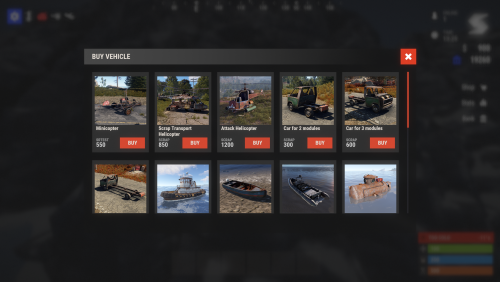 Absolutely fantastic plugin! Our LuffyRust PvP players love how flexible and useful Vehicle Buy is. It gives players a simple, convenient way to access vehicles without making the system feel clunky or overcomplicated. It has also integrated beautifully into our existing LuffyRust server panel, which makes it feel like a natural part of the server rather than just another command or standalone feature. Reliable, flexible, player-friendly, and a great addition to any Rust server. Highly recommended! Luffy Gaming Network https://www.luffyrust.com
 -
all I can see is this [BossMonster] Loading files on the /oxide/data/BossMonster/Bosses/ path has started... [BossMonster] File Brook has been loaded successfully! [BossMonster] File Clown has been loaded successfully! [BossMonster] File Evil has been loaded successfully! [BossMonster] File Franken has been loaded successfully! [BossMonster] File Frankenstein has been loaded successfully! [BossMonster] File Heavy has been loaded successfully! [BossMonster] File Horror has been loaded successfully! [BossMonster] File Jason has been loaded successfully! [BossMonster] File King of the Night has been loaded successfully! [BossMonster] File Michael Myers has been loaded successfully! [BossMonster] File Oni has been loaded successfully! [BossMonster] File Raptor D has been loaded successfully! [BossMonster] File Scary has been loaded successfully!
-
On daily restart, some of the plugins permissions dont register, after a reload. all is well again
-
BossMonster 2.1.9 NpcSpawn 3.4.1 NullReferenceException: Object reference not set to an instance of an object. at UnityEngine.Bindings.ThrowHelper.ThrowNullReferenceException (System.Object obj) [0x00018] in <7ef4b7e39e5e4212acadbf6d2e50d7fa>:0 at UnityEngine.Transform.get_position () [0x00006] in <7ef4b7e39e5e4212acadbf6d2e50d7fa>:0 at Oxide.Plugins.BossMonster+CustomSphereCollider.UpdatePosition () [0x00006] in <0632dd11fd864556af527fb2ef422a98>:0 at InvokeHandlerBase`1[T].DoTick () [0x00120] in <d8c888fa16c04960a1ce12d53406e420>:0 at InvokeHandlerBase`1[T].LateUpdate () [0x0002b] in <d8c888fa16c04960a1ce12d53406e420>:0 BossMonster’s custom radius collider cached the boss NPC’s transform and accessed it every second. Reloading NpcSpawn destroyed the NPC, but the collider briefly continued invoking UpdatePosition(), causing the null reference.
-
Found the solution, Simply disable these advanced markers.. these are the cause.

-
Error while compiling MonumentEvents: 'HackableLockedCrate' does not contain a definition for 'originalHackerPlayer' and no accessible extension method 'originalHackerPlayer' accepting a first argument of type 'HackableLockedCrate' could be found (are you missing a using directive or an assembly reference?) | Line: 5436, Pos: 55 FYI!
-
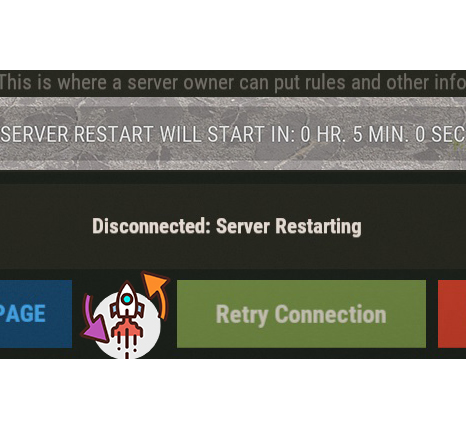 Luffy Gaming Network uses xRestartUI across all of our Rust servers, and it has been an excellent addition to our network. The UI is clean, professional, easy for players to understand, and makes scheduled server restarts much more noticeable than relying on standard chat messages alone. It gives players plenty of warning and helps make restarts feel organized and polished. It has worked extremely well for us across multiple servers, and it’s one of those plugins that simply does its job and does it well. Luffy Gaming Network highly recommends xRestartUI to any Rust server owner looking for a professional restart notification system.
- 37 comments
-
- 1
-
-
- #restart
- #autorestart
- (and 5 more)
-
Thank you So much!!
-
These are supplied with the plugin, these do not load because the developer has included broken links, I need the images .. and I adjust his links for my own.....the dev seems very slow to respond
-
unsure if your native language is English... LATEST VERSION STILL HAS BROKEN IMAGES LINK.. PLEASE either fix or supply the images so I can host myself. Loaded plugin Hud v3.5.2 by ahigao Image failed to download! Error: HTTP/1.1 404 Not Found - Image Name: https://media.discordapp.net/attachments/335512864548847617/1134455318030598154/convoy.png_0 - Image URL: https://media.discordapp.net/attachments/335512864548847617/1134455318030598154/convoy.png Image failed to download! Error: HTTP/1.1 404 Not Found - Image Name: https://cdn.discordapp.com/attachments/335512864548847617/1134455315488854016/sputnik.png_0 - Image URL: https://cdn.discordapp.com/attachments/335512864548847617/1134455315488854016/sputnik.png Image failed to download! Error: HTTP/1.1 404 Not Found - Image Name: https://cdn.discordapp.com/attachments/335512864548847617/1134455315841155173/train.png_0 - Image URL: https://cdn.discordapp.com/attachments/335512864548847617/1134455315841155173/train.png Image failed to download! Error: HTTP/1.1 404 Not Found - Image Name: https://cdn.discordapp.com/attachments/335512864548847617/1134455318332592219/harbor.png_0 - Image URL: https://cdn.discordapp.com/attachments/335512864548847617/1134455318332592219/harbor.png Image failed to download! Error: HTTP/1.1 404 Not Found - Image Name: https://media.discordapp.net/attachments/335512864548847617/1134455318030598154/convoy.png_0 - Image URL: https://media.discordapp.net/attachments/335512864548847617/1134455318030598154/convoy.png Image failed to download! Error: HTTP/1.1 404 Not Found - Image Name: https://cdn.discordapp.com/attachments/335512864548847617/1134455315488854016/sputnik.png_0 - Image URL: https://cdn.discordapp.com/attachments/335512864548847617/1134455315488854016/sputnik.png Image failed to download! Error: HTTP/1.1 404 Not Found - Image Name: https://cdn.discordapp.com/attachments/335512864548847617/1134455315841155173/train.png_0 - Image URL: https://cdn.discordapp.com/attachments/335512864548847617/1134455315841155173/train.png Image failed to download! Error: HTTP/1.1 404 Not Found - Image Name: https://cdn.discordapp.com/attachments/335512864548847617/1134455318332592219/harbor.png_0 - Image URL: https://cdn.discordapp.com/attachments/335512864548847617/1134455318332592219/harbor.png Image failed to download! Error: HTTP/1.1 404 Not Found - Image Name: https://media.discordapp.net/attachments/335512864548847617/1134455318030598154/convoy.png_0 - Image URL: https://media.discordapp.net/attachments/335512864548847617/1134455318030598154/convoy.png Image failed to download! Error: HTTP/1.1 404 Not Found - Image Name: https://cdn.discordapp.com/attachments/335512864548847617/1134455315488854016/sputnik.png_0 - Image URL: https://cdn.discordapp.com/attachments/335512864548847617/1134455315488854016/sputnik.png Image failed to download! Error: HTTP/1.1 404 Not Found - Image Name: https://cdn.discordapp.com/attachments/335512864548847617/1134455315841155173/train.png_0 - Image URL: https://cdn.discordapp.com/attachments/335512864548847617/1134455315841155173/train.png Image failed to download! Error: HTTP/1.1 404 Not Found - Image Name: https://cdn.discordapp.com/attachments/335512864548847617/1134455318332592219/harbor.png_0 - Image URL: https://cdn.discordapp.com/attachments/335512864548847617/1134455318332592219/harbor.png Image failed to download! Error: HTTP/1.1 404 Not Found - Image Name: https://media.discordapp.net/attachments/335512864548847617/1134455318030598154/convoy.png_0 - Image URL: https://media.discordapp.net/attachments/335512864548847617/1134455318030598154/convoy.png Image failed to download! Error: HTTP/1.1 404 Not Found - Image Name: https://cdn.discordapp.com/attachments/335512864548847617/1134455315488854016/sputnik.png_0 - Image URL: https://cdn.discordapp.com/attachments/335512864548847617/1134455315488854016/sputnik.png Image failed to download! Error: HTTP/1.1 404 Not Found - Image Name: https://cdn.discordapp.com/attachments/335512864548847617/1134455315841155173/train.png_0 - Image URL: https://cdn.discordapp.com/attachments/335512864548847617/1134455315841155173/train.png Image failed to download! Error: HTTP/1.1 404 Not Found - Image Name: https://cdn.discordapp.com/attachments/335512864548847617/1134455318332592219/harbor.png_0 - Image URL: https://cdn.discordapp.com/attachments/335512864548847617/1134455318332592219/harbor.png [Hud] ImageLibrary was unable to store these images, they will stay invisible until the links are fixed: https://media.discordapp.net/attachments/335512864548847617/1134455318030598154/convoy.png, https://cdn.discordapp.com/attachments/335512864548847617/1134455315488854016/sputnik.png, https://cdn.discordapp.com/attachments/335512864548847617/1134455315841155173/train.png, https://cdn.discordapp.com/attachments/335512864548847617/1134455318332592219/harbor.png
-
you gave 4 images, what about the rest?
-
did you update the plugin with those link?
-

Ultimate Leaderboard Integration please?
MrLiquid replied to SlayersRust's Support Report in Support
Also noticed when you remove a Leaderboard role.. it simple moves it to first spot.. didnt remove it.. am I doing something wrong? -
Ultimate Leaderboard Integration please?
MrLiquid replied to SlayersRust's Support Report in Support
Thank you for adding Leaderboard intergration, [TitleSelector] UltimateLeaderboard integration: loaded 5 custom titles Can we stop this spam to console please? No need to display that message on server save. -
@Sheo can you supply the images please?
-
Can you please supply the images? Loaded plugin Hud v3.5.0 by ahigao Image failed to download! Error: HTTP/1.1 404 Not Found - Image Name: https://media.discordapp.net/attachments/335512864548847617/1134455318030598154/convoy.png_0 - Image URL: https://media.discordapp.net/attachments/335512864548847617/1134455318030598154/convoy.png Image failed to download! Error: HTTP/1.1 404 Not Found - Image Name: https://cdn.discordapp.com/attachments/335512864548847617/1134455315488854016/sputnik.png_0 - Image URL: https://cdn.discordapp.com/attachments/335512864548847617/1134455315488854016/sputnik.png Image failed to download! Error: HTTP/1.1 404 Not Found - Image Name: https://cdn.discordapp.com/attachments/335512864548847617/1134455315841155173/train.png_0 - Image URL: https://cdn.discordapp.com/attachments/335512864548847617/1134455315841155173/train.png Image failed to download! Error: HTTP/1.1 404 Not Found - Image Name: https://cdn.discordapp.com/attachments/335512864548847617/1134455318332592219/harbor.png_0 - Image URL: https://cdn.discordapp.com/attachments/335512864548847617/1134455318332592219/harbor.png Image failed to download! Error: HTTP/1.1 404 Not Found - Image Name: https://media.discordapp.net/attachments/335512864548847617/1134455318030598154/convoy.png_0 - Image URL: https://media.discordapp.net/attachments/335512864548847617/1134455318030598154/convoy.png Image failed to download! Error: HTTP/1.1 404 Not Found - Image Name: https://cdn.discordapp.com/attachments/335512864548847617/1134455315488854016/sputnik.png_0 - Image URL: https://cdn.discordapp.com/attachments/335512864548847617/1134455315488854016/sputnik.png Image failed to download! Error: HTTP/1.1 404 Not Found - Image Name: https://cdn.discordapp.com/attachments/335512864548847617/1134455315841155173/train.png_0 - Image URL: https://cdn.discordapp.com/attachments/335512864548847617/1134455315841155173/train.png Image failed to download! Error: HTTP/1.1 404 Not Found - Image Name: https://cdn.discordapp.com/attachments/335512864548847617/1134455318332592219/harbor.png_0 - Image URL: https://cdn.discordapp.com/attachments/335512864548847617/1134455318332592219/harbor.png
-
 Custom Item Vending is an absolutely fantastic plugin and has quickly become a favorite across the LuffyRust servers. The amount of flexibility it provides is outstanding, allowing us to create unique, customized vending experiences that fit our server perfectly. The plugin is versatile, reliable, and opens up so many possibilities for custom items, player trading, rewards, and server progression. Our players genuinely love the features it brings, and it has added another enjoyable layer to our community. Custom Item Vending comes highly recommended by both me and the LuffyRust player base. It is an excellent addition for any server owner looking to offer something more creative and unique. Keep up the amazing work! Luffy On! — MrLiquid, Luffy Gaming Network luffyrust.com

