Jump to content

Iftebinjan

Creator
  • Posts

    860
  • Joined

  • Last visited

  • Days Won

    1

Everything posted by Iftebinjan

  1. Iftebinjan

    SimplePVE

    Version 1.2.14

    3,639 downloads

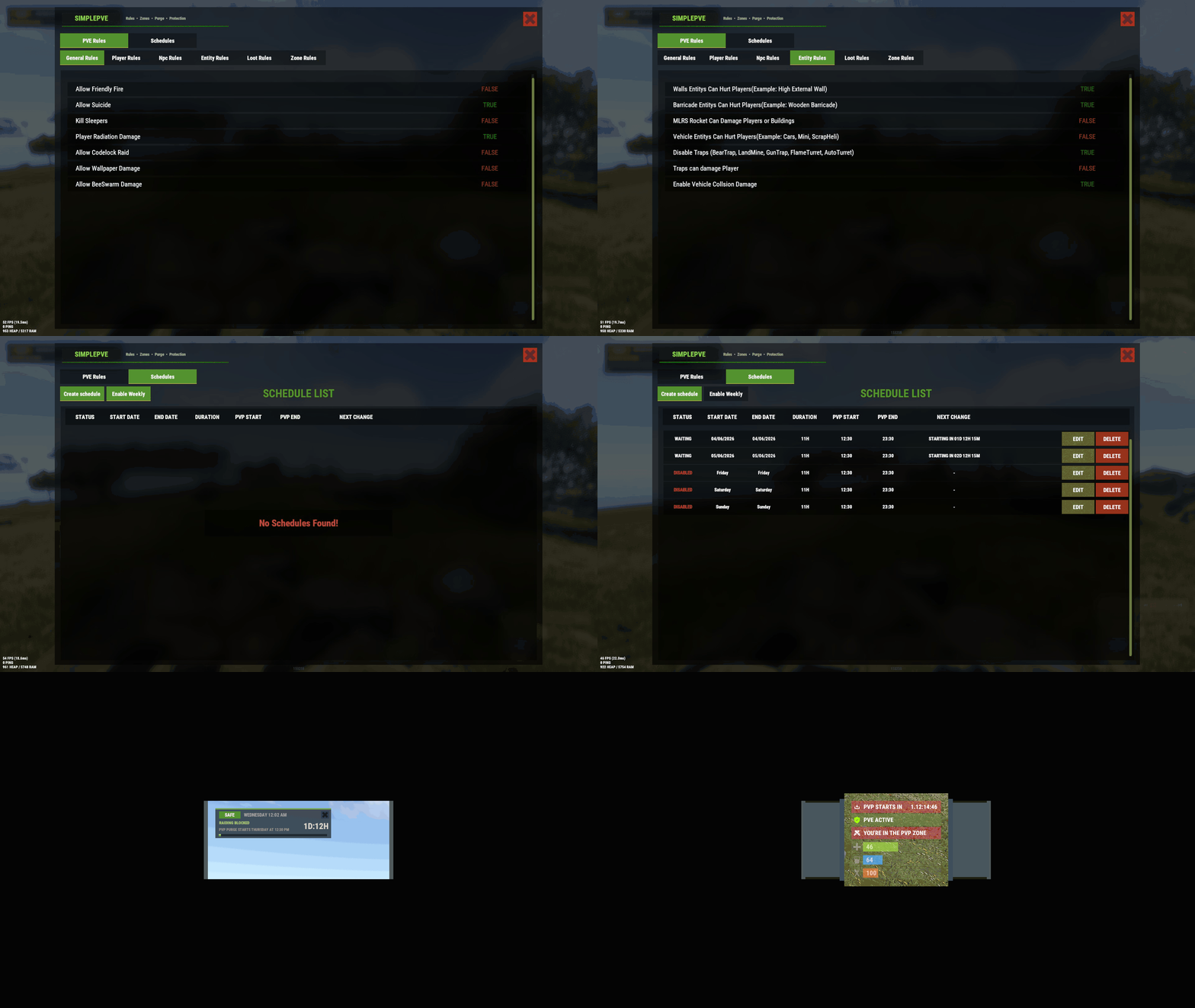
    SimplePVE is exactly what the name suggests: a simple and easy-to-use PVE plugin for Rust servers. It allows server owners to control and customize PVE rules individually, either through the config or with a clean in-game CUI. You can also create, edit, and manage PVE/PVP schedules directly, making it easy to run full PVE servers, purge events, or hybrid PVE/PVP setups. Key Features Control PVE rules directly from in-game CUI or through the config Easy-to-understand rule system for managing damage, raiding, looting, and protection Enable or disable PVE/PVP manually with commands Create automatic PVP schedules for purge times Supports weekly schedules, such as Sunday to Friday or weekend-only PVP Supports date-specific schedules, such as January 1 to January 7, holiday events, wipe-weekend events, and custom purge periods Automatic PVE/PVP purge events based on your configured schedule Loot protection system to prevent unauthorized looting Zone Manager support for custom PVE/PVP zones Exclude specific zones from global PVE rules Supports many popular event plugins Works without using `server.pve true` In-game rule manager using `/sprules` Debug command to help check why damage is blocked or allowed Optional PVE/PVP status UI for players Customizable UI position, status text, icons, and colors Discord embed messages when PVP purge starts or ends Optional Discord warning messages before PVE/PVP schedule changes Run custom server commands when PVP purge starts or ends Admin bypass permissions for loot and damage control Supports PVP delay when leaving PVP zones Flexible config for server owners who want full control Designed for simple PVE servers, purge servers, hybrid PVE/PVP servers, and event-based servers Commands /simplepve - Use to enable or disable pve toggle (Chat & Console command) /simplepve on or off - Use to enable disable pve (Chat & Console command) /sprules - Use to Open a Cui to control PVE Rules & Creating Schedules (Chat command) /spdebug - Use this for debuging rules Permissions simplepve.admin - Required to enable or disable SimplePVE simplepve.adminloot - Required to view Loots of other players simplepve.admindamage - Required for Admin damages to any entity Video Showcase API & Hooks void OnSPVEPurgeStarted() void OnSPVEPurgeEnded() TimeSpan GetPVPStartTimeRemaining() TimeSpan GetPVPEndTimeRemaining() Configurations Rules Data file in Oxide/data/SimplePVE FAQ Question: Does SimplePVE require server.pve to be set to false? Yes, it requires server.pve set to false. Question: Where can I change the rules for my PVE server? You can use the `/sprules` command to open the in-game CUI rule manager. You must have the `simplepve.admin` permission assigned to use this command. Question: PVE/PVP schedules times are not working properly, why is that happening? You may need to adjust the `UTC Time Difference` value in the config. Make sure the UTC offset matches your server’s intended timezone. For more details, please check the Info tab below. Question: How do I enable or disable PVE manually? You can use `/simplepve on` to enable PVE and `/simplepve off` to disable it. You need the `simplepve.admin` permission to use these commands. Question: Can I create automatic PVP purge schedules? Yes. SimplePVE supports scheduled PVP/PVE times, allowing you to automatically enable PVP during purge events and return to PVE when the schedule ends. Question: Can I do Weekly schedules like Sunday To Friday or specific date to another date? Yes. SimplePVE supports both option and you can only use one of them at once. Question: Can admins damage players or entities while PVE is enabled? Yes, but only if the admin damage settings and permissions allow it. The permission `simplepve.admindamage` is used for admin damage access. Question: Why is damage still happening during PVE mode? This usually means one of your rules allows that damage type, or another plugin is modifying damage before or after SimplePVE. Use `/spdebug` to help debug which rule is being applied. Question: What does `/spdebug` do? The `/spdebug` command helps you debug damage rules. It can be useful when you are trying to understand why damage is blocked or allowed. Question: Can admins damage players or entities while PVE is enabled? Yes, but only if the admin damage settings and permissions allow it. The permission `simplepve.admindamage` is used for admin damage access. Question: How does loot protection work? Loot protection prevents players from looting protected entities or containers, depending on your config settings. Admins can be allowed to bypass this using the `simplepve.adminloot` permission. Question: Can I exclude specific entities from loot protection? Yes. You can add entity shortnames to the `Loot Protection Excluded Entitys` list in the config. Question: Does SimplePVE support zones? Yes. SimplePVE supports Zone Manager, allowing you to create different PVE/PVP behavior inside specific zones. Question: Can I exclude specific zones from SimplePVE rules? Yes. You can add zone IDs to the `Exclude Zone IDs From Rules` config option. Question: Can SimplePVE send Discord notifications? Yes. SimplePVE can send Discord embed messages when PVP purge starts, ends, or when a scheduled event is approaching, depending on your Discord config settings. Question: Can I run server commands when PVP purge starts or ends? Yes. You can add commands to the config options for commands that run when PVP purge starts or ends. Schedules Settings for your own timezone For Developers Support Check Out My Other plugins as Well
    $15.00
  2. Iftebinjan

    SimplePVE

    Yes, This will also work with Raidable Bases
  3. It well worked for first time started the server, after that giving me this error. i have no antivirus also i excluded this folder from windows security. Still wont work.

About Us

Codefling is the largest marketplace for plugins, maps, tools, and more, making it easy for customers to discover new content and for creators to monetize their work.

Downloads
2.5m
Total downloads
Customers
11.2k
Customers served
Files Sold
160.3k
Total sales
Payments
3.5m
Processed total
×
×
  • Create New...

Important Information

We have placed cookies on your device to help make this website better. You can adjust your cookie settings, otherwise we'll assume you're okay to continue.