

Iftebinjan
-
Posts
1,059 -
Joined
-
Last visited
-
Days Won
3
Content Type
Profiles
Warranty Claims
Downloads
Forums
Store
Services
Downloads Plus Support
DOWNLOADS EXTRA
Reels
Everything posted by Iftebinjan
-
command in console - server.tags "pve" then use command - writecfg this should work to show ur server tag as pve, you add more tags from here https://wiki.facepunch.com/rust/server-browser-tags Example: server.tags "pve, NA, monthly" then do command writecfg to save this
-
 will be checking this. Updates coming soon
-

Version 2.0.0
733 downloads
The "PlaytimeCommands" plugin for Rust allows server administrators to automate the execution of commands when players achieve specific playtime milestones. Upon initialization, it checks players' playtime at regular intervals and triggers configured commands when certain hour goals are reached. NEW! Version 2.0.0 Doesn't requires any support plugin like PlaytimeTracker plugin and now stores playtime natively with most efficient methods. Features Easy config, add unlimited playtime goals and their rewards Light plugin, no performance issues Saved playtime for each player natively using efficient methods Saved PlayerData to ensure they don't get repeat rewards Reset PlayerData when editing config values NEW! Send customized Broadcast message or personal messages NEW! Send discord webhook notification Commands /playtime - View your playtime /playtime top - View the top playtimes /prc resetrewards [name|id] - Reset rewards (all or one player) Requires (PlaytimeCommands.admin) /prc resetplaytime [name|id] - reset playtime (all or one player) Requires (PlaytimeCommands.admin) /prc import - Imports playtime from PlaytimeTracker plugin data Requires (PlaytimeCommands.admin) /prc help - Shows all available admin commands Requires (PlaytimeCommands.admin) Config { "Check how often it checks for playtime and execute commands?(In Seconds)": 600, "Number of players to show in the /playtime top list": 10, "Discord Webhook Settings": { "Enable discord notify": false, "Webhook URL": "", "Message": [ "PlaytimeCommands", "Excuted commands for {PLAYERNAME} - {PLAYERID}", "Executed Playtime ID {PLAYTIME}" ] }, "Reset data on new wipe": false, "Execute command upon playtime Minutes completation": { "60": [ "oxide.usergroup add {UserID} chads", "chat user add {UserID} chads", "msg: You have recevied chads role for playtime.", "broadcast: {Name} has recevied chad role for playtime" ], "120": [ "sr add {Name} 1000", "sr take {UserID} 100", "oxide.usergroup add {UserID} veteran", "msg: You have recevied veteran role for playtime.", "broadcast: {Name} has recevied veteran role for playtime" ] }, "Version": { "Major": 2, "Minor": 0, "Patch": 0 } } Lang { "Prefix": "<color=#45b6fe>[PlayTime]</color> ", "NoPermission": "<color=#ff6b6b>You don't have permission to use this command.</color>", "Help": "<color=#45b6fe>Playtime Commands:</color>\n<color=#ffd479>/playtime</color> - view your playtime\n<color=#ffd479>/playtime top</color> - view the top playtimes\n<color=#ffd479>/prc resetrewards [name|id]</color> - reset rewards (all or one player)\n<color=#ffd479>/prc resetplaytime [name|id]</color> - reset playtime (all or one player)\n<color=#ffd479>/prc import</color> - import playtime from PlaytimeTracker", "Playtime.Self": "Your playtime: <color=#ffd479>{0}</color>", "Playtime.Other": "<color=#a1ff46>{0}</color> playtime: <color=#ffd479>{1}</color>", "Playtime.None": "No playtime has been stored for you yet.", "Playtime.Help": "See the top playtimes with <color=#a1ff46>/playtime top</color>", "Top.Title": "<color=#45b6fe>Top Playtimes:</color>", "Top.Format": "\n<color=#ffd479>#{0}</color> <color=#a1ff46>{1}</color> - <color=#ffd479>{2}</color>", "Top.Empty": "No playtime has been recorded yet.", "NoPlayerFound": "No player found matching <color=#a1ff46>{0}</color>.", "Reset.Rewards.All": "Cleared <color=#ffd479>all</color> players' rewards data.", "Reset.Rewards.Player": "Cleared rewards data for <color=#a1ff46>{0}</color>.", "Reset.Playtime.All": "Cleared <color=#ffd479>all</color> players' playtime.", "Reset.Playtime.Player": "Cleared playtime for <color=#a1ff46>{0}</color>." } Found this useful? Leave a review and help others find it too!Free -
 yes it has loot protection also has backpack support from Version 1.2.1 which was updated recently.
-

after switching to carbon i get spam in console with errors
Iftebinjan replied to seswa92's Support Report in Support
Changed Status from Pending to Closed -
issue with pve flame damage and incendiary bullets
Iftebinjan replied to tamwilson1979's Support Report in Support
Hey, can you confirm this? Also, I do not see any support or API for their NPCs if they used custom like ZombieNPC Try removing the config file and reload the plugin that might reset any error which might cause the incendiary damage -
Strt time and all the other times make them white too dark
Iftebinjan replied to US Apocalypse's Support Report in Support
Changed Status from Pending to Work in Progress -
Changed Status from Pending to Closed
-
Changed Status from Pending to Closed
-
Changed Status from Pending to Not a Bug
-
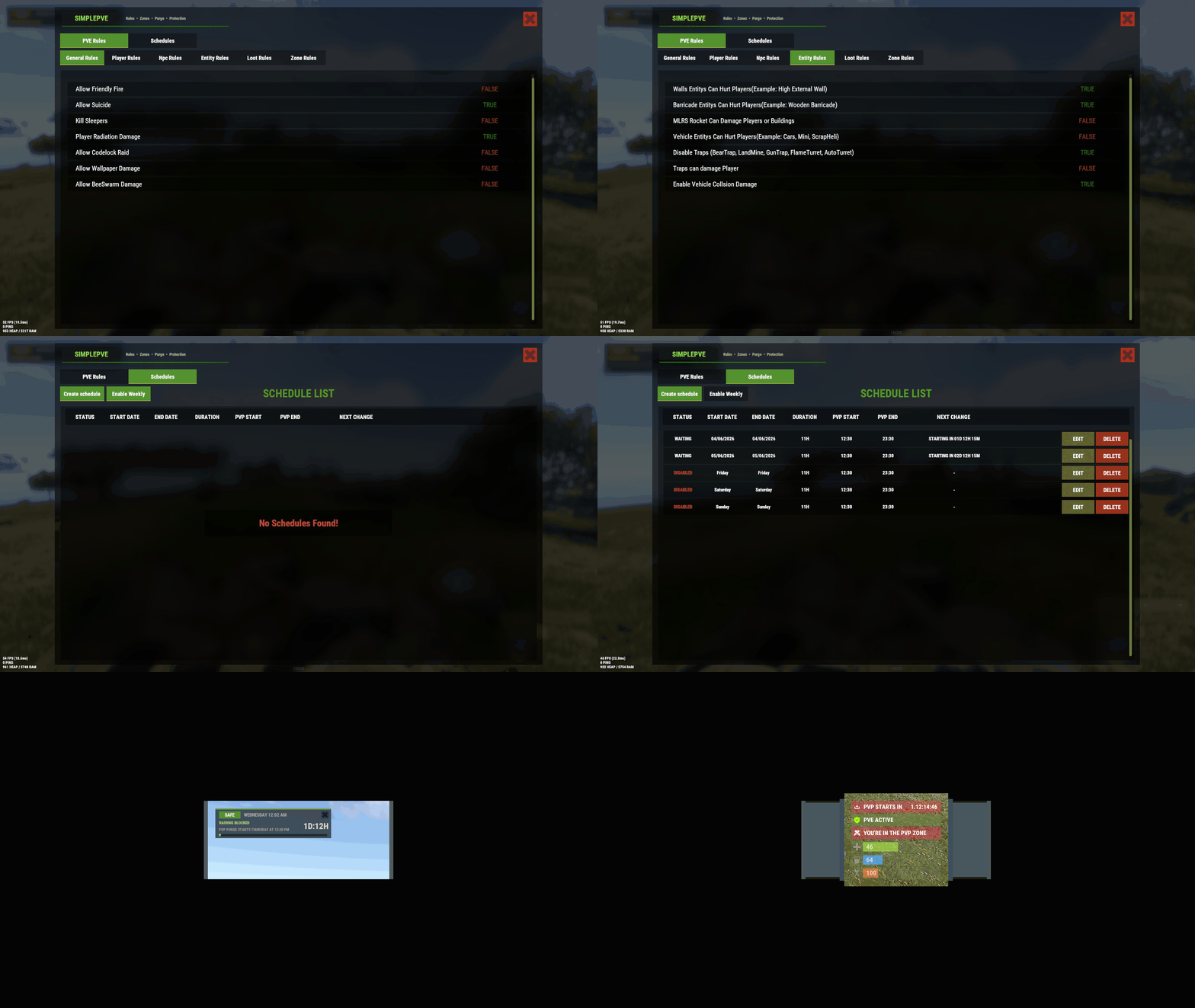
Use can disable "Use Loot Protection": true, which will not use the loot protection from this plugin then use the PreventLooting plugin for the loot protection which doesn't have Backpack support yet
-
Updating in a few hours.
-

Version 2.0.7
318 downloads
As soon as the event starts, several troops (NPCs) are spawned to defend an hackable crate that will be delivered by the CH47. This crate may contain a lot of loot, so the troops have the duty to defend it. For this purpose, there is a variety of troops such as snipers, close-range shooters, and long-range shooters. If a player manages to initiate the hacking of the crate, all the airfield troops will be relocated to a combat position. In other words, all troops that you haven't seen yet or that are hidden will be moved to the center of the airfield to defend the crate. After a few minutes, a plane will be sent with supply drops containing weapons to assist the troops in defense. However, airborne troops will also be dispatched from the plane to parachute down and aid in defending the crate. If the crate is looted, all troops will be destroyed, leaving only the crates, supply drops, and bodies to be looted by intruders. Commands /ma start to start the event /ma stop to stop the event /ma position to get the current position based in the airfield monument (used to config) Permissions militaryairfield.admin to access all commands API & Hooks private void OnMilitaryAirfieldEventStarted(); - // Called when the event starts private void OnMilitaryAirfieldEventEnded(BasePlayer? lootedBy); - // Called when the event ends Configurations Support$14.99 -
Rust server creation Oxide/Carbon full modded with custom plugins
Iftebinjan posted a record in Records
Hello, I can help create your server to fully complete the server setup. I have been doing this for 2 years now on Fiverr. LINK I will configure Rust game server with everything you need I will do Rust game Discord server setup I will create Rust game plugin for your Rust server Please get in touch with me if you need any of these services. Thanks -
SimplePVE doesnt make a pvp zone on any event, event plugin has to make a zone on their own. if it has a exact position then you can manually create zone for this
-
Changed Status from Pending to Not a Bug
-
Hello, is this not working with the plugin? is there any error messages?
-
Add /share command and tc accesss loot bug?
Iftebinjan replied to Namsaknoi's Support Report in Support
Changed Status from Pending to Work in Progress -
Add /share command and tc accesss loot bug?
Iftebinjan replied to Namsaknoi's Support Report in Support
Horses are count as BaseAnimalNPC so they do die if Players can damage animals setting to True Lets see if can do something like if horse in a player tc area then other player cant hurt them -
so i run a prefab like challenge house and its not working with simple pve
Iftebinjan replied to JeffG's Support Report in Support
Changed Status from Pending to No Response -
Add /share command and tc accesss loot bug?
Iftebinjan replied to Namsaknoi's Support Report in Support
I think you need to hold press e to pickup the bag? IDK I tried on test servers it was working alright. Let me know on this -
Add /share command and tc accesss loot bug?
Iftebinjan replied to Namsaknoi's Support Report in Support
About the TC access loots, its an intent features and added back then on requests. if you don't wanna use the loot rules from this plugin then you can easy disable the loot rules and use other plugins like https://umod.org/plugins/prevent-looting which has /share as well -
Add /share command and tc accesss loot bug?
Iftebinjan replied to Namsaknoi's Support Report in Support
Hey I understand the /share, that can be added. but only problem is its already a pretty large plugin and right now has a big hook times. So as of now I am refraining my self from adding more features of loot rules as /share need to have separate data folders to store owners and shared entitys I am trying to reduce the filesize and soon do updates on it -
Hello, I understand. But its design in a way so that other plugin can override this rules. So if the zombie horde decides that zombies wont damage on buildings or players then simplepve cant do anything on that.
-
 @LaserHydra is this purchasable anytime soon?

