-
Posts
1,324 -
Joined
-
Last visited
-
Days Won
18
Content Type
Profiles
Warranty Claims
Downloads
Forums
Store
Services
Downloads Plus Support
DOWNLOADS EXTRA
Reels
Everything posted by Sheo
-
Version 3.6.0
15,540 downloads
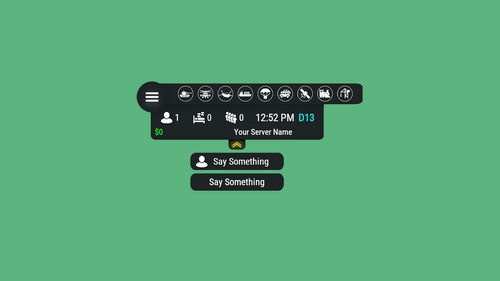
Server HUD · Rust · Oxide · CARBON Your chat is «is heli up?» twelve times an hour Put the answer on screen. Online count, clock, grid square, balance, and a live bar of every event running — Bradley, heli, cargo, airdrop, both oil rigs. Nine events out of the box, set up entirely from a panel in game. How it goes From install to the event you added yourself MINUTE ONE Install and it's on screen It doesn't wait for the next wipe to be useful Install mid-wipe and the heli that's already flying is on the bar. ImageLibrary is the only other plugin you need. Nine events on by default. Bradley, Patrol Heli, CH47, Cargo Ship, Airdrop, Harbor cargo, both Oil Rigs, Deep Sea. Rigs turn red while the crate is being hacked. Players see the fight starting from across the map. Icons are just URLs. Fetched and cached for you. First install reloads once to pick them up — expected, not a fault. No file to edit first. Defaults draw a finished HUD with your server name in it. FROM THEN ON Every player, every day The numbers your chat keeps asking for Updated as they change. A player standing still costs you nothing. K12 or X:-1204 Z:842 Grid square or raw coordinates. Your choice, your colour. Online, sleeping, queue. Admins can be left out of the count. Clock in each player's own format. 12- or 24-hour from their game language, or force one. Two balances, side by side. Economics, ServerRewards or ShoppyStock. Only what's live. One switch hides idle events instead of showing a wall of grey. Info messages on rotation. A random line from your list, any corner, any width. IN THE WAY The player decides Four states, and the choice is remembered Your logo is the button: full panel → events only → hidden. One command removes it entirely. Still set that way after a reconnect. Streamers keep coordinates off camera. One permission drops the position readout. CCTV and drones get a clean screen. Hides on mount, back on dismount, switchable. Any corner, any scale. Pixel offsets, one scale value, and a toggle to show it over the inventory. MONTHS LATER All of it, from in game The config file is optional One command opens an admin panel over every setting there is. Change it, it saves, everyone online sees it. Events from other plugins. A name, an icon, and the hooks it fires. Convoy, Sputnik, Armored Train and Harbor come pre-filled. Adding one rewrites a marked block in the plugin file and reloads it. A drop-down of command buttons. Any chat or console command, own icon, own permission, closes itself after use. Updates don't reset your settings. New events land with defaults; a section you deleted comes back. Or edit the file. Auto reload picks it up the moment you save. The look See it running, then make it yours Every icon is a URL in the config. Take a pack, or draw your own from the blank template. Free custom HUD icons Free Custom HUD icons Paid Server HUD custom icon pack Paid While you're not looking Built to be left alone ✓ A typo in the config won't take the HUD down — it falls back to defaults and says so ✓ Switching a counter off stops the work behind it, not just the display ✓ An economy you enabled but never installed shows 0, and the HUD carries on ✓ Unloading clears every panel off every screen — nothing stuck until relog Reference One chat command, five words after it Setup is admins only. Menu buttons take whatever permission you name in the config. Chat /h Show the command list Chat /h open Full panel — counters, clock, position, balance, events Chat /h events Event bar only Chat /h hide Hide the panels, keep the logo button Chat /h close Remove it entirely Chat /h setup Settings panel — admins only Perm hud.streamer Hides the position readout from whoever holds it Hook object CanHudChangeState(BasePlayer player, string currentState, string nextState) Fires before a state change. Return non-null to stop it. API string API_PlayerHudState(string playerId) Returns full, events, hidden or closed for a player. Straight answers Asked before buying Can players turn it off? Full panel, event bar only, or gone entirely — their choice, and it survives a reconnect. Do I have to edit the config file? No, the in-game panel covers all of it. If you prefer a text editor, auto reload picks the file up as you save. I stream — my coordinates are on screen. Grant yourself the streamer permission. The position readout goes, everything else stays. Can I add an event from another plugin? Yes — name it, give it an icon, and name the hooks it fires. Most plugins list those in their own description. What if I run no economy plugin? Leave it off and the HUD closes the gap. Enable it without the plugin and you get a 0, not a broken HUD. Does it block CCTV and drones? It hides itself in a Computer Station and comes back on dismount. One toggle if you'd rather it stayed. 9 events out of the box 4 states, chosen per player 2 economy balances at once 1 dependency — ImageLibrary$14.99 -
 Ok, I'll add it today or tomorrow
 -
There is only LangFile, in which you can change the text of the message. And what in this plugin could be added to the config?
-
Version 1.1.2
5,233 downloads
The plugin notifies players of an AirDrop by telling them the spawn square on the map, as well as displaying a marker on the map. Config: { "Show notify in chat": true, "Create MapMarker on map": true, "Select the type of marker (shopmarker | cratemarker)": "cratemarker", } Lang: { "CM_DROPSPAWNED": "AirDrop has been dropped in square {0} (You can see the marker when you open the map)" }Free -
 If I'm not mistaken, this error no longer exists. Write to me if she stays
 -
Changed Status from Pending to Closed Changed Fixed In to 2.0.0
-
Posted an update. Thank you for your patience!
-
Send me a message on Discord: AhigaO#4485
-
Send me a message on Discord: AhigaO#4485
-
I'll post an update in a couple of hours. Once again I apologize for the delay.
-
Write me a discord, we will solve your problem
-
Added
-
No, this plugin works for all players / NPCs
-
 Scroll to the bottom of the configuration. There are settings for what the player gets / loses behavior points
 -
Version 1.0.3
36 downloads
Features: Adds behavioral points for each player. The player gains or loses his behavior points for various actions (configurable in the config). Santa will cyclically give gifts to the player (the interval is configured in the config). The gift, as well as its content, depends on the behavior of the player. (All of the above is configured in the config). The plugin has a standard, playable configuration. Config: { "Command for open UI": "gifts", "SteamID for icon in chat messages": 0, "The interval for giving out gifts from Santa.(In seconds)": 86400, "Behaviors": [ { "The minimum number of behavior points to achieve this behavior": 0, "Name of behavior": "<color=red>UNSATISFACTORY</color>", "List of gifts for this behavior with random drop chance": [ { "Behavior name": "COMMON GIFT", "Minimum number of items to be given out": 1, "Maximum number of items to be given out": 2, "Item list": [ { "Shortname": "coal", "Amount": 1, "SkinID": 0 }, { "Shortname": "coal", "Amount": 1, "SkinID": 0 }, { "Shortname": "coal", "Amount": 1, "SkinID": 0 }, { "Shortname": "giantcandycanedecor", "Amount": 1, "SkinID": 0 } ] }, { "Behavior name": "UNCOMMON GIFT", "Minimum number of items to be given out": 2, "Maximum number of items to be given out": 3, "Item list": [ { "Shortname": "coal", "Amount": 1000, "SkinID": 0 }, { "Shortname": "coal", "Amount": 1000, "SkinID": 0 }, { "Shortname": "sulfur", "Amount": 1000, "SkinID": 0 }, { "Shortname": "metal.fragments", "Amount": 1000, "SkinID": 0 }, { "Shortname": "shotgun.waterpipe", "Amount": 1, "SkinID": 0 }, { "Shortname": "ladder.wooden.wall", "Amount": 1, "SkinID": 0 }, { "Shortname": "candycaneclub", "Amount": 1, "SkinID": 0 }, { "Shortname": "bow.compound", "Amount": 1, "SkinID": 0 }, { "Shortname": "door.double.hinged.metal", "Amount": 1, "SkinID": 0 } ] } ] }, { "The minimum number of behavior points to achieve this behavior": 500, "Name of behavior": "<color=yellow>SATISFACTORY</color>", "List of gifts for this behavior with random drop chance": [ { "Behavior name": "RARE GIFT", "Minimum number of items to be given out": 3, "Maximum number of items to be given out": 4, "Item list": [ { "Shortname": "scrap", "Amount": 200, "SkinID": 0 }, { "Shortname": "metal.fragments", "Amount": 1000, "SkinID": 0 }, { "Shortname": "gunpowder", "Amount": 500, "SkinID": 0 }, { "Shortname": "metalpipe", "Amount": 5, "SkinID": 0 }, { "Shortname": "riflebody", "Amount": 1, "SkinID": 0 }, { "Shortname": "smgbody", "Amount": 1, "SkinID": 0 }, { "Shortname": "pistol.m92", "Amount": 1, "SkinID": 0 }, { "Shortname": "grenade.f1", "Amount": 4, "SkinID": 0 }, { "Shortname": "jackhammer", "Amount": 1, "SkinID": 0 }, { "Shortname": "ammo.pistol", "Amount": 100, "SkinID": 0 } ] }, { "Behavior name": "EPIC GIFT", "Minimum number of items to be given out": 3, "Maximum number of items to be given out": 4, "Item list": [ { "Shortname": "scrap", "Amount": 500, "SkinID": 0 }, { "Shortname": "lowgradefuel", "Amount": 300, "SkinID": 0 }, { "Shortname": "metal.refined", "Amount": 100, "SkinID": 0 }, { "Shortname": "ammo.pistol", "Amount": 100, "SkinID": 0 }, { "Shortname": "ammo.pistol", "Amount": 28, "SkinID": 0 }, { "Shortname": "workbench2", "Amount": 1, "SkinID": 0 }, { "Shortname": "explosive.satchel", "Amount": 4, "SkinID": 0 }, { "Shortname": "smg.thompson", "Amount": 1, "SkinID": 0 }, { "Shortname": "oretea.advanced", "Amount": 3, "SkinID": 0 }, { "Shortname": "wall.frame.garagedoor", "Amount": 1, "SkinID": 0 }, { "Shortname": "supply.signal", "Amount": 100, "SkinID": 0 } ] } ] }, { "The minimum number of behavior points to achieve this behavior": 1000, "Name of behavior": "<color=green>SANTA'S FAVORITE</color>", "List of gifts for this behavior with random drop chance": [ { "Behavior name": "LEGENDARY GIFT", "Minimum number of items to be given out": 2, "Maximum number of items to be given out": 3, "Item list": [ { "Shortname": "ammo.rifle", "Amount": 100, "SkinID": 0 }, { "Shortname": "ammo.rifle", "Amount": 28, "SkinID": 0 }, { "Shortname": "ammo.rifle.explosive", "Amount": 100, "SkinID": 0 }, { "Shortname": "ammo.rifle.explosive", "Amount": 28, "SkinID": 0 }, { "Shortname": "hazmatsuit", "Amount": 1, "SkinID": 0 }, { "Shortname": "easter.silveregg", "Amount": 1, "SkinID": 0 }, { "Shortname": "door.hinged.toptier", "Amount": 1, "SkinID": 0 }, { "Shortname": "door.hinged.toptier", "Amount": 1, "SkinID": 0 }, { "Shortname": "metal.refined", "Amount": 100, "SkinID": 0 }, { "Shortname": "rifle.lr300", "Amount": 1, "SkinID": 0 }, { "Shortname": "workbench3", "Amount": 1, "SkinID": 0 }, { "Shortname": "syringe.medical", "Amount": 2, "SkinID": 0 }, { "Shortname": "gunpowder", "Amount": 1000, "SkinID": 0 }, { "Shortname": "gunpowder", "Amount": 1000, "SkinID": 0 }, { "Shortname": "gunpowder", "Amount": 1000, "SkinID": 0 }, { "Shortname": "gunpowder", "Amount": 1000, "SkinID": 0 } ] }, { "Behavior name": "SUPERIOR GIFT", "Minimum number of items to be given out": 2, "Maximum number of items to be given out": 3, "Item list": [ { "Shortname": "scrap", "Amount": 1000, "SkinID": 0 }, { "Shortname": "explosives", "Amount": 100, "SkinID": 0 }, { "Shortname": "explosive.timed", "Amount": 2, "SkinID": 0 }, { "Shortname": "jackhammer", "Amount": 1, "SkinID": 0 }, { "Shortname": "chainsaw", "Amount": 1, "SkinID": 0 }, { "Shortname": "metal.refined", "Amount": 100, "SkinID": 0 }, { "Shortname": "lmg.m249", "Amount": 1, "SkinID": 0 }, { "Shortname": "weapon.mod.small.scope", "Amount": 1, "SkinID": 0 }, { "Shortname": "weapon.mod.silencer", "Amount": 1, "SkinID": 0 }, { "Shortname": "weapon.mod.lasersight", "Amount": 1, "SkinID": 0 }, { "Shortname": "metal.facemask", "Amount": 1, "SkinID": 0 }, { "Shortname": "metal.plate.torso", "Amount": 1, "SkinID": 0 } ] } ] } ], "Behaivor Points per player kill": 20.0, "Behaivor Points per NPC kill": 20.0, "Behavior points per chat message": 0.1, "Behavior Points for Learning a Recipe": 1.5, "Behavior points per broken stone/ore/wood/corpse": 4.0, "The interval for giving the player 1 behavior point for being on the server": 300, "Behavior score for object destruction": { "assets/bundled/prefabs/autospawn/resource/loot/loot-barrel-1.prefab": 0.5, "assets/bundled/prefabs/autospawn/resource/loot/loot-barrel-2.prefab": 0.5, "assets/bundled/prefabs/radtown/loot_barrel_1.prefab": 1.0, "assets/bundled/prefabs/radtown/loot_barrel_2.prefab": 0.5, "assets/bundled/prefabs/radtown/oil_barrel.prefab": 1.0, "assets/rust.ai/agents/bear/bear.prefab": 1.0, "assets/rust.ai/agents/boar/boar.prefab": 1.0, "assets/rust.ai/agents/stag/stag.prefab": 1.0, "assets/rust.ai/agents/stag/wolf.prefab": 1.0 }, "Behavior points for the presence of certain words in the chat": { "dick": -0.5, "bitch": -0.5, "fuck": -1.0, "prick": -0.5, "bastard": -1.0, "bellend ": -0.5, "cunt": -0.5, "balls": -0.5, "shit": -1.0, "fucker": -0.5, "asshole": -1.0, "slave": -5.0, "nigger": -5.0, "best server": 5.0, "sorry": 1.0, "good": 0.5, "well done": 1.0, "cool": 0.5, "pretty": 0.5, "cute": 0.5 } } Lang: { "CM_TAKEGIFT": "Received a {0} gift from Santa", "UI_BEHAVIOR": "YOUR BEHAVIOR " }$9.99- 12 comments
- 1 review
-
- 4
-

-

-
- #new year
- #christmas sale
- (and 9 more)
-
Done
-
Version 2.0.12
474 downloads
Features: This plugin will allow players to wear any combination of clothes. The administrator has the ability to open a convenient menu to configure the plugin. You can limit the maximum protection for a player/NPC even if the player wears all the best helmets and gets 150% protection, but you set the limit to 80%, then the players will only block 80% of the damage. Permission for use : customclothingcombinations.use (Only if config parameter true) Commands: /ccc - open the menu Config: { "Allow for NPC": true, "Does the player need permission for the plugin to work?": false, "HEAD limit": 0.8, "BODY limit": 0.8, "LEGS limit": 0.8, "Blocked combination": [] }$8.00 -
Version 1.0.2
757 downloads
The plugin will add weight for the players on your server. In the config, you can set the weight for each item in the game. If a player exceeds the weight limit that he can carry, he will not be able to budge.The amount of the maximum weight of the player is determined by the permission that you set in the config (The first permission is given to all players). Config: { "Carry Weight Settings for Players": { "weight.default": 500, "weight.vip": 800, "weight.premium": 1200 }, "Player item check interval(Influences optimization)": 1.0, "Weight for all items not listed below": 0.1, "Weight setting for items(per 1 item)": { "rifle.ak": 5.0, "wood": 0.2 } }Free -
 This is not shown on the map. If you open the menu, then if the lord's post is occupied, it will be written what territory it occupies (In the form of a part of the world, for example SOUTH-WEST). To understand how it divides the map, simply draw two perpendicular lines across the center of the map, and you will see their territories corresponding to parts of the world.
 -
Hello. I am looking for an investor to create one specific server. I can say with confidence that at the moment there is no such server in the game. If you are interested, write me a discord (Approximate investment price $ 2000) My discord: AhigaO#4485
-
Hello. I think your idea requires more plugin addition. You can write to me on Discord and we will discuss it with you.
-

Version 1.1.4
218 downloads
Features: The plugin allows you to control the number of foundations per player (or per clan). You can also customize the number of foundations per player using permissions. Plugin works with Clans (from UMod or Clans REBORN). Also it can be used without the Clans plugin. How it works with the Clans plugin: If a player is in a clan, then he can use the entire clan limit (the clan limit counts the limit of each player), and a certain amount of an additional limit for each player is added to this limit (this percentage can be configured in the config or set to 0, which will disable this function) Commands: playerflimit steamid - show player limit (RCON command) Config: { "SteamID for icon in chat messages": 0, "Command for check limit": "flimit", "Additional foundations for each player (Percentage)": 0.05, "Permission - Limit for foundations(Should go from standard to best)": { "foundationlimits.default": 50, "foundationlimits.vip": 100, "foundationlimits.premium": 200 } } Lang: { "CM_LIMIT": "You have exceeded the limit for building foundations (type /{0})", "CM_LIMITFULL": "Your limit for foundations: <color=red>{0}/{1}</color>", "CM_NOTFULLLIMIT": "Your limit for foundations: <color=green>{0}/{1}</color>" }$5.00- 29 comments
- 1 review
-
- 5
-
-
-
- #paid
- #foundation
- (and 6 more)
-
Version 1.3.9
230 downloads
Creates a feudal system. Now on your server players can take one of 5 roles: Roles of Lords: There are 4 lords in total, each of which has its own territory (one of the parts of the world). If you farm resources in a given territory, then you will pay the tax set by the lord of this territory to his treasury. The role of the king: The king does not have his own territory from which he will receive taxes, however, every time the lord takes tax from his treasury, he also gives a part in the form of tax to the king (the king sets his own tax).The role can be taken through the interface (if it is not already taken).Also, if a regular player kills the ruler, then he will take his place If the ruler has not logged into the server for more than the time specified in the config, his role will be released Config: { "Global settings": { "Command for open menu": "feodal", "Lords map markers update frequency": 10, "Use Virtual Treasury?(true = virtual | false = real box treasury)": false, "SkinID for treasury chest(if use real box)": 2881793914, "Allow multiple lords per team": false, "SteamID for icon in chat messages": 0 }, "Role settings": { "Minimum tax": 15, "Maximum tax": 50, "Offline time to remove a role": 36 }, "Economics settings": { "Use payed roles? (0 - No pay for role | 1 - Economics | 2 - ServerRewards)": 1, "Price for King role": 1000, "Price for Lord role": 500 } } Lang: { "CM_RULERKILLRULER": "Player <color=yellow>{0}</color> killed the ruler <color=yellow>{1}</color>(<color=#0078F0>{2}</color>). Now the player <color=yellow>{0}</color> has become the new ruler(<color=#0078F0>{2}</color>), we congratulate him!", "CM_PLAYERKILLRULLER": "Ruler <color=yellow>{0}</color>(<color=#0078F0>{3}</color>) killed the ruler <color=yellow>{1}</color>(<color=#0078F0>{2}</color>). Now anyone can take the place of the ruler(<color=#0078F0>{3}</color>)", "CM_BECOMERULER": "Player <color=yellow>{0}</color> has become a ruler(<color=#0078F0>{1}</color>)", "CM_CANTBERULER": "You are already a ruler", "CM_LEAVEROLE": "Successfully left your role as ruler", "CM_LEAVEFROMROLE": "The player <color=yellow>{0}</color> left the role of the Ruler(<color=#0078F0>{1}</color>). Now anyone can take the place of the ruler(<color=#0078F0>{1}</color>)", "CM_TAXCANBE": "The tax can be from {0}% to {1}%", "CM_NEWTAX": "The ruler <color=yellow>{0}</color>(<color=#0078F0>{1}</color>) has established a new tax in the range of <color=#FF8B53>{2}%</color>.", "UI_RULERS": "RULERS", "UI_KING": "KING", "UI_BECOMEAKING": "CLICK TO\nBECOME A KING", "UI_TAX": "TAX", "UI_LORD": "LORD", "UI_TOBECOMEALORD": "CLICK TO\nBECOME A LORD", "UI_INVENTORY": "INVENTORY", "UI_APPLY": "APPLY", "UI_LEAVE": "<size=15>STOP BEING A RULER</size>" }$39.99 -

Version 1.0.3
1,149 downloads
The plugin that allows players to brand horses. A branded horse can only be saddled by its owner or his ally (if the option is enabled in the config). Config: { "Allow the owner's allies to mount his horse": false, "Horse limit command": "hlimit", "Command for claim horse": "hclaim", "Command for unclaim horse": "hrelease", "SteamID for icon in chat messages": 0, "Maximum number of horses that a player can brand(The player automatically gets the first permission)": { "privatehorse.default": 2, "privatehorse.vip": 3, "privatehorse.premium": 5 } } Lang: { "CM_NOOWNER": "This horse has no owner. You can become the owner of this horse (Type /{0}).", "CM_ONLYOWNER": "Only the owner of the horse can saddle it.", "CM_ONHORSE": "You must be on a horse to use this command.", "CM_LIMITISFULL": "Your horse limit is full", "CM_BECOMEAOWNER": "You have successfully become the owner of this horse.(Type /{0} for informaton about your horse limit)", "CM_NOTANOWNER": "You do not own this horse.", "CM_UNCLAIM": "You set the horse free. She can now be branded by other players", "CM_LIMIT": "Your horse limit: <color=green>{0}/{1}</color>", "CM_ALREADYHAVEOWNER": "This horse already has an owner" }Free